オブジェクト配列
このページでは、オブジェクトの配列を使って関連する属性をグループ化する方法を説明します。例えば、1人のユーザーに属するペットオブジェクト、曲オブジェクト、アカウントオブジェクトをすべて含むグループがあるとします。これらのオブジェクト配列を使用して、Liquidでメッセージングをパーソナライズしたり、オブジェクト内のいずれかの要素が条件に一致する場合にオーディエンスセグメントを作成したりできます。
サポートされるデータタイプ
以下のデータタイプがサポートされています。
| データタイプ | 説明 |
|---|---|
| 数値 | 1や5.5などの数値です。 |
| 文字列 | "Hello"や"The Hobbit"などのテキスト値です。 |
| ブール値 | trueまたはfalseのいずれかに評価される値です。 |
| 配列 | ["red", "blue", "green"]などの値のリストです。 |
| 時刻 |
日付と時刻の比較に使用されるタイムスタンプ値です。ネストされた時刻カスタム属性でフィルターする際に、以下を選択できます。
|
| オブジェクト | {"author": "Tolkien"}のようなキーと値のペアを持つ構造化された値です。 |
| オブジェクトの配列 |
[{"title": "The Hobbit"}, {"title": "Dune"}]のようなオブジェクトのリストです。
詳細については、オブジェクトの配列 を参照してください。
|
考慮事項
- オブジェクトの配列は、APIを通じて送信されるカスタム属性を対象としています。CSVアップロードはサポートされていません。これは、CSVファイル内のカンマが列区切りとして解釈され、値内のカンマがパースエラーを引き起こすためです。
- オブジェクトの配列にはアイテム数の制限はありませんが、最大サイズは100 KBです。更新(
$addや$updateなど)によって配列がこの制限を超える場合、Brazeはその更新を破棄し、属性は変更されません。APIリクエスト自体は成功レスポンスを返します。新しいアイテムを追加できるように配列を制限内に収めるには、まず$removeを使用して配列からアイテムを削除してください。 - すべてのBrazeパートナーがオブジェクト配列をサポートしているわけではありません。連携がこの機能をサポートしているかどうかは、パートナードキュメントを参照して確認してください。
配列内のアイテムを更新または削除するには、キーと値でアイテムを識別する必要があるため、配列内の各アイテムに一意の識別子を含めることを検討してください。一意性は配列内のみにスコープされ、配列から特定のオブジェクトを更新および削除する場合に役立ちます。これはBrazeによって強制されるものではありません。

リクエスト内の階層化カスタム属性に無効な値(無効な時刻形式やnull値など)が含まれている場合、Brazeはそのリクエスト内のすべての階層化カスタム属性の更新を処理から除外します。これは、その特定の属性内のすべての階層化構造に適用されます。送信前に、階層化カスタム属性内のすべての値が有効であることを確認してください。詳細については、ユーザーの作成と更新を参照してください。

APIの例
これらの例は、オブジェクトの配列として保存される階層化カスタム属性を作成または更新する/users/trackリクエストを送信する際に使用します。ペイロードは$add、$remove、$update演算子を使用するため、リクエストごとに配列全体を再構築することなく、特定のオブジェクトを変更できます。
以下は、pets配列を使用した/users/trackの例です。ペットのプロパティをキャプチャするには、petsをオブジェクトの配列としてリストするAPIリクエストを送信します。各オブジェクトには、後で更新を行う際に参照できる一意のidが割り当てられていることに注意してください。
この形式は、属性を初めて作成する場合や、配列全体を新しいベースラインのオブジェクトセットで置き換える場合に使用します。
{
"attributes": [
{
"external_id": "user_id",
"pets": [
{
"id": 1,
"type": "dog",
"breed": "beagle",
"name": "Mochi"
},
{
"id": 2,
"type": "cat",
"breed": "calico",
"name": "Pixel"
}
]
}
]
}
$add演算子を使用して、配列に別のアイテムを追加します。以下の例は、ユーザーのpets配列にさらに3つのペットオブジェクトを追加する方法を示しています。
$addは、1つ以上の新しいオブジェクトを追加し、既存のオブジェクトを変更しない場合に使用します。
{
"attributes": [
{
"external_id": "user_id",
"pets": {
"$add": [
{
"id": 3,
"type": "dog",
"breed": "corgi",
"name": "Biscuit"
},
{
"id": 4,
"type": "fish",
"breed": "salmon",
"name": "Pepper"
},
{
"id": 5,
"type": "bird",
"breed": "parakeet",
"name": "Noodle"
}
]
}
}
]
}
_merge_objectsパラメーターと$update演算子を使用して、配列内の特定のオブジェクトの値を更新します。他の階層化カスタム属性オブジェクトの更新と同様に、ディープマージが実行されます。
$updateは、配列内のオブジェクトからネストされたプロパティを削除するためには使用できないことに注意してください。これを行うには、配列からアイテム全体を削除し、その特定のキーを含まないオブジェクトを追加する必要があります($removeと$addの組み合わせを使用)。
$updateは、オブジェクトが既に存在し、$identifier_keyと$identifier_valueで一致させて1つ以上のフィールドを変更する場合に使用します。
以下の例は、idが4のオブジェクトのbreedプロパティをgoldfishに更新する方法を示しています。このリクエスト例では、idが5のオブジェクトのnameもAnnetteに更新しています。_merge_objectsパラメーターがtrueに設定されているため、これら2つのオブジェクトの他のすべてのフィールドはそのまま維持されます。
{
"attributes": [
{
"external_id": "user_id",
"_merge_objects": true,
"pets": {
"$update": [
{
"$identifier_key": "id",
"$identifier_value": 4,
"$new_object": {
"breed": "goldfish"
}
},
{
"$identifier_key": "id",
"$identifier_value": 5,
"$new_object": {
"name": "Annette"
}
}
]
}
}
]
}

_merge_objectsをtrueに設定する必要があります。設定しない場合、オブジェクトが上書きされます。_merge_objectsはデフォルトでfalseです。
$remove演算子を一致するキー($identifier_key)と値($identifier_value)と組み合わせて使用し、配列からオブジェクトを削除します。
$removeは、id = 2やtype = dogなど、既知の識別子ペアに一致するすべてのオブジェクトを削除する場合に使用します。
以下の例は、pets配列内でidの値が1のオブジェクト、idの値が2のオブジェクト、およびtypeの値がdogのオブジェクトを削除する方法を示しています。typeの値がdogのオブジェクトが複数ある場合、一致するすべてのオブジェクトが削除されます。
{
"attributes": [
{
"external_id": "user_id",
"pets": {
"$remove": [
// Remove by ID
{
"$identifier_key": "id",
"$identifier_value": 1
},
{
"$identifier_key": "id",
"$identifier_value": 2
},
// Remove any dog
{
"$identifier_key": "type",
"$identifier_value": "dog"
}
]
}
}
]
}
処理順序
単一の/users/trackリクエストに同じ配列属性に対する$add、$remove、$update操作が含まれている場合、Brazeは以下の順序で処理します。
$add$remove$update
この順序は、1つのリクエスト内の単一の属性更新オブジェクト内で適用され、すべての操作が評価された後の配列の最終状態を決定します。
$addが$removeより先に実行されるため、単一のリクエスト内で$removeの後に$addを行うアップサートメカニズムは使用できません。$addが最初に処理され、その後$removeがアイテムを削除します。アップサートを行うには、$addの前に別のリクエストで$removeを送信してください。
タイムスタンプ
オブジェクトの配列にタイムスタンプなどのフィールドを含める場合は、プレーンな文字列やUnixエポック整数ではなく、$time形式を使用してください。
{
"attributes": [
{
"external_id": "user123",
"purchases": [
{
"item_name": "T-shirt",
"price": 19.99,
"purchase_time": {
"$time": "2020-05-28"
}
}
]
}
]
}
SDKの例
val json = JSONArray()
.put(JSONObject()
.put("id", 1)
.put("type", "dog")
.put("breed", "beagle")
.put("name", "Gus"))
.put(JSONObject()
.put("id", 2)
.put("type", "cat")
.put("breed", "calico")
.put("name", "Pixel")
)
braze.getCurrentUser { user ->
user.setCustomUserAttribute("pets", json)
}
val json = JSONObject()
.put("\$add", JSONArray()
.put(JSONObject()
.put("id", 3)
.put("type", "dog")
.put("breed", "corgi")
.put("name", "Doug"))
.put(JSONObject()
.put("id", 4)
.put("type", "fish")
.put("breed", "salmon")
.put("name", "Pepper"))
.put(JSONObject()
.put("id", 5)
.put("type", "bird")
.put("breed", "parakeet")
.put("name", "Noodle")
)
)
braze.getCurrentUser { user ->
user.setCustomUserAttribute("pets", json, true)
}
val json = JSONObject()
.put("\$update", JSONArray()
.put(JSONObject()
.put("\$identifier_key", "id")
.put("\$identifier_value", 4)
.put("\$new_object", JSONObject()
.put("breed", "goldfish")
)
)
.put(JSONObject()
.put("\$identifier_key", "id")
.put("\$identifier_value", 5)
.put("\$new_object", JSONObject()
.put("name", "Annette")
)
)
)
braze.getCurrentUser { user ->
user.setCustomUserAttribute("pets", json, true)
}
val json = JSONObject()
.put("\$remove", JSONArray()
.put(JSONObject()
.put("\$identifier_key", "id")
.put("\$identifier_value", 1)
)
.put(JSONObject()
.put("\$identifier_key", "id")
.put("\$identifier_value", 2)
)
.put(JSONObject()
.put("\$identifier_key", "type")
.put("\$identifier_value", "dog")
)
)
braze.getCurrentUser { user ->
user.setCustomUserAttribute("pets", json, true)
}
let json: [[String: Any?]] = [
[
"id": 1,
"type": "dog",
"breed": "beagle",
"name": "Mochi"
],
[
"id": 2,
"type": "cat",
"breed": "calico",
"name": "Pixel"
]
]
braze.user.setCustomAttribute(key: "pets", array: json)
let json: [String: Any?] = [
"$add": [
[
"id": 3,
"type": "dog",
"breed": "corgi",
"name": "Biscuit"
],
[
"id": 4,
"type": "fish",
"breed": "salmon",
"name": "Pepper"
],
[
"id": 5,
"type": "bird",
"breed": "parakeet",
"name": "Noodle"
]
]
]
braze.user.setCustomAttribute(key: "pets", dictionary: json, merge: true)
let json: [String: Any?] = [
"$update": [
[
"$identifier_key": "id",
"$identifier_value": 4,
"$new_object": [
"breed": "goldfish"
]
],
[
"$identifier_key": "id",
"$identifier_value": 5,
"$new_object": [
"name": "Annette"
]
]
]
]
braze.user.setCustomAttribute(key: "pets", dictionary: json, merge: true)
let json: [String: Any?] = [
"$remove": [
[
"$identifier_key": "id",
"$identifier_value": 1,
],
[
"$identifier_key": "id",
"$identifier_value": 2,
],
[
"$identifier_key": "type",
"$identifier_value": "dog",
]
]
]
braze.user.setCustomAttribute(key: "pets", dictionary: json, merge: true)
階層化カスタム属性はAppboyKitではサポートされていません。
import * as braze from "@braze/web-sdk";
const json = [{
"id": 1,
"type": "dog",
"breed": "beagle",
"name": "Mochi"
}, {
"id": 2,
"type": "cat",
"breed": "calico",
"name": "Pixel"
}];
braze.getUser().setCustomUserAttribute("pets", json);
import * as braze from "@braze/web-sdk";
const json = {
"$add": [{
"id": 3,
"type": "dog",
"breed": "corgi",
"name": "Doug",
}, {
"id": 4,
"type": "fish",
"breed": "salmon",
"name": "Pepper",
}, {
"id": 5,
"type": "bird",
"breed": "parakeet",
"name": "Noodle",
}]
};
braze.getUser().setCustomUserAttribute("pets", json, true);
import * as braze from "@braze/web-sdk";
const json = {
"$update": [
{
"$identifier_key": "id",
"$identifier_value": 4,
"$new_object": {
"breed": "goldfish"
}
},
{
"$identifier_key": "id",
"$identifier_value": 5,
"$new_object": {
"name": "Annette"
}
}
]
};
braze.getUser().setCustomUserAttribute("pets", json, true);
import * as braze from "@braze/web-sdk";
const json = {
"$remove": [
{
"$identifier_key": "id",
"$identifier_value": 1,
},
{
"$identifier_key": "id",
"$identifier_value": 2,
},
{
"$identifier_key": "type",
"$identifier_value": "dog",
}
]
};
braze.getUser().setCustomUserAttribute("pets", json, true);
Liquidテンプレート
このpets配列を使用してメッセージをパーソナライズできます。以下のLiquidテンプレートの例は、前述のAPIリクエストから保存されたカスタム属性オブジェクトのプロパティを参照し、メッセージングで使用する方法を示しています。
{% assign pets = {{custom_attribute.${pets}}} %}
{% for pet in pets %}
I have a {{pet.type}} named {{pet.name}}! They are a {{pet.breed}}.
{% endfor %}
このシナリオでは、Liquidを使用してpets配列をループし、各ペットについてのステートメントを出力できます。petsカスタム属性に変数を割り当て、ドット記法を使用してオブジェクトのプロパティにアクセスします。オブジェクト名の後にピリオド.を付け、その後にプロパティ名を指定します。
セグメンテーション
オブジェクトの配列に基づいてユーザーをセグメント化する場合、配列内のいずれかのオブジェクトが条件に一致すると、そのユーザーはセグメントの対象となります。
新しいセグメントを作成し、フィルターとして階層化カスタム属性を選択します。次に、オブジェクト配列の名前を検索して選択します。
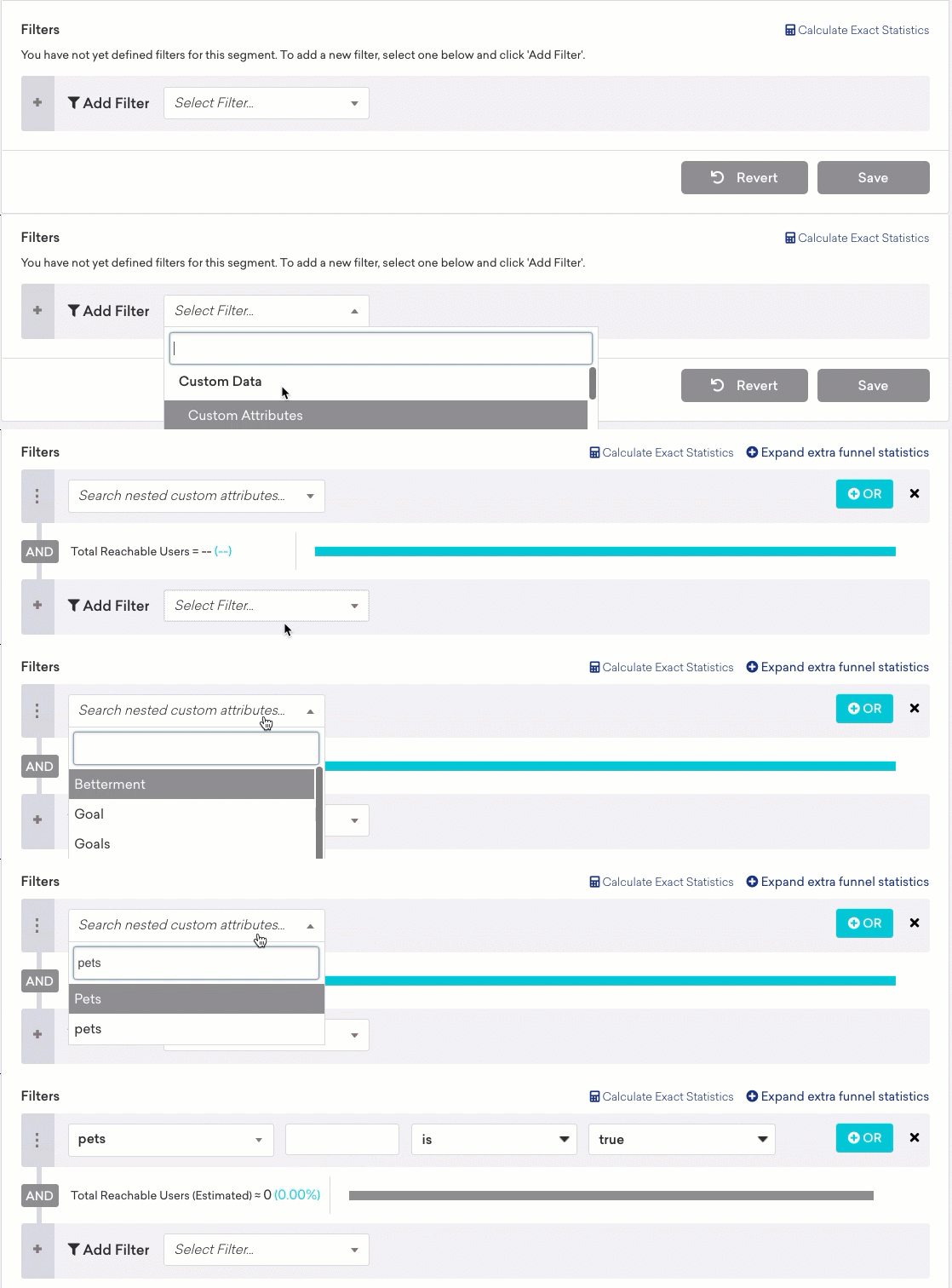
ドット記法を使用して、オブジェクトの配列内のどのフィールドを使用するかを指定します。テキストフィールドの先頭に空の角括弧[]を付けて、オブジェクトの配列内を検索していることをBrazeに伝えます。その後、ピリオド.を追加し、使用するフィールド名を続けます。
たとえば、typeフィールドに基づいてtop_3_moviesオブジェクト配列をフィルタリングする場合は、[].typeと入力し、Fantasy Movieなどフィルタリングする映画を選択します。
ネストのレベル
配列のネストは1レベルまで(配列内の配列)でセグメントを作成できます。たとえば、以下の属性の場合、pets[].nameにMochiが含まれるセグメントは作成できますが、pets[].nicknames[]にGuguが含まれるセグメントは作成できません。
{
"attributes": [
{
"external_id": "user_id",
"pets": [
{
"id": 1,
"type": "dog",
"breed": "beagle",
"name": "Mochi",
"nicknames": [
"MoMo",
"Mochi"
]
},
{
"id": 2,
"type": "cat",
"breed": "calico",
"name": "Pixel",
"nicknames": [
"PiPi",
"Pixel"
]
}
]
}
]
}
データポイント
データポイントは、プロパティの作成、更新、削除のいずれを行うかによって、異なる方法で記録されます。
新しい配列を作成すると、オブジェクト内の各属性に対して1データポイントが記録されます。この例では8データポイントを消費します。各ペットオブジェクトには4つの属性があり、オブジェクトが2つあるためです。
{
"attributes": [
{
"external_id": "user_id",
"pets": [
{
"id": 1,
"type": "dog",
"breed": "beagle",
"name": "Mochi"
},
{
"id": 2,
"type": "cat",
"breed": "calico",
"name": "Pixel"
}
]
}
]
}
既存の配列を更新すると、追加された各プロパティに対して1データポイントが記録されます。この例では、2つのオブジェクトそれぞれで1つのプロパティのみを更新しているため、2データポイントを消費します。
{
"attributes": [
{
"external_id": "user_id",
"_merge_objects": true,
"pets": {
"$update": [
{
"$identifier_key": "id",
"$identifier_value": 4,
"$new_object": {
"breed": "goldfish"
}
},
{
"$identifier_key": "id",
"$identifier_value": 5,
"$new_object": {
"name": "Annette"
}
}
]
}
}
]
}
配列からオブジェクトを削除すると、送信した各削除条件に対して1データポイントが記録されます。この例では、このステートメントで複数の犬を削除する可能性がありますが、3データポイントを消費します。
{
"attributes": [
{
"external_id": "user_id",
"pets": {
"$remove": [
// Remove by ID
{
"$identifier_key": "id",
"$identifier_value": 1
},
{
"$identifier_key": "id",
"$identifier_value": 2
},
// Remove any dog
{
"$identifier_key": "type",
"$identifier_value": "dog"
}
]
}
}
]
}