オラクル・クラウドツイスト
Oracle Crowdtwistは、ブランドがパーソナライズされたカスタマーエクスペリエンスを提供できるようにする、クラウドネイティブなカスタマー・ロイヤルティ・ソリューションのリーディング・カンパニーである。同社のソリューションは、100以上の既成概念にとらわれないエンゲージメントパスを提供し、マーケターがより完全な顧客ビューを開発するための迅速なTime-to-Valueを提供する。
Oracle Crowdtwistのデータプッシュ機能では、Crowdtwistのプラットフォームで更新が発生するたびに、ユーザーやイベントのメタデータを渡すことができる。
このガイドでは、Oracle Crowdtwistのユーザープロファイル、ユーザーアクティビティ、およびユーザーリデンプションライブプッシュフィードをBraze環境に統合する方法のプロファイルを説明する。このドキュメントでは明確に説明されていないが、2つのデータ・プッシュ・タイプが利用可能である。
-
Live Pushユーザープロファイル:新規プロファイルの作成と既存プロファイルの更新を含む。
-
ライブプッシュユーザーのアクティビティ:ユーザー・アクティビティの完了データを含む。
-
ライブプッシュユーザー還元:ユーザー報酬の償還に関するデータを含む。
Brazeデータ変換テンプレートを使用することで、Brazeに関係のないデータプッシュの要素をフィルターで除外し、Brazeで必要な値を割り当てて、使用可能な「送信先」で活用できるようにすることができる。
例えば、データプッシュを使用して、関連するカスタムイベントや属性をBrazeに渡すことができる。また、ユーザーのポイント残高のように、ユーザープロファイルのデータが更新されると同時に、カスタム属性をBrazeに記録するために使用することもできる。
前提条件
| 必要条件 | 説明 |
|---|---|
| オラクル・クラウドトウィストのアカウント | このパートナーシップを利用するには、Oracle Crowdtwistアカウントが必要である。 |
| Brazeデータ変換エンドポイント | この統合は、Brazeのデータ変換ツールに依存している。データ変換を作成すると、Brazeは、Crowdtwistのデータプッシュの送信先として追加できるユニークなエンドポイントを生成する。 |
統合
BrazeとOracle Crowdtwistは、顧客がユーザープロファイル、ユーザー償還、およびユーザーアクティビティイベントを活用した独自のデータ変換を開発できるように、データ変換テンプレートを作成した。
ステップ 1: Oracle Crowdtwistテンプレートからデータ変換を作成する
データ設定 > データ変換 > 変換を作成 > テンプレートを使用> に移動し、お好みの「BRAZE<> CROWDTWIST」テンプレートを選択する。
ユーザープロファイル、ユーザーアクティビティ、ユーザー償還の各イベントを変換するための4つのテンプレートと、様々なデータプッシュイベントに適用する条件ロジックを使用するマスターテンプレートがある。
Oracle CrowdtwistのData Pushドキュメントに示されているように、Data Pushオブジェクトには異なるメタデータが含まれているため、適切なBrazeオブジェクトを作成するには、それぞれ独自の変換コードが必要になる。マスターテンプレートは、3つのタイプのオブジェクトをそれぞれ受け入れるために1つのデータ変換を設定し、各オブジェクトからの値で適切な出力を作成する方法を示している。
ステップ 2:テンプレートの更新とテスト
以下に、注釈付きテンプレートを掲載する。これらのテンプレートの本体は、/users/track 送信先に適用されるように設計されている。注釈は、// 行頭と緑色のテキストでマークされ、変換コードの動作に影響を与えることなく削除することができる。
この変換はJavaScriptを使い、「brazecall」と呼ばれるオブジェクトを構築する。このオブジェクトで、Braze REST APIエンドポイントに送信するリクエストボディを作成する。これらの送信先へのリクエストに必要な構造については、「送信先」セクションのリンクを参照のこと。
各 “キー “の “値 “がpayload. で始まっていることに注目してほしい。ペイロードはOracle Crowdtwistから受け取ったデータオブジェクトを表す。JavaScriptのドット記法を使用して、Brazeオブジェクトの要素に入力するデータを選択する。例えば、external_id: payload.thirdPartyId と表示された場合、これはOracle Crowdtwistに保存されているthird_party_id の値によってBraze外部IDが設定されていることを意味する。Oracle Crowdtwistから送られてくるオブジェクトのスキーマや構成の詳細については、Oracleのドキュメントを参照のこと。
Oracle Crowdtwistから送られてきたオブジェクトを使って、Brazeにユーザーを作成する。値false を持つupdate_existing_only キーを含めることで、属性またはイベントオブジェクトがBrazeに存在しない識別子を含む場合、Brazeはイベントまたは属性オブジェクトに含まれる属性を持つユーザープロファイルを作成する。Oracle CrowdtwistがBrazeに既に存在するプロファイルのみを更新することを望む場合は、各属性またはイベントオブジェクトでこの属性をtrue に設定する。
データ変換テンプレート
1
2
3
4
5
6
7
8
9
10
11
12
13
14
15
16
17
18
19
20
21
22
23
24
25
26
27
28
29
30
31
32
33
34
35
36
37
38
39
40
41
42
43
44
45
let brazecall = {
 "attributes": [
   {
     //You must include an appropriate identifier for your attribute or event object from data available in Oracle Crowdtwist. This could be an external ID, Braze ID, user alias, phone, or email address for attribute or event objects.
     "external_id": payload.thirdPartyId,
     "email": payload.emailAddress,
   // **Important** To allow Oracle Crowdtwist events to create users in Braze, set the value of "_update_existing_only" to false. Otherwise, set this value to true in your event and attribute objects.
     "_update_existing_only": false,
     "crowdtwist_loyalty_points": payload.redeemablePoints,
 //In this example, the "tierInfo" object from Crowdtwist is transformed into a Braze Nested Custom Attribute. Use the "_merge_objects" value to avoid duplications in a data point efficient manner.
 //The "tierinfo_current_level" attribute is a flat Braze custom attribute, while "tierInfo" below is a nested object mirroring the Crowdtwist payload; the difference in capitalization is intentional.
     "tierinfo_current_level": payload.tierInfo.currentLevel,
     "_merge_objects" : true,
     "tierInfo" : {
       "resetDate": payload.tierInfo.resetDate,
       "dateReached":payload.tierInfo.dateReached,
        "scoreNeededToReach": payload.tierInfo.scoreNeededToReach,
        "nextLevel":{
        "minValue":payload.tierInfo.nextLevel.minValue,
        "maxValue":payload.tierInfo.nextLevel.maxValue,
        "title":payload.tierInfo.nextLevel.title
     }
     }
   }
 ]
,
//Below we show how to create both custom attributes and events from a single Crowdtwist User Profile object.
 "events": [
   {
     "external_id": payload.thirdPartyId,
     "email": payload.emailAddress,
     "name": "assignedByEvent",
//Below we can see how to write a timestamp in your object, which is a required value for some objects, like the Event Object.
     "time": new Date().toISOString(),
     "properties": {
       "assigned_by_event": payload.tierInfo.assignedByEvent,
       "date_assigned": payload.tierInfo.dateAssigned
     },
           "_update_existing_only": false
   }
 ]
};
// After the /users/track request is assigned to brazecall, return brazecall to create an output.
return brazecall;
1
2
3
4
5
6
7
8
9
10
11
12
13
14
15
16
let brazecall = {
"events": [
   {
     "external_id": payload.thirdPartyId,
     "_update_existing_only": false,
     "activityId": payload.activityId,
     "name": payload.activityName,
     "time": new Date().toISOString(),
     "properties": {
       "description": payload.description,
       "date_assigned": payload.dateAwarded
     }
   }
 ]
};
return brazecall;
1
2
3
4
5
6
7
8
9
10
11
12
13
14
let brazecall = {
 "attributes": [
   {
   "external_id": payload.thirdPartyId,
   //A user redemption event may not have a third party id, in which case you can instead provide the opportunity to include a user alias.
   "user_alias": { "alias_name" : "crowdtwist_redemption_username", "alias_label" : payload.userName},
   "_update_existing_only": false,
   "redeemed_coupon": payload.couponCode,
   "total_points_redeemed": payload.totalPointsRedeemed
      }
]
}
return brazecall;
1
2
3
4
5
6
7
8
9
10
11
12
13
14
15
16
17
18
19
20
21
22
23
24
25
26
27
28
29
30
31
32
33
34
35
36
37
38
39
40
41
42
43
44
45
46
47
48
49
50
51
52
53
54
55
56
57
58
59
60
61
62
63
64
65
66
67
68
69
70
71
72
73
74
75
76
77
78
//The master template uses JavaScript's conditional operators to determine the output of the Data Transformation. This example shows how to apply JavaScript to your transformation to allow for a dynamic range of sources or inputs.

 // We open the transformation with a simple "if" function. We're checking if the value "payload.tierInfo" is present. "tierInfo" is a value that is always populated in the User Profile Live Push object, but is not present in the others.

if (payload.tierInfo) {
let brazecall = {
 "attributes": [
   {
     "external_id": payload.thirdPartyId,
     "email": payload.emailAddress,
     "_update_existing_only": false,
     "crowdtwist_loyalty_points": payload.redeemablePoints,
     "tierinfo_current_level": payload.tierInfo.currentLevel,
     "_merge_objects" : true,
     "tierInfo" : {
       "resetDate": payload.tierInfo.resetDate,
       "dateReached":payload.tierInfo.dateReached,
        "scoreNeededToReach": payload.tierInfo.scoreNeededToReach,
        "nextLevel":{
        "minValue":payload.tierInfo.nextLevel.minValue,
        "maxValue":payload.tierInfo.nextLevel.maxValue,
        "title":payload.tierInfo.nextLevel.title
     }
     }
   }
 ]
,
 "events": [
   {
     "external_id": payload.thirdPartyId,
     "email": payload.emailAddress,
     "name": "assignedByEvent",
     "time": new Date().toISOString(),
     "properties": {
       "assigned_by_event": payload.tierInfo.assignedByEvent,
       "date_assigned": payload.tierInfo.dateAssigned
     },
           "_update_existing_only": false
   }
 ]
};
return brazecall;
//Now we use an "else if" operator to change the "brazecall" body if the object is a User Activity event by checking if the unique key "activityId" has been populated.
} else if (payload.activityId) {
 let brazecall = {
"events": [
   {
     "external_id": payload.thirdPartyId,
     "_update_existing_only": false,
     "activityId": payload.activityId,
     "name": payload.activityName,
     "time": new Date().toISOString(),
     "properties": {
       "description": payload.description,
       "date_assigned": payload.dateAwarded
     }
   }
 ]
};
return brazecall;
//Finally, this conditional statement triggers if the Data Push object is a User Redemption event, based on whether a value populates in the key "rewardId".
} else if (payload.rewardId) {
 let brazecall = {
 "attributes": [
   {
   "external_id": payload.thirdPartyId,
   "_update_existing_only": false,
   "redeemed_coupon": payload.couponCode,
   "total_points_redeemed": payload.totalPointsRedeemed
      }
]
}
return brazecall;
} else {
 //Include this error message to help with troubleshooting in the log if a call fails. Replace the text in the parentheses with anything that might be clearer to your team based on your Data Transformation.
 throw new Error("No appropriate Identifiers found");
}
送信先
このガイドのテンプレートは、”Track Users “送信先に配信するように作成されているが、関連するREST APIドキュメントを参照しながら、Brazeのデータ変換ガイドに記載されているどのエンドポイントにも送信できるようにテンプレートを設計することができる。
テスト
テンプレートを自分好みに修正したら、それが正しく動作するかどうかを検証しなければならない。Validate “をクリックすると、コード出力のプレビューが表示され、選択した送信先で受け入れられるリクエストかどうかが確認できる。
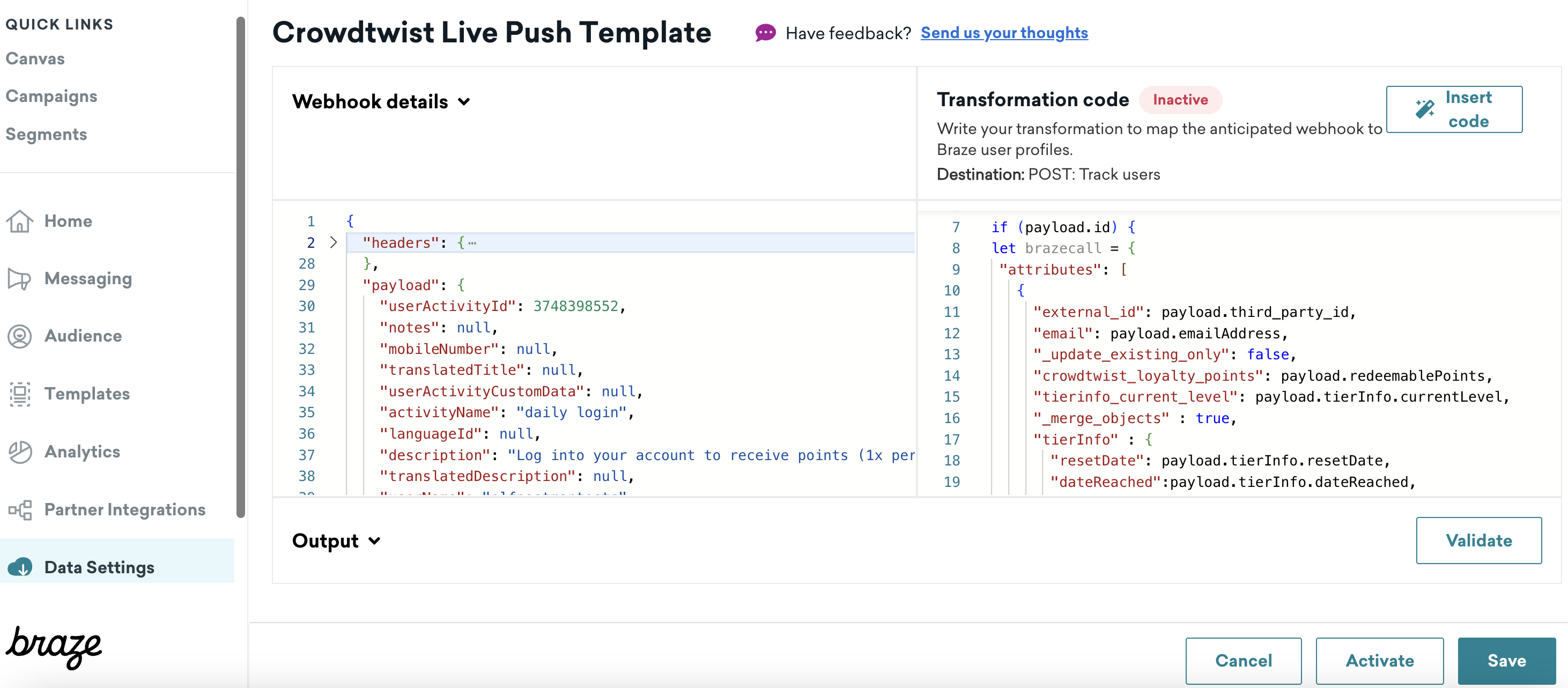
output “フィールドに表示されるオブジェクトに満足したら、“Activate “をクリックし、データ変換エンドポイントがデータを受け入れる準備を整える。
データ変換のWebhook URLは左側のサイドパネルにある。これをコピーし、Oracle CrowdtwistのIntegration Hub内の構成に使用する。
Braze Data Transformationエンドポイントには、毎分1000リクエストのレート制限がある。このデータをBrazeで利用できるようにする速度を検討し、より高いデータ変換レート制限が必要な場合は、Brazeアカウントマネージャーに相談する。
データ変換は非常にダイナミックなツールであり、JavaScriptを理解し、REST APIのドキュメントを参考にすれば、このドキュメントで説明されている以外の目的でも設計することができる。データ変換テンプレートの複雑な変更に関するサポートやトラブルシューティングについては、カスタマー・サクセス・マネージャーにご相談ください。
 GitHub でこのページを編集