AccuWeather
AccuWeather는 전 세계에 기상 예보 서비스를 제공하는 미디어 회사입니다. AccuWeather를 사용하면 마케팅 캠페인을 강화하고 개인화할 수 있으며, Braze 연결된 콘텐츠를 활용하여 번역을 자동화할 수도 있습니다.
이 통합은 AccuWeather에서 유지 관리합니다.
필수 조건
| 요구 사항 | 설명 |
|---|---|
| AccuWeather API 키 | 요청 URL에서 사용할 호환 API 키에 대해 AccuWeather 계정 매니저에게 문의하세요. 자세한 안내는 AccuWeather Enterprise API 페이지에서 확인할 수 있습니다. |
사용 가능한 AccuWeather API
다음은 Braze Campaigns 및 Canvases에서 참조할 수 있는 AccuWeather API입니다.
| API | 설명 |
|---|---|
| Locations | 원하는 위치에 대한 위치 키를 가져옵니다. 위치 키를 사용하여 Forecast 또는 Current Conditions API에서 날씨 데이터를 검색합니다. |
| Forecast | 특정 위치에 대한 예보 정보를 가져옵니다. |
| Current Conditions | 특정 위치에 대한 현재 조건 데이터를 가져옵니다. |
| Indices | 특정 위치에 대한 일일 지수 값을 가져옵니다. 지수 가용성은 위치에 따라 다릅니다. |
| Weather Alarms | 특정 위치에 대한 날씨 경보를 가져옵니다. AccuWeather 날씨 경보는 해당 위치의 일일 예보를 사용하여 결정됩니다. 예보 날씨가 특정 임계값을 충족하거나 초과하면 해당 위치에 대한 경보가 존재합니다. |
| Alerts | 공식 정부 기상청 및 주요 글로벌 기상 경보 제공업체로부터 악천후 경고를 가져옵니다. |
| Imagery | 레이더 및 위성 이미지를 가져옵니다. |
| Tropical | 전 세계 열대성 저기압의 현재 위치, 과거 위치 및 예보를 가져옵니다. |
| Translations | 사용 가능한 언어 목록을 가져옵니다. 특정 그룹의 구문에 대한 번역을 가져옵니다. |
연결된 콘텐츠 예시
다음 예시에서는 미국 내 사용자의 우편번호에 대한 현재 조건에 따라 두 가지 다른 유형의 메시지를 표시하는 연결된 콘텐츠 호출을 보여줍니다. AccuWeather Locations 및 Current Conditions API 엔드포인트가 사용됩니다.
{% connected_content http:///dataservice.accuweather.com/locations/v1/postalcodes/{{${country}}}/search?q={{custom_attribute.${Zip Code}}}&apikey={your API key} :save location_info %}
{% connected_content http://dataservice.accuweather.com/currentconditions/v1/{{location_info[0].Key}}?apikey={your API key} :save local_weather %}
{% if {{local_weather[0].WeatherText}} == 'Cloudy' %}
No sunscreen needed :)
{% elsif {{local_weather[0].WeatherText}} == 'Rain' %}
It's raining! Grab an umbrella!
{% else %}
Enjoy the weather!
{% endif %}
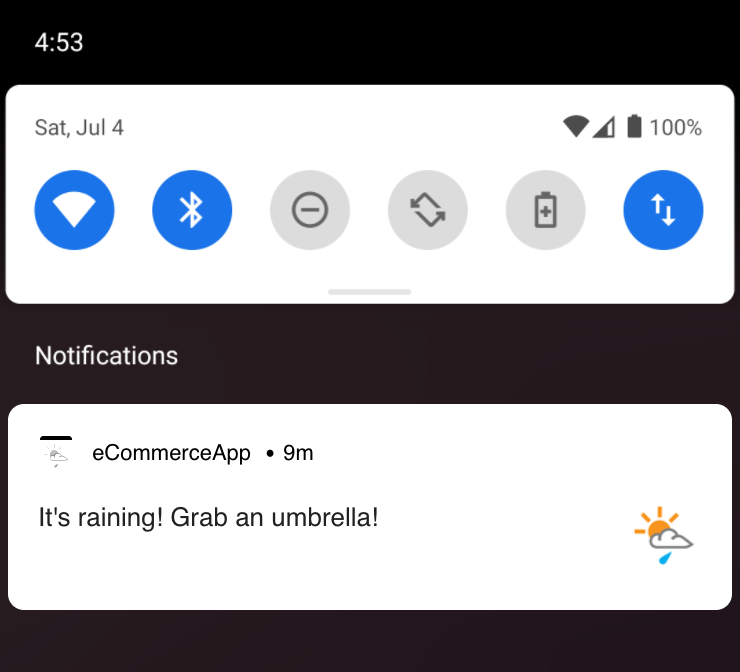
두 개의 연결된 콘텐츠 호출에 대한 분석은 다음 예시에서 확인할 수 있습니다.
Locations API 예시
첫 번째 connected_content 태그 내에서 Locations API에 대한 GET 요청이 수행됩니다. 이 예시에서는 우편번호 커스텀 속성이 없는 경우 사용자의 {{${city}}}를 대신 활용할 수 있습니다.
{% connected_content http://dataservice.accuweather.com/locations/v1/postalcodes/{{${country}}}/search?q={{custom_attribute.${Zip Code}}}&apikey={your API key} :save location_info %}
다음은 AccuWeather가 JSON 오브젝트로 반환하는 예시입니다:
[
{
"Version": 1,
"Key": "41333_PC",
"Type": "PostalCode",
"Rank": 35,
"LocalizedName": "Seattle",
"EnglishName": "Seattle",
"PrimaryPostalCode": "98102",
"Region": {
"ID": "NAM",
"LocalizedName": "North America",
"EnglishName": "North America"
},
"Country": {
"ID": "US",
"LocalizedName": "United States",
"EnglishName": "United States"
},
"AdministrativeArea": {
"ID": "WA",
"LocalizedName": "Washington",
"EnglishName": "Washington",
"Level": 1,
"LocalizedType": "State",
"EnglishType": "State",
"CountryID": "US"
},
"TimeZone": {
"Code": "PDT",
"Name": "America/Los_Angeles",
"GmtOffset": -7.0,
"IsDaylightSaving": true,
"NextOffsetChange": "2018-11-04T09:00:00Z"
},
"GeoPosition": {
"Latitude": 47.636,
"Longitude": -122.327,
"Elevation": {
"Metric": {
"Value": 26.0,
"Unit": "m",
"UnitType": 5
},
"Imperial": {
"Value": 85.0,
"Unit": "ft",
"UnitType": 0
}
}
},
"IsAlias": false,
"ParentCity": {
"Key": "351409",
"LocalizedName": "Seattle",
"EnglishName": "Seattle"
},
"SupplementalAdminAreas": [
{
"Level": 2,
"LocalizedName": "King",
"EnglishName": "King"
}
],
"DataSets": [
"Alerts",
"DailyAirQualityForecast",
"DailyPollenForecast",
"ForecastConfidence",
"MinuteCast"
]
}
]
“Key” ID는 두 번째 GET 요청에서 사용되므로 유용한 변수입니다.
이 JSON 오브젝트는 URL 뒤에 :save location_info를 지정하여 로컬 변수 location_info에 저장할 수 있습니다.
Current Conditions API 예시
두 번째 connected_content 태그의 경우, Current Conditions API에 대한 GET 요청이 수행됩니다. 요청 URL에 위치 키를 추가해야 합니다. 다음은 예시 connected_content 태그입니다:
{% connected_content http://dataservice.accuweather.com/currentconditions/v1/{{location_info[0].Key}}?apikey={your API key} :save local_weather %}
다음은 반환된 JSON 오브젝트입니다:
[
{
"LocalObservationDateTime": "2018-04-10T09:35:00-07:00",
"EpochTime": 1523378100,
"WeatherText": "Rain",
"WeatherIcon": 18,
"IsDayTime": true,
"Temperature": {
"Metric": {
"Value": 11.0,
"Unit": "C",
"UnitType": 17
},
"Imperial": {
"Value": 52.0,
"Unit": "F",
"UnitType": 18
}
},
"MobileLink": "http://m.accuweather.com/en/us/seattle-wa/98104/current-weather/41333_pc?lang=en-us",
"Link": "http://www.accuweather.com/en/us/seattle-wa/98104/current-weather/41333_pc?lang=en-us"
}
]
connected_content 태그에서 볼 수 있듯이, JSON 오브젝트는 URL 뒤에 :save local_weather를 추가하여 로컬 변수 local_weather에 저장됩니다.
WeatherText의 출력 결과를 {{local_weather[0].WeatherText}}를 참조하여 테스트할 수 있습니다.
API 호출이 {{local_weather[0].WeatherText}}로 응답하여 Rain을 반환하면, 사용자는 해당 푸시를 받게 됩니다.