SalesWings
SalesWings는 B2B SaaS 영업 및 마케팅 운영 솔루션으로, 전체적인 리드 점수 및 등급을 통해 리드 및 계정 자격을 관리하고 영업 인사이트 및 알림, B2B 기여도 보고와 함께 긴밀한 Salesforce CRM 통합을 제공합니다. 웹사이트 참여 애드온은 Digioh와 유사하게 웹사이트에서 리드를 생성할 수 있게 해줍니다. 캔버스와 세그먼트 세분화에서 개인화를 위해 Braze 내부의 관심사와 참여를 활용할 수 있습니다.
This integration is maintained by SalesWings.
About the integration
SalesWings allows marketing teams and marketing operations managers to qualify leads and accounts for their sales teams, essential for sales and marketing alignment and operational efficiency. 또한 SalesWings는 Braze와 함께 리드 및 계정의 전체 고객 여정과 Braze 마케팅 캠페인 참여 데이터를 영업 담당자에게 보여줄 수 있어, 보다 교육적인 대화를 통해 리드 퀄리티 전환율을 높일 수 있습니다. SalesWings는 다른 신호와 함께 필요와 관심사를 식별하여 자격을 갖춘 구매자를 CRM 내부의 영업 팀에 자동화된 방식으로 전달할 수 있습니다. 식별된 니즈, 관심사, 판매 준비도를 Braze 사용자 속성으로 사용하여 개인화 및 세그먼트를 세분화할 수 있습니다.
필수 조건
| Requirement | Description |
|---|---|
| SalesWings account | A SalesWings account is required to take advantage of this partnership. |
| Braze REST API key | users.export.ids 권한이 있는 Braze REST API 키(SalesWings 인사이트 푸시 기능을 사용하는 경우 users.track ). This can be created in the Braze dashboard from Settings > API Keys. |
| Braze REST endpoint | Your REST endpoint URL. Your endpoint will depend on the Braze URL for your instance. |
| Segment.com account (optional) | If you are a Segment.com user, you can send all lead engagement and profile data and identify events via Segment.com for lead profiling. |
사용 사례
SalesWings provides Braze customers with a flexible way to qualify leads, contacts, and accounts with state-of-the-art lead scoring and lead grading capabilities. All your lead qualification data is natively pushed to Salesforce CRM and other systems where you want to manage and report on leads, contacts, accounts, and opportunities.
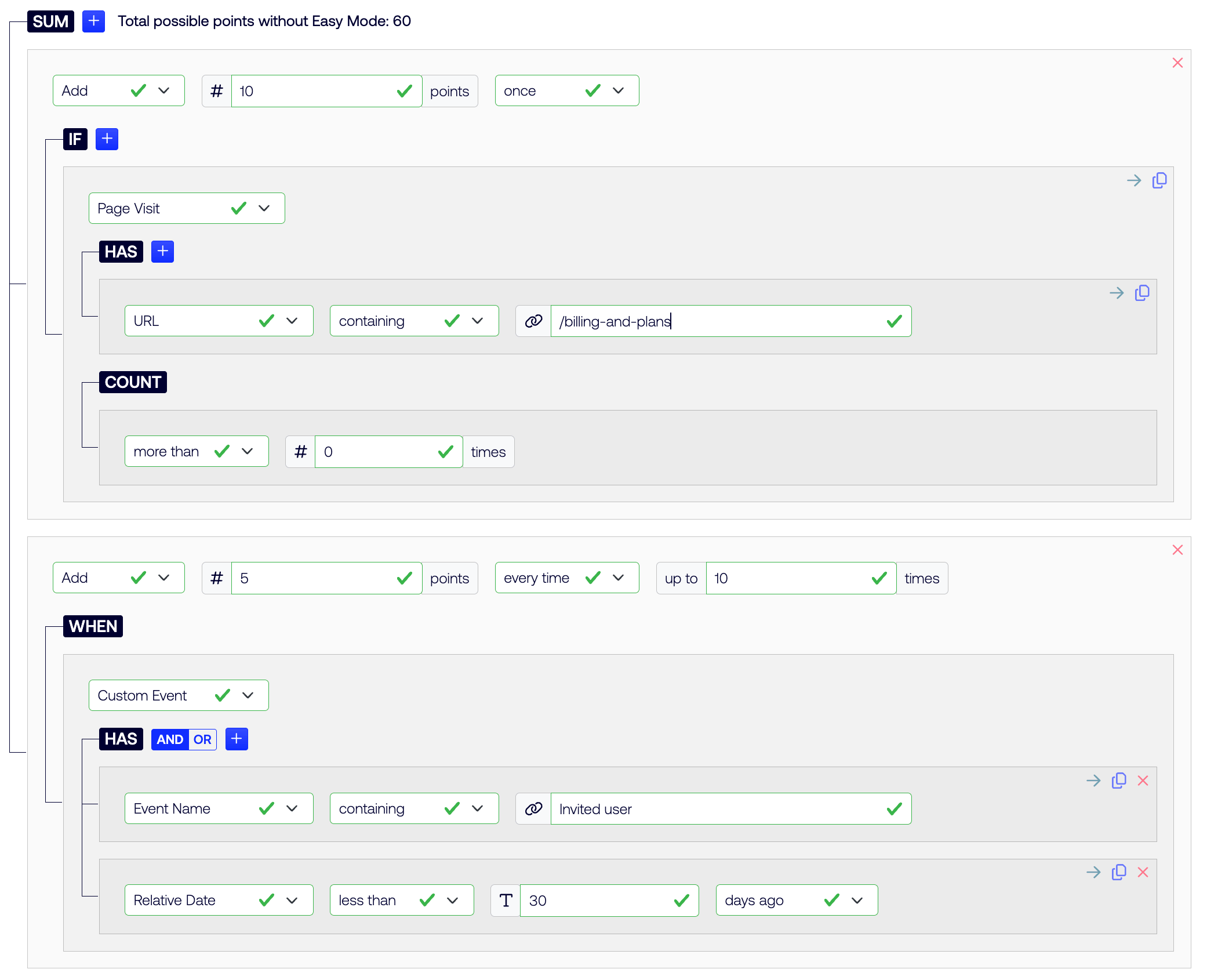
Example of a simple, click-not-code lead scoring model in SalesWings
SalesWings allows marketing teams to track, qualify and hand off marketing-qualified leads to your sales teams. All SalesWings data is natively pushed to Salesforce, and can be leveraged to fine-tune any existing process, or create new processes via lists, reports, flows, and more.
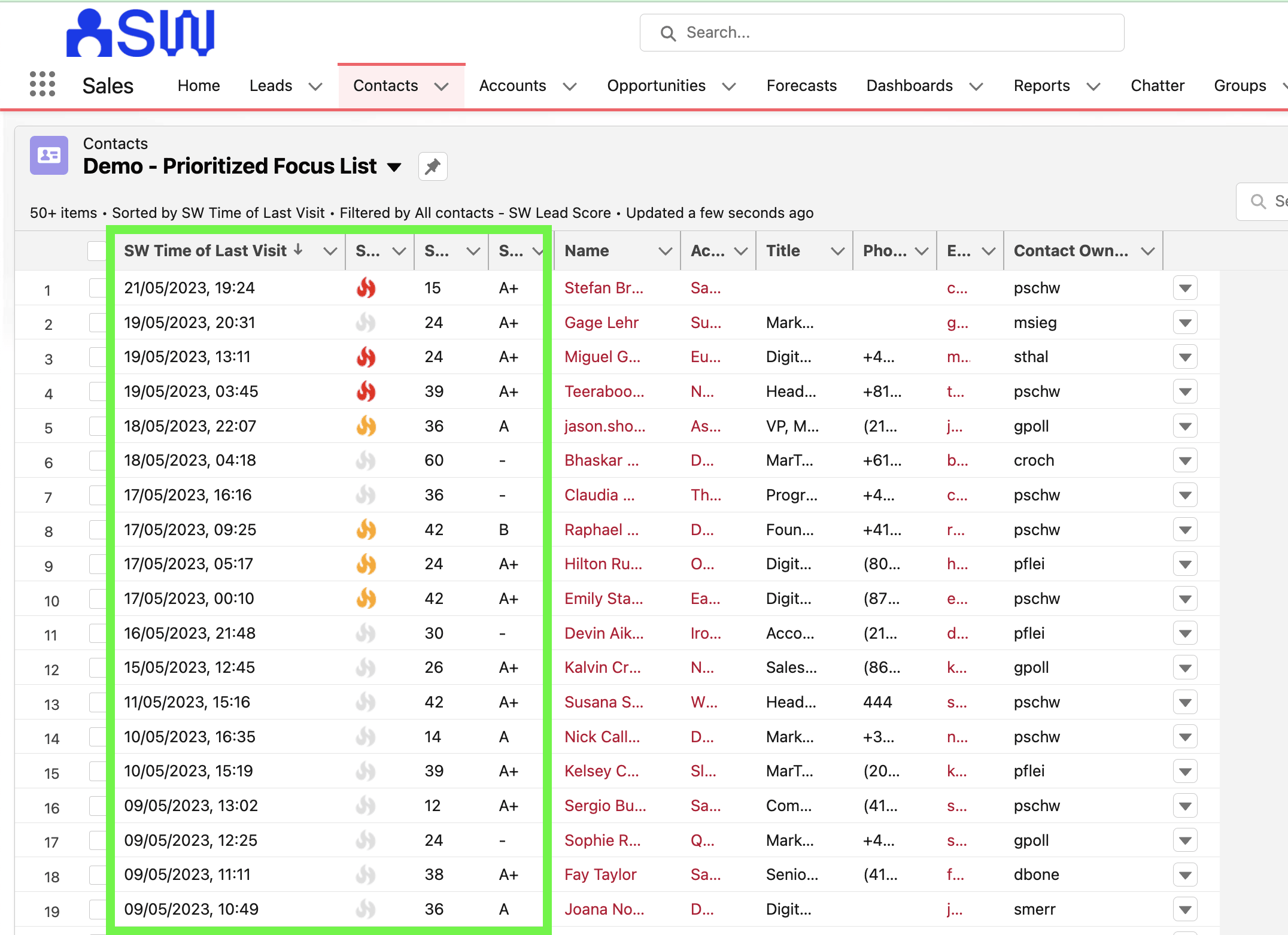
Example of how SalesWings lead scoring prioritizes a list of leads or contacts natively inside Salesforce
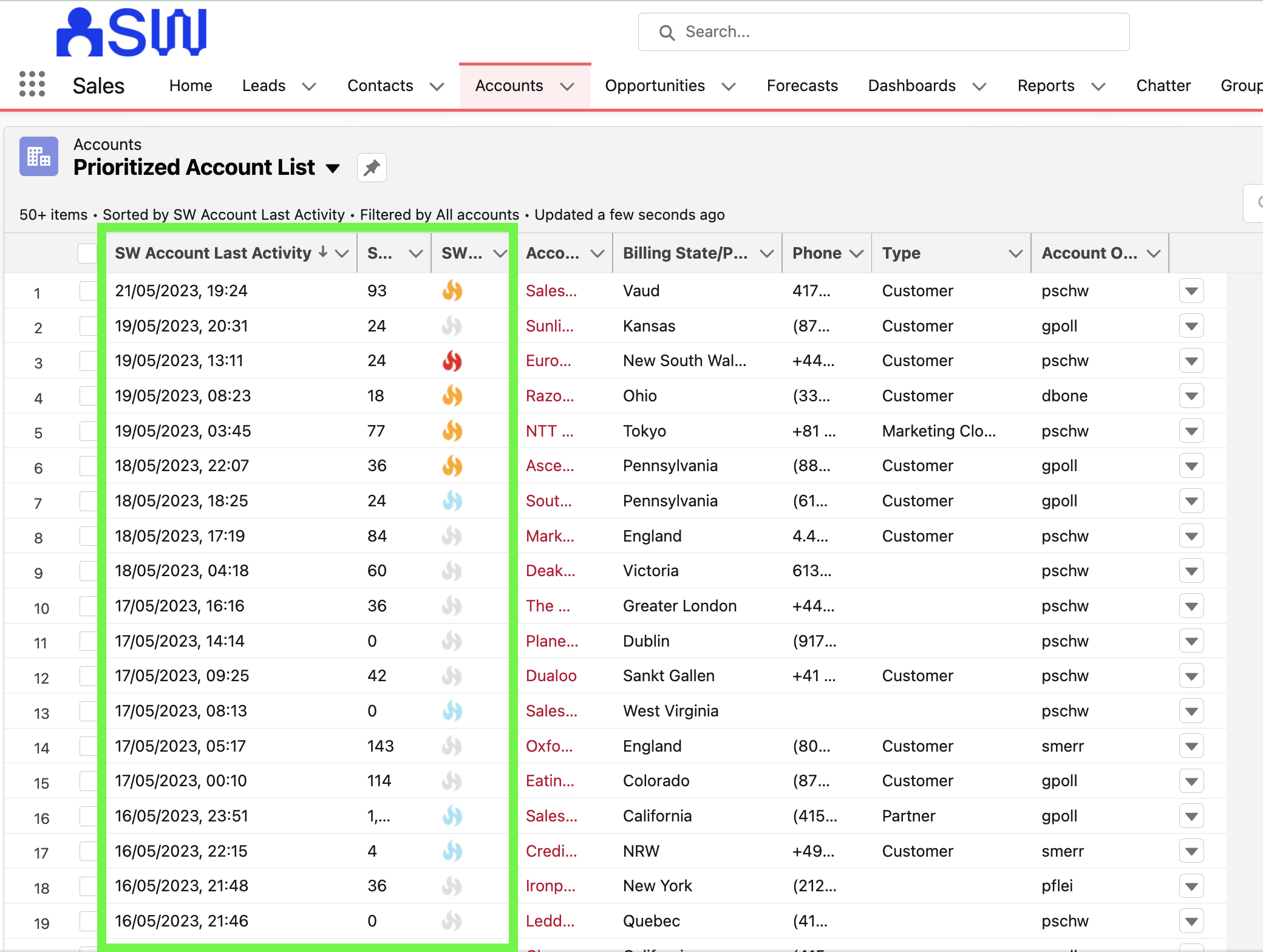
Example of how SalesWings lead scoring prioritizes a list of accounts natively inside Salesforce
SalesWings allows Braze customers to qualify leads and accounts based on profile data (typically CRM data). This is also referred to as “lead grading”, “fit scoring,” or “firmographic scoring”. Braze customers can send attribute data directly to SalesWings, and SalesWings can read any Salesforce CRM standard or custom objects data and records for holistic profile scoring.
SalesWings enables you to show your sales reps sales insights about their leads, contacts, and accounts (Marketo Sales Insights alternative). Essentially, you can surface any Braze and web engagement data to your sales team. The insights are natively embedded into Salesforce CRM and can be pushed to other CRMs or systems or via a Braze email as a “sales alert”.
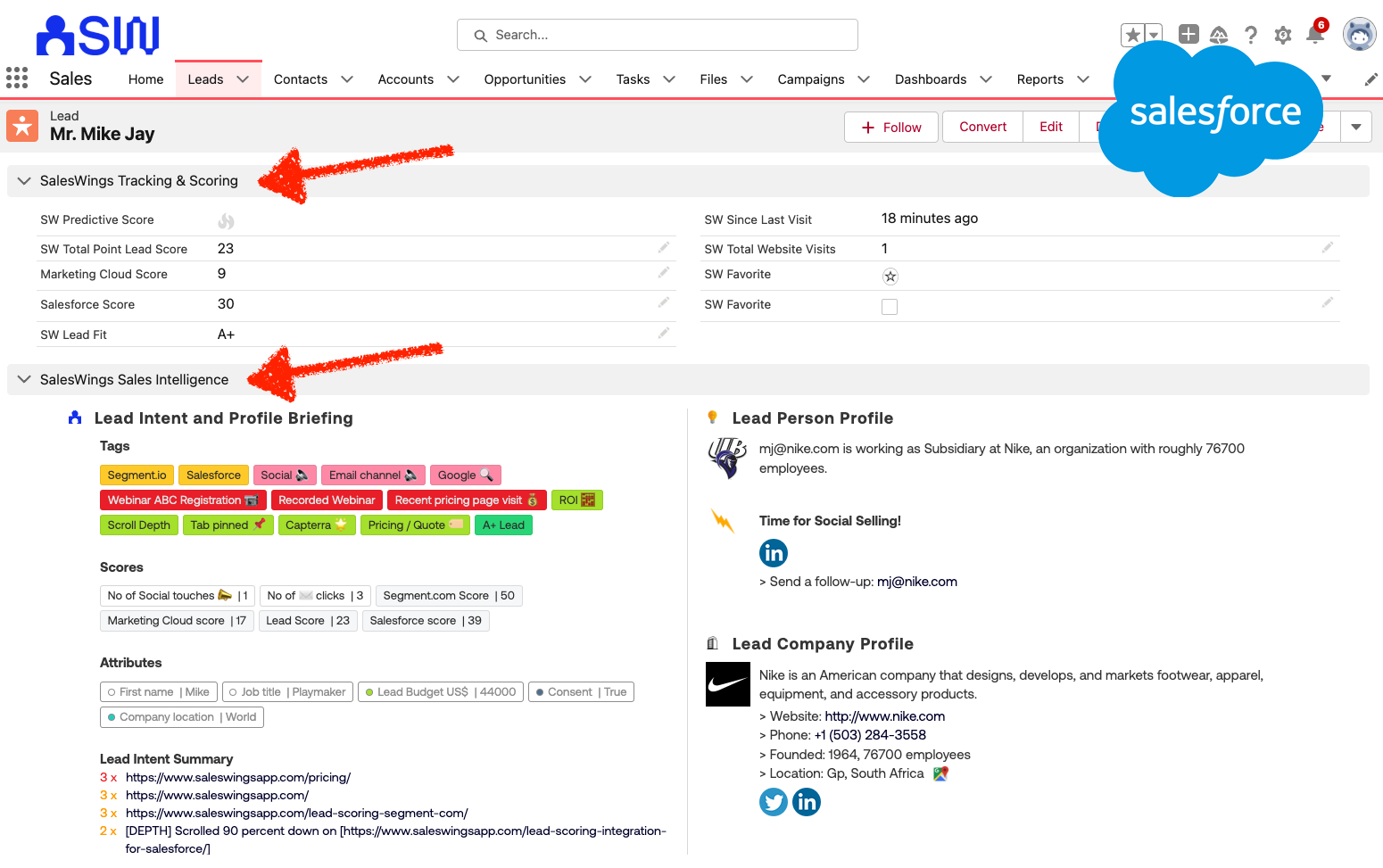
Example of sales insights view for sales reps inside Salesforce (also available for other CRM systems)
SalesWings offers native email and Slack alerts, and you can set up report subscriptions in Salesforce that your sales team can access to get daily, weekly, and monthly email reports. Furthermore, through a Zapier integration, you can build additional workflows based on SalesWings lead qualification data.
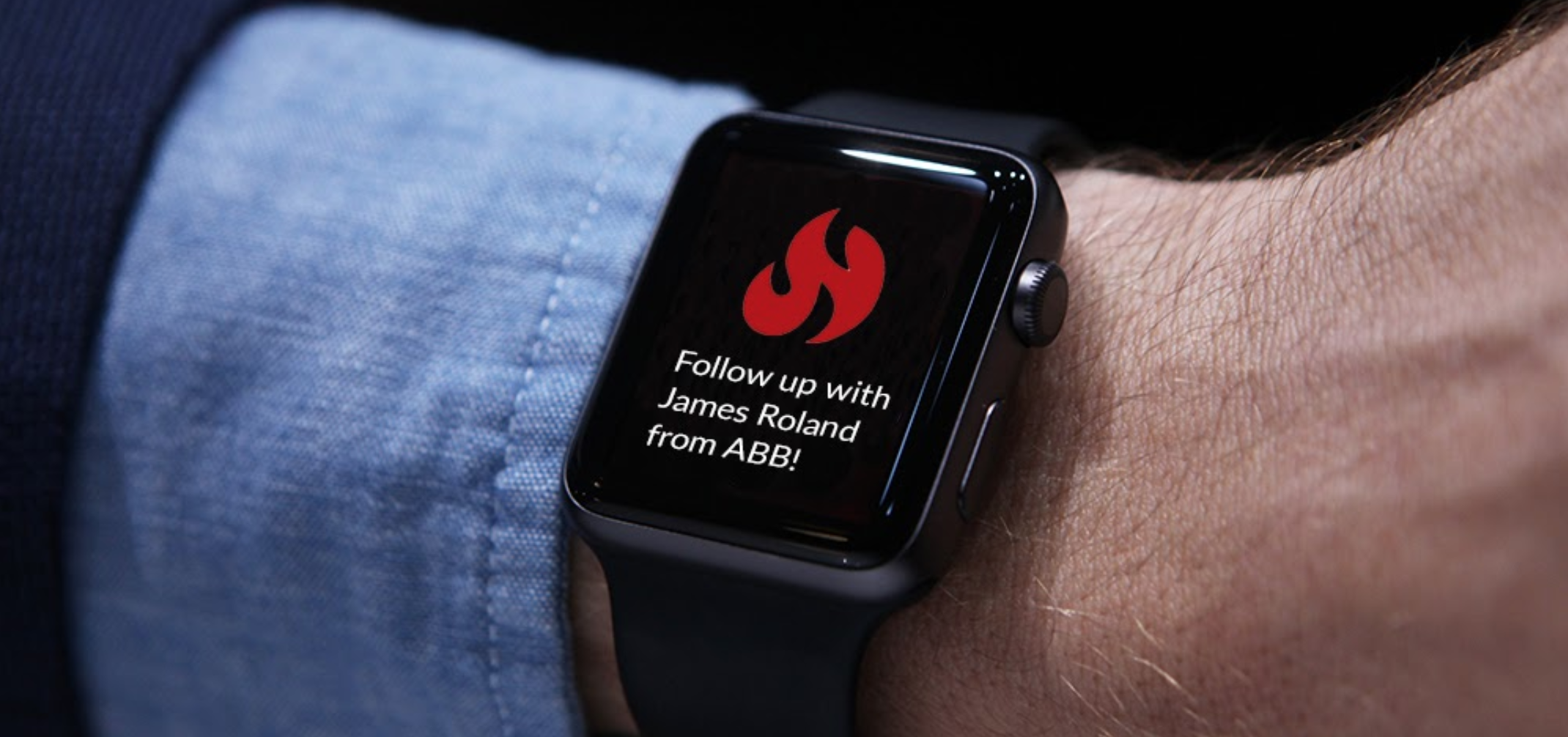
Example of sales alert via Slack channel
Through the native SalesWings integration with Salesforce, you can build automated reporting with leads, contacts, accounts, and opportunities based on web engagement data and any Braze campaign engagement with a native Braze currents integration. For example, you can surface a list of hot leads to a sales team, with everyone who clicked on a specific email campaign or performed a specific action in your app or website.
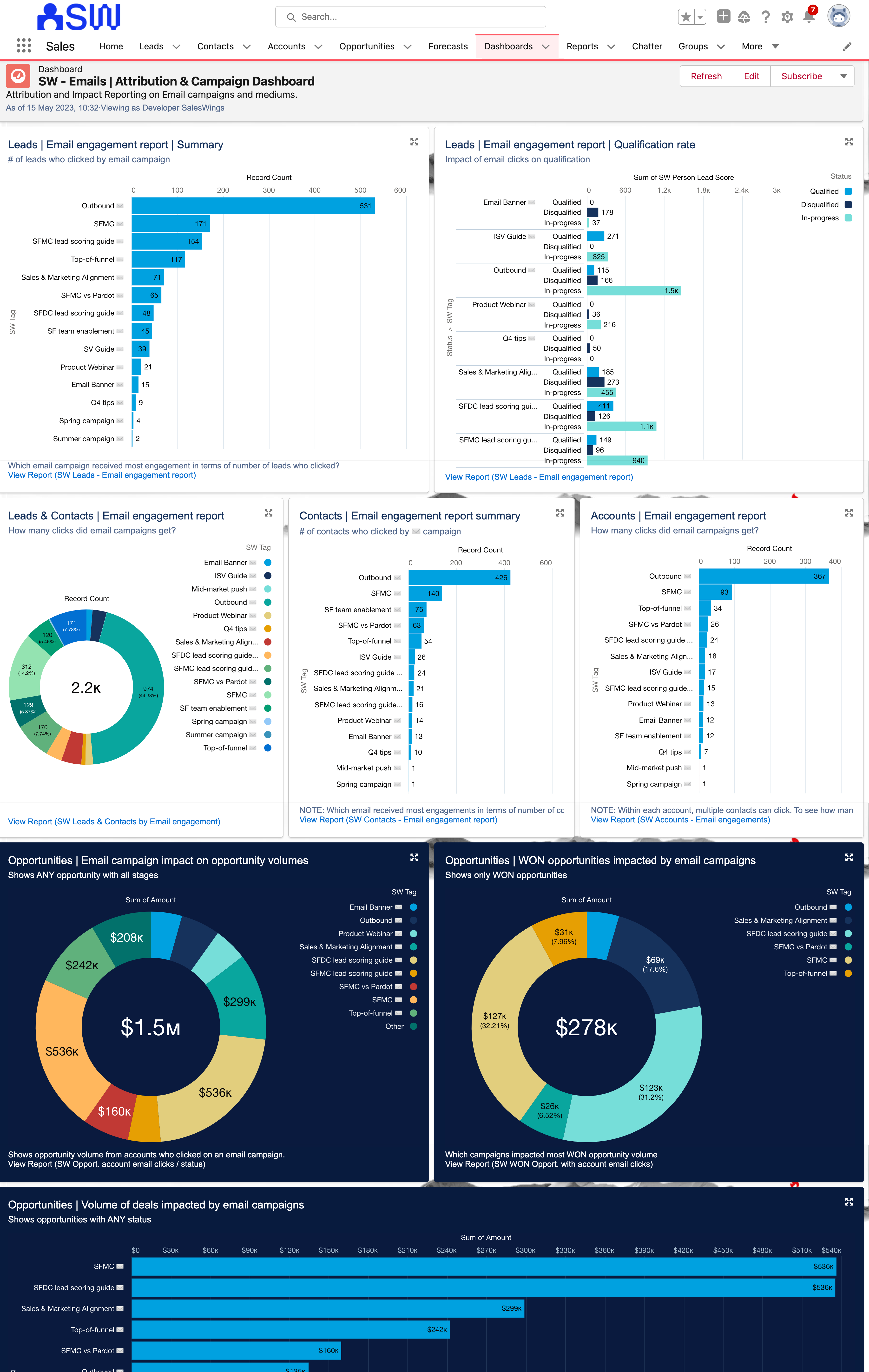
영업 결과 및 성과에 대한 Braze 캠페인의 영향을 살펴보는 Salesforce 내 이메일 & 마케팅 참여에 연결된 대시보드의 예입니다.
Integration
Step 1: SalesWings account and configuration
Schedule a demo with the friendly SalesWings team to learn more about SalesWings.
Step 2: Installing behavioral tracking on your website or app
There are several ways for you to collect behavioral data in SalesWings for lead and account scoring, identifying buyer intent and sales insights:
- Deploy the SalesWings tracking JavaScript on the websites and apps where you want to track and identify leads
- Ingest Braze events along with event properties into SalesWings via Braze Currents
- Send behavioral lead activity data (and lead profile data) via SalesWings integration with Segment
- Send data straight to the SalesWings API from a third-party solution
Step 3: Connecting SalesWings to Braze
Go to the SalesWings Integrations page and expand the Braze Integration section.
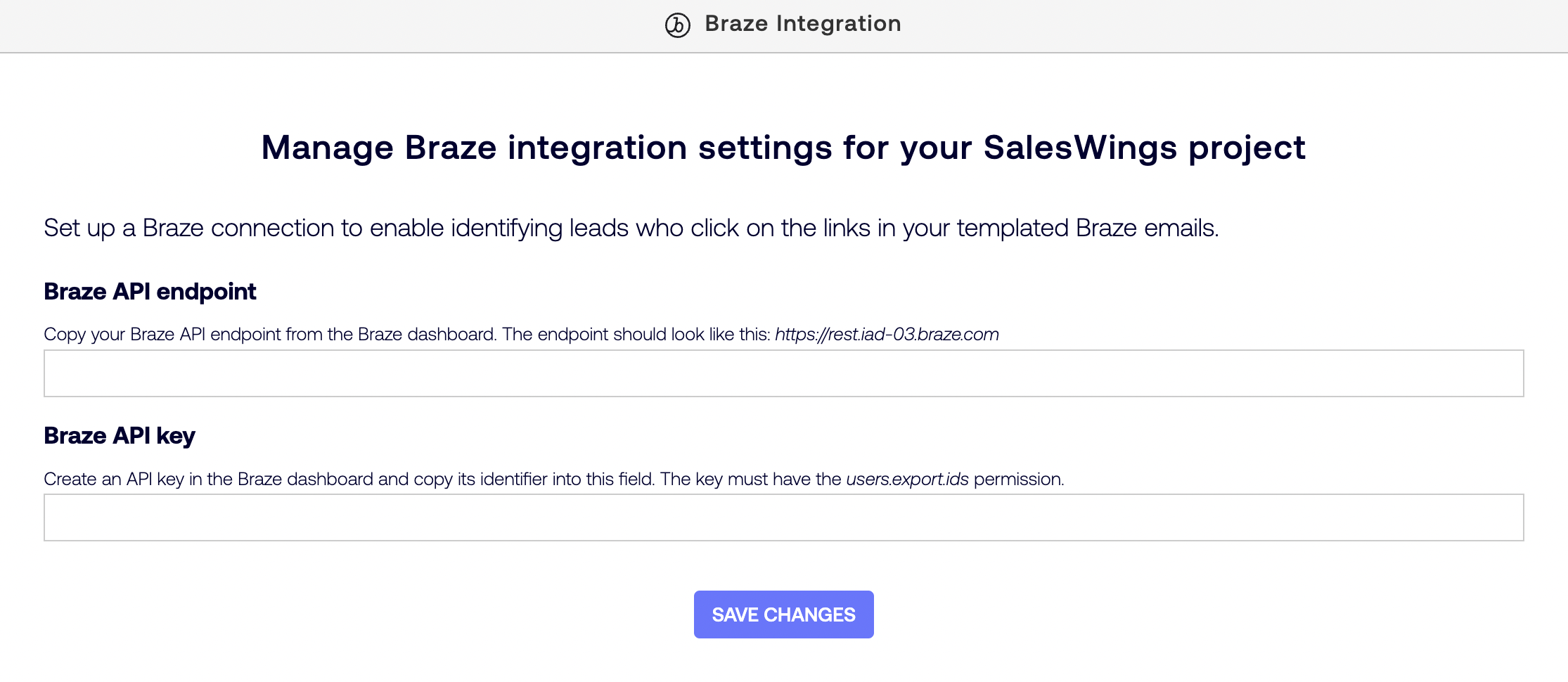
Copy the value of the Identifier column for the newly created key and paste it into the Braze API key field of the SalesWings Braze Integration section.
Add your Braze API endpoint as described in API and SDK endpoints article, and enter it in the Braze API endpoint field. Copy the value of the REST Endpoint column and enter it in the Braze API endpoint field in the SalesWings Braze Integration section.
Then, select Save.
4단계: SalesWings 인사이트 푸시를 Braze에 활성화(선택 사항)
세분화, 개인화 또는 캔버스 여정 오케스트레이션을 위해 고객 프로필에서 SalesWings 인사이트를 사용하려면 SalesWings 통합 페이지를 방문하여 Braze 통합 섹션을 확장하세요.
SalesWings-to-Braze 인사이트 데이터 푸시 아래에서 데이터 푸시 시작을 클릭합니다.
5단계: Set up a custom Currents export to SalesWings (optional)
If you want to use user behavior and message engagement events for behavioral intelligence, lead and account scoring, produce sales insights, or generate reports in your CRM, go to the SalesWings Integrations page and expand the Braze Integration section.
Select Generate under Generate an API token to setup a Custom Currents Export.
Then, create a new Current and select Custom Currents Export as the Current type.
In the Credentials section of the Current creation form, enter the API token you have generated on the SalesWings Integrations page for Bearer Token, and https://helium.saleswings.pro/api/braze/currents/events for Endpoint.
6단계: Configuring SalesWings lead and account scoring for Braze, CRM integration, and more
Consult the SalesWings services team for full onboarding support via the website.
Using this integration
To trigger tie behavioral data and other data to leads and accounts, SalesWings must identify a user on your website or app, or through a third-party integration. This can occur in the following ways:
- Form submissions: When a user submits a web form, SalesWings will automatically identify all of your web form types (such as login, download, contact us, etc.) and resolve the identity of a user when they submit a form.
- URL clicks with a Braze ID or external ID: A user clicks on a Braze marketing action, typically email clicks, banner clicks, or similar, leading to a page you are tracking with SalesWings.
- Braze Currents events (optional): If the Custom Currents export to SalesWings is configured, SalesWings will create an identified profile for every Braze user with an email that has events sent to the Current.
- Sales email tracking via Gmail and Outlook plugins (optional): If you decide to empower your sales representative with email tracking plugins, they can trigger full website tracking of users by sending trackable links.
- Segment.com identify event (optional): If you are a Segment.com user, you can also resolve the identity of a user with Segment.com integration.
Identifying users from URL clicks
You can identify users automatically when they click on a trackable URL (for example, email blasts, banners with URLs). To make a URL trackable, there are two ways to modify your website URLs in your emails, banners, or SMS by adding the parameter and ID at the end of your links.
- Appending
?braze_id=followed by{{${braze_id}}}- Link example:
https://www.your-website.com?braze_id={{${braze_id}}}
- Link example:
- Appending
?br_user_id=followed by{{${user_id}}}- Link example:
https://www.client-website.com?br_user_id={{${user_id}}}
- Link example:
The braze_id variable is set to an identifier of the user-generated by Braze and is always available. The br_user_id variable is set to the user’s identifier in your system and may be missing in certain scenarios (for example, for anonymous users created by the Braze SDK). 링크에 braze_id 및 br_user_id 을 모두 사용하는 경우 SalesWings는 braze_id 매개변수만 고려합니다.
SalesWings 인사이트를 Braze에 푸시하기
SalesWings 인사이트 푸시를 Braze에 인에이블먼트하면 SalesWings는 다음과 같은 커스텀 속성으로 고객 프로필을 업데이트합니다:
| Custom Attribute | 유형 | Description |
|---|---|---|
sw_favorite |
불리언 | 리드가 SalesWings 또는 Salesforce CRM에서 즐겨찾기로 표시되었는지 여부 |
sw_last_active_at |
date | 웹사이트에서 리드가 마지막으로 활동한 순간 |
sw_lead_link_open |
문자열 | SalesWings의 리드 프로필에 액세스하는 링크(SalesWings 대시보드 계정이 없는 경우) |
sw_lead_link_protected |
문자열 | SalesWings의 리드 프로필에 액세스하는 링크(SalesWings 대시보드 계정 포함) |
sw_lead_owner |
문자열 | SalesWings 또는 Salesforce CRM에서 리드에 대해 설정된 소유자 |
sw_lead_score |
플로트 | 세일즈윙즈 룰 엔진에 구성된 기본 세일즈윙즈 리드 점수의 값입니다. |
sw_predictive_score |
문자열 | 추적된 활동의 수와 최근성을 기반으로 리드의 참여를 평가하는 SalesWings 예측 점수의 값입니다. 가능한 값은 HOT, WARM, NORMAL, COLD 또는 FROZEN |
sw_salesforce_record_id |
문자열 | Salesforce CRM에 있는 리드 또는 연락처 레코드의 ID입니다. |
sw_salesforce_record_url |
문자열 | Salesforce CRM에서 리드 또는 연락처 레코드의 URL |
sw_session_count |
정수 | 이 리드에 대해 웹사이트에서 추적된 세션 수입니다. |
sw_tags |
문자열 배열 | 세일즈윙스가 식별한 고객의 니즈와 관심사는 ‘태그’로 표시됩니다. 이 리드에 적용되는 SalesWings 규칙 엔진에 구성된 SalesWings 태그의 이름입니다. |
| 추가 리드 점수 속성 | 플로트 | SalesWings 규칙 엔진에서 구성된 추가 리드 점수마다 하나의 커스텀 속성이 추가됩니다. 속성 이름은 SalesWings 점수 이름에서 파생되며, 예를 들어 Likeliness to meet 라는 이름의 점수는 커스텀 속성 sw_likeliness_to_meet 으로 전송됩니다. 시스템에서 점수를 생성한 후 이름을 변경하면 SalesWings는 초기 커스텀 속성 이름과 계속 동기화됩니다. |
푸시를 인에이블먼트하면 SalesWings 리드 프로필의 기본 데이터 포인트가 변경되는 즉시 SalesWings가 커스텀 속성을 Braze에 전송하기 시작하며, 새로운 업데이트가 없더라도 기존 리드를 모두 점진적으로 동기화합니다.
SalesWings는 모든 Braze 사용자에게 SalesWings 리드 프로필 이메일 주소와 일치하는 이메일로 업데이트합니다. Braze에 일치하는 사용자가 없는 경우 SalesWings는 새 사용자를 생성하지 않습니다.
Using Braze Currents events in your CRM
If you connect a Braze Current to SalesWings, SalesWings will create identified lead profiles for every Braze user with an email and record supported Braze events as lead activity. In your CRM, all data can automatically be aggregated on the lead’s account level. The recorded activity and data could be further combined with the behavioral data collected with the SalesWings tracking script or Segment.com, or by sending other data to the SalesWings API, and then used to identify the needs and sales-readiness of your prospects for your lead and account management processes.
The following table shows the Braze event types supported by SalesWings and their representation in SalesWings lead activity history and rule engine:
| Event Category | Event Type | Event Name in SalesWings |
|---|---|---|
| Canvas Events | Entries | [Nurturing] Added by marketing team onto the journey $canvas_name |
| Customer Behavior Events | Custom Events | [Custom Event tracked] $name |
| Customer Behavior Events | First Session | [User Action] Today marks the user's first session |
| Customer Behavior Events | Install Attribution | [User Action] User installed app from $source |
| Customer Behavior Events | Purchase Events | [Purchase] Customer purchased $product_id for $price $currency |
| Message Events | Content Card Click | [Content Card engagement] Clicked on $campaign_name content card |
| Message Events | Email Bounce | [Alerting or negative] Email hard-bounced. This person's email appears to be no longer valid |
| Message Events | Email Click | [Email campaign engagement] Clicked in email $campaign_name on $url |
| Message Events | Email Delivery | [Nurturing] Received email $campaign_name |
| Message Events | Email Open | [Email campaign engagement] Opened email $campaign_name |
| Message Events | Email Unsubscribe | [Subscription status change] Unsubscribed from $campaign_name |
| Message Events | In-App Message Click | [In-app campaign engagement] Clicked on message $campaign_name |
| Message Events | Push Open | [Push notification engagement] Clicked on notification $campaign_name |
| Message Events | SMS/MMS Inbound Received | [SMS/mobile campaign engagement] We received a message from this person to our internal number $inbound_phone_number: $message_body |
| Message Events | SMS/MMS Short Link Click | [SMS/mobile campaign engagement] Clicked on $short_url |
| Message Events | WhatsApp Inbound Received | [WhatsApp engagement] We received a message from this person to our WhatsApp number $inbound_phone_number: $message_body |
| Message Events | WhatsApp Read | [WhatsApp engagement] Lead read our message from the $campaign_name campaign |
| Subscriptions | Global Subscription State Change | [Subscription status change] Global marketing subscription setting set to $subscription_status |
| Subscriptions | Subscription Group State Change | [Subscription status change] $subscription_status to/from $campaign_name |
You can then configure Custom Event > Event Name and Custom Event > Event Property conditions for SalesWings tags and scores against the SalesWings event names from the table above. The list of event properties available for conditions is prefilled with some of the commonly used entries, and you can always add new ones in the Event Property section of the Rule Engine configuration page.
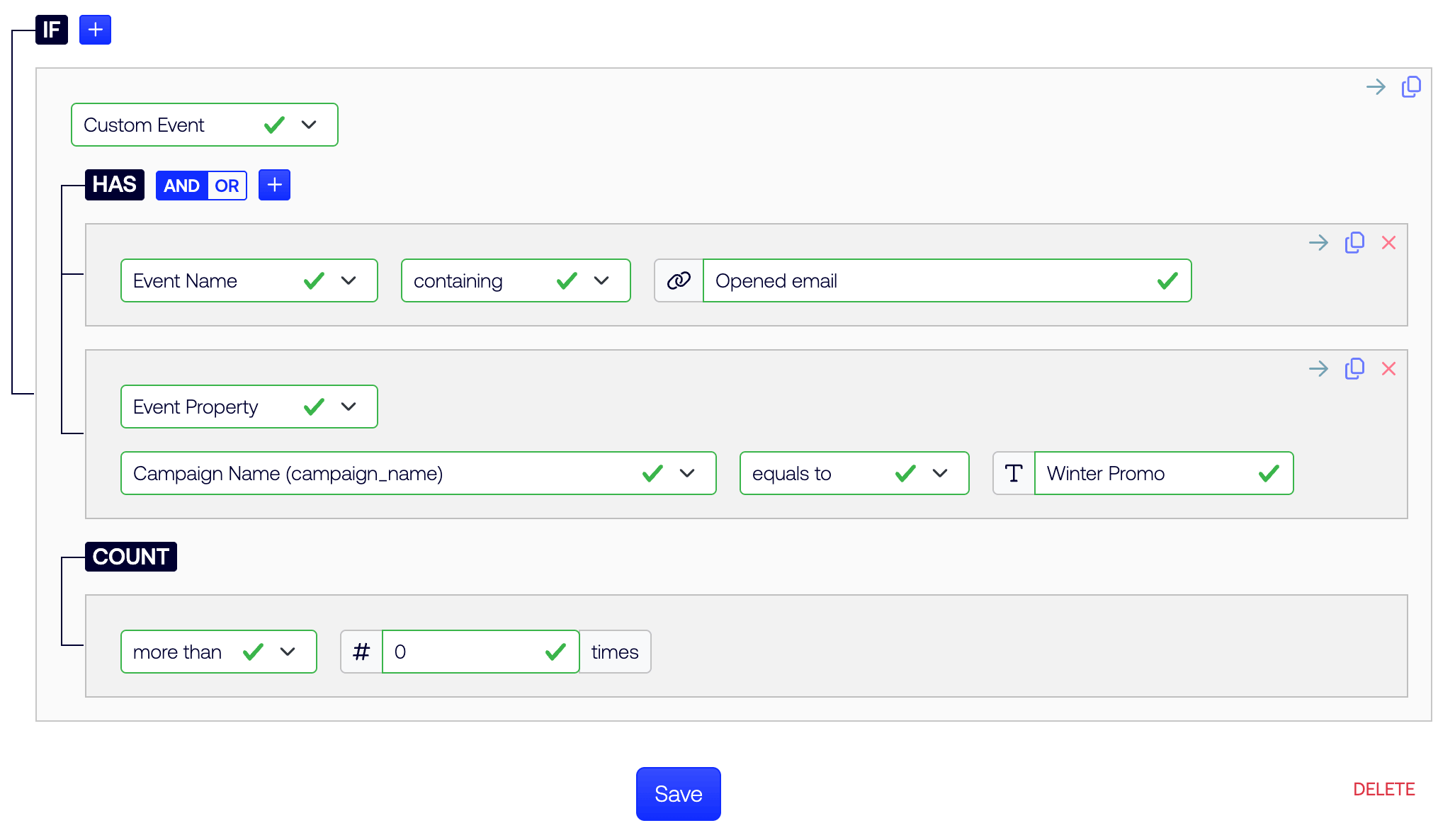
For configuration and further troubleshooting, contact the SalesWings services team for onboarding support.
 GitHub 에서 이 페이지를 편집합니다.