オブジェクト配列
このページでは、オブジェクトの配列を使って関連する属性をグループ化する方法を説明します。例えば、1 人のユーザーに属するペットオブジェクト、曲オブジェクト、アカウントオブジェクトをすべて含むグループがあるとします。これらのオブジェクト配列を使用して、Liquid でメッセージングをパーソナライズしたり、オブジェクト内のいずれかの要素が条件に一致する場合にオーディエンスセグメントを作成したりできます。
サポートされるデータ型
以下のデータタイプがサポートされている:
| データ型 | 説明 |
|---|---|
| 数値 | のような数値である。 1 または 5.5. |
| string | のようなテキスト値である。 "Hello" または "The Hobbit". |
| ブール値 | と評価される値。 true または false. |
| 配列 | のような値のリストである。 ["red", "blue", "green"]. |
| 時刻 |
日付と時刻の比較に使われるタイムスタンプ値。階層化された時間カスタム属性をフィルターする際に、選択できる:
|
| オブジェクト | のようなキーと値のペアを持つ構造化された値。 {"author": "Tolkien"}. |
| オブジェクト配列 |
などのオブジェクトのリストである。 [{"title": "The Hobbit"}, {"title": "Dune"}].
詳細は以下を参照のこと。
オブジェクトの配列。
|
制限事項
- オブジェクトの配列は、API を通じて送信されるカスタム属性を想定しています。CSV アップロードはサポートされていません。この理由は、CSVファイル内のコンマが列区切り文字として解釈され、値に含まれるコンマにより解析エラーが発生するためです。
- オブジェクトの配列にはアイテム数の制限はありませんが、最大サイズは 100 KB です。
- すべての Braze パートナーがオブジェクト配列をサポートしているわけではありません。連携がこの機能をサポートしているかどうかを確認するには、パートナーのドキュメントを参照してください。
配列内の項目の更新または削除を行うには、キーと値を使用して項目を特定する必要があります。したがって、配列内の各項目に一意の識別子を含めることを検討してください。一意性の範囲は配列のみに限定されるため、配列から特定のオブジェクトの更新および削除を行う場合に役立ちます。これは Braze での強制事項ではありません。
リクエスト内の階層化カスタム属性に無効な値(無効な時刻形式や null 値など)が含まれている場合、Braze はそのリクエスト内のすべての階層化カスタム属性の更新を処理から除外します。これは、その特定の属性内のすべての階層化構造に適用されます。送信前に、階層化カスタム属性内のすべての値が有効であることを確認してください。詳細については、「ユーザーの作成と更新」を参照してください。
ユーザー属性オブジェクトにオブジェクトの配列を使用する方法については、ユーザー属性オブジェクトを参照してください。
API の例
以下は、pets 配列を含む /users/track の例です。ペットのプロパティをキャプチャするには、オブジェクトの配列として pets をリストする API リクエストを送信します。各オブジェクトには一意の id が割り当てられていることに注意してください。この ID は、後で更新するときに参照できます。
1
2
3
4
5
6
7
8
9
10
11
12
13
14
15
16
17
18
19
20
21
{
  "attributes": [
    {
      "external_id": "user_id",
      "pets": [
        {
          "id": 1,
          "type": "dog",
          "breed": "beagle",
          "name": "Gus"
        },
        {
          "id": 2,
          "type": "cat",
          "breed": "calico",
          "name": "Gerald"
        }
      ]
    }
  ]
}
$add 演算子を使用して、別の項目を配列に追加します。次の例は、ユーザーの pets 配列にさらに 3 つのペットオブジェクトを追加する方法を示しています。
1
2
3
4
5
6
7
8
9
10
11
12
13
14
15
16
17
18
19
20
21
22
23
24
25
26
27
28
29
{
  "attributes": [
    {
      "external_id": "user_id",
      "pets": {
        "$add": [
          {
            "id": 3,
            "type": "dog",
            "breed": "corgi",
            "name": "Doug"
          },
          {
            "id": 4,
            "type": "fish",
            "breed": "salmon",
            "name": "Larry"
          },
           {
            "id": 5,
            "type": "bird",
            "breed": "parakeet",
            "name": "Mary"
          }
        ]
      }
    }
  ]
}
_merge_objects パラメーターと $update 演算子を使用して、配列内の特定オブジェクトの値を更新します。単純な階層化カスタム属性オブジェクトの更新と同様に、これはディープマージを実行します。
$update を使用して、配列内のオブジェクトからネストされたプロパティを削除することはできません。これを行うには、配列からアイテム全体を削除し、その特定のキーなしでオブジェクトを追加する必要があります($remove と $add の組み合わせを使用)。
次の例は、id が 4 のオブジェクトについて、breed プロパティを goldfish に更新する方法を示します。このリクエスト例では、id が 5 のオブジェクトの name も Annette に更新されます。_merge_objects パラメーターが true に設定されているため、これら 2 つのオブジェクトの他のフィールドはすべて同じままです。
1
2
3
4
5
6
7
8
9
10
11
12
13
14
15
16
17
18
19
20
21
22
23
24
25
26
{
  "attributes": [
    {
      "external_id": "user_id",
      "_merge_objects": true,
      "pets": {
        "$update": [
          {
            "$identifier_key": "id",
            "$identifier_value": 4,
            "$new_object": {
              "breed": "goldfish"
            }
          },
          {
            "$identifier_key": "id",
            "$identifier_value": 5,
            "$new_object": {
              "name": "Annette"
            }
          }
        ]
      }
    }
  ]
}
_merge_objects を true に設定する必要があります。設定しない場合、オブジェクトが上書きされます。_merge_objects のデフォルト値は false です。
配列からオブジェクトを削除するには、$remove 演算子と、一致するキー ($identifier_key) と値 ($identifier_value) を組み合わせて使用します。
次の例では、pets 配列内で、id の値が 1、id の値が 2、また type の値が dog のオブジェクトをすべて削除する方法を示します。type の値が dog であるオブジェクトが複数ある場合、一致するすべてのオブジェクトが削除されます。
1
2
3
4
5
6
7
8
9
10
11
12
13
14
15
16
17
18
19
20
21
22
23
24
25
{
  "attributes": [
    {
      "external_id": "user_id",
      "pets": {
        "$remove": [
          // Remove by ID
          {
            "$identifier_key": "id",
            "$identifier_value": 1
          },
          {
            "$identifier_key": "id",
            "$identifier_value": 2
          },
          // Remove any dog
          {
            "$identifier_key": "type",
            "$identifier_value": "dog"
          }
        ]
      }
    }
  ]
}
処理順序
単一の /users/track リクエストが同一の配列属性に対して $add、$remove、$update 操作を含む場合、Braze は次の順序で処理します。
$add$remove$update
$add が $remove より先に実行されるため、単一のリクエスト内で $remove の後に $add を実行するアップサート機構として使用することはできません。まず $add が処理され、その後で $remove がアイテムを削除します。アップサートするには、$add の前に別のリクエストで $remove を送信してください。
タイムスタンプ
オブジェクトの配列にタイムスタンプのようなフィールドを含める場合、単純な文字列や Unix エポック整数ではなく、$time 形式を使用してください。
1
2
3
4
5
6
7
8
9
10
11
12
13
14
15
16
{
  "attributes": [
    {
      "external_id": "user123",
      "purchases": [
        {
          "item_name": "T-shirt",
          "price": 19.99,
          "purchase_time": {
            "$time": "2020-05-28"
          }
        }
      ]
    }
  ]
}
詳細については、階層化カスタム属性を参照してください。
SDK の例
1
2
3
4
5
6
7
8
9
10
11
12
13
14
15
16
val json = JSONArray()
    .put(JSONObject()
        .put("id", 1)
        .put("type", "dog")
        .put("breed", "beagle")
        .put("name", "Gus"))
    .put(JSONObject()
        .put("id", 2)
        .put("type", "cat")
        .put("breed", "calico")
        .put("name", "Gerald")
    )

braze.getCurrentUser { user ->
    user.setCustomUserAttribute("pets", json)
}
1
2
3
4
5
6
7
8
9
10
11
12
13
14
15
16
17
18
19
20
21
22
23
val json = JSONObject()
    .put("\$add", JSONArray()
        .put(JSONObject()
            .put("id", 3)
            .put("type", "dog")
            .put("breed", "corgi")
            .put("name", "Doug"))
        .put(JSONObject()
            .put("id", 4)
            .put("type", "fish")
            .put("breed", "salmon")
            .put("name", "Larry"))
        .put(JSONObject()
            .put("id", 5)
            .put("type", "bird")
            .put("breed", "parakeet")
            .put("name", "Mary")
        )
    )

braze.getCurrentUser { user ->
    user.setCustomUserAttribute("pets", json, true)
}
1
2
3
4
5
6
7
8
9
10
11
12
13
14
15
16
17
18
19
20
21
val json = JSONObject()
    .put("\$update", JSONArray()
        .put(JSONObject()
            .put("\$identifier_key", "id")
            .put("\$identifier_value", 4)
            .put("\$new_object", JSONObject()
                .put("breed", "goldfish")
            )
        )
        .put(JSONObject()
            .put("\$identifier_key", "id")
            .put("\$identifier_value", 5)
            .put("\$new_object", JSONObject()
                .put("name", "Annette")
            )
        )
    )

braze.getCurrentUser { user ->
    user.setCustomUserAttribute("pets", json, true)
}
1
2
3
4
5
6
7
8
9
10
11
12
13
14
15
16
17
18
19
val json = JSONObject()
    .put("\$remove", JSONArray()
        .put(JSONObject()
            .put("\$identifier_key", "id")
            .put("\$identifier_value", 1)
        )
        .put(JSONObject()
            .put("\$identifier_key", "id")
            .put("\$identifier_value", 2)
        )
        .put(JSONObject()
            .put("\$identifier_key", "type")
            .put("\$identifier_value", "dog")
        )
    )

braze.getCurrentUser { user ->
    user.setCustomUserAttribute("pets", json, true)
}
1
2
3
4
5
6
7
8
9
10
11
12
13
14
15
16
let json: [[String: Any?]] = [
  [
    "id": 1,
    "type": "dog",
    "breed": "beagle",
    "name": "Gus"
  ],
  [
    "id": 2,
    "type": "cat",
    "breed": "calico",
    "name": "Gerald"
  ]
]

braze.user.setCustomAttribute(key: "pets", array: json)
1
2
3
4
5
6
7
8
9
10
11
12
13
14
15
16
17
18
19
20
21
22
23
24
let json: [String: Any?] = [
  "$add": [
    [
      "id": 3,
      "type": "dog",
      "breed": "corgi",
      "name": "Doug"
    ],
    [
      "id": 4,
      "type": "fish",
      "breed": "salmon",
      "name": "Larry"
    ],
    [
      "id": 5,
      "type": "bird",
      "breed": "parakeet",
      "name": "Mary"
    ]
  ]
]

braze.user.setCustomAttribute(key: "pets", dictionary: json, merge: true)
1
2
3
4
5
6
7
8
9
10
11
12
13
14
15
16
17
18
19
20
let json: [String: Any?] = [
  "$update": [
    [
      "$identifier_key": "id",
      "$identifier_value": 4,
      "$new_object": [
        "breed": "goldfish"
      ]
    ],
    [
      "$identifier_key": "id",
      "$identifier_value": 5,
      "$new_object": [
        "name": "Annette"
      ]
    ]
  ]
]

braze.user.setCustomAttribute(key: "pets", dictionary: json, merge: true)
1
2
3
4
5
6
7
8
9
10
11
12
13
14
15
16
17
18
let json: [String: Any?] = [
  "$remove": [
    [
      "$identifier_key": "id",
      "$identifier_value": 1,
    ],
    [
      "$identifier_key": "id",
      "$identifier_value": 2,
    ],
    [
      "$identifier_key": "type",
      "$identifier_value": "dog",
    ]
  ]
]

braze.user.setCustomAttribute(key: "pets", dictionary: json, merge: true)
階層化カスタム属性は AppboyKit ではサポートされていません。
1
2
3
4
5
6
7
8
9
10
11
12
13
import * as braze from "@braze/web-sdk";
const json = [{
  "id": 1,
  "type": "dog",
  "breed": "beagle",
  "name": "Gus"
}, {
  "id": 2,
  "type": "cat",
  "breed": "calico",
  "name": "Gerald"
}];
braze.getUser().setCustomUserAttribute("pets", json);
1
2
3
4
5
6
7
8
9
10
11
12
13
14
15
16
17
18
19
20
import * as braze from "@braze/web-sdk";
const json = {
  "$add": [{
    "id":  3,
    "type":  "dog",
    "breed":  "corgi",
    "name":  "Doug",
  }, {
    "id":  4,
    "type":  "fish",
    "breed":  "salmon",
    "name":  "Larry",
  }, {
    "id":  5,
    "type":  "bird",
    "breed":  "parakeet",
    "name":  "Mary",
  }]
};
braze.getUser().setCustomUserAttribute("pets", json, true);
1
2
3
4
5
6
7
8
9
10
11
12
13
14
15
16
17
18
19
20
import * as braze from "@braze/web-sdk";
const json = {
  "$update": [
    {
      "$identifier_key": "id",
      "$identifier_value": 4,
      "$new_object": {
        "breed": "goldfish"
      }
    },
    {
      "$identifier_key": "id",
      "$identifier_value": 5,
      "$new_object": {
        "name": "Annette"
      }
    }
  ]
};
braze.getUser().setCustomUserAttribute("pets", json, true);
1
2
3
4
5
6
7
8
9
10
11
12
13
14
15
16
17
18
import * as braze from "@braze/web-sdk";
const json = {
  "$remove": [
    {
      "$identifier_key": "id",
      "$identifier_value": 1,
    },
    {
      "$identifier_key": "id",
      "$identifier_value": 2,
    },
    {
      "$identifier_key": "type",
      "$identifier_value": "dog",
    }
  ]
};
braze.getUser().setCustomUserAttribute("pets", json, true);
Liquid のテンプレート作成
この pets 配列を使用して、メッセージをパーソナライズできます。次の Liquid テンプレートの例では、前述した API リクエストから保存されたカスタム属性オブジェクトのプロパティを参照し、メッセージングでそれらを使用する方法を示します。
1
2
3
4
5
{% assign pets = {{custom_attribute.${pets}}} %}

{% for pet in pets %}
I have a {{pet.type}} named {{pet.name}}! They are a {{pet.breed}}.
{% endfor %}
このシナリオでは、Liquid を使用して pets 配列全体をループし、各ペットの文を出力できます。カスタム属性 pets に変数を割り当て、ドット表記を使用してオブジェクトのプロパティにアクセスします。オブジェクト名を指定し、その後にピリオド . を付け、プロパティ名を指定します。
セグメンテーション
オブジェクト配列に基づいてユーザーをセグメント化する場合、配列内のいずれかのオブジェクトが条件に一致すると、ユーザーはそのセグメントの対象になります。
新規のセグメントを作成し、フィルターとして [階層化カスタム属性] を選択します。次に、オブジェクト配列の名前を検索して選択します。
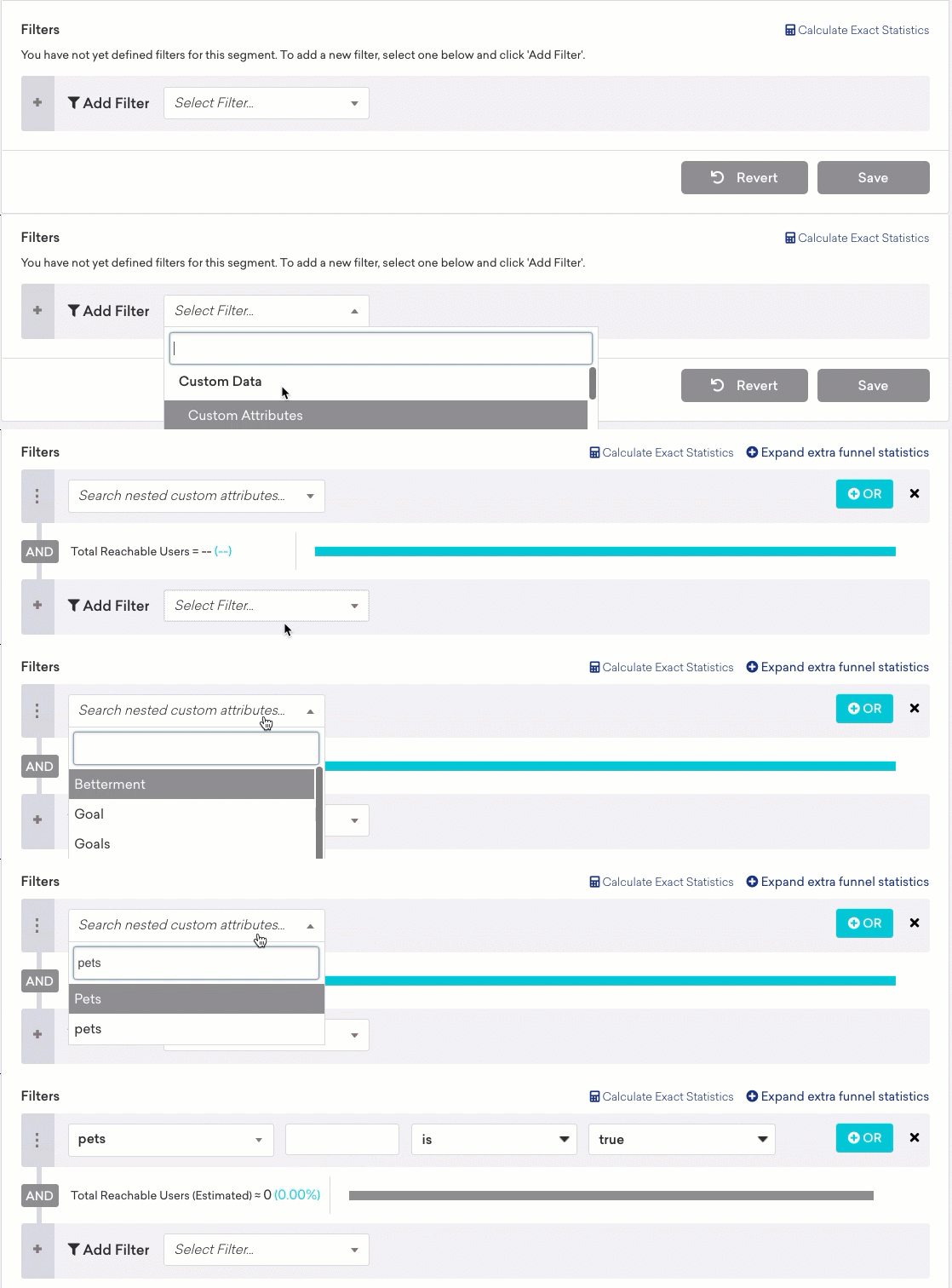
ドット表記を使用して、使用するオブジェクト配列内のフィールドを指定します。テキストフィールドは空の角かっこのセット ([]) で始めます。これにより、オブジェクト配列の内部を参照していることを Braze に伝えます。その後にピリオド (.) と、使用するフィールドの名前を入力します。
例えば、type フィールドを基準にしてオブジェクト配列 top_3_movies にフィルターを適用する場合は、[].type と入力し、Fantasy Movie などフィルターに使用する映画のジャンルを選択します。
階層化のレベル
最大 1 レベルの配列の階層化(別の配列内の配列)を含むセグメントを作成できます。例えば、次のコードに示す属性がある場合、pets[].name に Gus を含むセグメントを作成できます。ただし、pets[].nicknames[] に Gugu を含むセグメントは作成できません。
1
2
3
4
5
6
7
8
9
10
11
12
13
14
15
16
17
18
19
20
21
22
23
24
25
26
27
28
29
{
  "attributes": [
    {
      "external_id": "user_id",
      "pets": [
        {
          "id": 1,
          "type": "dog",
          "breed": "beagle",
          "name": "Gus",
          "nicknames": [
            "Gugu",
            "Gusto"
          ]
        },
        {
          "id": 2,
          "type": "cat",
          "breed": "calico",
          "name": "Gerald",
          "nicknames": [
            "GeGe",
            "Gerry"
          ]
        }
      ]
    }
  ]
}
データポイント
プロパティの作成、更新、削除によって、データポイントの記録方法は異なります。
新しい配列を作成すると、オブジェクトの各属性に対して 1 つのデータポイントが記録されます。次の例では 8 データポイントを消費します。各ペットオブジェクトには属性が 4 つあり、オブジェクトが 2 つあります。
1
2
3
4
5
6
7
8
9
10
11
12
13
14
15
16
17
18
19
20
21
{
  "attributes": [
    {
      "external_id": "user_id",
      "pets": [
        {
          "id": 1,
          "type": "dog",
          "breed": "beagle",
          "name": "Gus"
        },
        {
          "id": 2,
          "type": "cat",
          "breed": "calico",
          "name": "Gerald"
        }
      ]
    }
  ]
}
既存の配列を更新すると、追加されたプロパティごとに 1 つのデータポイントが記録されます。次の例では、2 つのオブジェクトのそれぞれでプロパティを 1 つのみ更新するため、2 データポイントを消費します。
1
2
3
4
5
6
7
8
9
10
11
12
13
14
15
16
17
18
19
20
21
22
23
24
25
26
{
  "attributes": [
    {
      "external_id": "user_id",
      "_merge_objects": true,
      "pets": {
        "$update": [
          {
            "$identifier_key": "id",
            "$identifier_value": 4,
            "$new_object": {
              "breed": "goldfish"
            }
          },
          {
            "$identifier_key": "id",
            "$identifier_value": 5,
            "$new_object": {
              "name": "Annette"
            }
          }
        ]
      }
    }
  ]
}
配列からオブジェクトを削除すると、送信した削除条件ごとに 1 つのデータポイントが記録されます。次の例では、このステートメントで複数の犬を削除できるにもかかわらず、3 データポイントを消費します。
1
2
3
4
5
6
7
8
9
10
11
12
13
14
15
16
17
18
19
20
21
22
23
24
25
{
  "attributes": [
    {
      "external_id": "user_id",
      "pets": {
        "$remove": [
          // Remove by ID
          {
            "$identifier_key": "id",
            "$identifier_value": 1
          },
          {
            "$identifier_key": "id",
            "$identifier_value": 2
          },
          // Remove any dog
          {
            "$identifier_key": "type",
            "$identifier_value": "dog"
          }
        ]
      }
    }
  ]
}
 GitHub でこのページを編集