Knak
Knak is the first campaign creation platform built for enterprise marketing teams to use in-house. Their drag-and-drop platform lets anyone create beautiful, on-brand emails and landing pages in minutes, with no coding or outside help required.
This integration is maintained by Knak.
About the integration
The Braze and Knak integration allows you to create fully responsive emails in minutes or hours instead of days or weeks and export them as ready-to-use Braze templates. Knak is built for marketers who want to level up their email creation for campaigns managed in Braze, without the need for outside agencies or hand-coding.
Prerequisites
| Requirement | Description |
|---|---|
| Knak account | A Knak account is required to take advantage of this partnership. |
| Braze REST API key | A Braze REST API key with full Templates permissions. This can be created in the Braze dashboard from Settings > API Keys. |
| Braze REST endpoint | Your REST endpoint URL. Your endpoint will depend on the Braze URL for your instance. |
Use cases
Knak is built for marketers who want to level up their email creation, with no coding or outside help required. It’s great for those who:
- Currently use simple templates for emails and want to up their game
- Rely on outside agencies or developers to build emails for Braze
- Want to take back creative control over asset creation and get to market considerably faster
Integration
Step 1: Configure your integration
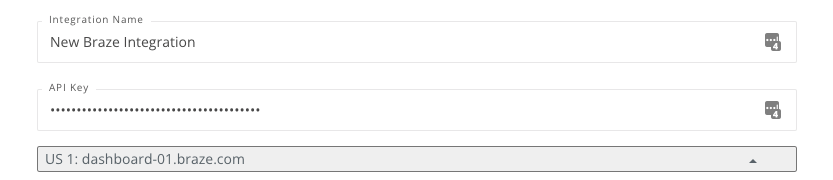
Knak에서 통합 > 플랫폼 > + 새 통합 추가로 이동합니다.

그런 다음, Braze 플랫폼을 선택하고 Braze API 키와 REST 엔드포인트를 제공합니다. 새 통합 생성을 클릭하여 통합을 완료합니다.
2단계: Sync your Knak templates
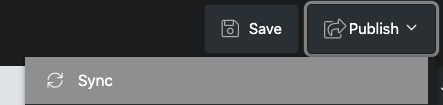
Knak에서 Braze에 동기화하려는 이메일을 찾아 게시를 선택한 다음, 동기화를 선택합니다.
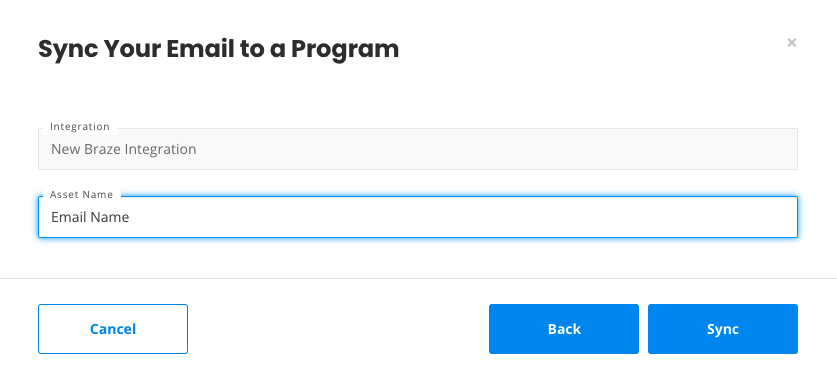
그런 다음 이메일 이름을 확인하고 동기화를 클릭합니다.
Using the Integration
업로드한 Knak 이메일은 Braze의 참여 > 템플릿 & 미디어에서 찾을 수 있습니다. They’ll be beautiful, on-brand, and fully responsive. The only limit is your own creativity!
 GitHub 에서 이 페이지를 편집합니다.