Antavo Loyalty Cloud
Antavo is an enterprise-grade SaaS loyalty technology provider that builds comprehensive loyalty programs to foster brand love and change customer behavior.
This integration is maintained by Antavo.
About the integration
The Antavo and Braze integration allows you to use loyalty program-related data to build personalized campaigns to enhance the customer experience. Antavo supports loyalty data synchronization between the two platforms—this is a one-way data synchronization only, from Antavo to Braze. The integration supports the external_id Braze field, which Antavo uses to synchronize the loyalty member ID.
Prerequisites
| Requirement | Description |
|---|---|
| Antavo account | An Antavo account with the Braze integration enabled is required to take advantage of this partnership. |
| Braze REST API key | A Braze REST API key with the following permissions: users.track, events.list, events.data_series, and events.get.This can be created in the Braze dashboard from Settings > API Keys. |
| Braze REST endpoint | Your REST endpoint URL. Your endpoint will depend on the Braze URL for your instance. |
| Braze app identifier | Your app identifier key. To locate this key in the Braze dashboard, go to Settings > API Keys and find the Identification section. |
Integration
Step 1: Connect Braze in Antavo
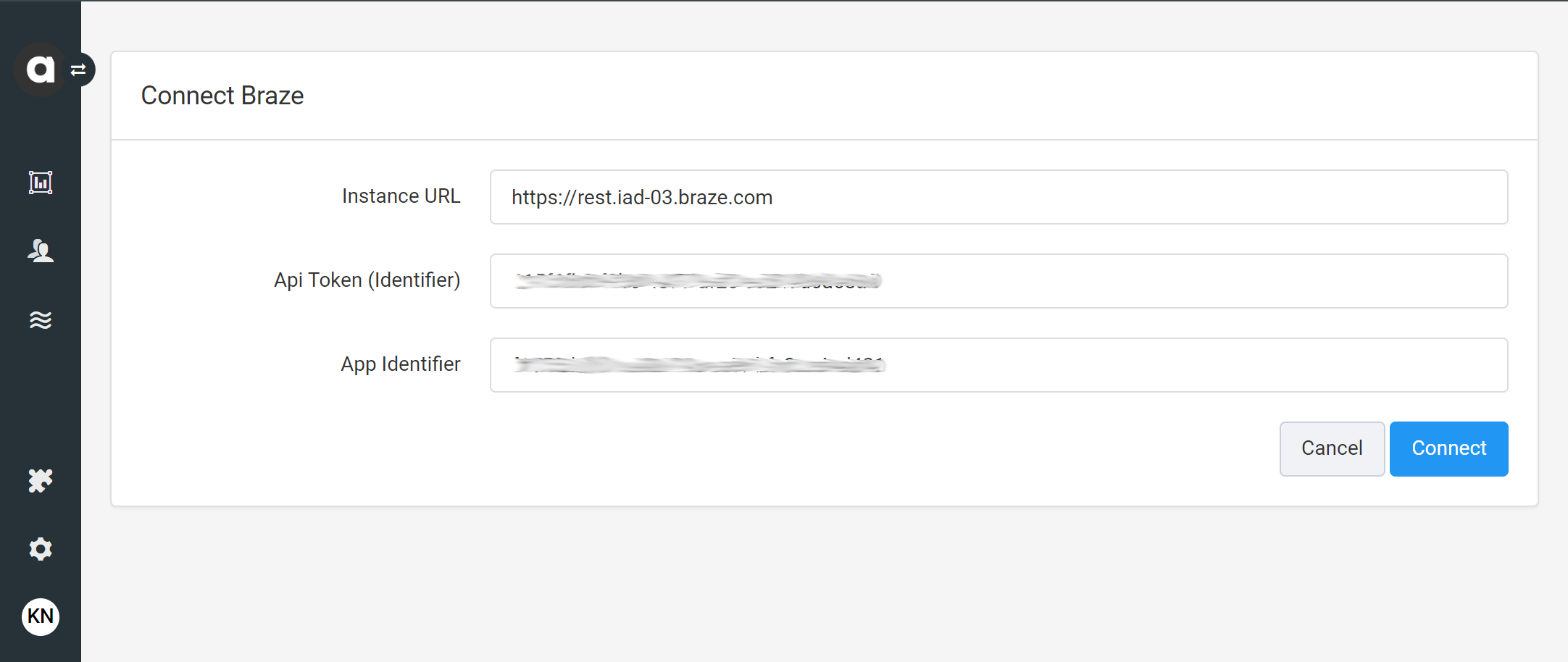
In Antavo, go to Modules > Braze and click Configure. When first navigating to the Braze integration configuration page in Antavo, the interface will prompt you to connect the two systems.
Provide the following credentials:
- Instance URL: The Braze REST endpoint of the instance you are provisioned to.
- API Token (Identifier): The Braze REST API key that Antavo should use when sending requests to Braze.
- App Identifier: The Braze app identifier.
자격 증명을 입력한 후 연결을 클릭합니다.
2단계: Configure field mapping
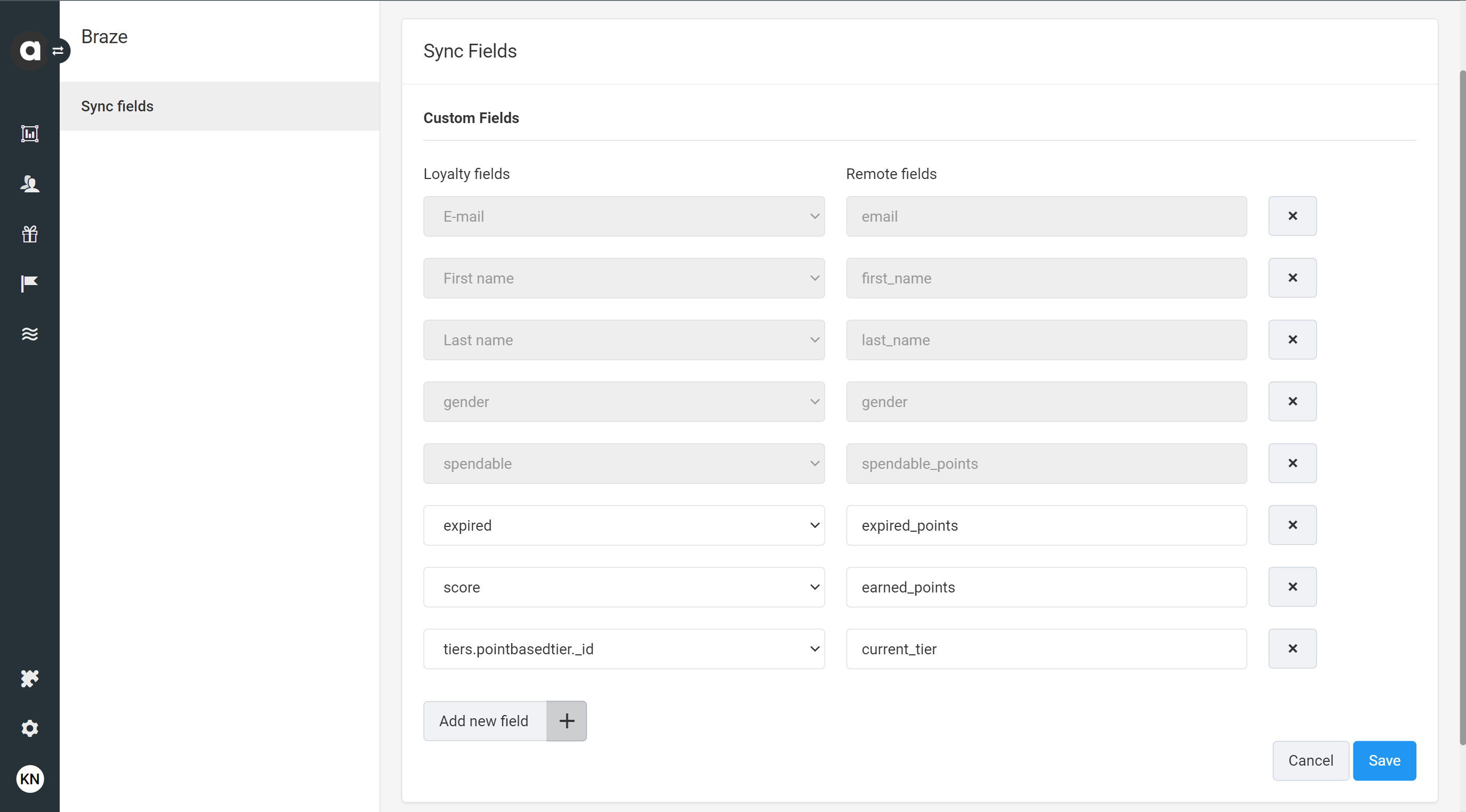
After the connection is established, you’ll be redirected to the Sync Fields page automatically in Antavo to configure the field synchronization between the two systems. You can reach this page at any time through Modules > Braze.
To configure field mapping in Antavo:
- Click Add new field .
- Use the dropdown field to select the Antavo Loyalty field that you want to synchronize to Braze.
- Enter the Remote field that represents the equivalent custom attribute in Braze to which the data will be populated.
You can find your list of custom attributes in Braze under Data Settings > Custom Attributes. If the field you enter is not defined in Braze, a new field will automatically be generated with the first sync.
4. 필드 페어링을 추가하려면 1~3단계를 반복합니다. 5. To remove a field from the list of synchronized data, click at the end of the row. 6. Click Save.
Antavo에서 구성된 필드의 값이 변경되면 해당 단일 값의 동기화가 트리거될 뿐만 아니라 필드 매핑에 추가된 모든 필드가 요청에 포함됩니다.
데이터 포인트 사용량을 최소화하려면 Braze 내에서 작업할 필드만 매핑하는 것이 좋습니다.
Supported data types
이 통합은 숫자(정수, 플로트), 문자열, 배열, 부울, 오브젝트, 오브젝트 배열, 날짜 등 모든 Braze 커스텀 속성 데이터 유형을 지원합니다.
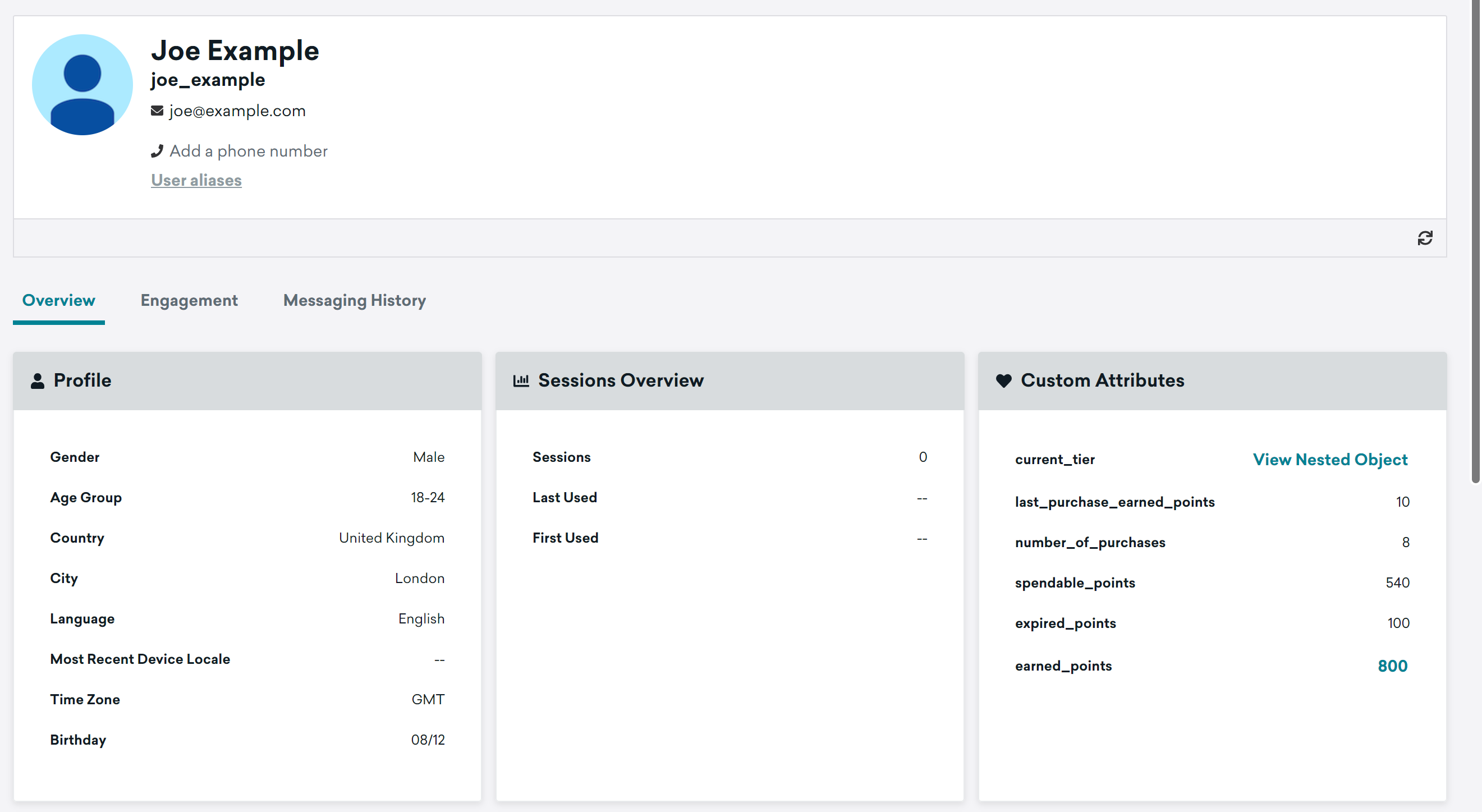
데이터 필드는 구성된 필드 매핑에 따라 채워집니다.
Triggers
In addition to configuring field mapping, the integration provides further capabilities through features built into Antavo’s Workflows tool. All Braze custom attribute data types and custom event property data types can be synchronized through workflows as well.
Synchronizing loyalty data occasionally
Use this option if the data is not stored in loyalty fields in Antavo or if the data is not added to the list of mapped fields. The synchronization of requested data is triggered when the configured workflow criteria are met.
Visit the step-by-step guide to learn how to configure the synchronization of loyalty data related to the last purchase.
Synchronizing loyalty program events
Use events synchronized from Antavo to enter loyalty members in action-based Braze Canvases. The integration can synchronize any Antavo event (including purchase events) that appears in Braze as custom events.
Visit the step-by-step guide to learn how to configure the synchronization of the loyalty program enrollment event and the synchronization of the loyalty program benefit earning event.
 GitHub 에서 이 페이지를 편집합니다.