AppsFlyer Audiences
This article describes how to import user cohorts from AppsFlyer to Braze by using the AppsFlyer Audiences integration. For more information on integrating AppsFlyer and its other functionalities, such as mobile attribution see the main AppsFlyer article.
Prerequisites
| Requirement | Description |
|---|---|
| AppsFlyer account | An AppsFlyer account is required to take advantage of this partnership. |
| iOS or Android app | This integration supports iOS and Android apps. Depending on your platform, code snippets may be required in your application. Details on these requirements can be found in step 1 of the integration process. |
| AppsFlyer SDK | In addition to the required Braze SDK, you must install the AppsFlyer SDK. |
Data import integration
1단계: Configure the AppsFlyer SDK
To use this integration, you must pass the user’s Braze external ID to AppsFlyer using the setPartnerData() function of the AppsFlyer SDK:
Android
1
2
3
Map<String, Object> brazeData = new HashMap<>();
partnerData.put("external_user_id", "some-braze-external-id-value");
AppsFlyerLib.getInstance().setPartnerData("braze_int", brazeData);
iOS
1
2
3
4
NSDictionary *brazeInfo = @{
     @"external_user_id":@"some-braze-external-id-value"
};
[[AppsFlyerLib shared]  setPartnerDataWithPartnerId:@"braze_int" partnerInfo:brazeInfo];
2단계: Get the Braze data import key
In Braze, navigate to Partner Integrations > Technology Partners and select AppsFlyer.
여기에서 REST 엔드포인트를 찾아 Braze 데이터 가져오기 키를 생성할 수 있습니다. After the key is generated, you can create a new key or invalidate an existing one. The data import key and the REST endpoint are used in the next step when setting up a postback in AppsFlyer’s dashboard.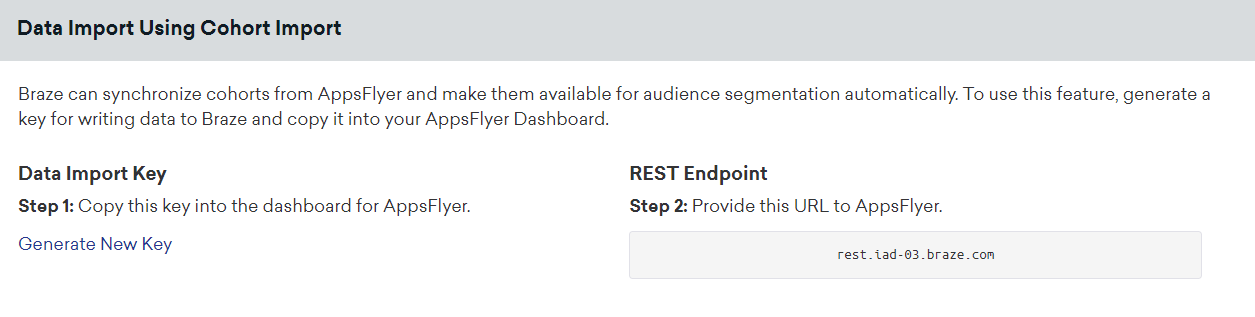
3단계: Configure a Braze connection in AppsFlyer Audiences
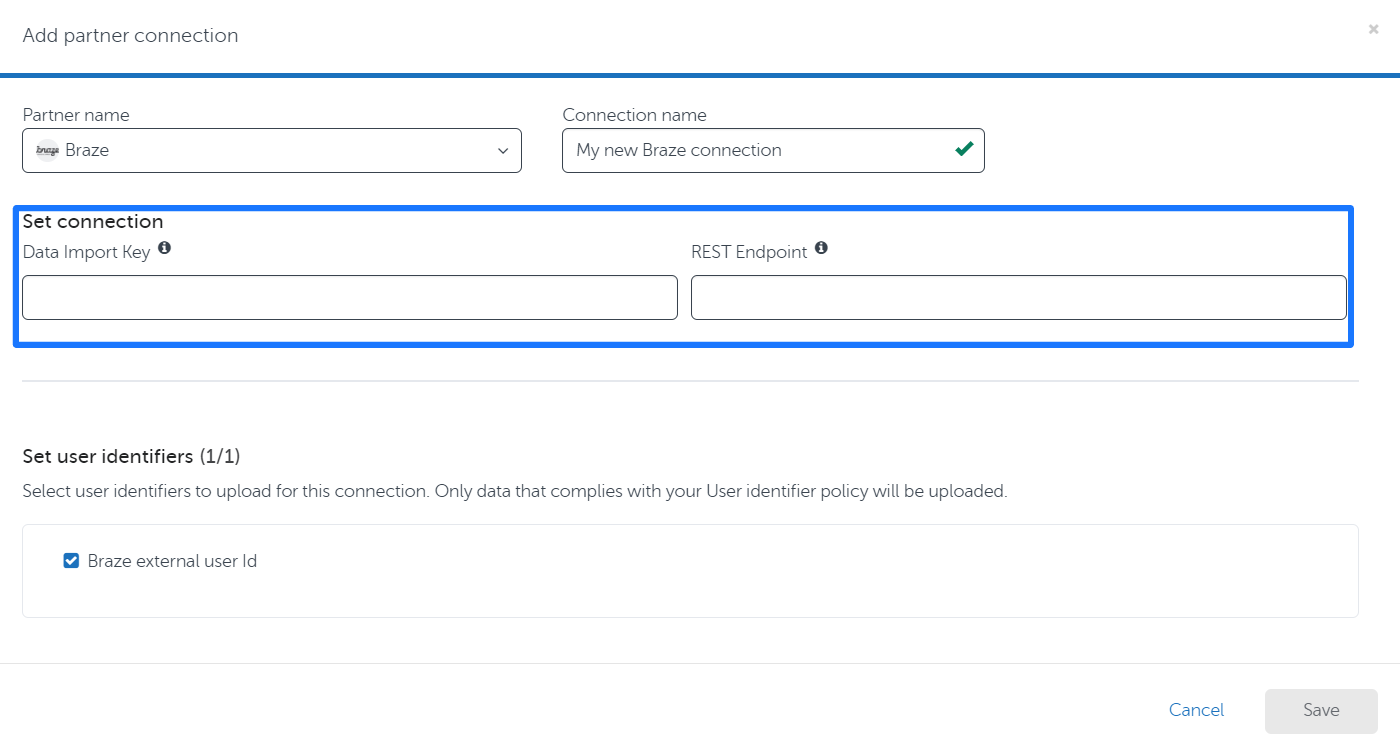
- In AppsFlyer Audiences, go to the Connections tab and click Add partner connection.
- Select Braze as the partner and give the connection a name.
- Provide the data import key and Braze REST endpoint.
- Save the connection, and it will be available to link to any new or existing audience.
4단계: Using AppsFlyer Audiences cohorts in Braze
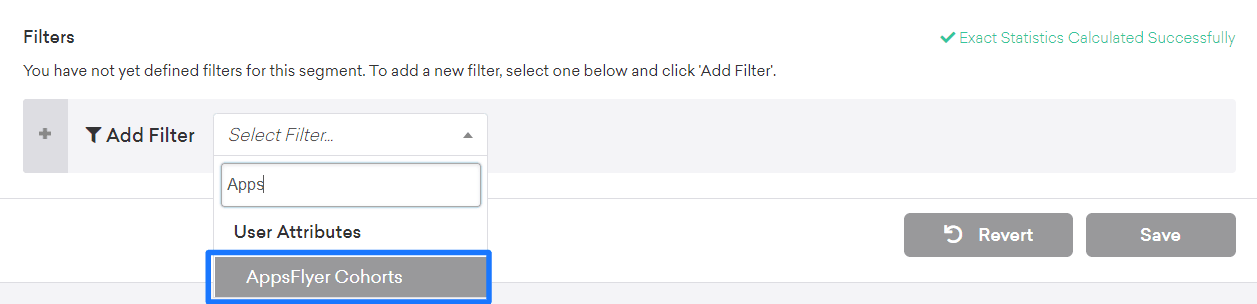
AppsFlyer 오디언스가 Braze에 업로드되면 Braze에서 세그먼트를 정의할 때 AppsFlyer Cohorts 필터를 선택하여 필터로 사용할 수 있습니다.
Only users who already exist within Braze will be added or removed from a cohort. Cohort Import will not create new users in Braze.
User Matching
Identified users can be matched by either their external_id or alias. Anonymous users can be matched by their device_id. Identified users who were originally created as anonymous users can’t be identified by their device_id, and must be identified by their external_id or alias.
 GitHub 에서 이 페이지를 편집합니다.