BrazeをChatGPTアプリと統合する
このガイドでは、BrazeをChatGPTアプリと統合し、AI搭載アプリケーション内で分析とイベントロギングを有効にする方法を説明します。
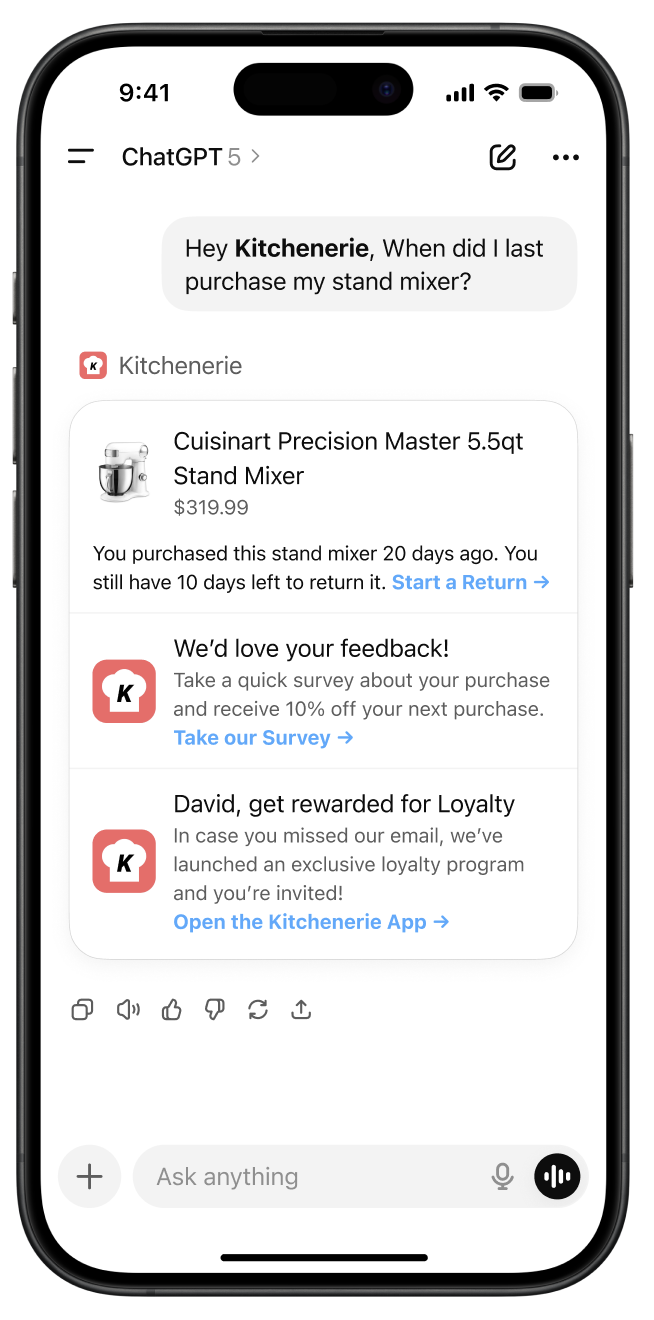
概要
ChatGPTアプリは、AI対話型アプリケーションを構築するための強力なプラットフォームを提供します。BrazeをChatGPTアプリと統合することで、AI時代においてもファーストパーティデータのコントロールを維持し続けることができます。具体的には以下のことが可能です。
- ChatGPTアプリ内でのユーザーエンゲージメントと動作をトラッキングする(例:顧客がどの質問やチャット機能を利用しているかを特定する)
- AIインタラクションパターンに基づいてBraze キャンペーンをセグメント化し、リターゲティングする(例:週に3回以上チャットを利用したユーザーにメールを送信する)
主な利点
- カスタマージャーニーを自分のものに: ユーザーがChatGPTを通じてブランドとやり取りする間も、その動作、好み、エンゲージメントパターンを把握し続けることができます。このデータはAIプラットフォームの分析だけでなく、Brazeユーザープロファイルに直接流れ込みます。
- クロスプラットフォームリターゲティング: ChatGPTアプリでのユーザーインタラクションをトラッキングし、AI利用パターンに基づいたパーソナライズ済みキャンペーンで、自社チャネル(メール、SMS、プッシュ通知、アプリ内メッセージ)全体でリターゲティングできます。
- ChatGPTの会話に1:1のプロモーションコンテンツを返す: チームがアプリ用に構築したカスタム対話型UIコンポーネントを使って、ChatGPT体験内で直接Brazeのアプリ内メッセージ、Content Cardsなどを配信できます。
- 収益アトリビューション: ChatGPTアプリのインタラクションから発生した購入とコンバージョンをトラッキングできます。
前提条件
BrazeをChatGPTアプリと統合する前に、以下が必要です。
- Brazeワークスペースに新規のWebアプリとAPIキーが作成されていること
- OpenAIプラットフォームで作成されたChatGPTアプリ(OpenAIサンプルアプリ)
ChatGPTアプリの統合
設定
ステップ1:Braze統合ファイルを取得する
ChatGPTアプリ統合リポジトリからbraze.jsファイルをプロジェクトにコピーします。このファイルには、必要なBraze SDKの設定とヘルパー関数がすべて含まれています。
ステップ2:依存関係をインストールする
Brazeの最新機能セットを利用するために、Web SDKをインストールします。
クライアントサイド統合の場合:
npm install @braze/web-sdk
Implementation
There are two ways to integrate Braze with your ChatGPT app depending on your use case:
Client-side integration (custom widgets)

Recommended Approach: This method enables rich messaging experiences and real-time user interaction tracking within your ChatGPT app widgets.
For displaying Braze messaging and tracking user interactions within your custom ChatGPT app widgets, use the Web SDK integration. A full messaging example can be found in our sample repository here.
Configure widget metadata
Add the following metadata to your MCP server file to allow Braze domains, ensuring to update the CDN domain based on your region:
"openai/widgetCSP": {
connect_domains: ["https://YOUR-SDK-ENDPOINT"],
resource_domains: [
"https://appboy-images.com",
"https://braze-images.com",
"https://cdn.braze.eu",
"https://use.fontawesome.com"
],
}
YOUR-SDK-ENDPOINTを実際のBraze SDKエンドポイントに置き換えてください。
useBrazeフックを設定する
import { useBraze } from "./utils/braze";
function YourWidget() {
const braze = useBraze({
apiKey: "your-braze-api-key",
baseUrl: "your-braze-endpoint.braze.com",
});
useEffect(() => {
if (!braze.isInitialized) {
return;
}
// Set user identity
braze.changeUser("user-id-123");
// Log widget interactions
braze.logCustomEvent("viewed_pizzaz_list");
}, [braze.isInitialized]);
return (
// Your widget JSX
);
}
Braze Content Cardsを表示する
const [cards, setCards] = useState([]);
useEffect(() => {
// - Available in version 7.0.0+
// Subscribe to content card events. The SDK sends the cached cards right away.
braze.subscribeToContentCardsEvents((event) => {
switch (event.type) {
case braze.ChannelEventType.CACHE_REPLAY:
case braze.ChannelEventType.CACHE_LOAD:
case braze.ChannelEventType.DATA_UPDATED:
setCards(event.cacheSnapshot.contentCards.cards);
break;
}
});
// Get cached content cards
setCards(braze.getCachedContentCards()?.cards ?? []);
// Subscribe to content card updates
braze.subscribeToContentCardsUpdates((contentCards) => {
setCards(contentCards.cards);
});
// Open session
braze.openSession();
return () => {
braze.removeAllSubscriptions();
}
}, []);
Web SDK 7.0.0以降では、subscribeToContentCardsEventsがCACHE_REPLAYイベントでキャッシュされたカードを即座に配信するため、getCachedContentCards()の呼び出しは不要です。subscribeToContentCardsUpdatesは7.0.0で非推奨となっています。
ウィジェットイベントをトラッキングする
// Track user interactions within your widget
const handleButtonClick = () => {
braze.logCustomEvent("widget_button_clicked", {
button_type: "save_list",
widget_name: "pizza_list"
});
};
const handleItemInteraction = (itemId) => {
braze.logCustomEvent("item_interacted", {
item_id: itemId,
interaction_type: "view_details"
});
};
サーバーサイド統合(MCPサーバー)
MCPサーバー上でメッセージング機能のサーバーサイド統合も必要な場合は、[email protected]までお問い合わせください。MCPサーバーからのイベントや購入のトラッキングには、REST APIを使用してください。