
AppboyKit(OBJECTIVE-C SDKとも呼ばれます)はサポートが終了しており、Swift SDKに置き換えられました。新機能、バグ修正、セキュリティ更新、テクニカルサポートは提供されません。ただし、メッセージングと分析は引き続き通常どおり機能します。詳しくは、新しいBraze Swift SDKの紹介を参照してください。

プッシュ通知実装ガイド
このオプションの高度な実装ガイドでは、プッシュ通知コンテンツアプリの拡張機能を活用してプッシュメッセージを最大限に活用する方法について説明します。当社チームが構築した3つのカスタムユースケース、付随するコードスニペット、および分析のロギングに関するガイダンスが含まれています。こちらから Braze Demo リポジトリにアクセスしてください!この実装ガイドはSwiftの実装を中心としていますが、興味のある方のためにObjective-Cのスニペットも提供されています。
通知コンテンツアプリ拡張機能
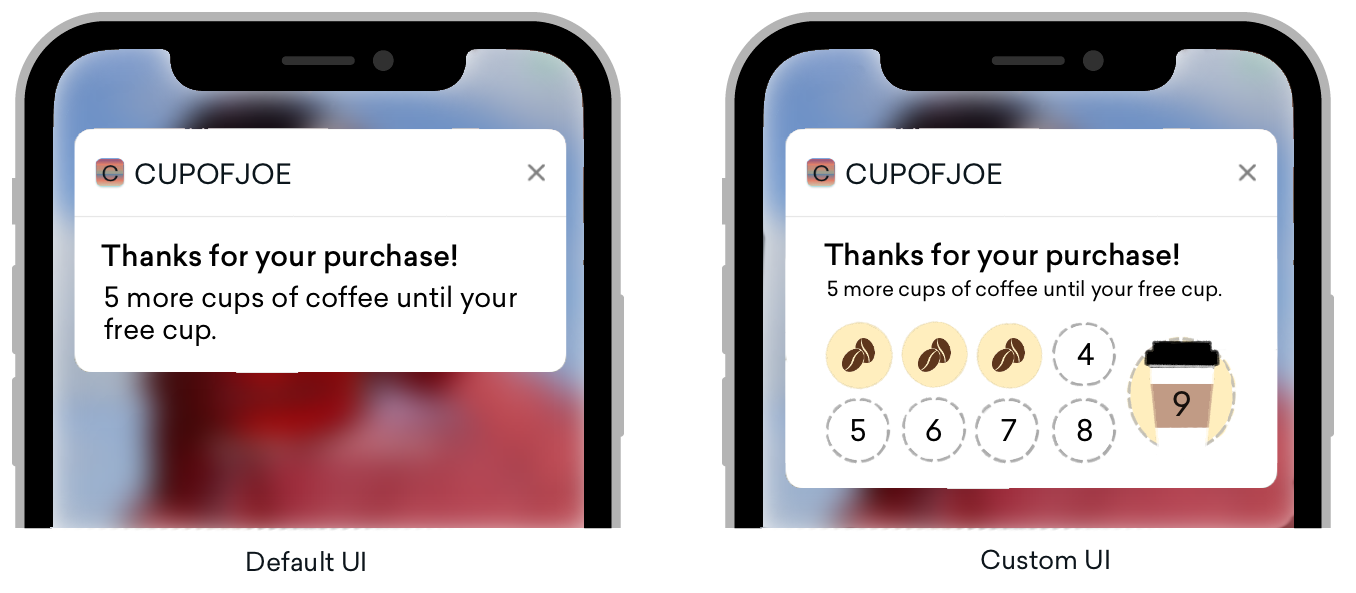
プッシュ通知は、さまざまなプラットフォームで標準的に見えますが、デフォルトUIで通常実装される範囲を超えた膨大なカスタマイズオプションを提供します。プッシュ通知が展開されると、コンテンツ通知拡張機能により、展開されたプッシュ通知のカスタムビューが利用可能になります。
プッシュ通知は3つの方法で展開できます。
- プッシュバナーを長押しする
- プッシュバナーを下にスワイプする
- バナーをスワイプして「表示」を選択する
これらのカスタムビューは、インタラクティブな通知、ユーザーデータが入力された通知、さらには電話番号やメールなどの情報を取得できるプッシュメッセージなど、多くの異なるタイプのコンテンツを表示できる、顧客をエンゲージするためのスマートな方法を提供します。この方法でプッシュを実装することは一部の方にとっては馴染みがないかもしれませんが、Brazeのよく知られた機能の1つであるPush Storiesは、通知コンテンツアプリ拡張機能のカスタムビューがどのようなものかを示す代表的な例です!
要件
- アプリにプッシュ通知が正常に統合されていること
- iOS 10以上
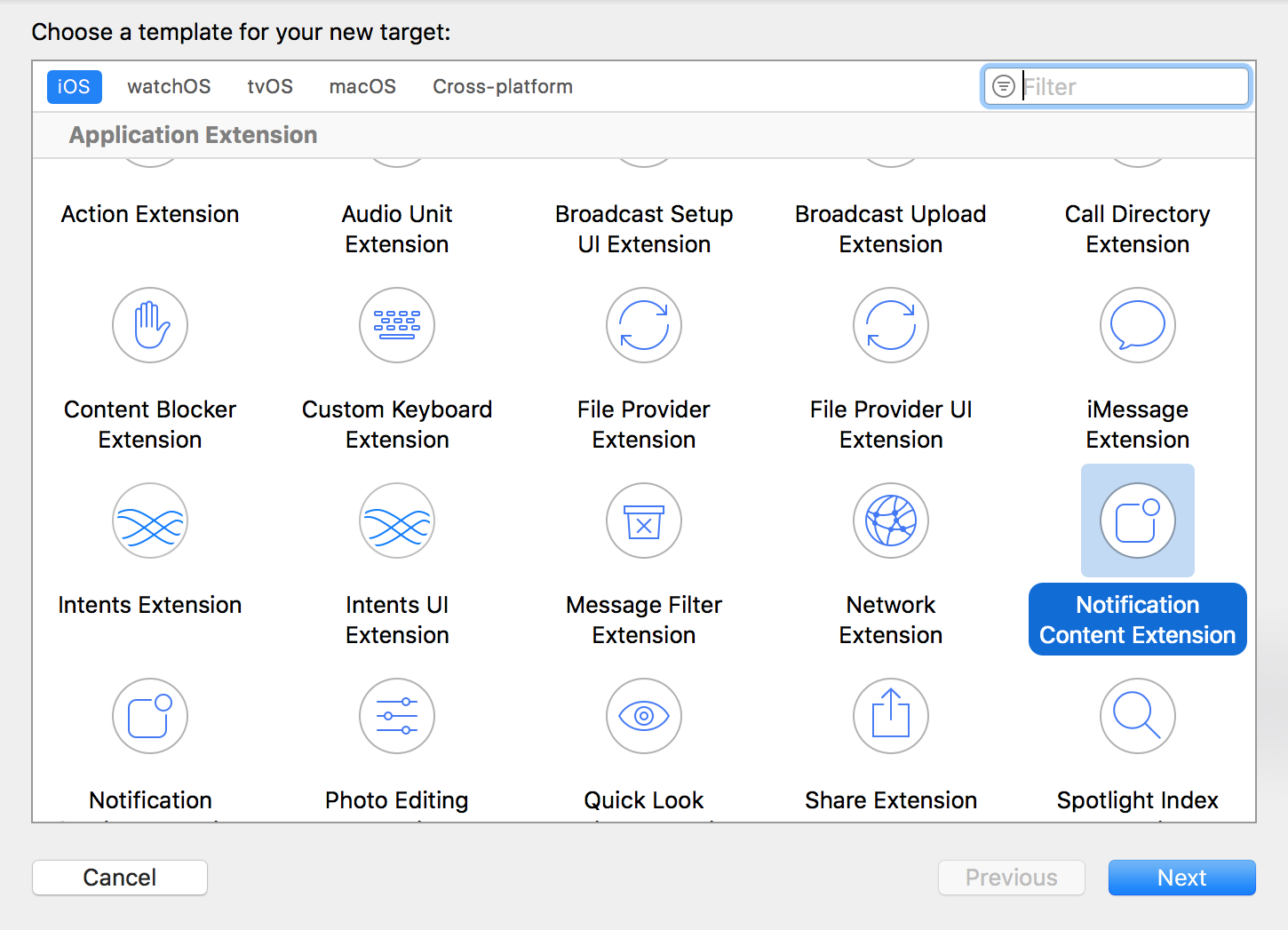
- コーディング言語に基づいてXcodeが生成する以下のファイル:
Swift
- NotificationViewController.swift
- MainInterface.storyboard
Objective-C
- NotificationViewController.h
- NotificationViewController.m
- MainInterface.storyboard
カスタムカテゴリの設定
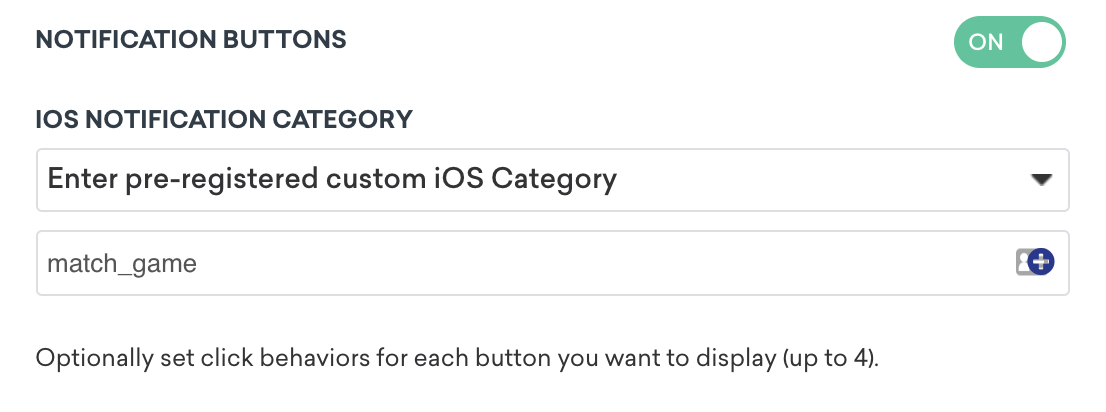
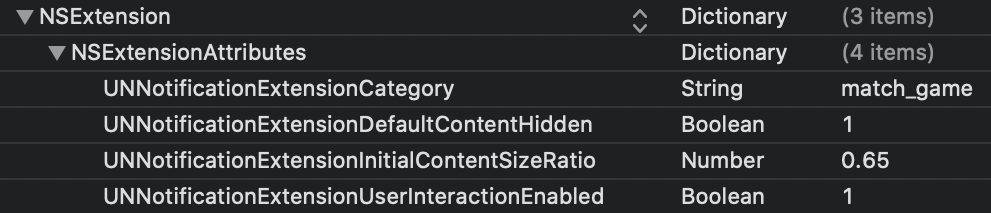
ダッシュボードでカスタムビューを設定するには、通知ボタンを有効にし、カスタムカテゴリを入力する必要があります。事前に登録したカスタムiOSカテゴリは、Notification Content Extension Targetの.plist内のUNNotificationExtensionCategoryと照合されます。ここで指定する値は、Brazeダッシュボードで設定されたものと一致する必要があります。
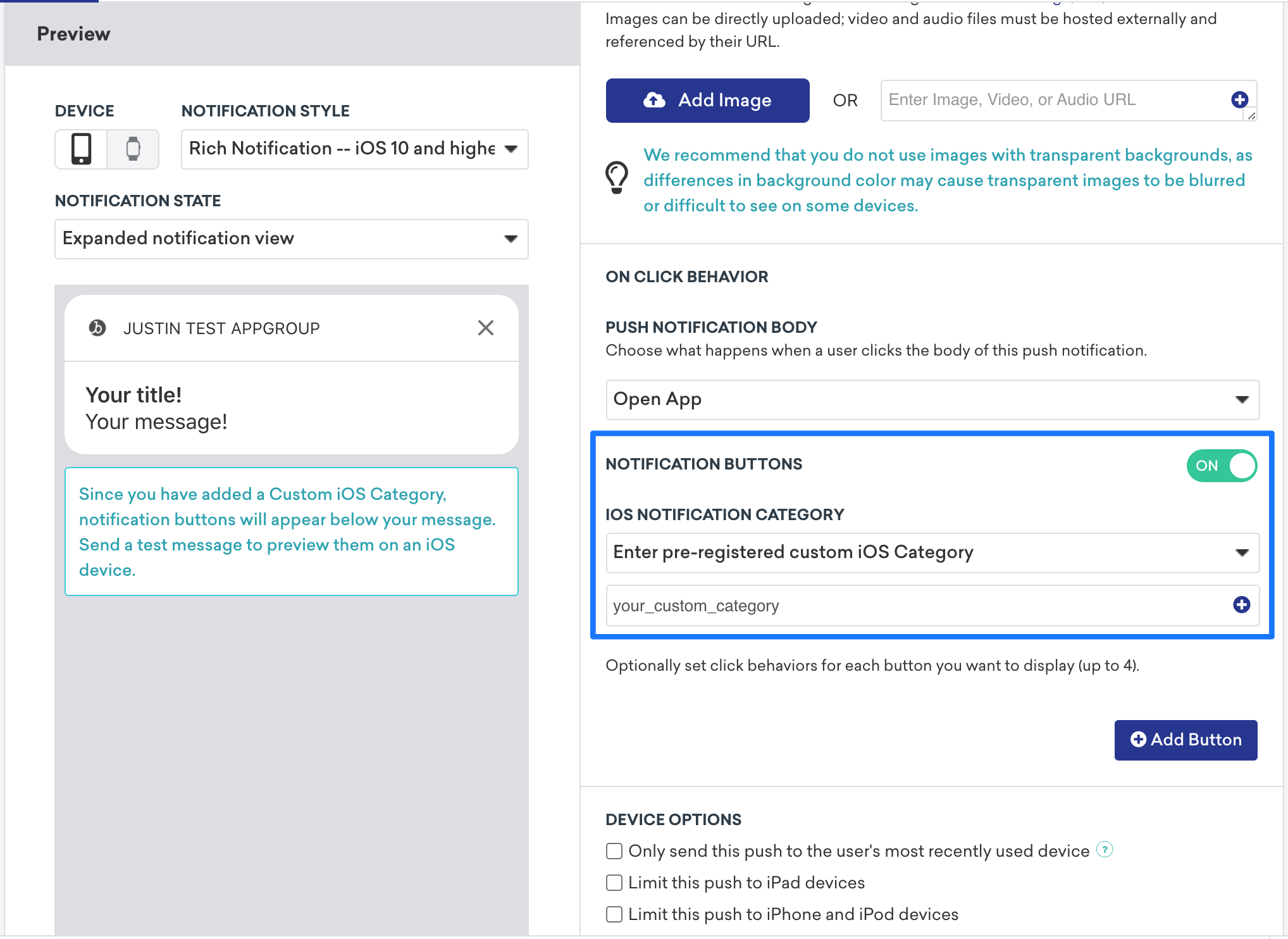


コンテンツ拡張機能付きのプッシュは常に明示的ではないため、ユーザーにプッシュ通知を展開するよう促すコールトゥアクションを含めることをお勧めします。
ユースケースと実装のウォークスルー
プッシュ通知のコンテンツアプリ拡張機能には3つのタイプが用意されています。各タイプには、コンセプトのウォークスルー、考えられるユースケース、およびプッシュ通知変数がBrazeダッシュボードでどのように表示・使用されるかを説明します。
インタラクティブプッシュ通知
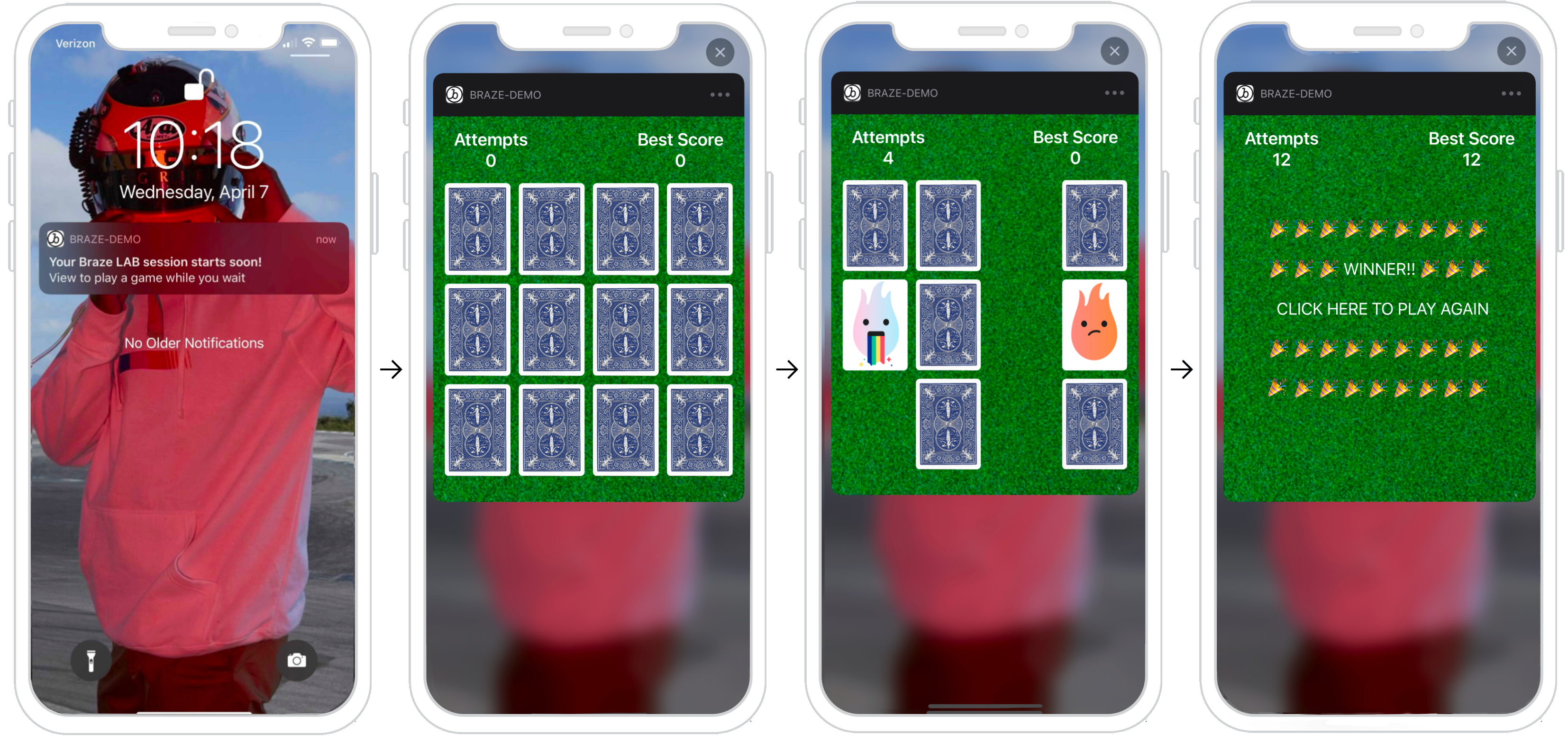
プッシュ通知はコンテンツ拡張機能内でユーザーアクションに応答できます。iOS 12以降を利用しているユーザーの場合、プッシュメッセージを完全にインタラクティブなプッシュ通知に変えることができます。このインタラクティブ性により、ユーザーを通知に引き込むさまざまな可能性が広がります。以下の例では、ユーザーが展開した通知内でマッチングゲームをプレイできるプッシュを示しています。
ダッシュボードの設定
ダッシュボードでカスタムビューを設定するには、通知ボタン設定内で表示したい特定のカテゴリを入力します。次に、Notification Content Extensionの.plistで、UNNotificationExtensionCategory属性にもカスタムカテゴリを設定する必要があります。ここで指定する値はBrazeダッシュボードで設定したものと一致させる必要があります。最後に、プッシュ通知でユーザーインタラクションを有効にするには、UNNotificationExtensionInteractionEnabledキーをtrueに設定します。
その他のユースケース
プッシュコンテンツ拡張機能は、プロモーションやアプリケーションにインタラクティブ性を導入するための魅力的なオプションです。例としては、ユーザーがプレイできるゲーム、割引のためのスピン・トゥ・ウィンホイール、リスティングや曲を保存するための「いいね」ボタンなどがあります。
分析のログ記録の準備はできましたか?
データの流れがどのようになるかをより深く理解するには、次のセクションをご覧ください。
パーソナライズされたプッシュ通知
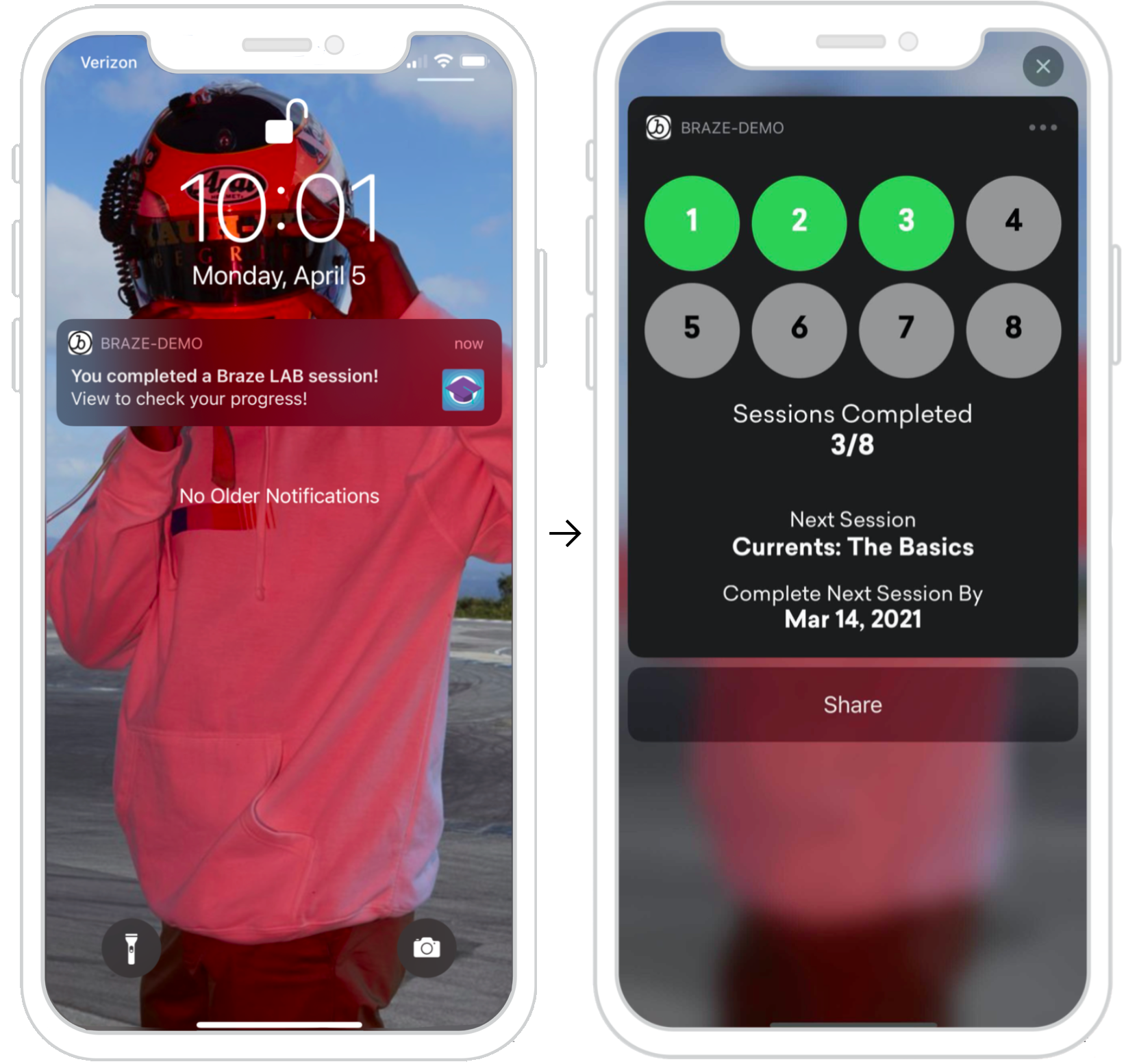
プッシュ通知はコンテンツ拡張機能内でユーザー固有の情報を表示できます。この例では、ユーザーが特定のタスク(Braze Learningコース)を完了した後に送信されるプッシュ通知を示しており、この通知を展開して進捗状況を確認するよう促しています。ここで提供される情報はユーザー固有のものであり、セッションの完了時や特定のユーザーアクションの実行時に、APIトリガーを活用して送信できます。
ダッシュボードの設定
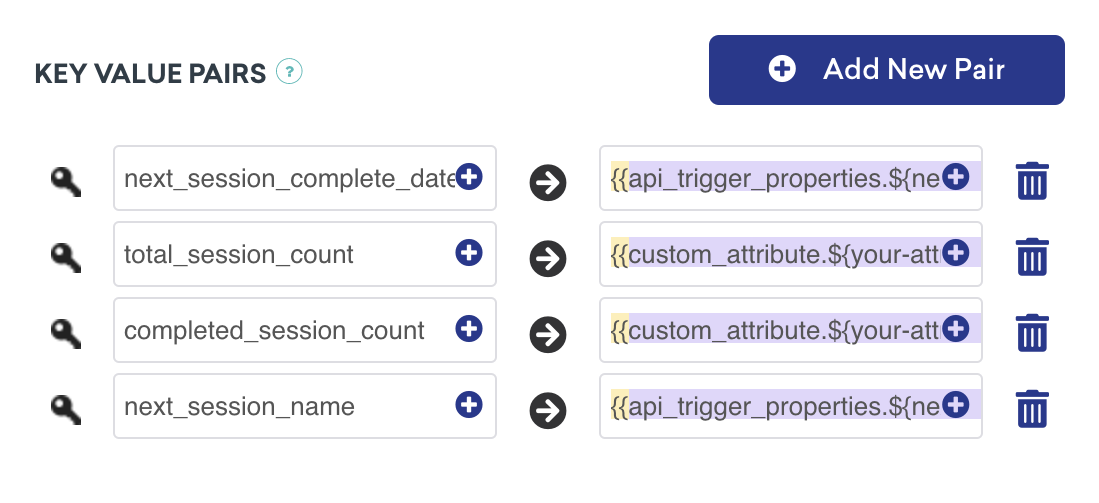
ダッシュボードでパーソナライズされたプッシュを設定するには、表示したい特定のカテゴリを登録し、キーと値のペア内で標準的なLiquidを使用して、メッセージに表示したい適切なユーザー属性を設定する必要があります。これらのビューは、特定のユーザープロファイルの特定のユーザー属性に基づいてパーソナライズできます。
キーと値のペアの処理
以下のメソッドdidReceiveは、コンテンツ拡張機能が通知を受信したときに呼び出され、NotificationViewController内に記述されています。ダッシュボードで提供されたキーと値のペアは、userInfoディクショナリを使用してコード内で表現されます。
プッシュ通知からのキーと値のペアの解析
func didReceive(_ notification: UNNotification) {
let userInfo = notification.request.content.userInfo
guard let value = userInfo["YOUR-KEY-VALUE-PAIR"] as? String,
let otherValue = userInfo["YOUR-OTHER-KEY-VALUE-PAIR"] as? String,
else { fatalError("Key-Value Pairs are incorrect.")}
...
}
- (void)didReceiveNotification:(nonnull UNNotification *)notification {
NSDictionary *userInfo = notification.request.content.userInfo;
if (userInfo[@"YOUR-KEY-VALUE-PAIR"] && userInfo[@"YOUR-OTHER-KEY-VALUE-PAIR"]) {
...
} else {
[NSException raise:NSGenericException format:@"Key-Value Pairs are incorrect"];
}
}
その他のユースケース
進捗ベースおよびユーザーフォーカスのプッシュコンテンツ拡張機能のアイデアは無限にあります。例としては、異なるプラットフォーム間で進捗を共有するオプションの追加、達成したアチーブメントの表示、ポイントカード、オンボーディングチェックリストなどがあります。
分析のログ記録の準備はできましたか?
データの流れがどのようになるかをより深く理解するには、次のセクションをご覧ください。
情報キャプチャプッシュ通知
プッシュ通知はコンテンツ拡張機能内でユーザー情報をキャプチャでき、プッシュで可能なことの限界を押し広げることができます。以下に示すフローを確認すると、ビューが状態変化に応答できることがわかります。各画像には、状態変化のコンポーネントが表されています。
- ユーザーがプッシュ通知を受信します。
- プッシュが開かれ、ユーザーに情報の入力を促します。
- 情報が入力され、有効であれば登録ボタンが表示されます。
- 確認ビューが表示され、プッシュが閉じられます。
ここでリクエストされる情報は、SMS番号のキャプチャなど幅広いものが可能であり、メール固有のものである必要はありません。
ダッシュボードの設定
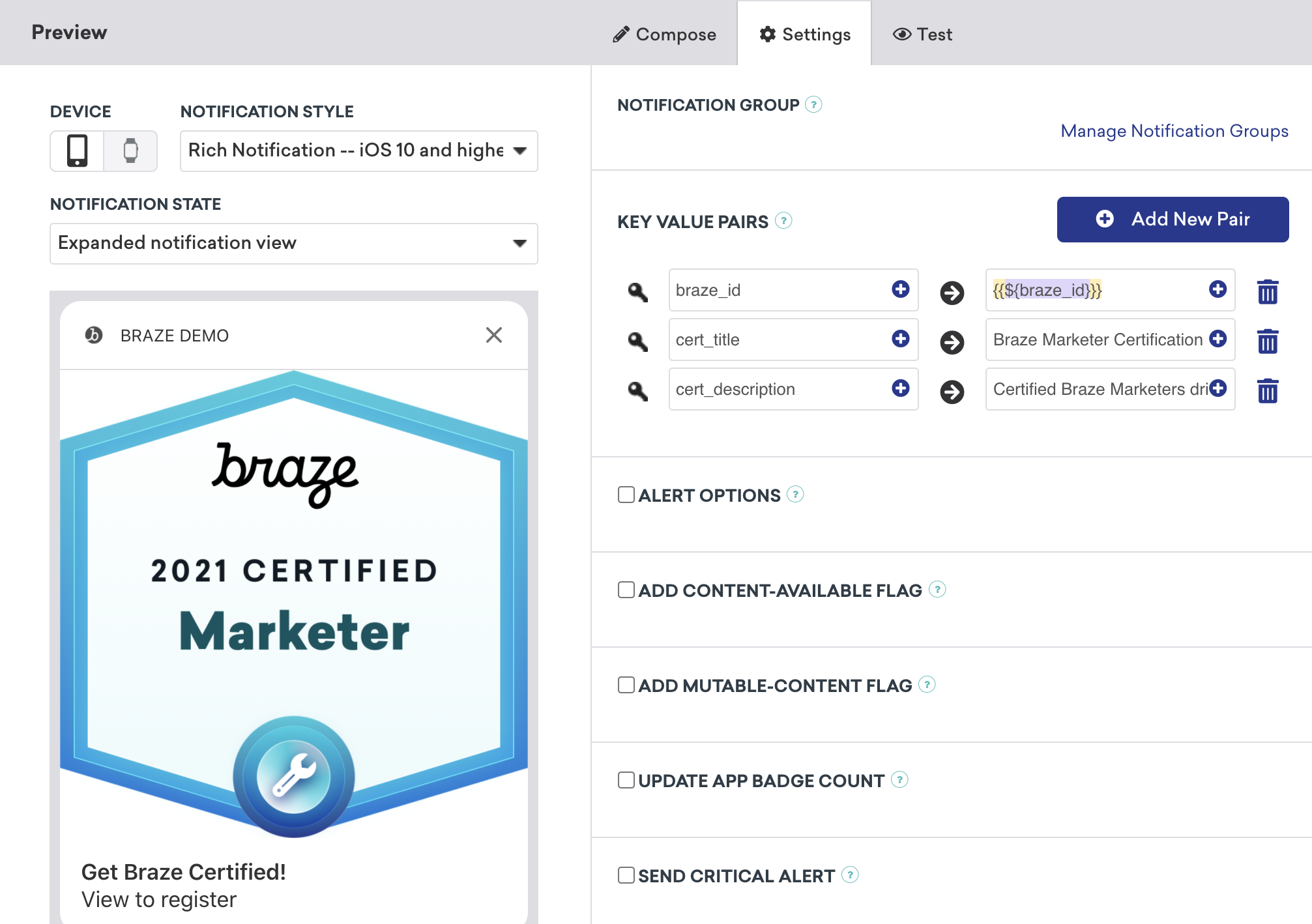
ダッシュボードで情報キャプチャ対応のプッシュを設定するには、カスタムカテゴリを登録して設定し、必要なキーと値のペアを提供する必要があります。例に示すように、プッシュに画像を含めることもできます。これを行うには、リッチプッシュ通知を統合し、キャンペーンの通知スタイルをRich Notificationに設定し、リッチプッシュ画像を含める必要があります。
ボタンアクションの処理
各アクションボタンは一意に識別されます。コードはレスポンス識別子がactionIdentifierと一致するかどうかをチェックし、一致する場合はユーザーがアクションボタンをクリックしたことを認識します。
プッシュ通知アクションボタンレスポンスの処理
func didReceive(_ response: UNNotificationResponse, completionHandler completion: @escaping (UNNotificationContentExtensionResponseOption) -> Void) {
if response.actionIdentifier == "YOUR-REGISTER-IDENTIFIER" {
// do something
} else {
// do something else
}
}
- (void)didReceiveNotificationResponse:(UNNotificationResponse *)response completionHandler:(void (^)(UNNotificationContentExtensionResponseOption))completion {
if ([response.actionIdentifier isEqualToString:@"YOUR-REGISTER-IDENTIFIER"]) {
completion(UNNotificationContentExtensionResponseOptionDismiss);
} else {
completion(UNNotificationContentExtensionResponseOptionDoNotDismiss);
}
}
プッシュの閉じ方
プッシュ通知はアクションボタンの押下から自動的に閉じることができます。推奨される3つのビルトインのプッシュ閉じオプションがあります。
completion(.dismiss)- 通知を閉じますcompletion(.doNotDismiss)- 通知が開いたままになりますcompletion(.dismissAndForward)- プッシュが閉じられ、ユーザーがアプリケーションに転送されます。
その他のユースケース
プッシュ通知を通じてユーザー入力をリクエストすることは、多くの企業が活用していないエキサイティングな機会です。これらのプッシュメッセージでは、名前、メール、電話番号などの基本情報をリクエストするだけでなく、未完了のユーザープロファイルの完了を促したり、フィードバックの送信を依頼したりすることもできます。
分析のログ記録の準備はできましたか?
データの流れがどのようになるかをより深く理解するには、次のセクションをご覧ください。
分析のロギング
Braze APIを使用したロギング(推奨)
分析のロギングは、顧客のサーバーが/users/trackエンドポイントにアクセスすることで、リアルタイムでのみ実行できます。分析をロギングするには、キーと値のペアフィールドにbraze_id値を送信し(以下のスクリーンショットを参照)、更新するユーザープロファイルを識別します。

手動ロギング
手動ロギングでは、まずXcode内でアプリグループを設定し、分析の作成、保存、取得を行う必要があります。これには、お客様側でカスタム開発作業が必要です。以下に示すコードスニペットは、この対応に役立ちます。
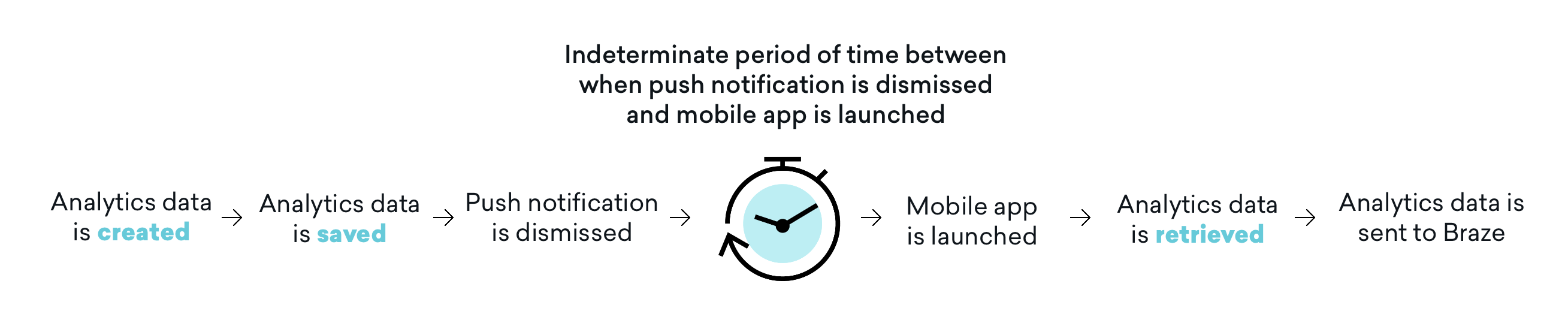
また、分析はモバイルアプリケーションがその後起動されるまでBrazeに送信されないことにも注意が必要です。つまり、却下設定によっては、プッシュ通知が却下されてからモバイルアプリが起動されて分析が取得されるまでの間に、不確定な期間が存在することが多いです。この時間バッファがすべてのユースケースに影響するわけではありませんが、ユーザーはその影響を考慮し、必要に応じてアプリケーションの開封を含むようにユーザージャーニーを調整して、この問題に対処する必要があります。
ステップ1:Xcode内でアプリグループを設定する
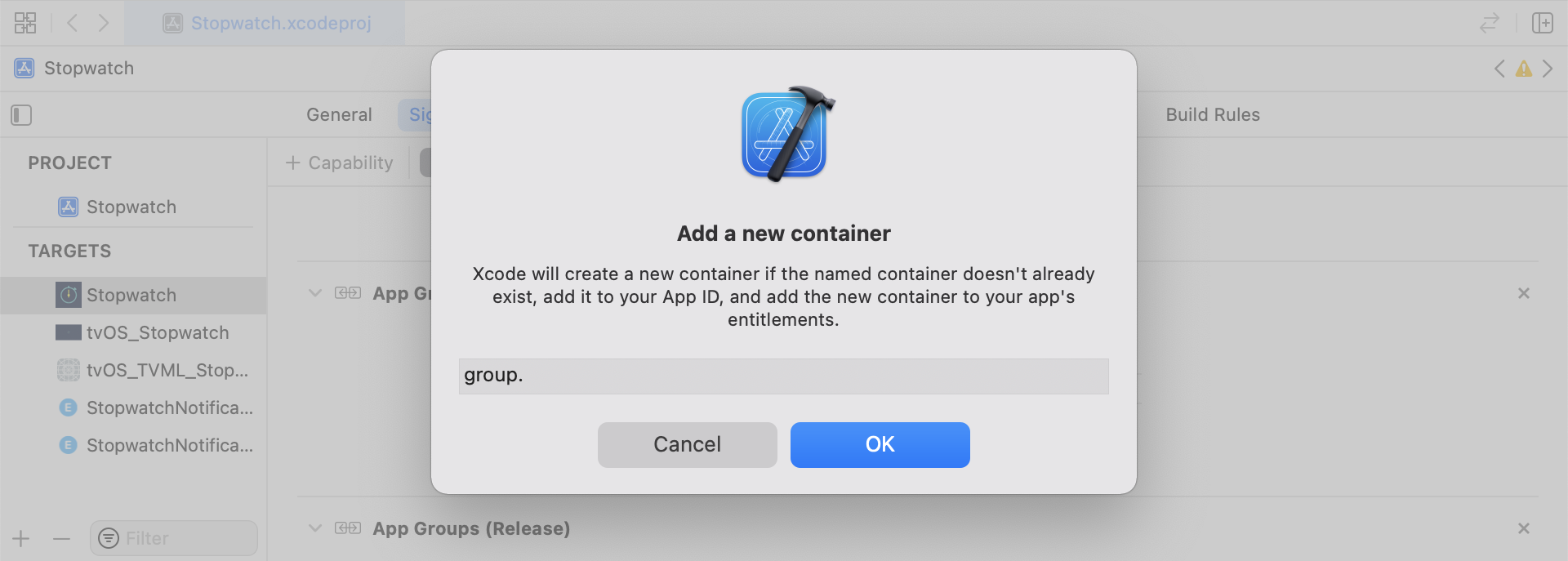
App Groupsケイパビリティを追加します。アプリにアプリグループがまだない場合は、メインアプリターゲットのケイパビリティに移動し、App Groupsをオンにして「+」をクリックします。アプリのバンドルIDを使用してアプリグループを作成します。例えば、アプリのバンドルIDがcom.company.appnameの場合、アプリグループにgroup.com.company.appname.xyzと名前を付けることができます。メインアプリターゲットとコンテンツエクステンションターゲットの両方でApp Groupsがオンになっていることを確認してください。
ステップ2:コードスニペットを統合する
以下のコードスニペットは、カスタムイベント、カスタム属性、ユーザー属性の保存と送信方法に関する参考資料です。このガイドではUserDefaultsの観点から説明しますが、コード表現はヘルパーファイルRemoteStorageの形式になっています。ユーザー属性の送信と保存に使用される追加のヘルパーファイルUserAttributesとEventName Dictionaryも存在します。すべてのヘルパーファイルはこのガイドの末尾にあります。
カスタムイベントの保存
カスタムイベントを保存するには、新しいデザインとして分析を作成する必要があります。これは、ディクショナリを作成し、メタデータを入力し、ヘルパーファイルを通じてデータを保存することで行います。
- イベントメタデータでディクショナリを初期化する
userDefaultsを初期化してイベントデータを取得・保存する- 既存の配列がある場合は、既存の配列に新しいデータを追加して保存する
- 既存の配列がない場合は、新しい配列を
userDefaultsに保存する
func saveCustomEvent(with properties: [String: Any]? = nil) {
// 1
let customEventDictionary = Dictionary(eventName: "YOUR-EVENT-NAME", properties: properties)
// 2
let remoteStorage = RemoteStorage(storageType: .suite)
// 3
if var pendingEvents = remoteStorage.retrieve(forKey: .pendingCustomEvents) as? [[String: Any]] {
pendingEvents.append(contentsOf: [customEventDictionary])
remoteStorage.store(pendingEvents, forKey: .pendingCustomEvents)
} else {
// 4
remoteStorage.store([customEventDictionary], forKey: .pendingCustomEvents)
}
}
- (void)saveCustomEvent:(NSDictionary<NSString *, id> *)properties {
// 1
NSDictionary<NSString *, id> *customEventDictionary = [[NSDictionary alloc] initWithEventName:@"YOUR-EVENT-NAME" properties:properties];
// 2
RemoteStorage *remoteStorage = [[RemoteStorage alloc] initWithStorageType:StorageTypeSuite];
NSMutableArray *pendingEvents = [[remoteStorage retrieveForKey:RemoteStorageKeyPendingCustomEvents] mutableCopy];
// 3
if (pendingEvents) {
[pendingEvents addObject:customEventDictionary];
[remoteStorage store:pendingEvents forKey:RemoteStorageKeyPendingCustomAttributes];
} else {
// 4
[remoteStorage store:@[ customEventDictionary ] forKey:RemoteStorageKeyPendingCustomAttributes];
}
}
カスタムイベントをBrazeに送信する
SDKの初期化後が、通知コンテンツアプリエクステンションから保存された分析をロギングする最適なタイミングです。これは、保留中のイベントをループ処理し、「Event Name」キーをチェックし、Brazeで適切な値を設定してから、次回この関数が必要になったときのためにストレージをクリアすることで実行できます。
- 保留中のイベントの配列をループ処理する
pendingEventsディクショナリの各キーと値のペアをループ処理する- 「Event Name」のキーを明示的にチェックし、それに応じて値を設定する
- その他のすべてのキーと値のペアは
propertiesディクショナリに追加する - 個別のカスタムイベントをロギングする
- すべての保留中のイベントをストレージから削除する
func logPendingCustomEventsIfNecessary() {
let remoteStorage = RemoteStorage(storageType: .suite)
guard let pendingEvents = remoteStorage.retrieve(forKey: .pendingCustomEvents) as? [[String: Any]] else { return }
// 1
for event in pendingEvents {
var eventName: String?
var properties: [AnyHashable: Any] = [:]
// 2
for (key, value) in event {
if key == PushNotificationKey.eventName.rawValue {
// 3
if let eventNameValue = value as? String {
eventName = eventNameValue
} else {
print("Invalid type for event_name key")
}
} else {
// 4
properties[key] = value
}
}
// 5
if let eventName = eventName {
logCustomEvent(eventName, withProperties: properties)
}
}
// 6
remoteStorage.removeObject(forKey: .pendingCustomEvents)
}
- (void)logPendingEventsIfNecessary {
RemoteStorage *remoteStorage = [[RemoteStorage alloc] initWithStorageType:StorageTypeSuite];
NSArray *pendingEvents = [remoteStorage retrieveForKey:RemoteStorageKeyPendingCustomEvents];
// 1
for (NSDictionary<NSString *, id> *event in pendingEvents) {
NSString *eventName = nil;
NSMutableDictionary *properties = [NSMutableDictionary dictionary];
// 2
for (NSString* key in event) {
if ([key isEqualToString:@"event_name"]) {
// 3
if ([[event objectForKey:key] isKindOfClass:[NSString class]]) {
eventName = [event objectForKey:key];
} else {
NSLog(@"Invalid type for event_name key");
}
} else {
// 4
properties[key] = event[key];
}
}
// 5
if (eventName != nil) {
[[Appboy sharednstance] logCustomEvent:eventName withProperties:properties];
}
}
// 6
[remoteStorage removeObjectForKey:RemoteStorageKeyPendingCustomEvents];
}
カスタム属性の保存
カスタム属性を保存するには、新しいデザインとして分析を作成する必要があります。これは、ディクショナリを作成し、メタデータを入力し、ヘルパーファイルを使用してデータを保存することで行います。
- 属性メタデータでディクショナリを初期化する
userDefaultsを初期化して属性データを取得・保存する- 既存の配列がある場合は、既存の配列に新しいデータを追加して保存する
- 既存の配列がない場合は、新しい配列を
userDefaultsに保存する
func saveCustomAttribute() {
// 1
let customAttributeDictionary: [String: Any] = ["YOUR-CUSTOM-ATTRIBUTE-KEY": "YOUR-CUSTOM-ATTRIBUTE-VALUE"]
// 2
let remoteStorage = RemoteStorage(storageType: .suite)
// 3
if var pendingAttributes = remoteStorage.retrieve(forKey: .pendingCustomAttributes) as? [[String: Any]] {
pendingAttributes.append(contentsOf: [customAttributeDictionary])
remoteStorage.store(pendingAttributes, forKey: .pendingCustomAttributes)
} else {
// 4
remoteStorage.store([customAttributeDictionary], forKey: .pendingCustomAttributes)
}
}
- (void)saveCustomAttribute {
// 1
NSDictionary<NSString *, id> *customAttributeDictionary = @{ @"YOUR-CUSTOM-ATTRIBUTE-KEY": @"YOUR-CUSTOM-ATTRIBUTE-VALUE" };
// 2
RemoteStorage *remoteStorage = [[RemoteStorage alloc] initWithStorageType:StorageTypeSuite];
NSMutableArray *pendingAttributes = [[remoteStorage retrieveForKey:RemoteStorageKeyPendingCustomAttributes] mutableCopy];
// 3
if (pendingAttributes) {
[pendingAttributes addObject:customAttributeDictionary];
[remoteStorage store:pendingAttributes forKey:RemoteStorageKeyPendingCustomAttributes];
} else {
// 4
[remoteStorage store:@[ customAttributeDictionary ] forKey:RemoteStorageKeyPendingCustomAttributes];
}
}
カスタム属性をBrazeに送信する
SDKの初期化後が、通知コンテンツアプリエクステンションから保存された分析をロギングする最適なタイミングです。これは、保留中の属性をループ処理し、Brazeで適切なカスタム属性を設定してから、次回この関数が必要になったときのためにストレージをクリアすることで実行できます。
- 保留中の属性の配列をループ処理する
pendingAttributesディクショナリの各キーと値のペアをループ処理する- 対応するキーと値で個別のカスタム属性をロギングする
- すべての保留中の属性をストレージから削除する
func logPendingCustomAttributesIfNecessary() {
let remoteStorage = RemoteStorage(storageType: .suite)
guard let pendingAttributes = remoteStorage.retrieve(forKey: .pendingCustomAttributes) as? [[String: Any]] else { return }
// 1
pendingAttributes.forEach { setCustomAttributesWith(keysAndValues: $0) }
// 4
remoteStorage.removeObject(forKey: .pendingCustomAttributes)
}
func setCustomAttributesWith(keysAndValues: [String: Any]) {
// 2
for (key, value) in keysAndValues {
// 3
if let value = value as? [String] {
setCustomAttributeArrayWithKey(key, andValue: value)
} else {
setCustomAttributeWithKey(key, andValue: value)
}
}
}
- (void)logPendingCustomAttributesIfNecessary {
RemoteStorage *remoteStorage = [[RemoteStorage alloc] initWithStorageType:StorageTypeSuite];
NSArray *pendingAttributes = [remoteStorage retrieveForKey:RemoteStorageKeyPendingCustomAttributes];
// 1
for (NSDictionary<NSString*, id> *attribute in pendingAttributes) {
[self setCustomAttributeWith:attribute];
}
// 4
[remoteStorage removeObjectForKey:RemoteStorageKeyPendingCustomAttributes];
}
- (void)setCustomAttributeWith:(NSDictionary<NSString *, id> *)keysAndValues {
// 2
for (NSString *key in keysAndValues) {
// 3
[self setCustomAttributeWith:key andValue:[keysAndValues objectForKey:key]];
}
}
ユーザー属性の保存
ユーザー属性を保存する際は、更新される属性のタイプ(email、first_name、phone_numberなど)を判別するためのカスタムオブジェクトを作成することをお勧めします。このオブジェクトはUserDefaultsに保存・取得可能である必要があります。この実現方法の一例として、UserAttributeヘルパーファイルを参照してください。
- 対応するタイプでエンコード済みの
UserAttributeオブジェクトを初期化する userDefaultsを初期化してイベントデータを取得・保存する- 既存の配列がある場合は、既存の配列に新しいデータを追加して保存する
- 既存の配列がない場合は、新しい配列を
userDefaultsに保存する
func saveUserAttribute() {
// 1
guard let data = try? PropertyListEncoder().encode(UserAttribute.userAttributeType("USER-ATTRIBUTE-VALUE")) else { return }
// 2
let remoteStorage = RemoteStorage(storageType: .suite)
// 3
if var pendingAttributes = remoteStorage.retrieve(forKey: .pendingUserAttributes) as? [Data] {
pendingAttributes.append(contentsOf: [data])
remoteStorage.store(pendingAttributes, forKey: .pendingUserAttributes)
} else {
// 4
remoteStorage.store([data], forKey: .pendingUserAttributes)
}
}
- (void)saveUserAttribute {
// 1
UserAttribute *userAttribute = [[UserAttribute alloc] initWithUserField:@"USER-ATTRIBUTE-VALUE" attributeType:UserAttributeTypeEmail];
NSError *error;
NSData *data = [NSKeyedArchiver archivedDataWithRootObject:userAttribute requiringSecureCoding:YES error:&error];
if (error != nil) {
// log error
}
// 2
RemoteStorage *remoteStorage = [[RemoteStorage alloc] initWithStorageType:StorageTypeSuite];
NSMutableArray *pendingAttributes = [[remoteStorage retrieveForKey:RemoteStorageKeyPendingUserAttributes] mutableCopy];
// 3
if (pendingAttributes) {
[pendingAttributes addObject:data];
[remoteStorage store:pendingAttributes forKey:RemoteStorageKeyPendingUserAttributes];
} else {
// 4
[remoteStorage store:@[data] forKey:RemoteStorageKeyPendingUserAttributes];
}
}
ユーザー属性をBrazeに送信する
SDKの初期化後が、通知コンテンツアプリエクステンションから保存された分析をロギングする最適なタイミングです。これは、保留中の属性をループ処理し、Brazeで適切なカスタム属性を設定してから、次回この関数が必要になったときのためにストレージをクリアすることで実行できます。
pendingAttributesデータの配列をループ処理する- 属性データからエンコード済みの
UserAttributeオブジェクトを初期化する - ユーザー属性タイプに基づいて特定のユーザーフィールドを設定する(メール)
- すべての保留中のユーザー属性をストレージから削除する
func logPendingUserAttributesIfNecessary() {
let remoteStorage = RemoteStorage(storageType: .suite)
guard let pendingAttributes = remoteStorage.retrieve(forKey: .pendingUserAttributes) as? [Data] else { return }
// 1
for attributeData in pendingAttributes {
// 2
guard let userAttribute = try? PropertyListDecoder().decode(UserAttribute.self, from: attributeData) else { continue }
// 3
switch userAttribute {
case .email(let email):
user?.email = email
}
}
// 4
remoteStorage.removeObject(forKey: .pendingUserAttributes)
}
- (void)logPendingUserAttributesIfNecessary {
RemoteStorage *remoteStorage = [[RemoteStorage alloc] initWithStorageType:StorageTypeSuite];
NSArray *pendingAttributes = [remoteStorage retrieveForKey:RemoteStorageKeyPendingUserAttributes];
// 1
for (NSData *attributeData in pendingAttributes) {
NSError *error;
// 2
UserAttribute *userAttribute = [NSKeyedUnarchiver unarchivedObjectOfClass:[UserAttribute class] fromData:attributeData error:&error];
if (error != nil) {
// log error
}
// 3
if (userAttribute) {
switch (userAttribute.attributeType) {
case UserAttributeTypeEmail:
[self user].email = userAttribute.userField;
break;
}
}
}
// 4
[remoteStorage removeObjectForKey:RemoteStorageKeyPendingUserAttributes];
}
ヘルパーファイル
RemoteStorageヘルパーファイル
enum RemoteStorageKey: String, CaseIterable {
// MARK: - Notification Content Extension Analytics
case pendingCustomEvents = "pending_custom_events"
case pendingCustomAttributes = "pending_custom_attributes"
case pendingUserAttributes = "pending_user_attributes"
}
enum RemoteStorageType {
case standard
case suite
}
class RemoteStorage: NSObject {
private var storageType: RemoteStorageType = .standard
private lazy var defaults: UserDefaults = {
switch storageType {
case .standard:
return .standard
case .suite:
return UserDefaults(suiteName: "YOUR-DOMAIN-IDENTIFIER")!
}
}()
init(storageType: RemoteStorageType = .standard) {
self.storageType = storageType
}
func store(_ value: Any, forKey key: RemoteStorageKey) {
defaults.set(value, forKey: key.rawValue)
}
func retrieve(forKey key: RemoteStorageKey) -> Any? {
return defaults.object(forKey: key.rawValue)
}
func removeObject(forKey key: RemoteStorageKey) {
defaults.removeObject(forKey: key.rawValue)
}
func resetStorageKeys() {
for key in RemoteStorageKey.allCases {
defaults.removeObject(forKey: key.rawValue)
}
}
}
@interface RemoteStorage ()
@property (nonatomic) StorageType storageType;
@property (nonatomic, strong) NSUserDefaults *defaults;
@end
@implementation RemoteStorage
- (id)initWithStorageType:(StorageType)storageType {
if (self = [super init]) {
self.storageType = storageType;
}
return self;
}
- (void)store:(id)value forKey:(RemoteStorageKey)key {
[[self defaults] setValue:value forKey:[self rawValueForKey:key]];
}
- (id)retrieveForKey:(RemoteStorageKey)key {
return [[self defaults] objectForKey:[self rawValueForKey:key]];
}
- (void)removeObjectForKey:(RemoteStorageKey)key {
[[self defaults] removeObjectForKey:[self rawValueForKey:key]];
}
- (void)resetStorageKeys {
[[self defaults] removeObjectForKey:[self rawValueForKey:RemoteStorageKeyPendingCustomEvents]];
[[self defaults] removeObjectForKey:[self rawValueForKey:RemoteStorageKeyPendingCustomAttributes]];
[[self defaults] removeObjectForKey:[self rawValueForKey:RemoteStorageKeyPendingUserAttributes]];
}
- (NSUserDefaults *)defaults {
if (!self.defaults) {
switch (self.storageType) {
case StorageTypeStandard:
return [NSUserDefaults standardUserDefaults];
break;
case StorageTypeSuite:
return [[NSUserDefaults alloc] initWithSuiteName:@"YOUR-DOMAIN-IDENTIFIER"];
}
} else {
return self.defaults;
}
}
- (NSString*)rawValueForKey:(RemoteStorageKey)remoteStorageKey {
switch(remoteStorageKey) {
case RemoteStorageKeyPendingCustomEvents:
return @"pending_custom_events";
case RemoteStorageKeyPendingCustomAttributes:
return @"pending_custom_attributes";
case RemoteStorageKeyPendingUserAttributes:
return @"pending_user_attributes";
default:
[NSException raise:NSGenericException format:@"Unexpected FormatType."];
}
}
UserAttributeヘルパーファイル
enum UserAttribute: Hashable {
case email(String?)
}
// MARK: - Codable
extension UserAttribute: Codable {
private enum CodingKeys: String, CodingKey {
case email
}
func encode(to encoder: Encoder) throws {
var values = encoder.container(keyedBy: CodingKeys.self)
switch self {
case .email(let email):
try values.encode(email, forKey: .email)
}
}
init(from decoder: Decoder) throws {
let values = try decoder.container(keyedBy: CodingKeys.self)
let email = try values.decode(String.self, forKey: .email)
self = .email(email)
}
}
@implementation UserAttribute
- (id)initWithUserField:(NSString *)userField attributeType:(UserAttributeType)attributeType {
if (self = [super init]) {
self.userField = userField;
self.attributeType = attributeType;
}
return self;
}
- (void)encodeWithCoder:(NSCoder *)encoder {
[encoder encodeObject:self.userField forKey:@"userField"];
[encoder encodeInteger:self.attributeType forKey:@"attributeType"];
}
- (id)initWithCoder:(NSCoder *)decoder {
if (self = [super init]) {
self.userField = [decoder decodeObjectForKey:@"userField"];
NSInteger attributeRawValue = [decoder decodeIntegerForKey:@"attributeType"];
self.attributeType = (UserAttributeType) attributeRawValue;
}
return self;
}
@end
EventName Dictionaryヘルパーファイル
extension Dictionary where Key == String, Value == Any {
init(eventName: String, properties: [String: Any]? = nil) {
self.init()
self[PushNotificationKey.eventName.rawValue] = eventName
if let properties = properties {
for (key, value) in properties {
self[key] = value
}
}
}
}
@implementation NSDictionary (Helper)
- (id)initWithEventName:(NSString *)eventName properties:(NSDictionary *)properties {
self = [self init];
if (self) {
dict[@"event_name"] = eventName;
for(id key in properties) {
dict[key] = properties[key];
}
}
return self;
}
@end