
AppboyKit(OBJECTIVE-C SDKとも呼ばれます)はサポートが終了しており、Swift SDKに置き換えられました。新機能、バグ修正、セキュリティ更新、テクニカルサポートは提供されません。ただし、メッセージングと分析は引き続き通常どおり機能します。詳しくは、新しいBraze Swift SDKの紹介を参照してください。

Content Cards実装ガイド
このオプションの高度な実装ガイドでは、Content Cardsのコードに関する考慮事項、当社チームが構築した3つのカスタムユースケース、付随するコードスニペット、およびインプレッション、クリック、却下のロギングに関するガイダンスについて説明します。こちらから Braze Demo リポジトリにアクセスしてください!この実装ガイドはSwiftの実装を中心としていますが、興味のある方のためにObjective-Cのスニペットも提供されています。
コードに関する考慮事項
Content Cardsをカスタムオブジェクトとして使用する
ロケットにブースターを追加するように、独自のカスタムオブジェクトを拡張してContent Cardsとして機能させることができます。このような限定的なAPIサーフェスは、異なるデータバックエンドを交換して使用できる柔軟性を提供します。これは、ContentCardableプロトコルに準拠し、イニシャライザを実装することで実現できます(以下のコードスニペットを参照)。ContentCardData構造体を使用することで、ABKContentCardデータにアクセスできるようになります。ABKContentCardペイロードは、ContentCardData構造体とカスタムオブジェクト自体の初期化に使用され、すべてプロトコルが提供するイニシャライザを介してDictionary型から初期化されます。
イニシャライザにはContentCardClassType列挙型も含まれています。この列挙型は、どのオブジェクトを初期化するかを決定するために使用されます。Brazeダッシュボード内のキーと値のペアを使用して、初期化するオブジェクトを決定するための明示的なclass_typeキーを設定できます。Content Cardsのこれらのキーと値のペアは、ABKContentCardのextras変数を通じて渡されます。イニシャライザのもう1つの主要コンポーネントは、metaDataディクショナリパラメーターです。metaDataには、ABKContentCardからパースされたすべてのデータが一連のキーと値として含まれています。関連するカードがパースされてカスタムオブジェクトに変換されると、アプリはJSONやその他のソースからインスタンス化されたかのようにそれらを操作できる状態になります。
これらのコードに関する考慮事項をしっかりと理解したら、ユースケースを確認してカスタムオブジェクトの実装を開始してください。
ContentCardable プロトコル
ABKContentCardデータを表すContentCardDataオブジェクトとContentCardClassType列挙型です。ABKContentCardメタデータを使用してカスタムオブジェクトをインスタンス化するためのイニシャライザです。
protocol ContentCardable {
var contentCardData: ContentCardData? { get }
init?(metaData: [ContentCardKey: Any], classType contentCardClassType: ContentCardClassType)
}
extension ContentCardable {
var isContentCard: Bool {
return contentCardData != nil
}
func logContentCardClicked() {
BrazeManager.shared.logContentCardClicked(idString: contentCardData?.contentCardId)
}
func logContentCardDismissed() {
BrazeManager.shared.logContentCardDismissed(idString: contentCardData?.contentCardId)
}
func logContentCardImpression() {
BrazeManager.shared.logContentCardImpression(idString: contentCardData?.contentCardId)
}
}
Content カード データ構造体
ContentCardDataはABKContentCardのパースされた値を表します。
struct ContentCardData: Hashable {
let contentCardId: String
let contentCardClassType: ContentCardClassType
let createdAt: Double
let isDismissable: Bool
...
// other Content Card properties such as expiresAt, pinned, etc.
}
extension ContentCardData: Equatable {
static func ==(lhs: ContentCardData, rhs: ContentCardData) -> Bool {
return lhs.contentCardId == rhs.contentCardId
}
}
ContentCardable プロトコル
ABKContentCardデータを表すContentCardDataオブジェクトとContentCardClassType列挙型、ABKContentCardメタデータを使用してカスタムオブジェクトをインスタンス化するためのイニシャライザです。
@protocol ContentCardable <NSObject>
@property (nonatomic, strong) ContentCardData *contentCardData;
- (instancetype __nullable)initWithMetaData:(NSDictionary *)metaData
classType:(enum ContentCardClassType)classType;
- (BOOL)isContentCard;
- (void)logContentCardImpression;
- (void)logContentCardClicked;
- (void)logContentCardDismissed;
@end
Content カード データ構造体
ContentCardDataはABKContentCardのパースされた値を表します。
@interface ContentCardData : NSObject
+ (ContentCardClassType)contentCardClassTypeForString:(NSString *)rawValue;
- (instancetype)initWithIdString:(NSString *)idString
classType:(ContentCardClassType)classType
createdAt:(double)createdAt isDismissible:(BOOL)isDismissible;
@property (nonatomic, readonly) NSString *contentCardId;
@property (nonatomic) ContentCardClassType classType;
@property (nonatomic, readonly) double *createdAt;
@property (nonatomic, readonly) BOOL isDismissible;
...
// other Content Card properties such as expiresAt, pinned, etc.
@end
カスタムオブジェクトのイニシャライザ
ABKContentCardからのメタデータは、オブジェクトの変数を設定するために使用されます。Brazeダッシュボードで設定されたキーと値のペアは「extras」ディクショナリで表されます。
extension CustomObject: ContentCardable {
init?(metaData: [ContentCardKey: Any], classType contentCardClassType: ContentCardClassType) {
guard let idString = metaData[.idString] as? String,
let createdAt = metaData[.created] as? Double,
let isDismissable = metaData[.dismissable] as? Bool,
let extras = metaData[.extras] as? [AnyHashable: Any],
else { return nil }
let contentCardData = ContentCardData(contentCardId: idString, contentCardClassType: contentCardClassType, createdAt: createdAt, isDismissable: isDismissable)
let customObjectProperty = extras["YOUR-CUSTOM-OBJECT-PROPERTY"] as? String
self.init(contentCardData: contentCardData, property: customObjectProperty)
}
}
型の識別
ContentCardClassType列挙型は、Brazeダッシュボードのclass_type値を表します。この値は、異なる場所にContent Cardsを表示するためのフィルター識別子としても使用されます。
enum ContentCardClassType: Hashable {
case yourValue
case yourOtherValue
...
case none
init(rawType: String?) {
switch rawType?.lowercased() {
case "your_value": // these values much match the value set in the Braze dashboard
self = .yourValue
case "your_other_value": // these values much match the value set in the Braze dashboard
self = .yourOtherValue
...
default:
self = .none
}
}
}
カスタムオブジェクトのイニシャライザ
ABKContentCardからのメタデータは、オブジェクトの変数を設定するために使用されます。Brazeダッシュボードで設定されたキーと値のペアは「extras」ディクショナリで表されます。
- (id _Nullable)initWithMetaData:(nonnull NSDictionary *)metaData classType:(enum ContentCardClassType)classType {
self = [super init];
if (self) {
if ([metaData objectForKey:ContentCardKeyIdString] && [metaData objectForKey:ContentCardKeyCreated] && [metaData objectForKey:ContentCardKeyDismissible] && [metaData objectForKey:ContentCardKeyExtras]) {
NSDictionary *extras = metaData[ContentCardKeyExtras];
NSString *idString = metaData[ContentCardKeyIdString];
double createdAt = [metaData[ContentCardKeyCreated] doubleValue];
BOOL isDismissible = metaData[ContentCardKeyDismissible];
if ([extras objectForKey: @"YOUR-CUSTOM-PROPERTY")
_customObjectProperty = extras[@"YOUR-CUSTOM-OBJECT-PROPERTY"];
self.contentCardData = [[ContentCardData alloc] initWithIdString:idString classType:classType createdAt:createdAt isDismissible:isDismissible];
return self;
}
}
return nil;
}
型の識別
ContentCardClassType列挙型は、Brazeダッシュボードのclass_type値を表します。この値は、異なる場所にContent Cardsを表示するためのフィルター識別子としても使用されます。
typedef NS_ENUM(NSInteger, ContentCardClassType) {
ContentCardClassTypeNone = 0,
ContentCardClassTypeYourValue,
ContentCardClassTypeYourOtherValue,
...
};
+ (NSArray *)contentCardClassTypeArray {
return @[ @"", @"your_value", @"your_other_value" ];
}
+ (ContentCardClassType)contentCardClassTypeForString:(NSString*)rawValue {
if ([[self contentCardClassTypeArray] indexOfObject:rawValue] == NSNotFound) {
return ContentCardClassTypeNone;
} else {
NSInteger value = [[self contentCardClassTypeArray] indexOfObject:rawValue];
return (ContentCardClassType) value;
}
}
Content Cardsのリクエスト
オブザーバーがメモリに保持されている限り、Braze SDKからの通知コールバックを受け取ることができます。
func loadContentCards() {
BrazeManager.shared.addObserverForContentCards(observer: self, selector: #selector(contentCardsUpdated))
BrazeManager.shared.requestContentCardsRefresh()
}
Content Cards SDKコールバックの処理
通知コールバックをヘルパーファイルに転送して、カスタムオブジェクトのペイロードデータをパースします。
@objc func contentCardsUpdated(_ notification: Notification) {
guard let contentCards = BrazeManager.shared.handleContentCardsUpdated(notification, for: [.yourValue]) as? [CustomObject],!contentCards.isEmpty else { return }
// do something with your array of custom objects
}
Content Cardsの操作
class_typeはフィルターとして渡され、一致するclass_typeを持つContent Cardsのみを返します。
func handleContentCardsUpdated(_ notification: Notification, for classTypes: [ContentCardClassType]) -> [ContentCardable] {
guard let updateIsSuccessful = notification.userInfo?[ABKContentCardsProcessedIsSuccessfulKey] as? Bool, updateIsSuccessful, let cards = contentCards else { return [] }
return convertContentCards(cards, for: classTypes)
}
Content Cardsのリクエスト
オブザーバーがメモリに保持されている限り、Braze SDKからの通知コールバックを受け取ることができます。
- (void)loadContentCards {
[[BrazeManager shared] addObserverForContentCards:self selector:@selector(contentCardsUpdated:)];
[[BrazeManager shared] requestContentCardsRefresh];
}
Content Cards SDKコールバックの処理
通知コールバックをヘルパーファイルに転送して、カスタムオブジェクトのペイロードデータをパースします。
- (void)contentCardsUpdated:(NSNotification *)notification {
NSArray *classTypes = @[@(ContentCardClassTypeYourValue)];
NSArray *contentCards = [[BrazeManager shared] handleContentCardsUpdated:notification forClassTypes:classTypes];
// do something with your array of custom objects
}
Content Cardsの操作
class_typeはフィルターとして渡され、一致するclass_typeを持つContent Cardsのみを返します。
- (NSArray *)handleContentCardsUpdated:(NSNotification *)notification forClassType:(ContentCardClassType)classType {
BOOL updateIsSuccessful = [notification.userInfo[ABKContentCardsProcessedIsSuccessfulKey] boolValue];
if (updateIsSuccessful) {
return [self convertContentCards:self.contentCards forClassType:classType];
} else {
return @[];
}
}
ペイロードデータの操作
Content Cardsの配列をループし、一致するclass_typeを持つカードのみをパースします。ABKContentCardからのペイロードはDictionaryにパースされます。
func convertContentCards(_ cards: [ABKContentCard], for classTypes: [ContentCardClassType]) -> [ContentCardable] {
var contentCardables: [ContentCardable] = []
for card in cards {
let classTypeString = card.extras?[ContentCardKey.classType.rawValue] as? String
let classType = ContentCardClassType(rawType: classTypeString)
guard classTypes.contains(classType) else { continue }
var metaData: [ContentCardKey: Any] = [:]
switch card {
case let banner as ABKBannerContentCard:
metaData[.image] = banner.image
case let captioned as ABKCaptionedImageContentCard:
metaData[.title] = captioned.title
metaData[.cardDescription] = captioned.cardDescription
metaData[.image] = captioned.image
case let classic as ABKClassicContentCard:
metaData[.title] = classic.title
metaData[.cardDescription] = classic.cardDescription
default:
break
}
metaData[.idString] = card.idString
metaData[.created] = card.created
metaData[.dismissible] = card.dismissible
metaData[.urlString] = card.urlString
metaData[.extras] = card.extras
...
// other Content Card properties such as expiresAt, pinned, etc.
if let contentCardable = contentCardable(with: metaData, for: classType) {
contentCardables.append(contentCardable)
}
}
return contentCardables
}
Content Cardsのペイロードデータからカスタムオブジェクトを初期化する
class_typeは、ペイロードデータからどのカスタムオブジェクトを初期化するかを決定するために使用されます。
func contentCardable(with metaData: [ContentCardKey: Any], for classType: ContentCardClassType) -> ContentCardable? {
switch classType {
case .yourValue:
return CustomObject(metaData: metaData, classType: classType)
case .yourOtherValue:
return OtherCustomObject(metaData: metaData, classType: classType)
...
default:
return nil
}
}
ペイロードデータの操作
Content Cardsの配列をループし、一致するclass_typeを持つカードのみをパースします。ABKContentCardからのペイロードはDictionaryにパースされます。
- (NSArray *)convertContentCards:(NSArray<ABKContentCard*> *)cards forClassType:(ContentCardClassType)classType {
NSMutableArray *contentCardables = [[NSMutableArray alloc] init]; for (ABKContentCard *card in cards) {
NSString *classTypeString = [card.extras objectForKey:ContentCardKeyClassType];
ContentCardClassType cardClassType = [ContentCardData contentCardClassTypeForString: classTypeString];
if (cardClassType != classType) { continue; }
NSMutableDictionary *metaData = [[NSMutableDictionary alloc] init];
if ([card isKindOfClass:[ABKBannerContentCard class]]) {
ABKBannerContentCard *banner = (ABKBannerContentCard *)card;
metaData[ContentCardKeyImage] = banner.image;
} else if ([card isKindOfClass:[ABKCaptionedImageContentCard class]]) {
ABKCaptionedImageContentCard *captioned = (ABKCaptionedImageContentCard *)card;
metaData[ContentCardKeyTitle] = captioned.title;
metaData[ContentCardKeyCardDescription] = captioned.cardDescription;
metaData[ContentCardKeyImage] = captioned.image;
} else if ([card isKindOfClass:[ABKClassicContentCard class]]) {
ABKClassicContentCard *classic = (ABKClassicContentCard *)card;
metaData[ContentCardKeyCardDescription] = classic.title;
metaData[ContentCardKeyImage] = classic.image;
}
metaData[ContentCardKeyIdString] = card.idString;
metaData[ContentCardKeyCreated] = [NSNumber numberWithDouble:card.created];
metaData[ContentCardKeyDismissible] = [NSNumber numberWithBool:card.dismissible];
metaData[ContentCardKeyUrlString] = card.urlString;
metaData[ContentCardKeyExtras] = card.extras;
...
// other Content Card properties such as expiresAt, pinned, etc.
id<ContentCardable> contentCardable = [self contentCardableWithMetaData:metaData forClassType:classType];
if (contentCardable) {
[contentCardables addObject:contentCardable];
}
}
return contentCardables;
}
Content Cardsのペイロードデータからカスタムオブジェクトを初期化する
class_typeは、ペイロードデータからどのカスタムオブジェクトを初期化するかを決定するために使用されます。
- (id<ContentCardable>)contentCardableWithMetaData:(NSDictionary *)metaData forClassType:(ContentCardClassType)classType {
switch (classType) {
case ContentCardClassTypeYourValue:
return [[CustomObject alloc] initWithMetaData:metaData classType:classType];
case ContentCardClassTypeYourOtherValue:
return nil;
...
default:
return nil;
}
}
ユースケース
以下のセクションでは、3つのユースケースを紹介します。各ユースケースでは、詳細な説明、関連するコードスニペット、Content Cardsの変数がBrazeダッシュボードでどのように表示および使用されるかについて説明します。
補足コンテンツとしてのContent Cards
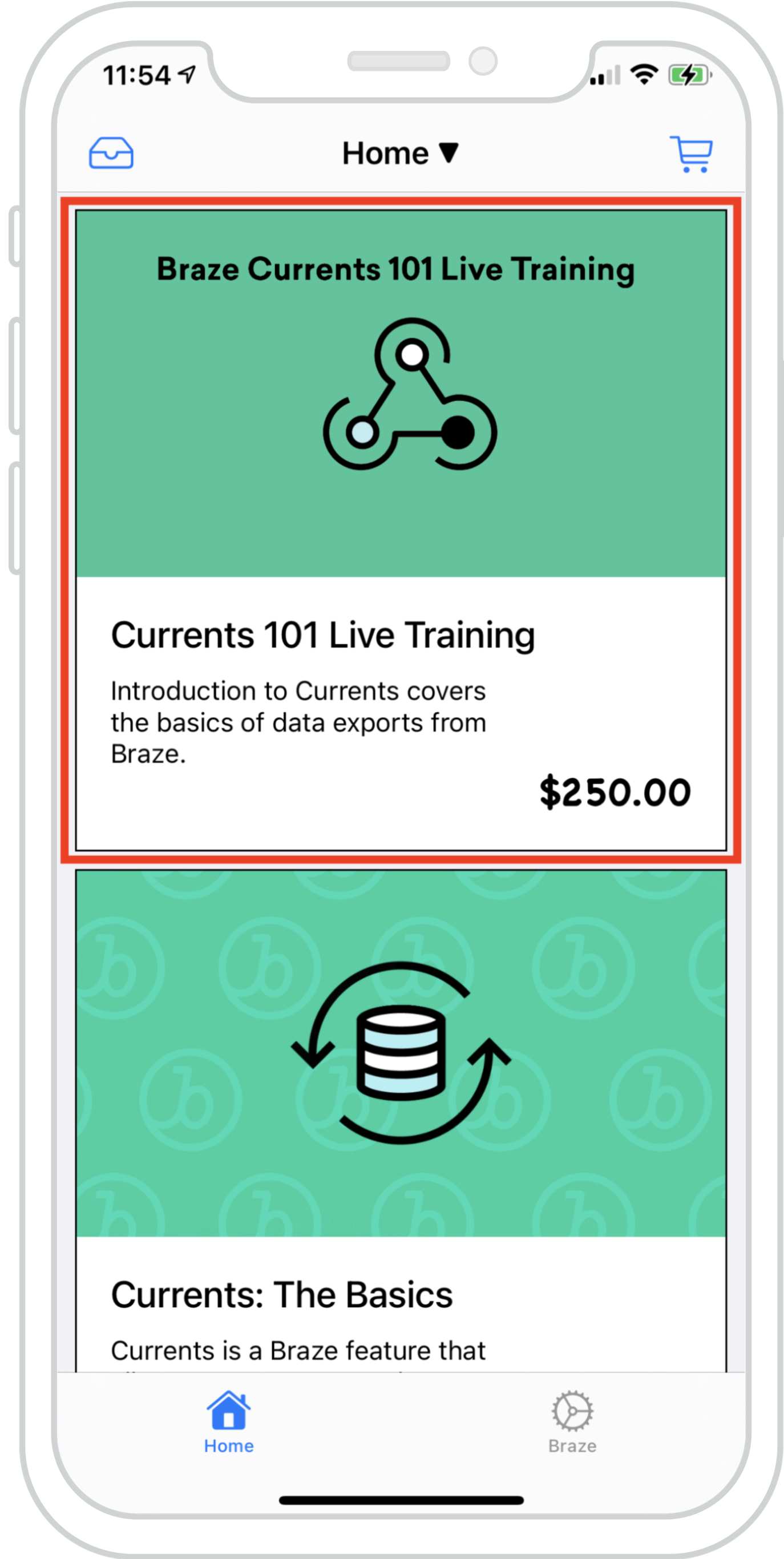
Content Cardsを既存のフィードにシームレスに組み込み、複数のフィードからのデータを同時に読み込むことができます。これにより、Braze Content Cardsと既存のフィードコンテンツが一体化した、調和のとれた体験が実現します。
付随する例では、ローカルデータとBrazeによるContent Cardsから構成されるハイブリッドリストを持つ UICollectionView を示しています。これにより、Content Cardsを既存のコンテンツと区別できないほど自然に表示できます。
ダッシュボード設定
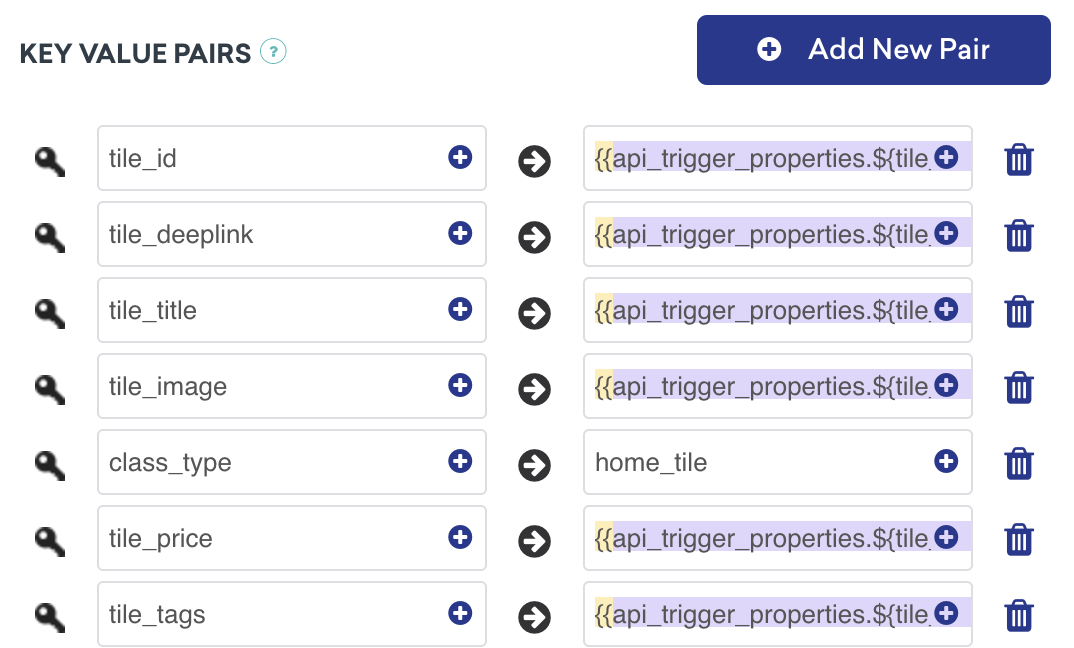
このContent Cardsは、APIトリガーのキーと値のペアを持つAPIトリガーキャンペーンによって配信されます。これは、カードの値がユーザーに表示するコンテンツを決定する外部要因に依存するキャンペーンに最適です。class_type はセットアップ時に既知である必要があることに注意してください。
分析のロギングの準備はできましたか?
データのフローがどのように見えるべきかをより深く理解するには、次のセクションをご覧ください。
メッセージセンター内のContent Cards
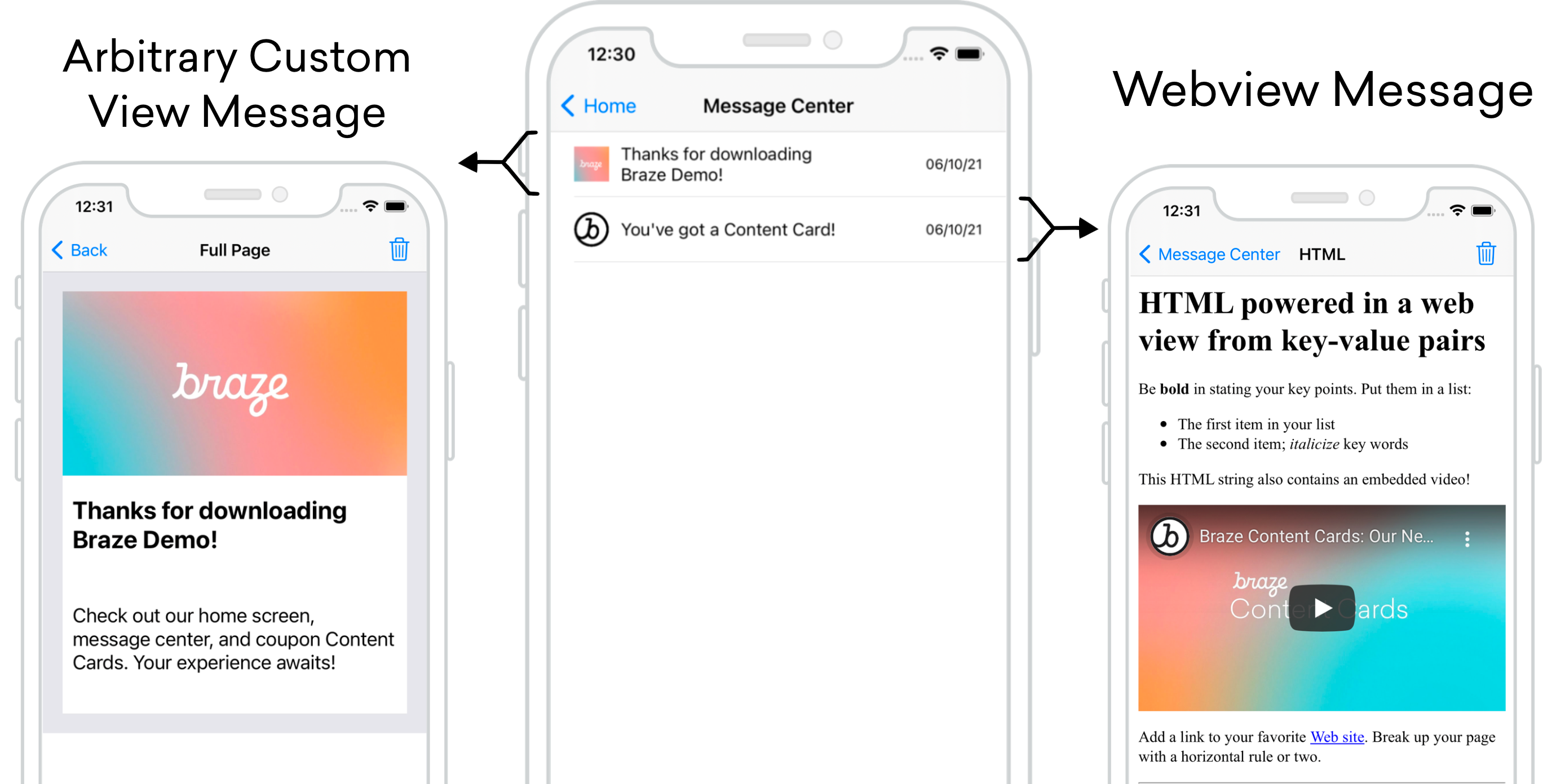
Content Cardsは、各メッセージが独自のカードとなるメッセージセンター形式で使用できます。メッセージセンターの各メッセージはContent Cardsのペイロードを介して入力され、各カードにはクリック時のUI/UXを制御する追加のキーと値のペアが含まれています。次の例では、1つのメッセージが任意のカスタムビューに誘導し、もう1つはカスタムHTMLを表示するWebビューを開きます。
ダッシュボード設定
以下のメッセージタイプでは、キーと値のペア class_type をダッシュボード設定に追加する必要があります。ここで割り当てる値は任意ですが、クラスタイプ間で区別可能である必要があります。これらのキーと値のペアは、ユーザーが省略された受信トレイメッセージをクリックした際にどこに移動するかをアプリケーションが判断するための重要な識別子です。
このユースケースのキーと値のペアには以下が含まれます:
message_headerをFull Pageに設定class_typeをmessage_full_pageに設定

このユースケースのキーと値のペアには以下が含まれます:
message_headerをHTMLに設定class_typeをmessage_webviewに設定message_title
このメッセージはHTMLのキーと値のペアも参照しますが、Webドメインを使用している場合は、URLのキーと値のペアも有効です。

詳細な説明
メッセージセンターのロジックは、Brazeのキーと値のペアから提供される contentCardClassType によって駆動されます。addContentCardToView メソッドを使用して、これらのクラスタイプをフィルターおよび識別できます。
クリック時の動作に class_type を使用する
メッセージがクリックされると、ContentCardClassType が次の画面をどのように表示するかを処理します。
func addContentCardToView(with message: Message) {
switch message.contentCardData?.contentCardClassType {
case .message(.fullPage):
loadContentCardFullPageView(with: message as! FullPageMessage)
case .message(.webView):
loadContentCardWebView(with: message as! WebViewMessage)
default:
break
}
}
クリック時の動作に class_type を使用する
メッセージがクリックされると、ContentCardClassType が次の画面をどのように表示するかを処理します。
- (void)addContentCardToView:(Message *)message {
switch (message.contentCardData.classType) {
case ContentCardClassTypeMessageFullPage:
[self loadContentCardFullPageView:(FullPageMessage *)message];
break;
case ContentCardClassTypeMessageWebview:
[self loadContentCardWebView:(WebViewMessage *)message];
break;
default:
break;
}
}
分析のロギングの準備はできましたか?
データのフローがどのように見えるべきかをより深く理解するには、次のセクションをご覧ください。
インタラクティブなContent Cards
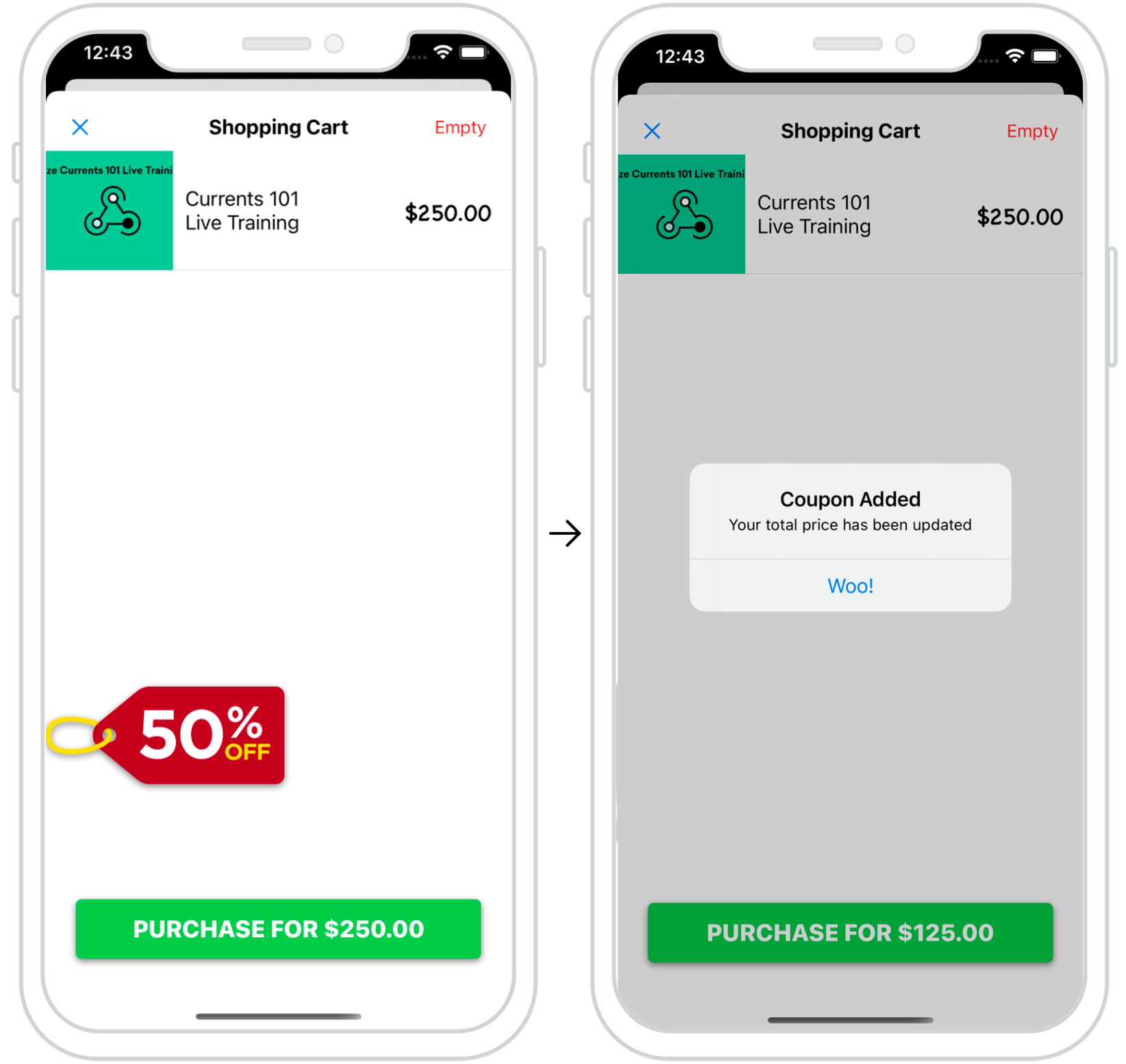
Content Cardsを使用して、ユーザーにダイナミックでインタラクティブな体験を提供できます。付随する例では、チェックアウト時にContent Cardsのポップアップが表示され、ユーザーに直前のプロモーションを提供します。
このように適切に配置されたカードは、特定のユーザーアクションに向けてユーザーに「後押し」を与える優れた方法です。
ダッシュボード設定
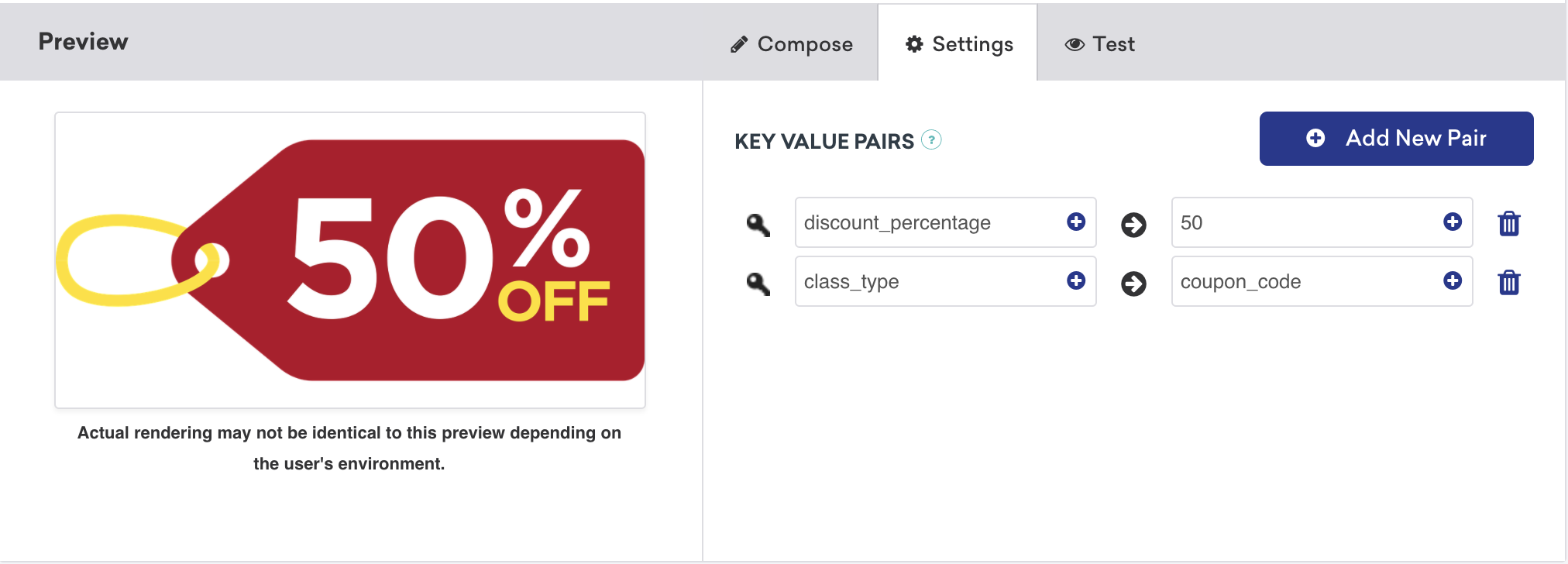
インタラクティブなContent Cardsのダッシュボード設定は簡単です。このユースケースのキーと値のペアには、希望する割引額として設定された discount_percentage と、coupon_code として設定された class_type が含まれます。これらのキーと値のペアは、タイプ固有のContent Cardsがフィルターされ、チェックアウト画面に表示される仕組みです。
分析のロギングの準備はできましたか?
データのフローがどのように見えるべきかをより深く理解するには、次のセクションをご覧ください。
ダークモードのカスタマイズ
デフォルトでは、Content Cardsビューはデバイスのダークモード変更に自動的に応答し、テーマに沿ったカラーセットを使用します。
この動作は、カスタムスタイリングガイドで詳しく説明されているようにオーバーライドできます。
インプレッション、クリック、却下のロギング
カスタムオブジェクトを Content Cardsとして機能するように拡張した後、インプレッション、クリック、却下などの貴重な指標のロギングを素早く行えます。これは、ContentCardable プロトコルを使用して、Braze SDKによってロギングされるヘルパーファイルにデータを参照・提供することで実現できます。
実装コンポーネント
分析のロギング
ロギングメソッドは、ContentCardable プロトコルに準拠するオブジェクトから直接呼び出すことができます。
customObject.logContentCardImpression()
customObject.logContentCardClicked()
customObject.logContentCardDismissed()
ABKContentCard の取得
カスタムオブジェクトから渡された idString は、分析をロギングするための関連する Content カード を識別するために使用されます。
extension BrazeManager {
func logContentCardImpression(idString: String?) {
guard let contentCard = getContentCard(forString: idString) else { return }
contentCard.logContentCardImpression()
}
private func getContentCard(forString idString: String?) -> ABKContentCard? {
return contentCards?.first(where: { $0.idString == idString })
}
}
分析のロギング
ロギングメソッドは、ContentCardable プロトコルに準拠するオブジェクトから直接呼び出すことができます。
[customObject logContentCardImpression];
[customObject logContentCardClicked];
[customObject logContentCardDismissed];
ABKContentCard の取得
カスタムオブジェクトから渡された idString は、分析をロギングするための関連する Content カード を識別するために使用されます。
- (void)logContentCardImpression:(NSString *)idString {
ABKContentCard *contentCard = [self getContentCard:idString];
[contentCard logContentCardImpression];
}
- (ABKContentCard *)getContentCard:(NSString *)idString {
NSPredicate *predicate = [NSPredicate predicateWithFormat:@"self.idString == %@", idString];
NSArray *filteredArray = [self.contentCards filteredArrayUsingPredicate:predicate];
return filteredArray.firstObject;
}
コントロールバリアントの Content カード の場合でも、カスタムオブジェクトをインスタンス化し、UIロジックでそのオブジェクトに対応するビューを非表示に設定する必要があります。その後、オブジェクトはインプレッションをロギングして、ユーザーがコントロールカードを見たであろうタイミングを分析に通知できます。
ヘルパーファイル
ContentCardKey ヘルパーファイル
enum ContentCardKey: String {
case idString
case created
case classType = "class_type"
case dismissible
case extras
...
}
static NSString *const ContentCardKeyIdString = @"idString";
static NSString *const ContentCardKeyCreated = @"created";
static NSString *const ContentCardKeyClassType = @"class_type";
static NSString *const ContentCardKeyDismissible = @"dismissible";
static NSString *const ContentCardKeyExtras = @"extras";
...