バナー配置の管理
Braze SDKでバナー配置を作成・管理する方法について説明します。配置固有のプロパティへのアクセスやインプレッションの記録についても解説します。一般的な情報については、バナーについてを参照してください。
配置リクエストについて
アプリやWebサイトで配置を作成すると、アプリは各配置に対応するバナーメッセージを取得するため、Brazeにリクエストを送信します。
- 1回の更新リクエストにつき、最大10件の配置をリクエストできます。
- 各配置において、Brazeはユーザーが受け取る資格のある最高優先度のバナーを返します。
- リフレッシュ時に10件を超える配置がリクエストされた場合、最初の10件のみが返され、残りは破棄されます。
例えば、アプリがリフレッシュリクエストで3つの配置をリクエストする場合があります:homepage_promo、cart_abandonment、およびseasonal_offer。各リクエストは、その配置に対して最も関連性の高いバナーを返します。
更新リクエストのレート制限
古いSDKバージョン(SWIFT 13.1.0以前、Android 38.0.0以前、Web 6.1.0以前、React Native 17.0.0以前、Flutter 15.0.0以前)を使用している場合、ユーザーセッションごとにリフレッシュリクエストは1回のみ許可されます。
新しい最小SDKバージョン(SWIFT 13.1.0以上、Android 38.0.0以上、Web 6.1.0以上、React Native 17.0.0以上、Flutter 15.0.0以上)を使用している場合、リフレッシュリクエストは過剰なポーリングを防ぐためトークンバケットアルゴリズムで制御されます。
- 各ユーザーセッションは、5つのリフレッシュトークンから始まります。
- トークンは180秒(3分)ごとに1個補充されます。
requestBannersRefreshを明示的に呼び出すたびにトークンを1つ消費します。新しいセッションの開始時やchangeUserが呼び出された際に自動的に行われるリフレッシュはトークンを消費しません。これは、そのユーザーに対して最後にキャッシュされたバナーを配信するためです。トークンが利用できない状態で更新を試みると、SDKはリクエストを送信せず、トークンが補充されるまでエラーをログに記録します。これはセッション途中やイベントトリガーによる更新において重要です。ダイナミックな更新を実装する場合(例えば、ユーザーが同じページでアクションを完了した後など)、カスタムイベントが記録された後にリフレッシュメソッドを呼び出してください。ただし、ユーザーが別のバナーキャンペーンの対象となる前に、Brazeがイベントを取り込んで処理するのに必要な遅延がある点に注意してください。
プレースメントの作成
前提条件
バナープレースメントを作成するために必要なSDKの最小バージョンは以下のとおりです。
ステップ1:Brazeで配置を作成する
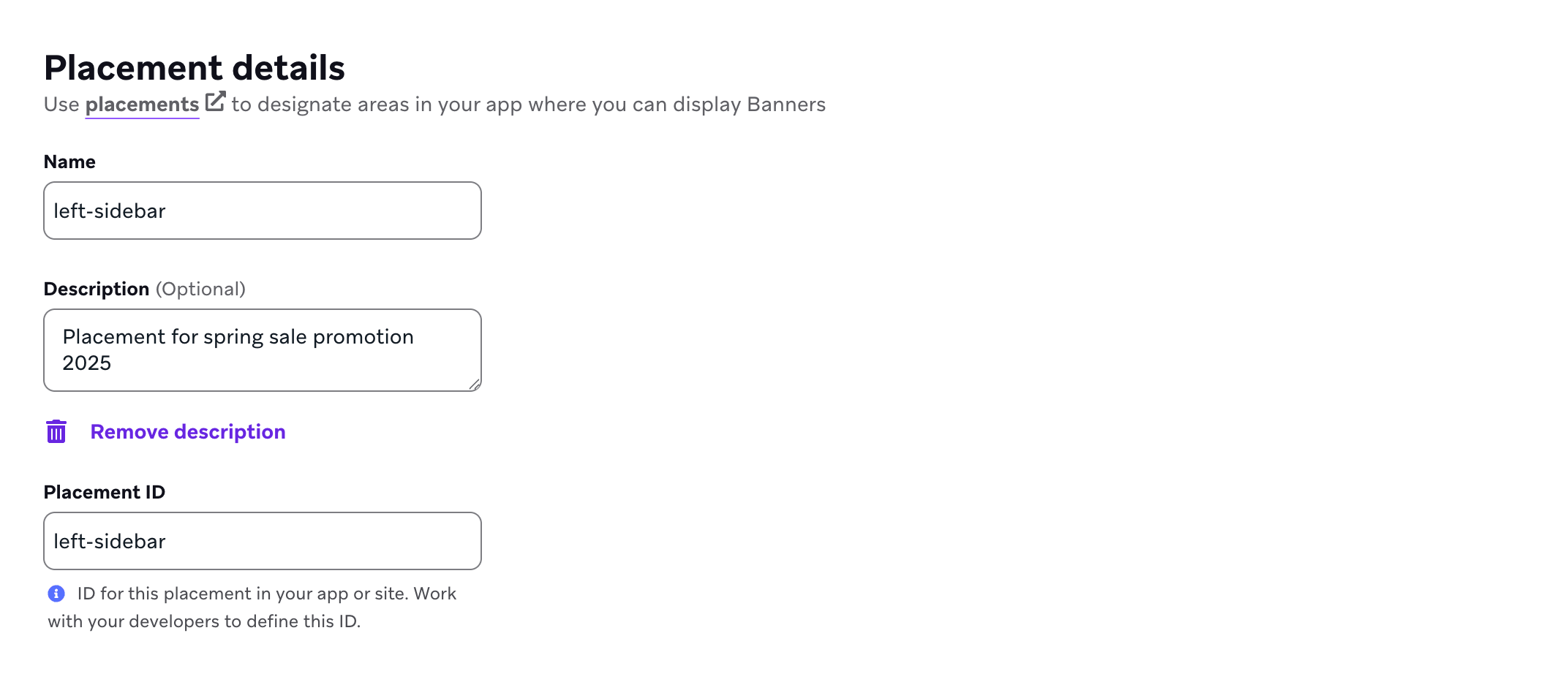
まだ作成していない場合は、アプリまたはサイトでバナーを表示できる場所を定義するために使用するバナーの配置をBrazeで作成する必要があります。配置を作成するには、設定 > バナーの配置に移動し、配置を作成を選択します。

配置に名前を付け、配置IDを割り当てます。IDはカードのライフサイクル全体で使用され、後から変更できないため、IDを割り当てる前に他のチームに相談してください。詳細については、配置IDを参照してください。
ステップ2:アプリ内のプレースメントを更新する
プレースメントを更新するには、SDKの requestBannersRefresh() を呼び出します。
requestBannersRefresh() は既存のバナーキャッシュにマージされます。渡したプレースメントIDのみが追加、更新、または削除されます。
- サーバーがリクエストされたプレースメントに対してバナーを返した場合、そのプレースメントのキャッシュされたバナーが置き換えられます。
- サーバーがリクエストされたプレースメントに対してバナーを返さなかった場合、そのプレースメントはキャッシュから削除されます。
- リクエストしなかったプレースメントのキャッシュされたバナーは、有効期限が切れるまでキャッシュに残ります。
1回の更新でリクエストできるプレースメント数については、プレースメントリクエストについてを参照してください。異なるプレースメントのセットを時間の経過とともに更新し(たとえば現在の画面のプレースメント)、他のプレースメントのバナーをキャッシュに保持できます。
バナーの更新動作には2つのパスがあります。
- 明示的な更新:アクティブなセッション中の任意の時点で更新メソッドを呼び出すことができます。
- 新しいセッションでの自動更新:少なくとも1回の明示的な更新リクエストを行った後、新しいBrazeセッションが開始されたとき(たとえば
changeUser()の後やセッションタイムアウトの後)、SDKは最後にリクエストされたプレースメントIDを再リクエストできます。
バナーイベントの購読の役割はプラットフォームによって異なります。
- iOSとAndroid:Androidの
subscribeToBannersEvents()(またはSwiftのsubscribeToEvents())はイベントハンドラーを登録します。セッション開始時の自動更新はサブスクリプションがアクティブであるかどうかに依存しません。 - Web:セッション開始時の自動更新は
subscribeToBannersEvents()(または非推奨のsubscribeToBannersUpdates())が登録されていることに紐付いています。アクティブなサブスクリプションがないと、SDKは新しいセッションで自動的に更新を繰り返しません。
いずれの場合も、アプリのライフサイクルごとに少なくとも1回の明示的な更新リクエストを行う必要があり、これによりSDKはどのプレースメントIDを最新の状態に保つかを認識します。バナーは最初の呼び出しなしでは初回起動時に自動的に取得されず、トラッキングされるプレースメントIDはアプリの再起動後にリセットされます。
セッション開始時の自動更新ではレート制限トークンは消費されません。

バナーのダウンロードや表示の遅延を避けるために、できるだけ早くプレースメントを更新してください。
import * as braze from "@braze/web-sdk";
braze.requestBannersRefresh(["global_banner", "navigation_square_banner"]);
AppDelegate.braze?.banners.requestBannersRefresh(placementIds: ["global_banner", "navigation_square_banner"])
ArrayList<String> placementIds = new ArrayList<>();
placementIds.add("global_banner");
placementIds.add("navigation_square_banner");
Braze.getInstance(context).requestBannersRefresh(placementIds);
Braze.getInstance(context).requestBannersRefresh(listOf("global_banner", "navigation_square_banner"))
Braze.requestBannersRefresh(["global_banner", "navigation_square_banner"]);
This feature is not currently supported on Unity.
This feature is not currently supported on Cordova.
braze.requestBannersRefresh(["global_banner", "navigation_square_banner"]);
This feature is not currently supported on Roku.
ステップ3:更新をリッスンする
このガイドのSDKメソッドを使用してバナーを挿入した場合、すべての分析イベント(インプレッションやクリックなど)は自動的に処理され、インプレッションはバナーが表示されているときにのみ記録されます。
subscribeToBannersEventsを使用してバナーイベントをリッスンし、requestBannersRefreshを呼び出してプレースメントを取得します。SDKはイベントオブジェクトを含むハンドラーを呼び出します。event.type で分岐して各種イベントを処理します。イベント値の詳細については、イベントサブスクリプションを参照してください。
Web Braze SDKでバニラJavaScriptを使用している場合は、requestBannersRefresh を呼び出す前にハンドラーを登録してください。
import * as braze from "@braze/web-sdk";
const placementIds = ["global_banner", "navigation_square_banner"];
// - Available in version 7.0.0+
const subscriptionId = braze.subscribeToBannersEvents((event) => {
switch (event.type) {
case braze.ChannelEventType.CACHE_REPLAY:
// Sent once, right away, with the Banners that are already cached.
// Render them now instead of waiting for the network.
console.log("Cached Banners:", Object.keys(event.cacheSnapshot.banners));
break;
case braze.ChannelEventType.CACHE_LOAD:
// The cache changed without a refresh, such as after changeUser().
// The snapshot can be empty, so clear Banners from the previous user.
console.log("Cache reloaded:", Object.keys(event.cacheSnapshot.banners));
break;
case braze.ChannelEventType.DATA_UPDATED:
// A refresh finished, even if nothing changed, or a Banner was dismissed.
console.log("Banners were updated:", event.reason);
break;
case braze.ChannelEventType.ERROR:
switch (event.retryState) {
case braze.RetryState.SDK_WILL_RETRY:
// The SDK is retrying. Keep the current Banners and wait.
break;
case braze.RetryState.INTEGRATOR_MAY_RETRY: {
// The SDK stopped retrying. Try again later, and limit how often you retry.
const delayMs = event.rateLimitedUntil
? Math.max(event.rateLimitedUntil.getTime() - Date.now(), 0)
: 30000;
setTimeout(() => braze.requestBannersRefresh(placementIds), delayMs);
break;
}
case braze.RetryState.DO_NOT_RETRY:
// The failure is final. For example, Banners are disabled for this workspace.
if (event.reason === braze.ChannelErrorReason.FEATURE_DISABLED) {
// Hide the Banner containers.
}
break;
}
break;
}
});
const deprecatedSubscriptionId = braze.subscribeToBannersUpdates((banners) => {
console.log("Banners were updated");
});
// Always refresh after your subscriber function has been registered
braze.requestBannersRefresh(placementIds);
// Remove the subscription when you no longer need it
// braze.removeSubscription(subscriptionId);
Web Braze SDKでReactを使用している場合は、useEffect フック内で subscribeToBannersEvents をセットアップし、リスナーを登録した後に requestBannersRefresh を呼び出します。
import * as braze from "@braze/web-sdk";
useEffect(() => {
const placementIds = ["global_banner", "navigation_square_banner"];
// - Available in version 7.0.0+
const subscriptionId = braze.subscribeToBannersEvents((event) => {
switch (event.type) {
case braze.ChannelEventType.CACHE_REPLAY:
case braze.ChannelEventType.CACHE_LOAD:
// Cached Banners, sent right away on subscribe or after the cache reloads
console.log("Cached Banners:", Object.keys(event.cacheSnapshot.banners));
break;
case braze.ChannelEventType.DATA_UPDATED:
// A refresh finished, even if nothing changed, or a Banner was dismissed
console.log("Banners were updated:", event.reason);
break;
case braze.ChannelEventType.ERROR:
if (event.retryState === braze.RetryState.INTEGRATOR_MAY_RETRY) {
// The SDK stopped retrying. Try again later, and limit how often you retry.
const delayMs = event.rateLimitedUntil
? Math.max(event.rateLimitedUntil.getTime() - Date.now(), 0)
: 30000;
setTimeout(() => braze.requestBannersRefresh(placementIds), delayMs);
}
break;
}
});
const deprecatedSubscriptionId = braze.subscribeToBannersUpdates((banners) => {
console.log("Banners were updated");
});
// Always refresh after your subscriber function has been registered
braze.requestBannersRefresh(placementIds);
// Cleanup listeners
return () => {
braze.removeSubscription(subscriptionId);
braze.removeSubscription(deprecatedSubscriptionId);
};
}, []);
各イベントがいつ発火するか、また各更新理由、リトライ状態、分析アクション、エラー理由が何を意味するかについては、イベントサブスクリプションを参照してください。
event.cacheSnapshot.banners は各プレースメントIDをその Banner にマッピングするオブジェクトです。これには、直近の requestBannersRefresh 呼び出しのプレースメントIDだけでなく、以前の更新からのプレースメントも含まれる場合があります。特定のプレースメントのみが必要な場合は、スナップショットからそれらのプレースメントIDを読み取り、残りはスキップしてください。
Web SDK 7.0.0以降では subscribeToBannersEvents を使用してください。subscribeToBannersUpdates は以前のパターンであり、7.0.0で非推奨になりました。以前のパターンでは現在のバナーのみが配信されるため、バナーが変更された理由や更新が失敗したタイミングを把握できません。

バナーの更新リスナーは、SDKのメモリ内バナー状態を反映します。1回の更新に、既にキャッシュされたプレースメント(たとえば以前の更新、別の画面、またはSDKの自動処理によるもの)が含まれることがあり、直近の requestBannersRefresh 呼び出しのプレースメントIDだけではありません。特定のプレースメントのみが必要な場合は、リスナー内で各バナーのプレースメントIDを確認し、残りはスキップしてください。リスナーを登録したら、Brazeと同期したいプレースメントに対して requestBannersRefresh を呼び出してください。
// - Available in version 19.0.0+
let placementIds = ["global_banner", "navigation_square_banner"]
let cancellable = brazeClient.braze()?.banners.subscribeToEvents { event in
switch event {
case .cacheReplay(let cacheSnapshot), .cacheLoad(let cacheSnapshot):
cacheSnapshot.banners.forEach { placementId, banner in
print("Received banner: \(banner) with placement ID: \(placementId)")
}
case .dataUpdated(let cacheSnapshot, let reason):
cacheSnapshot.banners.forEach { placementId, banner in
print("Received banner: \(banner) with placement ID: \(placementId)")
}
default:
break
}
}
// Always refresh after your subscriber is registered
brazeClient.braze()?.banners.requestBannersRefresh(placementIds: placementIds)
let placementIds = ["global_banner", "navigation_square_banner"]
let cancellable = brazeClient.braze()?.banners.subscribeToUpdates { banners in
banners.forEach { placementId, banner in
print("Received banner: \(banner) with placement ID: \(placementId)")
}
}
// Always refresh after your subscriber is registered
brazeClient.braze()?.banners.requestBannersRefresh(placementIds: placementIds)
Swift SDK 19.0.0以降では subscribeToEvents(_:) を使用してください。subscribeToUpdates(_:) は以前のパターンであり、19.0.0で非推奨になりました。
各イベントがいつ発火するか、また各更新理由、リトライ状態、分析アクション、エラー理由が何を意味するかについては、イベントサブスクリプションを参照してください。
バナーイベントハンドラーは、SDKのメモリ内バナー状態を反映します。1回のイベントに、既にキャッシュされたプレースメント(たとえば以前の更新、別の画面、またはSDKの自動処理によるもの)が含まれることがあり、直近の requestBannersRefresh 呼び出しのプレースメントIDだけではありません。特定のプレースメントのみが必要な場合は、ハンドラー内で各バナーのプレースメントIDを確認し、残りはスキップしてください。サブスクライバーを登録したら、Brazeと同期したいプレースメントに対して requestBannersRefresh を呼び出してください。
ArrayList<String> placementIds = new ArrayList<>();
placementIds.add("global_banner");
placementIds.add("navigation_square_banner");
// - Available in version 44.0.0+
Braze.getInstance(context).subscribeToBannersEvents(event -> {
if (event instanceof BannersEvent.CacheReplay) {
logBanners(((BannersEvent.CacheReplay) event).getCacheSnapshot());
} else if (event instanceof BannersEvent.CacheLoad) {
logBanners(((BannersEvent.CacheLoad) event).getCacheSnapshot());
} else if (event instanceof BannersEvent.DataUpdated) {
logBanners(((BannersEvent.DataUpdated) event).getCacheSnapshot());
}
});
// Always refresh after your subscriber is registered
Braze.getInstance(context).requestBannersRefresh(placementIds);
Braze.getInstance(context).subscribeToBannersUpdates(event -> {
for (Banner banner : event.getBanners()) {
Log.d(TAG, "Received banner: " + banner.getPlacementId());
}
});
// Always refresh after your subscriber is registered
Braze.getInstance(context).requestBannersRefresh(placementIds);
private void logBanners(BannersCacheSnapshot cacheSnapshot) {
for (Banner banner : cacheSnapshot.getBanners().values()) {
Log.d(TAG, "Received banner: " + banner.getPlacementId());
}
}
val placementIds = listOf("global_banner", "navigation_square_banner")
// - Available in version 44.0.0+
Braze.getInstance(context).subscribeToBannersEvents { event ->
when (event) {
is BannersEvent.CacheReplay -> logBanners(event.cacheSnapshot)
is BannersEvent.CacheLoad -> logBanners(event.cacheSnapshot)
is BannersEvent.DataUpdated -> logBanners(event.cacheSnapshot)
else -> {}
}
}
// Always refresh after your subscriber is registered
Braze.getInstance(context).requestBannersRefresh(placementIds)
Braze.getInstance(context).subscribeToBannersUpdates { event ->
event.banners.forEach { banner ->
Log.d(TAG, "Received banner: ${banner.placementId}")
}
}
// Always refresh after your subscriber is registered
Braze.getInstance(context).requestBannersRefresh(placementIds)
private fun logBanners(cacheSnapshot: BannersCacheSnapshot) {
cacheSnapshot.banners.values.forEach { banner ->
Log.d(TAG, "Received banner: ${banner.placementId}")
}
}
イベントはバックグラウンドスレッドで到着します。ビューを更新する前にメインスレッドに切り替えてください。
Android SDK 44.0.0以降では subscribeToBannersEvents を使用してください。subscribeToBannersUpdates は以前のパターンであり、44.0.0で非推奨になりました。
各イベントがいつ発火するか、また各更新理由、リトライ状態、分析アクション、エラー理由が何を意味するかについては、イベントサブスクリプションを参照してください。
const bannerCardsSubscription = Braze.addListener(
Braze.Events.BANNER_CARDS_UPDATED,
(data) => {
const banners = data.banners;
console.log(
`Received ${banners.length} Banner Cards with placement IDs:`,
banners.map((banner) => banner.placementId)
);
}
);
This feature is not currently supported on Unity.
This feature is not currently supported on Cordova.
StreamSubscription bannerStreamSubscription = braze.subscribeToBanners((List<BrazeBanner> banners) {
for (final banner in banners) {
print("Received banner: " + banner.toString());
}
});
This feature is not currently supported on Roku.
ステップ4:プレースメントIDを使用して挿入する
バナー用のコンテナ要素を作成します。幅と高さを必ず設定してください。
<div id="global-banner-container" style="width: 100%; height: 450px;"></div>
Web Braze SDKでバニラJavaScriptを使用している場合は、insertBannerメソッドを呼び出してコンテナ要素の内部HTMLを置き換えます。
import * as braze from "@braze/web-sdk";
braze.initialize("sdk-api-key", {
baseUrl: "sdk-base-url",
allowUserSuppliedJavascript: true, // banners require you to opt-in to user-supplied javascript
});
// - Available in version 7.0.0+
braze.subscribeToBannersEvents((event) => {
const container = document.getElementById("global-banner-container");
switch (event.type) {
case braze.ChannelEventType.CACHE_REPLAY:
case braze.ChannelEventType.CACHE_LOAD:
case braze.ChannelEventType.DATA_UPDATED: {
// get this placement's banner. If it's missing the user did not qualify for one.
const globalBanner = event.cacheSnapshot.banners["global_banner"];
if (!globalBanner) {
container.style.display = "none";
return;
}
// Insert the banner which replaces the innerHTML of that container
braze.insertBanner(globalBanner, container);
// Special handling if the user is part of a Control Variant
container.style.display = globalBanner.isControl ? "none" : "";
break;
}
case braze.ChannelEventType.ERROR:
if (event.reason === braze.ChannelErrorReason.FEATURE_DISABLED) {
// Banners are disabled, so hide the container
container.style.display = "none";
}
break;
}
});
braze.subscribeToBannersUpdates((banners) => {
// get this placement's banner. If it's `null` the user did not qualify for one.
const globalBanner = braze.getBanner("global_banner");
if (!globalBanner) {
return;
}
const container = document.getElementById("global-banner-container");
// Insert the banner which replaces the innerHTML of that container
braze.insertBanner(globalBanner, container);
// Special handling if the user is part of a Control Variant
if (globalBanner.isControl) {
// hide or collapse the container
container.style.display = "none";
}
});
braze.requestBannersRefresh(["global_banner", "navigation_square_banner"]);
Web SDK 7.0.0以降では subscribeToBannersEvents を使用してください。subscribeToBannersUpdates は以前のパターンであり、7.0.0で非推奨になりました。
Web Braze SDKでReactを使用している場合は、insertBannerメソッドを ref とともに呼び出して、コンテナ要素の内部HTMLを置き換えます。
import { useRef } from 'react';
import * as braze from "@braze/web-sdk";
export default function App() {
const bannerRef = useRef<HTMLDivElement>(null);
useEffect(() => {
const globalBanner = braze.getBanner("global_banner");
if (!globalBanner || globalBanner.isControl) {
// hide the container
} else {
// insert the banner to the container node
braze.insertBanner(globalBanner, bannerRef.current);
}
}, []);
return <div ref={bannerRef}></div>
}
インプレッションをトラッキングするには、isControl に対しても必ず insertBanner を呼び出してください。その後、コンテナを非表示にしたり折りたたんだりできます。
更新後、SDKはそのプレースメントのキャッシュされたコンテンツが変更(追加、削除、または更新)された場合にのみ BannerUIView または BannerView を更新します。変更されていない表示中のバナーはそのまま維持されます。changeUser() を呼び出すと、登録済みのすべてのバナービューが更新されます。
// To get access to the Banner model object:
let globalBanner: Braze.Banner?
AppDelegate.braze?.banners.getBanner(for: "global_banner", { banner in
self.globalBanner = banner
})
// UIKit implementation:
// If you simply want the Banner view, initialize a `UIView` with the placement ID:
if let braze = AppDelegate.braze {
let bannerUIView = BrazeBannerUI.BannerUIView(
placementId: "global_banner",
braze: braze,
// iOS does not perform automatic resizing or visibility changes.
// Use the `processContentUpdates` parameter to adjust the size and visibility of your Banner according to your use case.
processContentUpdates: { result in
switch result {
case .success(let updates):
if let height = updates.height {
// Adjust the visibility and/or height.
}
case .failure(let error):
// Handle the error.
}
}
)
}
// SwiftUI implementation:
// Similarly, if you want a Banner view in SwiftUI, use the corresponding `BannerView` initializer:
if let braze = AppDelegate.braze {
let bannerView = BrazeBannerUI.BannerView(
placementId: "global_banner",
braze: braze,
// iOS does not perform automatic resizing or visibility changes.
// Use the `processContentUpdates` parameter to adjust the size and visibility of your Banner according to your use case.
processContentUpdates: { result in
switch result {
case .success(let updates):
if let height = updates.height {
// Adjust the visibility and/or height according to your parent controller.
}
case .failure(let error):
// Handle the error.
}
}
)
}
更新後、SDKはそのプレースメントのキャッシュされたコンテンツが変更(追加、削除、または更新)された場合にのみ BannerView を更新します。変更されていない表示中のバナーはそのまま維持されます。changeUser() を呼び出すと、登録済みのすべての BannerView が更新されます。
Javaコードでバナーを取得するには、以下を使用します。
Banner globalBanner = Braze.getInstance(context).getBanner("global_banner");
Androidビューのレイアウトにバナーを作成するには、以下のXMLを含めます。
<com.braze.ui.banners.BannerView
android:id="@+id/global_banner_id"
android:layout_width="match_parent"
android:layout_height="wrap_content"
app:placementId="global_banner" />
Android Viewsを使用している場合は、以下のXMLを使用します。
<com.braze.ui.banners.BannerView
android:id="@+id/global_banner_id"
android:layout_width="match_parent"
android:layout_height="wrap_content"
app:placementId="global_banner" />
Jetpack Composeを使用するには、アプリモジュールに com.braze:android-sdk-jetpack-compose アーティファクトを追加します。他のBraze Android SDKの依存関係と同じバージョンを使用してください。このモジュールは android-sdk-ui とは別であり、com.braze.jetpackcompose.banners 配下に Banner コンポーザブルを提供します。
一部のCompose UIライブラリは独自の Banner コンポーザブルを定義しています。BrazeのAPIを呼び出すように com.braze.jetpackcompose.banners.Banner を明示的にインポートしてください。
import com.braze.jetpackcompose.banners.Banner
@Composable
fun myBannerSlot() {
Banner(placementId = "global_banner")
}
オプションで heightCallback を渡すことで、バナーサイズが変更されたときにレンダリングされた高さ(dp)を受け取ることができます。詳細については、Banner のKDocを参照してください。
Jetpack Composeモジュールを追加しない場合は、BannerViewを AndroidViewでラップします。
import android.view.ViewGroup
import androidx.compose.runtime.Composable
import androidx.compose.ui.viewinterop.AndroidView
import com.braze.ui.banners.BannerView
@Composable
fun myBannerSlot() {
AndroidView(
factory = { context ->
BannerView(context, "global_banner").apply {
layoutParams = ViewGroup.LayoutParams(
ViewGroup.LayoutParams.MATCH_PARENT,
ViewGroup.LayoutParams.WRAP_CONTENT
)
}
},
update = { it.placementId = "global_banner" }
)
}
Kotlinでバナーを取得するには、以下を使用します。
val banner = Braze.getInstance(context).getBanner("global_banner")
React Nativeの新しいアーキテクチャを使用している場合は、AppDelegate.mm で BrazeBannerView をFabricコンポーネントとして登録する必要があります。
#ifdef RCT_NEW_ARCH_ENABLED
/// Register the `BrazeBannerView` for use as a Fabric component.
- (NSDictionary<NSString *,Class<RCTComponentViewProtocol>> *)thirdPartyFabricComponents {
NSMutableDictionary * dictionary = [super thirdPartyFabricComponents].mutableCopy;
dictionary[@"BrazeBannerView"] = [BrazeBannerView class];
return dictionary;
}
#endif
最もシンプルな統合方法として、ビュー階層に以下のJavaScript XML(JSX)スニペットを追加し、プレースメントIDのみを指定します。
<Braze.BrazeBannerView
placementId='global_banner'
/>
React Nativeでバナーのデータモデルを取得するか、ユーザーのキャッシュにそのプレースメントが存在するかを確認するには、以下を使用します。
const banner = await Braze.getBanner("global_banner");
This feature is not currently supported on Unity.
This feature is not currently supported on Cordova.
最もシンプルな統合方法として、ビュー階層に以下のウィジェットを追加し、プレースメントIDのみを指定します。
BrazeBannerView(
placementId: "global_banner",
),
To get the Banner's data model in Flutter, use:
getBanner メソッドを使用して、ユーザーのキャッシュにそのプレースメントが存在するかを確認できます。
braze.getBanner("global_banner").then((banner) {
if (banner == null) {
// Handle null cases.
} else {
print(banner.toString());
}
});
This feature is not currently supported on Roku.
ステップ5:テストバナーを送信する(オプション)
バナーキャンペーンを開始する前に、テストバナーを送信して統合を検証できます。テストバナーは別のメモリ内キャッシュに保存され、アプリの再起動後は保持されません。追加のセットアップは不要ですが、テストを表示するためにテストデバイスがフォアグラウンドのプッシュ通知を受信できる必要があります。
テストバナーは他のバナーと同様ですが、次のアプリセッションで削除される点が異なります。
インプレッションの記録
Brazeは、SDKメソッドを使用してバナーを挿入すると、表示されているバナーのインプレッションを自動的に記録します。そのため、インプレッションを手動でトラッキングする必要はありません。
クリックの記録
バナーのクリックを記録するために使用するメソッドは、バナーのレンダリング方法とクリックハンドラーの場所によって異なります。
標準バナーコンテンツ(自動)
デフォルトの組み込みSDKメソッドを使用してバナーを挿入し、バナーが標準のエディターコンポーネント(画像、ボタン、テキスト)を使用している場合、クリックは自動的にトラッキングされます。SDKがこれらの要素にクリックリスナーをアタッチするため、追加のコードは必要ありません。
カスタムコードブロック
バナーがBrazeダッシュボードのカスタムコードエディターブロックを使用している場合、カスタムHTML内からクリックを記録するには brazeBridge.logClick() を使用する必要があります。これは、SDKメソッドを使用してバナーをレンダリングしている場合でも適用されます。SDKはカスタムコード内の要素にリスナーを自動的にアタッチできないためです。
<button onclick="brazeBridge.logClick()">
Click me
</button>
完全なリファレンスについては、バナーのカスタムコードとJavaScriptブリッジを参照してください。brazeBridge は、バナーの内部HTMLと親のBraze SDKの間の通信レイヤーを提供します。
カスタムUI実装(ヘッドレス)
バナーHTMLをレンダリングするのではなく、バナーのカスタムプロパティを使用して完全にカスタムのUIを構築している場合、アプリケーションコードからクリックとインプレッションを手動で記録する必要があります。SDKがバナーをレンダリングしていないため、カスタムUI要素とのインタラクションを自動的にトラッキングする手段がありません。
メソッドのシグネチャと詳細については、Braze SDKリファレンスドキュメントを参照してください。
インプレッションの記録
カスタムUIがバナーを「表示済み」と見なしたときに、プラットフォームのバナーインプレッションメソッドを呼び出します。重複イベントを避けるために、インプレッションとしてカウントする条件を堅牢なロジックで構築してください。たとえば、バナーがビューポートに入ったとき(または同等の状態のとき)にのみ記録し、同じバナーが再びスクロールして表示に戻った場合や、新しい表示イベントなしにコンポーネントが再レンダリングされた場合には再度記録しないようにします。
import * as braze from "@braze/web-sdk";
// Log impression when your custom UI considers the banner viewed (for example, once when it enters viewport)
const banner = braze.getBanner("placement_id_homepage_top");
if (banner) {
braze.logBannerImpressions([banner]);
}
// Log impression when your custom UI considers the banner viewed (for example, once when it enters viewport)
Braze.getInstance(context).logBannerImpression("placement_id_homepage_top")
// Log impression when your custom UI considers the banner viewed (for example, once when it enters viewport)
Braze.getInstance(context).logBannerImpression("placement_id_homepage_top");
// Retrieve a banner and log an impression on it (for example, once when it enters viewport)
braze.banners.getBanner(for: "placement_id_homepage_top") { banner in
banner?.context.logImpression()
}
// Log impression when your custom UI considers the banner viewed (for example, once when it enters viewport)
Braze.logBannerImpression("placement_id_homepage_top");
最新のメソッドシグネチャについては、React Native SDKリポジトリを参照してください。
// Log impression when your custom UI considers the banner viewed (for example, once when it enters viewport)
braze.logBannerImpression("placement_id_homepage_top");
クリックの記録
ユーザーがカスタムバナー(または特定のボタン)をタップしたときに、プラットフォームのバナークリックメソッドを呼び出します。クリックが特定のボタンに対するものである場合は、オプションの buttonId を渡して、分析がクリックを正しく帰属できるようにします。
import * as braze from "@braze/web-sdk";
// Log click
braze.logBannerClick("placement_id_homepage_top", buttonId); // buttonID is optional
// Log click
Braze.getInstance(context).logBannerClick("placement_id_homepage_top", buttonId) // buttonID parameter can be null
// Log click
Braze.getInstance(context).logBannerClick("placement_id_homepage_top", buttonId); // buttonID parameter can be null
// Retrieve a banner and log a click on it
braze.banners.getBanner(for: "placement_id_homepage_top") { banner in
banner?.context.logClick(buttonId: buttonId) // buttonID is optional
}
// Log click
Braze.logBannerClick("placement_id_homepage_top", buttonId); // buttonID is optional
最新のメソッドシグネチャについては、React Native SDKリポジトリを参照してください。
// Log click
braze.logBannerClicked("placement_id_homepage_top", buttonId); // buttonID parameter can be null
閉じるアクションの記録
バナーの閉じるアクション(ディスミス)は、ユーザーが能動的にバナーを閉じた際に、プログラムによってプレースメントからバナーを削除します。閉じられたバナーは、そのユーザーに対して非表示になります。次にプレースメントリストが更新された際、ユーザーが新しいバナーの対象であれば、新しいバナーが返されます。
前提条件
バナーの閉じるアクションを記録するために必要なSDKの最小バージョンは以下のとおりです。
連携
標準バナー連携(ドラッグ&ドロップエディター)
バナーがドラッグ&ドロップエディターを使用し、閉じるボタンコンポーネントを含んでいる場合、追加のコードは不要です。ユーザーが閉じるボタンをクリックすると、メッセージが非表示になり、ディスミスがトリガーされ、分析用のディスミスイベントが記録されます。
カスタムコードブロック
バナーがCustom Codeエディターブロックを使用している場合、バナーのHTML内でbrazeBridge.closeMessage()を使用して直接ディスミスをトリガーできます。
<button onclick="brazeBridge.closeMessage()">
Dismiss
</button>
プログラムによるバナーの閉じるアクション
標準のBrazeBannerViewとドラッグ&ドロップエディターで作成した閉じるボタンを使用している場合、追加のコードは不要です。ディスミスは自動的に処理されます。
カスタムUI連携の場合、Brazeインスタンスのdismissメソッドを直接呼び出して、プログラムによってバナーを閉じ、ディスミスイベントを記録できます。dismissメソッドは複数回呼び出しても安全です。SDKは同じバナーに対する重複呼び出しを無視します。
プログラムによってバナーを閉じるために必要なSDKの最小バージョンは以下のとおりです。
Bannerオブジェクトをbraze.dismissBanner()に渡します。Bannerオブジェクトはbraze.getAllBanners()またはsubscribeToBannersEventsイベントのcacheSnapshot.bannersオブジェクトから取得できます。
import * as braze from "@braze/web-sdk";
const banners = braze.getAllBanners();
const banner = banners["global_banner"];
if (banner) {
braze.dismissBanner(banner);
}
import * as braze from "@braze/web-sdk";
const banners = braze.getAllBanners();
const banner = banners["global_banner"];
if (banner) {
braze.dismissBanner(banner);
}
Braze.getInstance(context).dismissBanner("your-placement-id");
Braze.getInstance(context).dismissBanner("your-placement-id")
dismissBanner()はキャッシュからバナーを削除し、ChannelUpdateReason.CLIENT_ACTIONとともにBannersEvent.DataUpdatedを発行するため、カスタムUIは再レンダリングできます。BannerViewウィジェットはBannerDismissedEventを受信すると非表示になります。BannersEvent.DismissEventはそのディスミスの分析ライフサイクルであり、ビューを非表示にするシグナルではありません。
バナーのコンテキストが利用可能な場合は、dismiss()を使用します。このメソッドはべき等であり、onDismissコールバックを自動的に実行します。コンテキストが利用できない場合は、バナーに対して直接dismiss(using:)を呼び出します。どちらのメソッドもメインスレッドから呼び出す必要があります。
// Preferred: dismiss via context.
banner.context?.dismiss()
// Fallback: if context is unavailable.
banner.dismiss(using: braze)
Objective-Cでは、[banner.context dismiss]および[banner dismissUsing:braze]として利用できます。
Braze.dismissBanner("your-placement-id");
braze.dismissBanner("your-placement-id");
バナーのディスミス時にカスタム分析を記録する
バナーが閉じられた際にカスタムロジック(分析の記録など)を実行するには、SDKのdismissコールバックを使用します。コールバックは、バナーのplacementId、stableKey、trackingIdを含むイベントオブジェクトを受け取ります。
Banner.subscribeToDismissedEvent()を使用して、特定のバナーが閉じられた際にカスタムロジックを実行します。バナーを表示する前にイベントをサブスクライブしてください。
Banner.subscribeToDismissedEvent()にはWeb SDK 6.9.0以降が必要です。それ以前のバージョンでは、braze.subscribeToBannersUpdates()を使用し、更新されたバナーマップにバナーが存在しなくなったかどうかを確認してディスミスを検出してください。Web SDK 7.0.0以降では、braze.subscribeToBannersEvents()からのDISMISSイベントをリッスンすることもできます。
import * as braze from "@braze/web-sdk";
// - Available in version 7.0.0+
braze.subscribeToBannersEvents((event) => {
if (
event.type !== braze.ChannelEventType.CACHE_REPLAY &&
event.type !== braze.ChannelEventType.CACHE_LOAD &&
event.type !== braze.ChannelEventType.DATA_UPDATED
) {
return;
}
const banner = event.cacheSnapshot.banners["global_banner"];
if (banner) {
banner.subscribeToDismissedEvent(() => {
// Run any custom logic here, such as logging custom analytics
console.log("Banner was dismissed");
});
}
});
braze.subscribeToBannersUpdates((banners) => {
const banner = banners["global_banner"];
if (banner) {
banner.subscribeToDismissedEvent(() => {
// Run any custom logic here, such as logging custom analytics
console.log("Banner was dismissed");
});
}
});
braze.requestBannersRefresh(["global_banner"]);
Web SDK 7.0.0以降ではsubscribeToBannersEventsを使用してください。subscribeToBannersUpdatesは以前のパターンで、7.0.0で非推奨になりました。
import { useEffect } from "react";
import * as braze from "@braze/web-sdk";
useEffect(() => {
// - Available in version 7.0.0+
const subscriptionId = braze.subscribeToBannersEvents((event) => {
if (
event.type !== braze.ChannelEventType.CACHE_REPLAY &&
event.type !== braze.ChannelEventType.CACHE_LOAD &&
event.type !== braze.ChannelEventType.DATA_UPDATED
) {
return;
}
const banner = event.cacheSnapshot.banners["global_banner"];
if (banner) {
banner.subscribeToDismissedEvent(() => {
// Run any custom logic here, such as logging custom analytics
console.log("Banner was dismissed");
});
}
});
const deprecatedSubscriptionId = braze.subscribeToBannersUpdates((banners) => {
const banner = banners["global_banner"];
if (banner) {
banner.subscribeToDismissedEvent(() => {
// Run any custom logic here, such as logging custom analytics
console.log("Banner was dismissed");
});
}
});
braze.requestBannersRefresh(["global_banner"]);
return () => {
braze.removeSubscription(subscriptionId);
braze.removeSubscription(deprecatedSubscriptionId);
};
}, []);
Web SDK 7.0.0以降ではsubscribeToBannersEventsを使用してください。subscribeToBannersUpdatesは以前のパターンで、7.0.0で非推奨になりました。
BannerViewのオプションプロパティonDismissCallbackを設定します。
import android.util.Log;
import com.braze.ui.banners.BannerView;
import kotlin.Unit;
// After obtaining your BannerView instance (for example from XML via findViewById, or `new BannerView(context, "global_banner")`)
bannerView.setOnDismissCallback((snapshot) -> {
Log.d(TAG, "placementId: " + snapshot.getPlacementId()
+ ", stableKey: " + snapshot.getStableKey()
+ ", trackingId: " + snapshot.getTrackingId());
// Run any custom logic here, such as logging custom analytics
return Unit.INSTANCE;
});
import android.util.Log
import com.braze.ui.banners.BannerView
// After obtaining your BannerView instance (for example via findViewById or `BannerView(context, "global_banner")`)
bannerView.onDismissCallback = { snapshot ->
Log.d(TAG, "placementId: ${snapshot.placementId}, stableKey: ${snapshot.stableKey}, trackingId: ${snapshot.trackingId}")
// Run any custom logic here, such as logging custom analytics
}
// After initializing your banner view instance using UIKit or SwiftUI
bannerView.onDismiss = { event in
print("Banner dismissed — placementId: \(event.placementId ?? "unknown")")
print(" stableKey: \(event.stableKey ?? "unknown")")
print(" trackingId: \(event.trackingId ?? "unknown")")
// Run any custom logic here, such as logging custom analytics
}
Braze.BrazeBannerViewのonDismissプロパティを設定して、バナーが閉じられた際にカスタムロジックを実行します。
import Braze from "@braze/react-native-sdk";
<Braze.BrazeBannerView
placementId="global_banner"
onDismiss={(event) => {
console.log("placementId:", event.placementId, "stableKey:", event.stableKey, "trackingId:", event.trackingId);
// Run any custom logic here, such as logging custom analytics
}}
/>
BrazeBannerViewのonDismissパラメーターを設定して、バナーが閉じられた際にカスタムロジックを実行します。
BrazeBannerView(
placementId: 'global_banner',
onDismiss: (BrazeBannerDismissEvent event) {
print('placementId: ${event.placementId}, stableKey: ${event.stableKey}, trackingId: ${event.trackingId}');
// Run any custom logic here, such as logging custom analytics
},
)
保留中のディスミスのストレージ上限
ディスミスイベントは、次のrequestBannersRefresh呼び出し時にBrazeサーバーと同期されるまで、保留中のエントリとしてローカルに保存されます。

同期が成功しないまま大量のディスミスが蓄積するまれなケースでは、古い保留中のディスミスが削除される場合があります。この場合、以前閉じたバナーが次の同期が正常に完了するまで再表示されることがあります。このリスクを最小限に抑えるため、アプリがネットワーク接続を回復するたびにrequestBannersRefreshを呼び出してください。
寸法とサイズ
Bannerの寸法とサイズについて知っておくべきことは以下のとおりです。
- コンポーザーではさまざまな寸法でBannerをプレビューできますが、その情報は保存されず、SDKに送信されることもありません。
- HTMLはレンダリングされるコンテナの全幅を占めます。
- 固定寸法の要素を作成し、コンポーザーでその寸法をテストすることをお勧めします。
カスタムプロパティ
バナーキャンペーンのカスタムプロパティを使って、SDKを通じてキーと値のデータを取得し、アプリの動作や外観を変更できます。たとえば、以下のようなことが可能です。
- サードパーティの分析やインテグレーションにメタデータを送信します。
timestampやJSONオブジェクトなどのメタデータを使用して、条件付きロジックをトリガーします。ratioやformatなどの含まれるメタデータに基づいて、バナーの動作をコントロールします。
前提条件
バナーキャンペーンにカスタムプロパティを追加する必要があります。さらに、カスタムプロパティにアクセスするために必要な最小SDKバージョンは以下の通りです。
カスタムプロパティにアクセスする
バナーのカスタムプロパティにアクセスするには、ダッシュボードで定義されたプロパティの型に基づいて、以下のいずれかのメソッドを使用します。キーがその型のプロパティと一致しない場合、またはキーが存在しない場合、メソッドはnullを返します。
// Returns the Banner instance
const banner = braze.getBanner("placement_id_homepage_top");
// banner may be undefined or null
if (banner) {
// Returns the string property
const stringProperty = banner.getStringProperty("color");
// Returns the boolean property
const booleanProperty = banner.getBooleanProperty("expanded");
// Returns the number property
const numberProperty = banner.getNumberProperty("height");
// Returns the timestamp property (as a number)
const timestampProperty = banner.getTimestampProperty("account_start");
// Returns the image URL property as a string of the URL
const imageProperty = banner.getImageProperty("homepage_icon");
// Returns the JSON object property
const jsonObjectProperty = banner.getJsonProperty("footer_settings");
}
// Passes the specified banner to the completion handler
AppDelegate.braze?.banners.getBanner(for: "placement_id_homepage_top") { banner in
// Returns the string property
let stringProperty: String? = banner.stringProperty(key: "color")
// Returns the boolean property
let booleanProperty: Bool? = banner.boolProperty(key: "expanded")
// Returns the number property as a double
let numberProperty: Double? = banner.numberProperty(key: "height")
// Returns the Unix UTC millisecond timestamp property as an integer
let timestampProperty: Int? = banner.timestampProperty(key: "account_start")
// Returns the image property as a String of the image URL
let imageProperty: String? = banner.imageProperty(key: "homepage_icon")
// Returns the JSON object property as a [String: Any] dictionary
let jsonObjectProperty: [String: Any]? = banner.jsonObjectProperty(key: "footer_settings")
}
// Returns the Banner instance
Banner banner = Braze.getInstance(context).getBanner("placement_id_homepage_top");
// banner may be undefined or null
if (banner != null) {
// Returns the string property
String stringProperty = banner.getStringProperty("color");
// Returns the boolean property
Boolean booleanProperty = banner.getBooleanProperty("expanded");
// Returns the number property
Number numberProperty = banner.getNumberProperty("height");
// Returns the timestamp property (as a Long)
Long timestampProperty = banner.getTimestampProperty("account_start");
// Returns the image URL property as a String of the URL
String imageProperty = banner.getImageProperty("homepage_icon");
// Returns the JSON object property as a JSONObject
JSONObject jsonObjectProperty = banner.getJSONProperty("footer_settings");
}
// Returns the Banner instance
val banner: Banner = Braze.getInstance(context).getBanner("placement_id_homepage_top") ?: return
// Returns the string property
val stringProperty: String? = banner.getStringProperty("color")
// Returns the boolean property
val booleanProperty: Boolean? = banner.getBooleanProperty("expanded")
// Returns the number property
val numberProperty: Number? = banner.getNumberProperty("height")
// Returns the timestamp property (as a Long)
val timestampProperty: Long? = banner.getTimestampProperty("account_start")
// Returns the image URL property as a String of the URL
val imageProperty: String? = banner.getImageProperty("homepage_icon")
// Returns the JSON object property as a JSONObject
val jsonObjectProperty: JSONObject? = banner.getJSONProperty("footer_settings")
// Get the Banner instance
const banner = await Braze.getBanner('placement_id_homepage_top');
if (!banner) return;
// Get the string property
const stringProperty = banner.getStringProperty('color');
// Get the boolean property
const booleanProperty = banner.getBooleanProperty('expanded');
// Get the number property
const numberProperty = banner.getNumberProperty('height');
// Get the timestamp property (as a number)
const timestampProperty = banner.getTimestampProperty('account_start');
// Get the image URL property as a string
const imageProperty = banner.getImageProperty('homepage_icon');
// Get the JSON object property
const jsonObjectProperty = banner.getJSONProperty('footer_settings');
// Fetch the banner asynchronously
_braze.getBanner(placementId).then(('placement_id_homepage_top') {
// Get the string property
final String? stringProperty = banner?.getStringProperty('color');
// Get the boolean property
final bool? booleanProperty = banner?.getBooleanProperty('expanded');
// Get the number property
final num? numberProperty = banner?.getNumberProperty('height');
// Get the timestamp property
final int? timestampProperty = banner?.getTimestampProperty('account_start');
// Get the image URL property
final String? imageProperty = banner?.getImageProperty('homepage_icon');
// Get the JSON object property
final Map<String, dynamic>? jsonObjectProperty = banner?.getJSONProperty('footer_settings');
// Use these properties as needed in your UI or logic
});