로컬 연결된 콘텐츠 변수
This page provides an overview of local Connected Content variables and how to use and store them.
Braze는 전송 시점에 connected_content 태그에 지정된 엔드포인트로 표준 GET 요청을 보냅니다. 엔드포인트가 JSON을 반환하면 자동으로 파싱되어 connected라는 변수에 저장됩니다. 엔드포인트가 텍스트를 반환하는 경우 connected_content 태그 대신 메시지에 직접 삽입됩니다.
응답을 변수에 저장하려면 JSON 객체를 반환하는 것이 좋습니다. And if you want the response of Connected Content to replace the tag with the text, make sure the response isn’t valid JSON (as defined by json.org)
You can also specify :save your_variable_name after the URL to save the data as something else. 예를 들어 다음 connected_content 태그는 localweather라는 로컬 변수에 응답을 저장합니다(여러 개의 connected_content JSON 변수를 저장할 수 있음).
1
{% connected_content https://www.metaweather.com/api/location/2459115/ :save localweather %}
Metaweather는 “위치 기반 ID”를 사용하여 해당 지역의 날씨를 반환하는 무료 날씨 API입니다. 이 코드는 테스트 및 학습 목적으로만 사용하세요.
저장된 변수는
connected_content요청이 포함된 필드 내에서만 액세스할 수 있습니다. 예를 들어 메시지 필드와 제목 필드 모두에서localweather변수를 사용하려면 두 필드 모두에connected_content요청을 해야 합니다. 요청이 동일한 경우, Braze는 대상 서버에 두 번째 요청을 하지 않고 캐시된 결과를 사용합니다. 그러나 HTTP POST를 통해 이루어진 연결된 콘텐츠 호출은 기본적으로 캐시되지 않으며 대상 서버에 두 번째 요청을 하게 됩니다. POST 호출에 캐싱을 추가하려면 다음을 참조하세요.cache_max_age옵션을 참조하세요.
JSON 구문 분석
연결된 콘텐츠는 :save를 지정하면 JSON 형식의 모든 결과를 로컬 변수로 해석합니다. 예를 들어 날씨 관련 연결된 콘텐츠 엔드포인트는 :save localweather를 지정하여 로컬 변수 localweather에 저장하는 다음 JSON 개체를 반환합니다.
1
2
3
4
5
6
7
8
9
10
11
12
13
14
15
16
17
18
19
20
21
22
23
24
25
26
27
28
{
  "consolidated_weather": [
    {
      "id": 5.8143475362693e+15,
      "weather_state_name": "Clear",
      "weather_state_abbr": "c",
      "wind_direction_compass": "WSW",
      "created": "2017-06-12T14:14:46.268110Z",
      "applicable_date": "2017-06-12",
      "min_temp": 22.511666666667,
      "max_temp": 31.963333333333,
      "the_temp": 27.803333333333,
      "wind_speed": 6.8884690250312,
      "wind_direction": 251.62921994166,
      "air_pressure": 1021.335,
      "humidity": 50,
      "visibility": 14.945530601288,
      "predictability": 68
    },
    .
    .
    .
    "title": "New York",
    "location_type": "City",
    "woeid": 2459115,
    "latt_long": "40.71455,-74.007118",
    "timezone": "US\/Eastern"
  }
{{localweather.consolidated_weather[0].weather_state_name}}을 참조하여 비가 오는지 여부를 테스트할 수 있으며, 이 객체에 사용하면 Clear가 반환됩니다. 결과 위치 이름으로 개인화하려는 경우 {{localweather.title}}은 New York를 반환합니다.
다음 이미지는 올바르게 설정한 경우 대시보드에 표시되는 구문 강조 표시 유형을 보여줍니다. 또한 예제 connected_content 요청을 활용하는 방법도 설명합니다!
1
2
3
4
5
6
7
8
9
10
{% connected_content https://www.metaweather.com/api/location/search/?query={{custom_attribute.${customCity}}} :save locationjson %}
{% connected_content https://www.metaweather.com/api/location/{{locationjson[0].woeid}}/ :save localweather %}

{% if {{localweather.consolidated_weather[0].weather_state_name}} == 'Rain' %}
It's raining! Grab an umbrella!
{% elsif {{localweather.consolidated_weather[0].weather_state_name}} == 'Clouds' %}
No sunscreen needed :)
{% else %}
Enjoy the weather!
{% endif %}
API가 Rain을 반환하는 {{localweather.consolidated_weather[0].weather_state_name}}으로 응답하면 사용자는 이 푸시를 받게 됩니다.
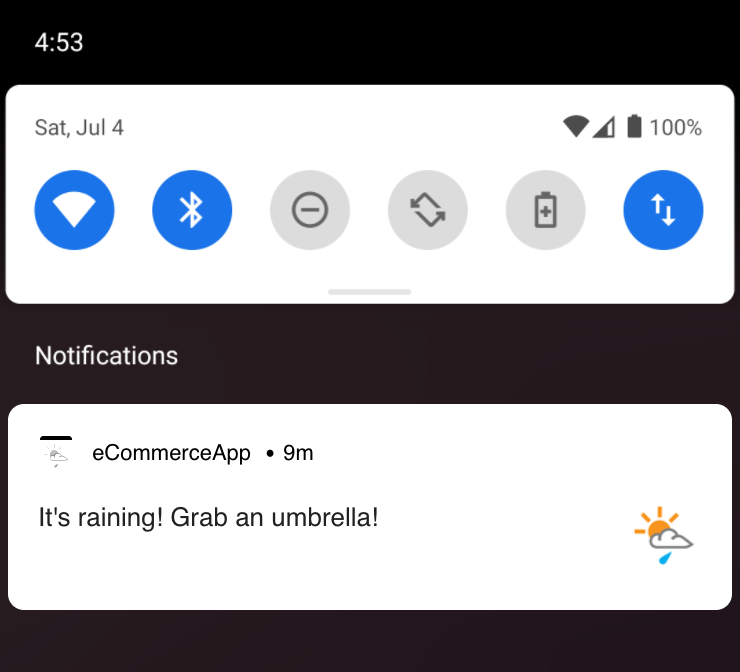
기본적으로 연결된 콘텐츠는 application/json으로 보내는 GET HTTP 요청에 Content-Type 헤더를 Accept: */*로 설정합니다. 다른 콘텐츠 유형이 필요한 경우 태그에 :content_type your/content-type 을 추가하여 명시적으로 지정하세요. 그러면 Braze는 콘텐츠 유형과 수락 헤더를 모두 지정한 유형으로 설정합니다.
1
{% connected_content http://numbersapi.com/random/trivia :content_type application/json %}
HTTP POST
기본적으로 연결된 콘텐츠는 지정된 URL에 HTTP GET 요청을 합니다. 대신 POST 요청을 하려면 :method post를 지정합니다.
선택적으로 :body 뒤에 key1=value1&key2=value2&... 형식의 쿼리 문자열 또는 캡처된 값에 대한 참조를 지정하여 POST 본문을 제공할 수 있습니다. 콘텐츠 유형 기본값은 application/x-www-form-urlencoded입니다. :content_type application/json을 지정하고 key1=value1&key2=value2와 같이 양식으로 URL 인코딩된 본문을 제공하면, Braze는 전송 전에 자동으로 본문을 JSON 인코딩합니다.
연결된 콘텐츠는 기본적으로 POST 호출도 캐시하지 않습니다. 이 동작은 연결된 콘텐츠 POST 호출에 :cache_max_age 을 추가하여 업데이트할 수 있습니다.
1
{% connected_content https://example.com/api/endpoint :method post :body key1=value1&key2=value2 %}
1
{% connected_content https://example.com/api/endpoint :method post :body key1=value1&key2=value2 :content_type application/json %}
JSON 본문 제공
자체 JSON 본문을 제공하려는 경우 공백이 없는 경우 인라인으로 작성할 수 있습니다. 본문에 공백이 있는 경우 할당 또는 캡처 문을 사용해야 합니다. 즉, 이 세 가지 중 어느 것이든 허용됩니다:
인라인: 공백 허용되지 않음
1
{% connected_content https://example.com/api/endpoint :method post :body {"foo":"bar","baz":"{{1|plus:1}}"} :content_type application/json %}
캡처 문의 본문: 공백 허용
1
2
3
4
{% capture postbody %}
{"foo": "bar", "baz": "{{ 1 | plus: 1 }}"}
{% endcapture %}
{% connected_content https://example.com/api/endpoint :method post :body {{postbody}} :content_type application/json %}
1
2
3
4
5
6
7
8
9
10
11
12
13
14
15
{% capture postbody %}
{
"ids":[ca_57832,ca_75869],"include":{"attributes":{"withKey":["daily_deals"]}}
}
{% endcapture %}

{% connected_content
    https://example.com/api/endpoint
    :method post
    :headers {
      "Content-Type": "application/json"
  }
  :body {{postbody}}
  :save result
%}
할당 문의 본문: 공백 허용
1
2
{% assign postbody = '{"foo":"bar", "baz": "2"}' %}
{% connected_content https://example.com/api/endpoint :method post :body {{postbody}} :content_type application/json %}
HTTP 상태 코드
먼저 로컬 변수로 저장한 다음 __http_status_code__ 키를 사용하여 연결된 콘텐츠 호출의 HTTP 상태를 활용할 수 있습니다. 예를 들어, 다음과 같습니다.
1
2
3
4
{% connected_content https://example.com/api/endpoint :save result %}
{% if result.__http_status_code__ != 200 %}
  {% abort_message('Connected Content returned a non-200 status code') %}
{% endif %}
이 키는 엔드포인트가 유효한 JSON 객체와 2XX 응답을 반환하는 경우에만 연결된 콘텐츠 객체에 자동으로 추가됩니다. 엔드포인트가 배열이나 다른 유형을 반환하는 경우 해당 키는 응답에서 자동으로 설정할 수 없습니다.
 GitHub 에서 이 페이지를 편집합니다.