기능 플래그 생성
기능 플래그를 사용하면 선택한 사용자에 대해 원격으로 기능을 활성화 또는 비활성화할 수 있습니다. Braze 대시보드 내에서 새 기능 플래그를 만듭니다. 이 기능을 활성화할 사용자의 이름과 ID, 타겟 오디언스 및 비율을 입력합니다. 그런 다음, 앱이나 웹사이트의 코드에서 동일한 ID를 사용하여 비즈니스 로직의 특정 부분을 조건부로 실행할 수 있습니다. 기능 플래그와 Braze에서 기능 플래그를 사용하는 방법에 대해 자세히 알아보려면 기능 플래그 정보를 참조하세요.
필수 조건
SDK 버전
기능 플래그를 사용하려면 SDK가 이 최소 버전 이상의 최신 상태인지 확인하세요.
Braze 권한
대시보드에서 기능 플래그를 관리하려면 관리자이거나 다음 권한이 있어야 합니다:
| 권한 |
할 수 있는 작업 |
| 기능 플래그 관리 |
기능 플래그를 보고, 만들고, 편집합니다. |
| 캠페인, 캔버스, 카드, 기능 플래그, 세그먼트, 미디어 라이브러리에 액세스하기 |
사용 가능한 기능 플래그 목록을 확인합니다. |
기능 플래그 생성
1단계: 새 기능 플래그 만들기
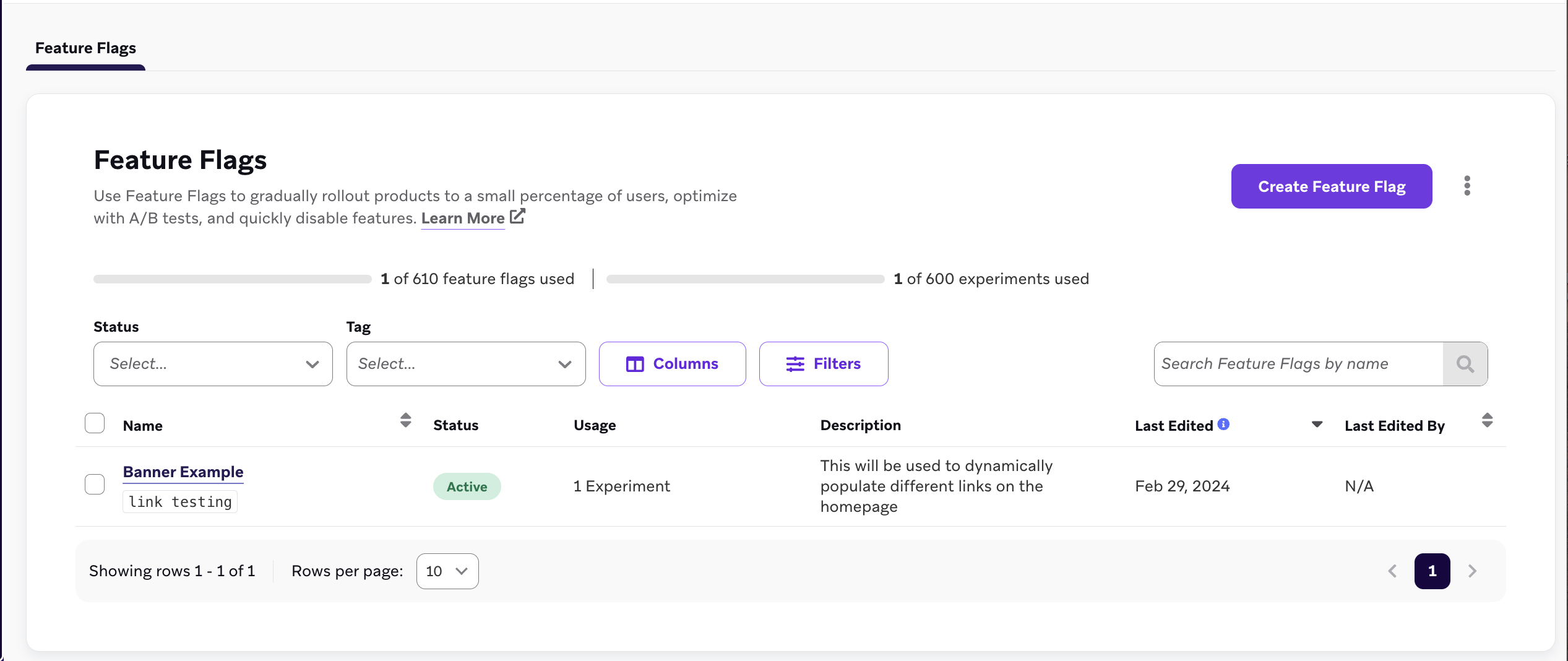
메시징 > 기능 플래그로 이동한 다음, 기능 플래그 생성을 선택합니다.
2단계: 세부 정보 입력
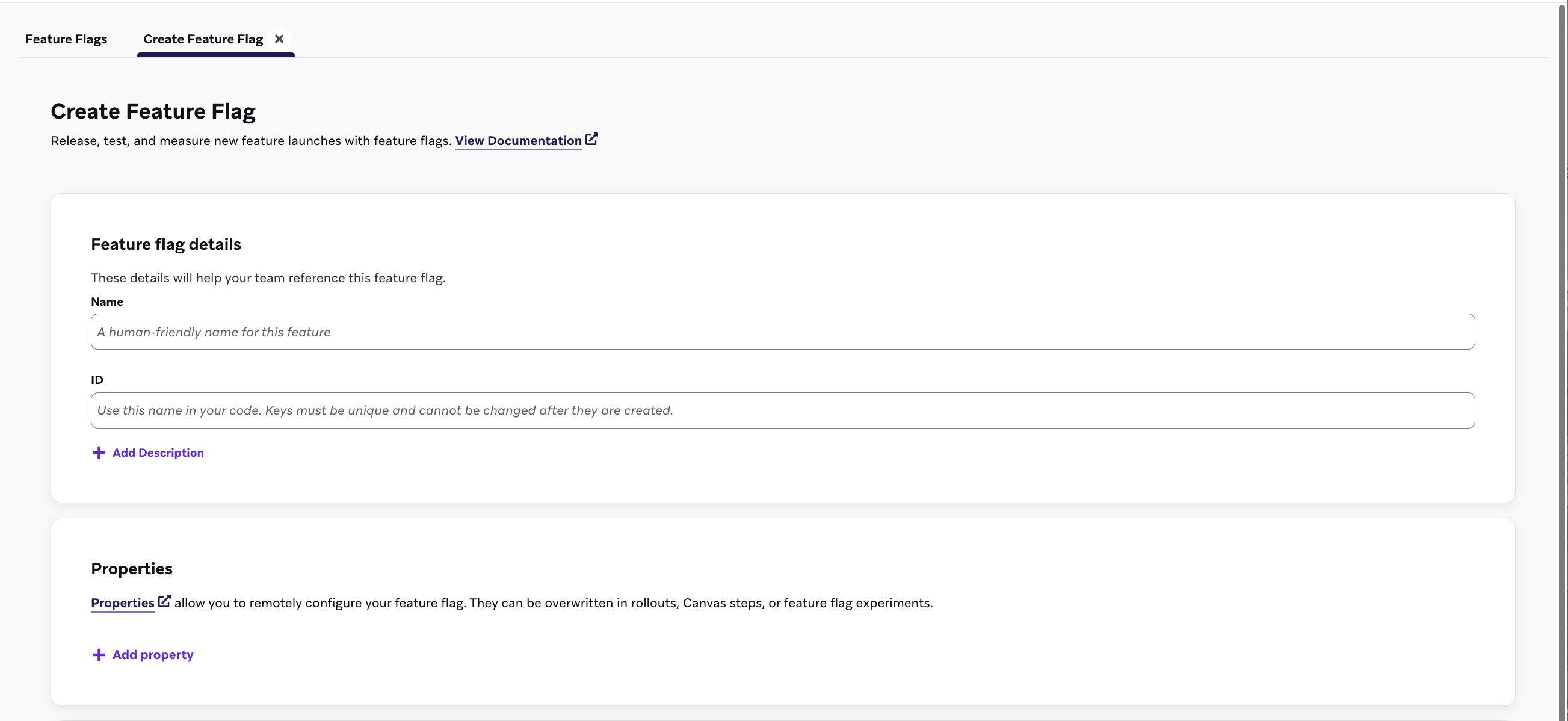
기능 플래그 세부정보 아래에 기능 플래그의 이름, ID 및 설명을 입력하세요.
| 필드 |
설명 |
| 이름 |
마케터와 관리자를 위한 사람이 읽을 수 있는 제목입니다. |
| ID |
코드에서 이 기능이 사용자에 대해 활성화되어 있는지 확인하기 위해 사용할 고유 ID입니다. 이 ID는 나중에 변경할 수 없으므로 계속하기 전에 ID 이름 지정 모범 사례를 검토하세요. |
| 설명 |
기능 플래그에 대한 컨텍스트를 제공하는 선택적 설명입니다. |
| 등록정보 |
기능 플래그를 원격으로 구성하는 선택적 등록정보입니다. 캔버스 단계나 기능 플래그 실험에서 덮어쓸 수 있습니다. |
2a단계: 커스텀 등록정보 만들기
등록정보 아래에서 기능이 활성화될 때 앱이 Braze SDK를 통해 접근할 수 있는 커스텀 등록정보를 선택적으로 생성할 수 있습니다. 각 변수에 문자열, 부울, 이미지, 타임스탬프, JSON 또는 숫자 값을 할당할 수 있으며 기본값을 설정할 수 있습니다.
다음 예제에서 기능 플래그는 나열된 커스텀 등록정보를 사용하여 전자상거래 상점에 품절 배너를 표시합니다:
| 등록정보 이름 |
유형 |
값 |
banner_height |
number |
75 |
banner_color |
string |
blue |
banner_text |
string |
Widgets are out of stock until July 1. |
dismissible |
boolean |
false |
homepage_icon |
image |
http://s3.amazonaws.com/[bucket_name]/ |
account_start |
timestamp |
2011-01-01T12:00:00Z |
footer_settings |
JSON |
{ "colors": [ "red", "blue", "green" ], "placement": 123 } |
팁:
추가할 수 있는 등록정보 수에는 제한이 없습니다. 그러나 기능 플래그의 등록정보는 총 10KB로 제한됩니다. 등록정보 값과 키의 길이는 모두 255자로 제한됩니다.
4단계: 타겟팅할 세그먼트 선택
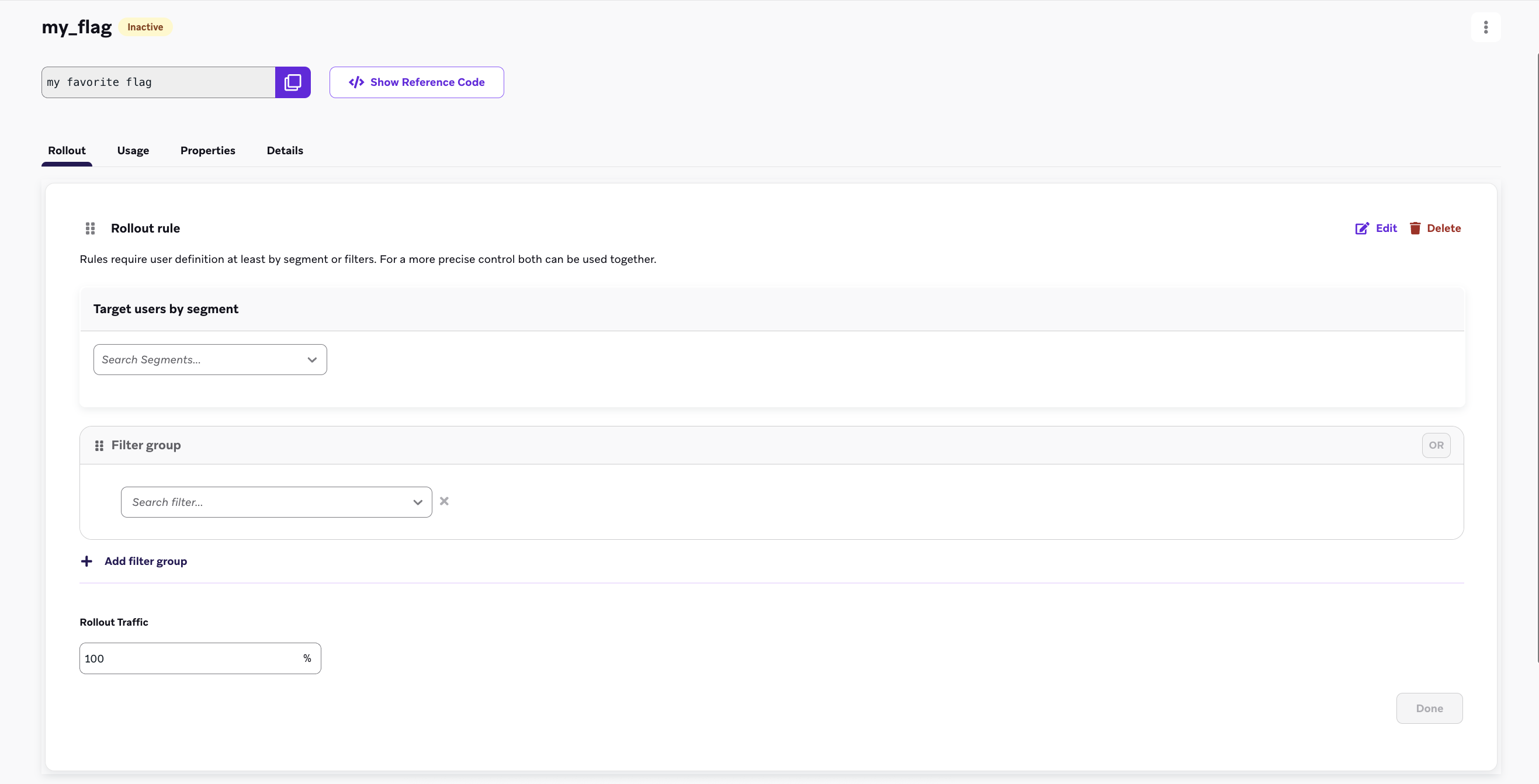
기능 플래그를 롤아웃하기 전에 타겟팅할 사용자 세그먼트를 선택해야 합니다. 새로 생성된 플래그에서 규칙 추가를 선택한 다음 필터 그룹 및 세그먼트 드롭다운 메뉴를 사용하여 타겟 오디언스에서 사용자를 필터링합니다. 여러 필터를 추가하여 오디언스를 더욱 좁힙니다.
5단계: 롤아웃 트래픽 설정
기본적으로 기능 플래그는 항상 비활성 상태이며, 이를 통해 기능 출시 날짜를 전체 사용자 활성화와 분리할 수 있습니다. 롤아웃을 시작하려면 롤아웃 트래픽 섹션을 사용하여 텍스트 상자에 비율을 입력하세요. 이것은 선택한 세그먼트의 무작위 사용자 중 이 새로운 기능을 받을 비율을 선택합니다.
중요:
새 기능을 출시할 준비가 될 때까지 롤아웃 트래픽을 0% 이상으로 설정하지 마세요. 대시보드에서 처음 기능 플래그를 정의할 때는 이 설정을 0%로 유지합니다.
중요:
하나의 규칙으로만 플래그를 롤아웃하거나 단일 오디언스에 롤아웃하려면 세분화 기준과 롤아웃 비율을 선택하여 첫 번째 규칙을 추가하세요. 마지막으로 다른 모든 사용자 규칙이 꺼져 있는지 확인하고 플래그를 저장하세요.
다중 규칙 기능 플래그 롤아웃
다중 규칙 기능 플래그 롤아웃을 사용하여 사용자를 평가하기 위한 규칙의 순서를 정의하면 정밀한 세분화 및 제어된 기능 출시가 가능합니다. 이 방법은 다양한 오디언스에 동일한 기능을 배포하는 데 이상적입니다.
평가 순서
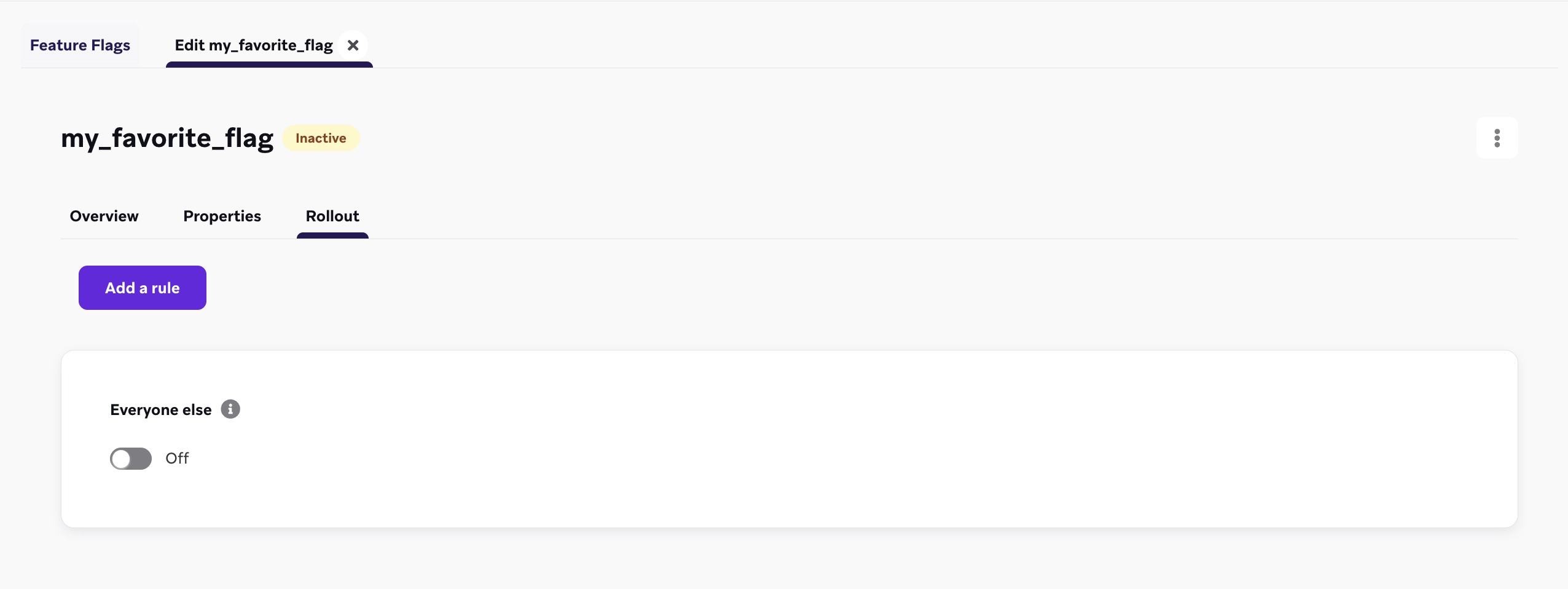
기능 플래그 규칙은 나열된 순서대로 위에서 아래로 평가됩니다. 사용자는 충족하는 첫 번째 규칙에 자격이 부여됩니다. 사용자가 어떤 규칙도 충족하지 않으면, 기본 “다른 모든 사용자” 규칙에 의해 자격이 결정됩니다.
사용자 자격
- 사용자가 첫 번째 규칙의 기준을 충족하면, 즉시 기능 플래그를 받을 자격이 있습니다.
- 사용자가 첫 번째 규칙에 자격이 없으면, 두 번째 규칙에 대해 평가되고, 이후 계속 진행됩니다.
순차적 평가는 사용자가 규칙에 자격이 있거나 목록의 맨 아래에 있는 “다른 모든 사용자” 규칙에 도달할 때까지 계속됩니다.
“다른 모든 사용자” 규칙
“다른 모든 사용자” 규칙은 기본값으로 작용합니다. 사용자가 이전의 어떤 규칙에도 자격이 없으면, 기능 플래그에 대한 자격은 “다른 모든 사용자” 규칙의 토글 설정에 의해 결정됩니다. 예를 들어, “다른 모든 사용자” 규칙이 기본 상태에서 “꺼짐”으로 토글되어 있다면, 다른 규칙의 기준을 충족하지 않는 사용자는 세션 시작 시 기능 플래그를 받지 못합니다.
규칙 재정렬
기본적으로 규칙은 생성된 순서대로 정렬되지만, 대시보드에서 드래그 앤 드롭하여 규칙을 재정렬할 수 있습니다.
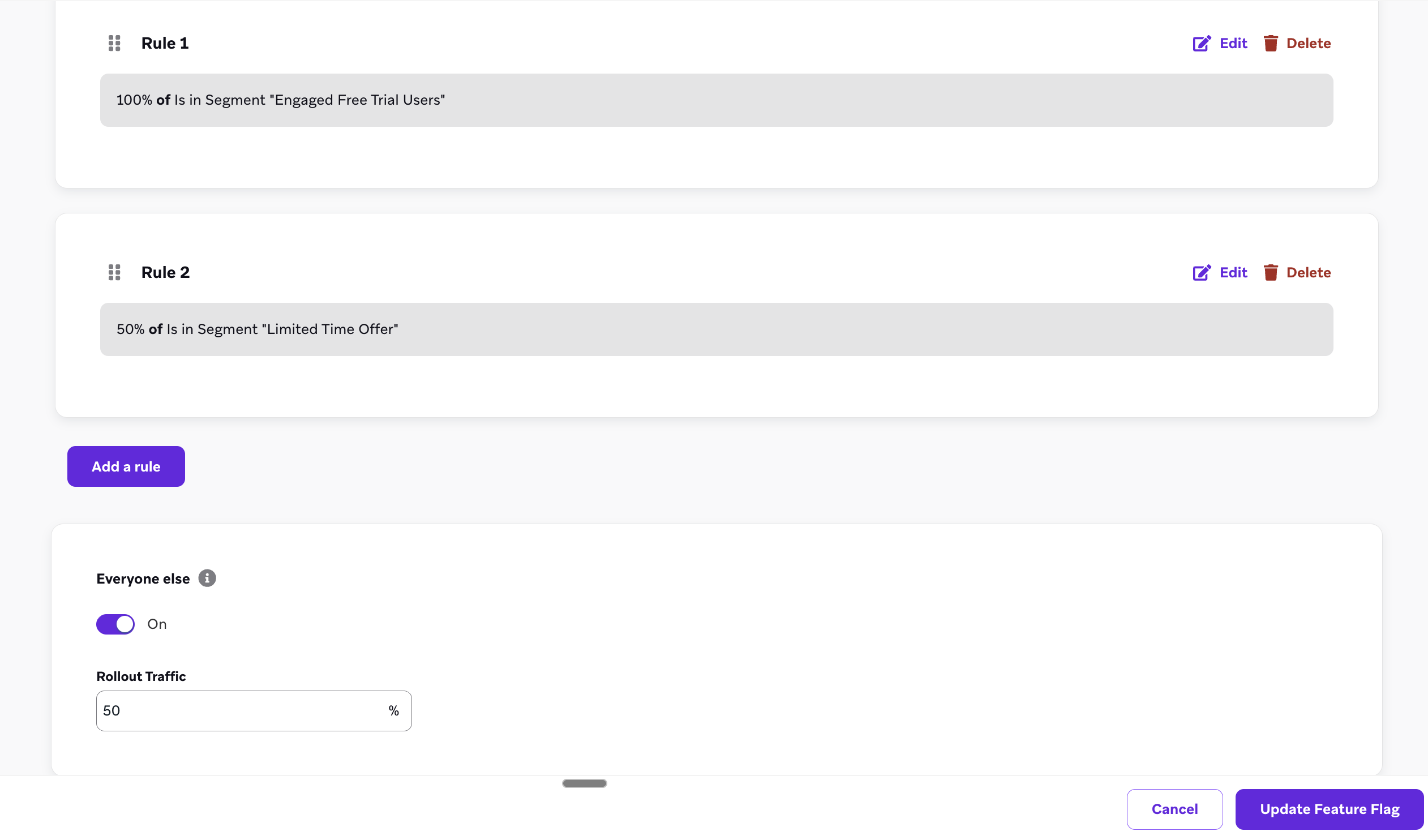
다중 규칙 기능 플래그 활용 사례
체크아웃 페이지를 점진적으로 출시하기
전자상거래 브랜드에서 일하고 있으며, 안정성을 보장하기 위해 다양한 지역에 걸쳐 출시하고자 하는 새로운 체크아웃 페이지가 있다고 가정해 보겠습니다. 다중 규칙 기능 플래그를 사용하여 다음을 설정할 수 있습니다:
- 규칙 1: 미국 세그먼트는 100%로 설정됩니다.
- 규칙 2: 브라질 사용자의 50%로 세그먼트가 설정되어 모든 사용자가 한 번에 흐름을 받지는 않습니다.
- 규칙 3 (다른 모든 사용자): 모든 다른 사용자에 대해서는 “다른 모든 사용자” 규칙을 토글하여 15%로 설정하여 일부 사용자가 새로운 흐름으로 체크아웃할 수 있도록 합니다.
먼저 내부 테스터에게 도달하기
새로운 제품을 출시할 때 내부 테스터가 항상 기능 플래그를 받을 수 있도록 하고 싶은 제품 매니저라고 가정해 보겠습니다. 내부 테스터 세그먼트를 첫 번째 규칙에 추가하고 100%로 설정하여 내부 테스터가 모든 기능 롤아웃 동안 자격을 갖추도록 할 수 있습니다.
기능 플래그에 “활성화됨” 필드 사용
기능 플래그를 정의한 후, 특정 사용자에게 활성화되어 있는지 확인하기 위해 앱이나 사이트를 구성하세요. 활성화되면 사용 사례에 따라 몇 가지 동작을 설정하거나 기능 플래그의 변수 등록정보를 참조하게 됩니다. Braze SDK는 기능 플래그의 상태와 해당 등록정보를 앱으로 가져오는 getter 메서드를 제공합니다.
세션 시작 시 기능 플래그가 자동으로 새로고침되므로 시작 시 최신 버전의 기능을 표시할 수 있습니다. SDK는 이러한 값을 캐시하여 오프라인 상태에서도 사용할 수 있도록 합니다.
앱에 새로운 유형의 고객 프로필을 배포한다고 가정합니다. ID를 expanded_user_profile로 설정할 수 있습니다. 그런 다음, 앱에서 이 새 고객 프로필을 특정 사용자에게 표시해야 하는지 확인합니다. 예를 들어:
1
2
3
4
5
6
| const featureFlag = braze.getFeatureFlag("expanded_user_profile");
if (featureFlag?.enabled) {
console.log(`expanded_user_profile is enabled`);
} else {
console.log(`expanded_user_profile is not enabled`);
}
|
1
2
3
4
5
6
| let featureFlag = braze.featureFlags.featureFlag(id: "expanded_user_profile")
if featureFlag?.enabled == true {
print("expanded_user_profile is enabled")
} else {
print("expanded_user_profile is not enabled")
}
|
1
2
3
4
5
6
| FeatureFlag featureFlag = braze.getFeatureFlag("expanded_user_profile");
if (featureFlag != null && featureFlag.getEnabled()) {
Log.i(TAG, "expanded_user_profile is enabled");
} else {
Log.i(TAG, "expanded_user_profile is not enabled");
}
|
1
2
3
4
5
6
| val featureFlag = braze.getFeatureFlag("expanded_user_profile")
if (featureFlag?.enabled == true) {
Log.i(TAG, "expanded_user_profile is enabled.")
} else {
Log.i(TAG, "expanded_user_profile is not enabled.")
}
|
1
2
3
4
5
6
| const featureFlag = await Braze.getFeatureFlag("expanded_user_profile");
if (featureFlag?.enabled) {
console.log(`expanded_user_profile is enabled`);
} else {
console.log(`expanded_user_profile is not enabled`);
}
|
1
2
3
4
5
6
| var featureFlag = Appboy.AppboyBinding.GetFeatureFlag("expanded_user_profile");
if (featureFlag != null && featureFlag.Enabled) {
Console.WriteLine("expanded_user_profile is enabled");
} else {
Console.WriteLine("expanded_user_profile is not enabled");
}
|
1
2
3
4
5
6
| const featureFlag = await BrazePlugin.getFeatureFlag("expanded_user_profile");
if (featureFlag?.enabled) {
console.log(`expanded_user_profile is enabled`);
} else {
console.log(`expanded_user_profile is not enabled`);
}
|
1
2
3
4
5
6
| BrazeFeatureFlag? featureFlag = await braze.getFeatureFlagByID("expanded_user_profile");
if (featureFlag?.enabled == true) {
print("expanded_user_profile is enabled");
} else {
print("expanded_user_profile is not enabled");
}
|
1
2
3
4
5
6
| featureFlag = m.braze.getFeatureFlag("expanded_user_profile")
if featureFlag <> invalid and featureFlag.enabled
print "expanded_user_profile is enabled"
else
print "expanded_user_profile is not enabled"
end if
|
기능 플래그 노출 횟수 기록
사용자가 새 기능과 상호 작용할 기회가 있었을 때 또는 기능이 비활성화되었을 때 상호 작용__할 수__ 있었던 경우(A/B 테스트 대조군의 경우) 기능 플래그 노출 횟수를 추적합니다. 기능 플래그 노출은 세션당 한 번만 기록됩니다.
일반적으로 앱에서 기능 플래그를 참조하는 위치 바로 아래에 이 코드 줄을 넣으면 됩니다:
1
| braze.logFeatureFlagImpression("expanded_user_profile");
|
1
| braze.featureFlags.logFeatureFlagImpression(id: "expanded_user_profile")
|
1
| braze.logFeatureFlagImpression("expanded_user_profile");
|
1
| braze.logFeatureFlagImpression("expanded_user_profile")
|
1
| Braze.logFeatureFlagImpression("expanded_user_profile");
|
1
| Appboy.AppboyBinding.LogFeatureFlagImpression("expanded_user_profile");
|
1
| BrazePlugin.logFeatureFlagImpression("expanded_user_profile");
|
1
| braze.logFeatureFlagImpression("expanded_user_profile");
|
1
| m.Braze.logFeatureFlagImpression("expanded_user_profile");
|
등록정보에 액세스
기능 플래그의 등록정보에 액세스하려면 대시보드에서 정의한 유형에 따라 다음 메서드 중 하나를 사용합니다.
제공한 키에 대해 해당 유형의 등록정보가 없으면 이러한 메서드는 null을 반환합니다.
1
2
3
4
5
6
7
8
9
10
11
12
13
14
15
16
17
18
19
20
| // Returns the Feature Flag instance
const featureFlag = braze.getFeatureFlag("expanded_user_profile");
// Returns the String property
const stringProperty = featureFlag.getStringProperty("color");
// Returns the boolean property
const booleanProperty = featureFlag.getBooleanProperty("expanded");
// Returns the number property
const numberProperty = featureFlag.getNumberProperty("height");
// Returns the Unix UTC millisecond timestamp property as a number
const timestampProperty = featureFlag.getTimestampProperty("account_start");
// Returns the image property as a String of the image URL
const imageProperty = featureFlag.getImageProperty("homepage_icon");
// Returns the JSON object property as a FeatureFlagJsonPropertyValue
const jsonProperty = featureFlag.getJsonProperty("footer_settings");
|
1
2
3
4
5
6
7
8
9
10
11
12
13
14
15
16
17
18
19
20
| // Returns the Feature Flag instance
let featureFlag: FeatureFlag = braze.featureFlags.featureFlag(id: "expanded_user_profile")
// Returns the string property
let stringProperty: String? = featureFlag.stringProperty(key: "color")
// Returns the boolean property
let booleanProperty: Bool? = featureFlag.boolProperty(key: "expanded")
// Returns the number property as a double
let numberProperty: Double? = featureFlag.numberProperty(key: "height")
// Returns the Unix UTC millisecond timestamp property as an integer
let timestampProperty: Int? = featureFlag.timestampProperty(key: "account_start")
// Returns the image property as a String of the image URL
let imageProperty: String? = featureFlag.imageProperty(key: "homepage_icon")
// Returns the JSON object property as a [String: Any] dictionary
let jsonObjectProperty: [String: Any]? = featureFlag.jsonObjectProperty(key: "footer_settings")
|
1
2
3
4
5
6
7
8
9
10
11
12
13
14
15
16
17
18
19
20
| // Returns the Feature Flag instance
FeatureFlag featureFlag = braze.getFeatureFlag("expanded_user_profile");
// Returns the String property
String stringProperty = featureFlag.getStringProperty("color");
// Returns the boolean property
Boolean booleanProperty = featureFlag.getBooleanProperty("expanded");
// Returns the number property
Number numberProperty = featureFlag.getNumberProperty("height");
// Returns the Unix UTC millisecond timestamp property as a long
Long timestampProperty = featureFlag.getTimestampProperty("account_start");
// Returns the image property as a String of the image URL
String imageProperty = featureFlag.getImageProperty("homepage_icon");
// Returns the JSON object property as a JSONObject
JSONObject jsonObjectProperty = featureFlag.getJSONProperty("footer_settings");
|
1
2
3
4
5
6
7
8
9
10
11
12
13
14
15
16
17
18
19
20
| // Returns the Feature Flag instance
val featureFlag = braze.getFeatureFlag("expanded_user_profile")
// Returns the String property
val stringProperty: String? = featureFlag.getStringProperty("color")
// Returns the boolean property
val booleanProperty: Boolean? = featureFlag.getBooleanProperty("expanded")
// Returns the number property
val numberProperty: Number? = featureFlag.getNumberProperty("height")
// Returns the Unix UTC millisecond timestamp property as a long
val timestampProperty: Long? = featureFlag.getTimestampProperty("account_start")
// Returns the image property as a String of the image URL
val imageProperty: String? = featureFlag.getImageProperty("homepage_icon")
// Returns the JSON object property as a JSONObject
val jsonObjectProperty: JSONObject? = featureFlag.getJSONProperty("footer_settings")
|
1
2
3
4
5
6
7
8
9
10
11
12
13
14
15
16
17
| // Returns the String property
const stringProperty = await Braze.getFeatureFlagStringProperty("expanded_user_profile", "color");
// Returns the boolean property
const booleanProperty = await Braze.getFeatureFlagBooleanProperty("expanded_user_profile", "expanded");
// Returns the number property
const numberProperty = await Braze.getFeatureFlagNumberProperty("expanded_user_profile", "height");
// Returns the Unix UTC millisecond timestamp property as a number
const timestampProperty = await Braze.getFeatureFlagTimestampProperty("expanded_user_profile", "account_start");
// Returns the image property as a String of the image URL
const imageProperty = await Braze.getFeatureFlagImageProperty("expanded_user_profile", "homepage_icon");
// Returns the JSON object property as an object
const jsonObjectProperty = await Braze.getFeatureFlagJSONProperty("expanded_user_profile", "footer_settings");
|
1
2
3
4
5
6
7
8
9
10
11
12
13
14
15
16
17
18
19
20
21
22
23
| // Returns the Feature Flag instance
var featureFlag = Appboy.AppboyBinding.GetFeatureFlag("expanded_user_profile");
// Returns the String property
var stringProperty = featureFlag.GetStringProperty("color");
// Returns the boolean property
var booleanProperty = featureFlag.GetBooleanProperty("expanded");
// Returns the number property as an integer
var integerProperty = featureFlag.GetIntegerProperty("height");
// Returns the number property as a double
var doubleProperty = featureFlag.GetDoubleProperty("height");
// Returns the Unix UTC millisecond timestamp property as a long
var timestampProperty = featureFlag.GetTimestampProperty("account_start");
// Returns the image property as a String of the image URL
var imageProperty = featureFlag.GetImageProperty("homepage_icon");
// Returns the JSON object property as a JSONObject
var jsonObjectProperty = featureFlag.GetJSONProperty("footer_settings");
|
1
2
3
4
5
6
7
8
9
10
11
12
13
14
15
16
17
| // Returns the String property
const stringProperty = await BrazePlugin.getFeatureFlagStringProperty("expanded_user_profile", "color");
// Returns the boolean property
const booleanProperty = await BrazePlugin.getFeatureFlagBooleanProperty("expanded_user_profile", "expanded");
// Returns the number property
const numberProperty = await BrazePlugin.getFeatureFlagNumberProperty("expanded_user_profile", "height");
// Returns the Unix UTC millisecond timestamp property as a number
const timestampProperty = await BrazePlugin.getFeatureFlagTimestampProperty("expanded_user_profile", "account_start");
// Returns the image property as a String of the image URL
const imageProperty = await BrazePlugin.getFeatureFlagImageProperty("expanded_user_profile", "homepage_icon");
// Returns the JSON object property as an object
const jsonObjectProperty = await BrazePlugin.getFeatureFlagJSONProperty("expanded_user_profile", "footer_settings");
|
1
2
3
4
5
6
7
8
9
10
11
12
13
14
15
16
17
18
19
20
| // Returns the Feature Flag instance
BrazeFeatureFlag featureFlag = await braze.getFeatureFlagByID("expanded_user_profile");
// Returns the String property
var stringProperty = featureFlag.getStringProperty("color");
// Returns the boolean property
var booleanProperty = featureFlag.getBooleanProperty("expanded");
// Returns the number property
var numberProperty = featureFlag.getNumberProperty("height");
// Returns the Unix UTC millisecond timestamp property as an integer
var timestampProperty = featureFlag.getTimestampProperty("account_start");
// Returns the image property as a String of the image URL
var imageProperty = featureFlag.getImageProperty("homepage_icon");
// Returns the JSON object property as a Map<String, dynamic> collection
var jsonObjectProperty = featureFlag.getJSONProperty("footer_settings");
|
1
2
3
4
5
6
7
8
9
10
11
12
13
14
15
16
17
| ' Returns the String property
color = featureFlag.getStringProperty("color")
' Returns the boolean property
expanded = featureFlag.getBooleanProperty("expanded")
' Returns the number property
height = featureFlag.getNumberProperty("height")
' Returns the Unix UTC millisecond timestamp property
account_start = featureFlag.getTimestampProperty("account_start")
' Returns the image property as a String of the image URL
homepage_icon = featureFlag.getImageProperty("homepage_icon")
' Returns the JSON object property
footer_settings = featureFlag.getJSONProperty("footer_settings")
|
모든 기능 플래그 목록 가져오기
1
2
3
4
| const features = getAllFeatureFlags();
for(const feature of features) {
console.log(`Feature: ${feature.id}`, feature.enabled);
}
|
1
2
3
4
| let features = braze.featureFlags.featureFlags
for let feature in features {
print("Feature: \(feature.id)", feature.enabled)
}
|
1
2
3
4
| List<FeatureFlag> features = braze.getAllFeatureFlags();
for (FeatureFlag feature: features) {
Log.i(TAG, "Feature: ", feature.getId(), feature.getEnabled());
}
|
1
2
3
4
| val featureFlags = braze.getAllFeatureFlags()
featureFlags.forEach { feature ->
Log.i(TAG, "Feature: ${feature.id} ${feature.enabled}")
}
|
1
2
3
4
| const features = await Braze.getAllFeatureFlags();
for(const feature of features) {
console.log(`Feature: ${feature.id}`, feature.enabled);
}
|
1
2
3
4
| List<FeatureFlag> features = Appboy.AppboyBinding.GetAllFeatureFlags();
foreach (FeatureFlag feature in features) {
Console.WriteLine("Feature: {0} - enabled: {1}", feature.ID, feature.Enabled);
}
|
1
2
3
4
| const features = await BrazePlugin.getAllFeatureFlags();
for(const feature of features) {
console.log(`Feature: ${feature.id}`, feature.enabled);
}
|
1
2
3
4
| List<BrazeFeatureFlag> featureFlags = await braze.getAllFeatureFlags();
featureFlags.forEach((feature) {
print("Feature: ${feature.id} ${feature.enabled}");
});
|
1
2
3
4
| features = m.braze.getAllFeatureFlags()
for each feature in features
print "Feature: " + feature.id + " enabled: " + feature.enabled.toStr()
end for
|
기능 플래그 새로고침
세션 도중에 현재 사용자의 기능 플래그를 새로고침하여 Braze에서 최신 값을 가져올 수 있습니다.
팁:
세션이 시작되면 새로고침이 자동으로 수행됩니다. 새로고침은 결제 페이지를 로드하기 전과 같이 중요한 사용자 작업 전이나 기능 플래그가 참조될 것을 알고 있는 경우에만 필요합니다.
1
2
3
4
5
| braze.refreshFeatureFlags(() => {
console.log(`Feature flags have been refreshed.`);
}, () => {
console.log(`Failed to refresh feature flags.`);
});
|
1
2
3
4
5
6
7
8
| braze.featureFlags.requestRefresh { result in
switch result {
case .success(let features):
print("Feature flags have been refreshed:", features)
case .failure(let error):
print("Failed to refresh feature flags:", error)
}
}
|
1
| braze.refreshFeatureFlags();
|
1
| braze.refreshFeatureFlags()
|
1
| Braze.refreshFeatureFlags();
|
1
| Appboy.AppboyBinding.RefreshFeatureFlags();
|
1
| BrazePlugin.refreshFeatureFlags();
|
1
| braze.refreshFeatureFlags();
|
1
| m.Braze.refreshFeatureFlags()
|
변경 사항 수신 대기
SDK가 기능 플래그를 새로고침할 때 앱을 수신 대기하고 업데이트하도록 Braze SDK를 구성할 수 있습니다.
사용자가 더 이상 기능을 사용할 수 없는 경우 앱을 업데이트하려는 때에 유용합니다. 예를 들어, 기능의 활성화 여부 또는 등록정보 값 중 하나를 기반으로 앱에서 일부 상태를 설정하는 경우가 이에 해당합니다.
1
2
3
4
5
6
| // Register an event listener
const subscriptionId = braze.subscribeToFeatureFlagsUpdates((features) => {
console.log(`Features were updated`, features);
});
// Unregister this event listener
braze.removeSubscription(subscriptionId);
|
1
2
3
4
5
6
7
| // Create the feature flags subscription
// - You must keep a strong reference to the subscription to keep it active
let subscription = braze.featureFlags.subscribeToUpdates { features in
print("Feature flags were updated:", features)
}
// Cancel the subscription
subscription.cancel()
|
1
2
3
4
5
6
| braze.subscribeToFeatureFlagsUpdates(event -> {
Log.i(TAG, "Feature flags were updated.");
for (FeatureFlag feature: event.getFeatureFlags()) {
Log.i(TAG, "Feature: ", feature.getId(), feature.getEnabled());
}
});
|
1
2
3
4
5
6
| braze.subscribeToFeatureFlagsUpdates() { event ->
Log.i(TAG, "Feature flags were updated.")
event.featureFlags.forEach { feature ->
Log.i(TAG, "Feature: ${feature.id}")
}
}
|
1
2
3
4
| // Register an event listener
Braze.addListener(braze.Events.FEATURE_FLAGS_UPDATED, (featureFlags) => {
console.log(`featureFlagUpdates`, JSON.stringify(featureFlags));
});
|
변경 사항을 수신 대기하려면 Braze 구성 > 기능 플래그에서 게임 오브젝트 이름 및 콜백 메서드 이름 값을 애플리케이션의 해당 값으로 설정합니다.
1
2
3
4
| // Register an event listener
BrazePlugin.subscribeToFeatureFlagUpdates((featureFlags) => {
console.log(`featureFlagUpdates`, JSON.stringify(featureFlags));
});
|
앱의 Dart 코드에서 다음 샘플 코드를 사용합니다:
1
2
3
4
5
6
7
8
9
| // Create stream subscription
StreamSubscription featureFlagsStreamSubscription;
featureFlagsStreamSubscription = braze.subscribeToFeatureFlags((featureFlags) {
print("Feature flags were updated");
});
// Cancel stream subscription
featureFlagsStreamSubscription.cancel();
|
기능 플래그 데이터는 Android 및 iOS 네이티브 레이어 모두에서 자동으로 전달됩니다. 추가 설정이 필요하지 않습니다.
Flutter SDK 17.1.0 이하를 사용하는 경우, iOS 네이티브 레이어에서의 기능 플래그 데이터 전달에는 수동 설정이 필요합니다. 애플리케이션에 BrazePlugin.processFeatureFlags(featureFlags)를 호출하는 featureFlags.subscribeToUpdates 콜백이 포함되어 있을 수 있습니다. Flutter SDK 18.0.0으로 마이그레이션하려면 BrazePlugin.processFeatureFlags(_:) 호출을 제거하세요. 데이터 전달이 이제 자동으로 처리됩니다.
예제는 Braze Flutter SDK 샘플 애플리케이션의 AppDelegate.swift를 참조하세요.
1
2
| ' Define a function called `onFeatureFlagChanges` to be called when feature flags are refreshed
m.BrazeTask.ObserveField("BrazeFeatureFlags", "onFeatureFlagChanges")
|
1
2
3
4
5
6
7
8
9
10
11
12
13
14
15
16
17
18
19
20
21
22
23
24
| import { useEffect, useState } from "react";
import {
FeatureFlag,
getFeatureFlag,
removeSubscription,
subscribeToFeatureFlagsUpdates,
} from "@braze/web-sdk";
export const useFeatureFlag = (id: string): FeatureFlag => {
const [featureFlag, setFeatureFlag] = useState<FeatureFlag>(
getFeatureFlag(id)
);
useEffect(() => {
const listener = subscribeToFeatureFlagsUpdates(() => {
setFeatureFlag(getFeatureFlag(id));
});
return () => {
removeSubscription(listener);
};
}, [id]);
return featureFlag;
};
|
사용자 자격 확인
Braze에서 사용자가 어떤 기능 플래그에 자격이 있는지 확인하려면 오디언스 > 사용자 검색으로 이동한 다음 사용자를 검색하고 선택하세요.
기능 플래그 자격 탭에서 플랫폼, 애플리케이션 또는 기기별로 자격이 있는 기능 플래그 목록을 필터링할 수 있습니다. 기능 플래그 옆에 있는 를 선택하여 사용자에게 반환될 페이로드를 미리 볼 수도 있습니다.
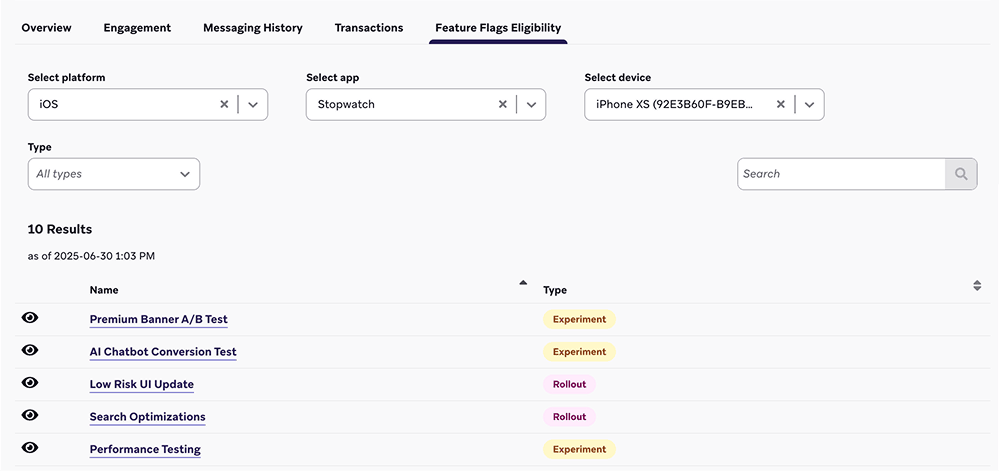
체인지로그 보기
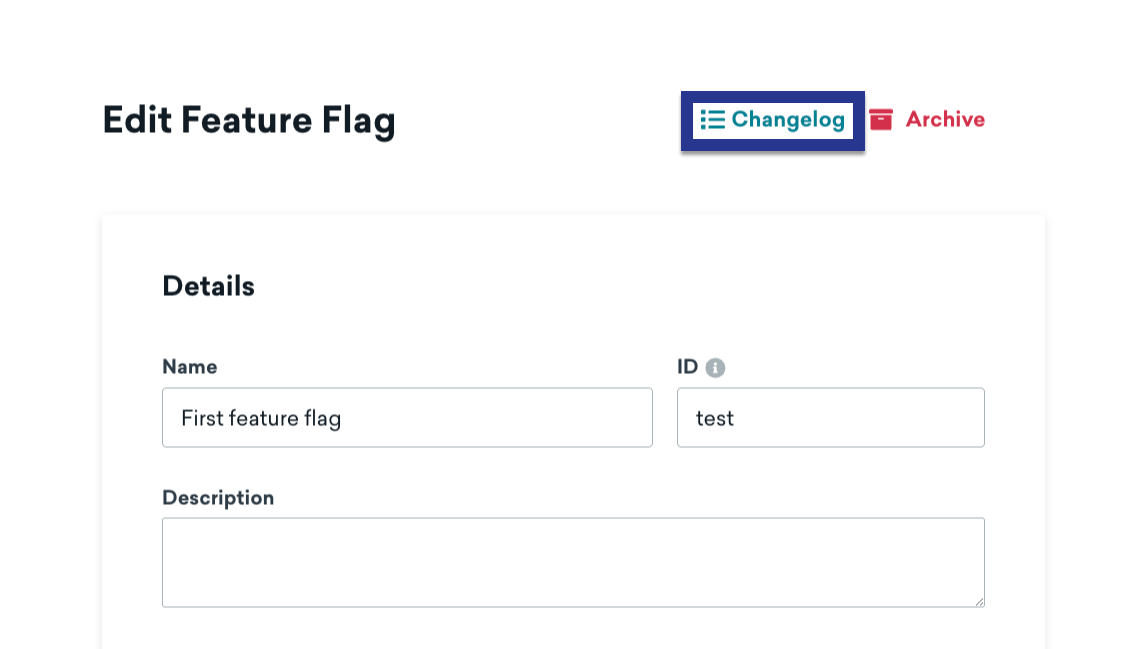
기능 플래그의 체인지로그를 보려면 기능 플래그를 열고 체인지로그를 선택합니다.
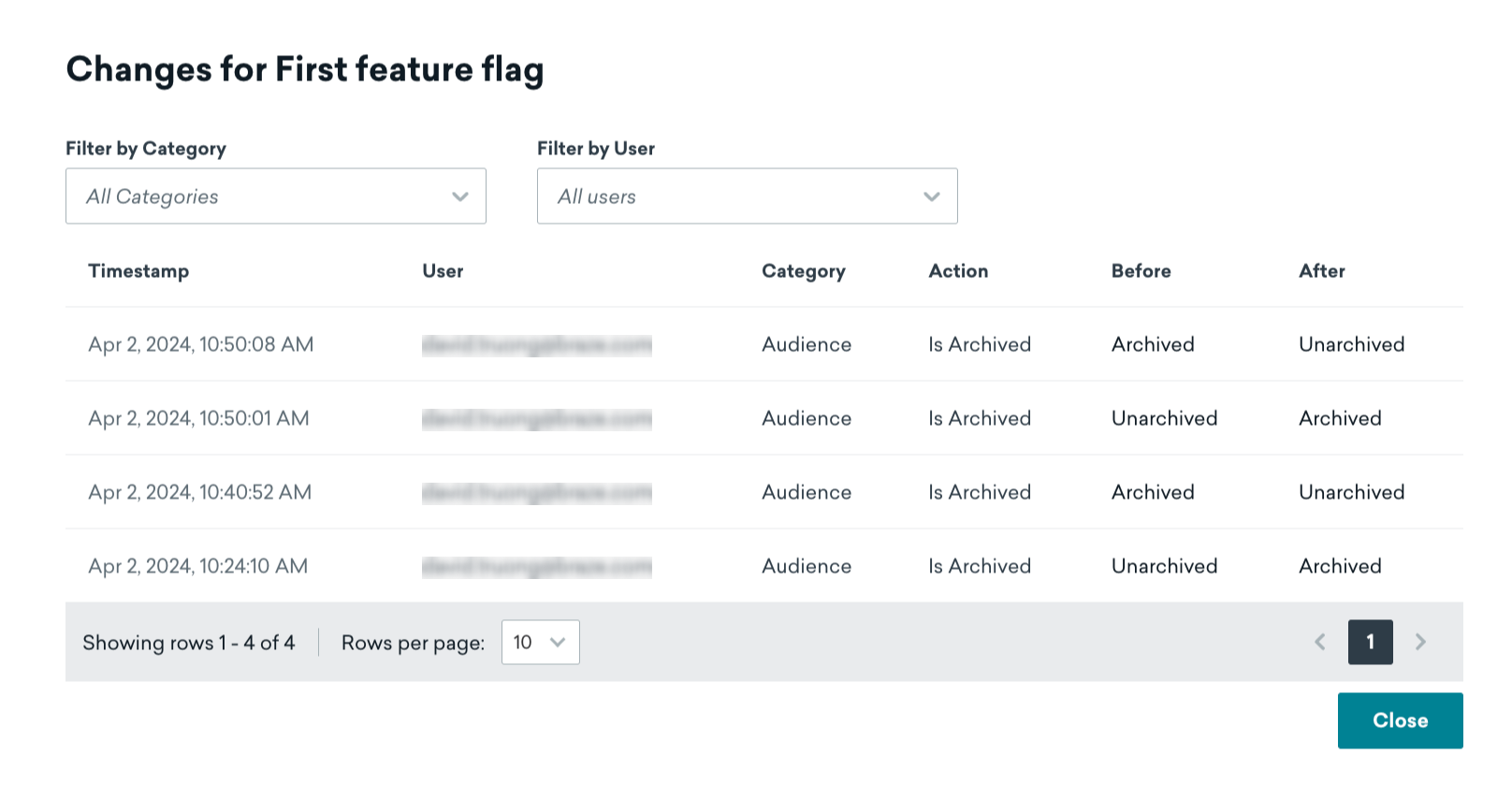
여기에서 변경이 발생한 시기, 변경을 수행한 사람, 변경이 속한 카테고리 등을 검토할 수 있습니다.
기능 플래그로 세분화
Braze는 현재 어떤 사용자가 기능 플래그를 활성화했는지 자동으로 추적합니다. 기능 플래그 필터를 사용하여 세그먼트 또는 타겟 메시지를 생성할 수 있습니다. 세그먼트 필터링에 대한 자세한 내용은 세그먼트 생성을 참조하세요.
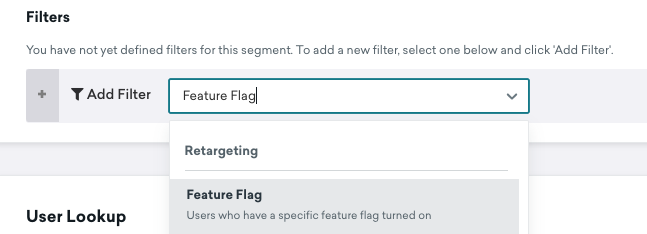
참고:
재귀 세그먼트를 방지하기 위해 다른 기능 플래그를 참조하는 세그먼트를 생성할 수 없습니다.
모범 사례
롤아웃과 캔버스 또는 실험을 결합하지 마세요
다른 진입점에 의해 사용자가 활성화 및 비활성화되는 것을 방지하려면 롤아웃 슬라이더를 0보다 큰 값으로 설정하거나 캔버스 또는 실험에서 기능 플래그를 활성화해야 합니다. 캔버스나 실험에서 기능 플래그를 사용하려는 경우 롤아웃 비율을 0으로 유지하는 것이 모범 사례입니다.
이름 지정 규칙
코드를 명확하고 일관되게 유지하려면 기능 플래그 ID의 이름을 지정할 때 다음 형식을 사용하는 것이 좋습니다.
1
| BEHAVIOR_PRODUCT_FEATURE
|
다음을 교체합니다:
| 플레이스홀더 |
설명 |
BEHAVIOR |
기능의 동작. 코드에서 동작이 기본적으로 비활성화되어 있는지 확인하고 기능 플래그 이름에 disabled와 같은 문구를 사용하지 마세요. |
PRODUCT |
해당 기능이 속한 제품입니다. |
FEATURE |
기능의 이름입니다. |
다음은 기능 플래그의 예제입니다. 여기서 show는 동작, animation_profile은 제품, driver는 기능입니다:
1
| show_animation_profile_driver
|
미리 계획하기
항상 안전하게 작업하세요. 끄기 스위치가 필요할 수 있는 새로운 기능을 고려할 때는 새로운 앱 업데이트가 필요하다는 점을 나중에 깨닫는 것보다 필요하지 않더라도 기능 플래그를 포함하여 새 코드를 출시하는 것이 좋습니다.
설명하기
기능 플래그에 설명을 추가합니다. 이 필드는 Braze에서 선택 사항이지만, 다른 사람이 사용 가능한 기능 플래그를 검색할 때 궁금해할 수 있는 질문에 답하는 데 도움이 될 수 있습니다.
- 이 플래그의 인에이블먼트 및 동작을 담당하는 담당자에 대한 연락처 정보
- 이 플래그를 비활성화해야 하는 시기
- 이 플래그가 제어하는 새로운 기능에 대한 설명서 또는 참고 사항 링크
- 기능 사용 방법에 대한 종속성 또는 참고 사항
오래된 기능 플래그 정리
기능의 롤아웃을 필요 이상으로 오랫동안 100% 상태로 두는 상황에 대해 모두가 책임을 안고 있습니다.
코드 및 Braze 대시보드를 깔끔하게 유지하려면 모든 사용자가 업그레이드하여 기능을 비활성화하는 옵션이 더 이상 필요하지 않게 된 후 코드 베이스에서 영구 기능 플래그를 제거합니다. 이렇게 하면 개발 환경의 복잡성을 줄일 수 있을 뿐만 아니라 기능 플래그 목록도 깔끔하게 정리할 수 있습니다.