예측 이벤트 분석
예측을 작성하고 학습한 후에는 예측 분석 페이지에 액세스할 수 있습니다. 이 페이지는 사용자의 가능성 점수 또는 카테고리를 기반으로 타겟팅할 사용자를 결정하는 데 도움을 줍니다.
예측 이벤트 분석 정보
예측이 훈련을 마치고 이 페이지가 채워지면, 필터를 세그먼트나 캠페인에서 사용하여 모델의 출력을 사용하기 시작할 수 있습니다. 대상을 결정하는 데 도움이 필요하고 그 이유를 알고 싶다면, 이 페이지는 모델의 역사적 정확성과 비즈니스 목표에 따라 도움을 줄 수 있습니다.
이것이 예측 이벤트 분석을 구성하는 구성 요소입니다:
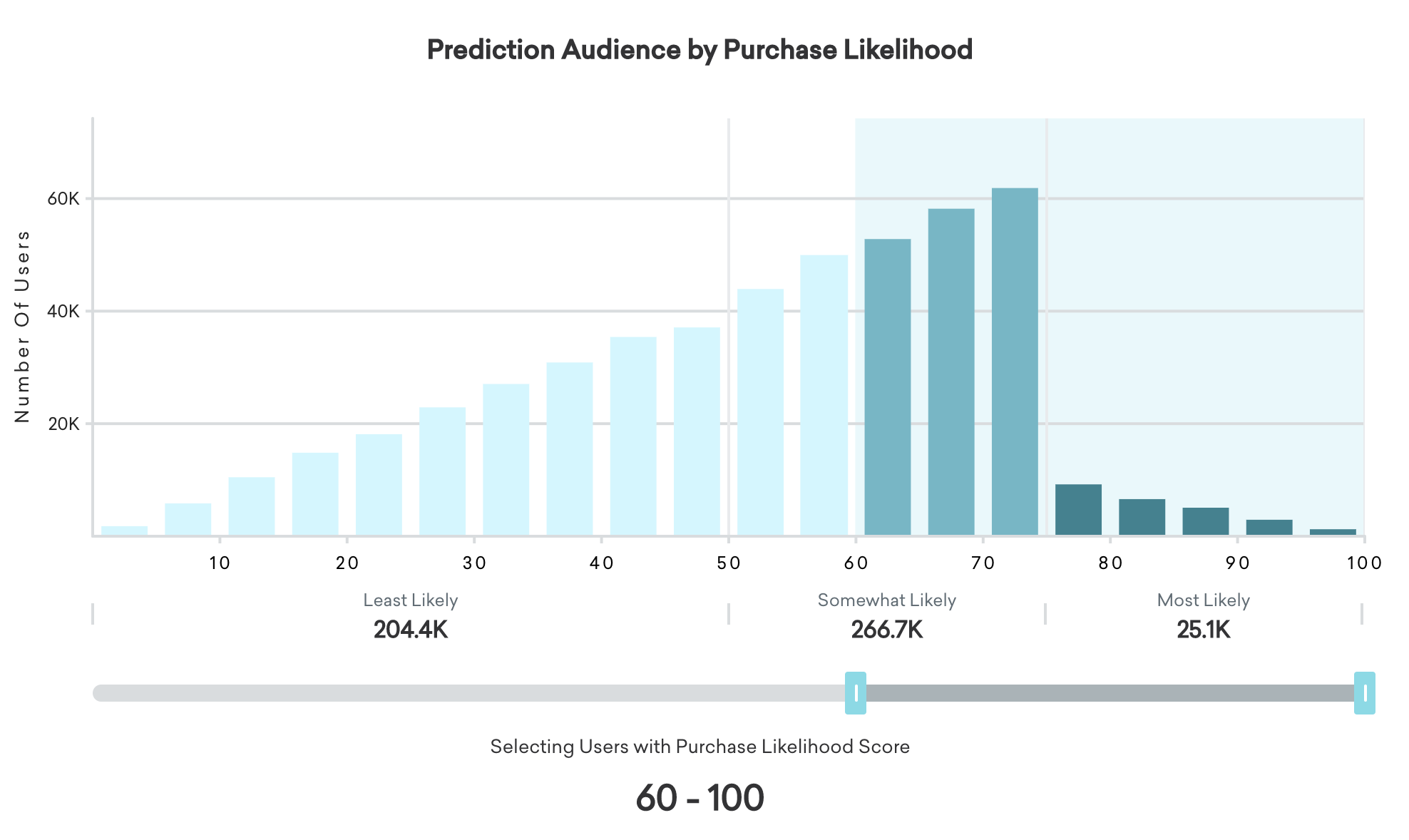
페이지 상단에 전체 예측 오디언스에 대한 가능성 점수 분포가 표시됩니다. 버킷이 오른쪽으로 갈수록 점수가 높고 이벤트를 수행할 가능성이 더 높습니다. 왼쪽에 있는 버킷의 사용자들은 이벤트를 수행할 가능성이 적습니다. 차트 아래의 슬라이더를 사용하면 사용자 섹션을 선택하고 해당 사용자를 타겟팅했을 때의 결과를 추정할 수 있습니다.
슬라이더 핸들을 다른 위치로 이동하면 패널의 왼쪽 절반에 있는 막대가 선택한 인구의 일부를 사용하여 전체 예측 오디언스 중 몇 명의 사용자가 타겟팅될 것인지 알려줍니다.
가능성 점수
예측 오디언스의 사용자에게는 0에서 100 사이의 가능성 점수가 할당됩니다. 점수가 높을수록 이벤트를 수행할 가능성이 커집니다.
다음은 사용자가 가능성 점수에 따라 분류되는 방법입니다:
- 낮음: 0과 50 사이
- 중간: 50과 75 사이
- 높음: 75에서 100 사이
점수와 해당 카테고리는 예측 생성 페이지에서 선택한 일정에 따라 업데이트됩니다. 페이지 상단의 차트에는 20개의 동일한 크기의 버킷 각각 또는 각 가능성 범주에 있는 가능성 점수를 가진 사용자 수가 표시됩니다.
사용자 수준 가능성 점수 액세스하기
단일 사용자의 가능성 점수를 보려면 대시보드에서 해당 사용자를 조회하고 참여 > 예측으로 이동하여 점수를 확인합니다. 한 번에 많은 사용자의 점수 및 카테고리에 액세스하려면 이벤트 가능성 점수 또는 이벤트 가능성 카테고리 필터를 사용하여 세그먼트를 만든 다음 해당 세그먼트에서 사용자를 내보내세요. 내보낼 때 내보내기 데이터에 가능성 점수를 포함할 수 있습니다.
예측 이벤트와 예측 이탈 모두 사용자에게 점수를 할당하지만 중요한 차이점이 있습니다:
- 예측 이벤트 (구매 예측): 이전에 타겟팅 이벤트를 수행했는지 여부에 관계없이 예측 오디언스에 포함된 모든 사용자를 고려합니다. 예를 들어, 구매 예측을 통해 첫 구매 가능성이 높은 사용자를 식별할 수 있습니다.
- 예측 이탈: 이미 커스텀 이벤트를 수행한 사용자만 고려합니다. 이탈 예측은 이전에 어떤 행동을 한 적이 있고 그 행동을 중단할 가능성이 있는 사용자를 식별합니다. 로그인한 적이 없는 사용자가 로그인하지 않으면 ‘고객이탈’로 간주할 수 없습니다.
세그먼트에서 이탈 위험 점수를 내보낼 때 이 점수는 구매 또는 기타 이벤트 예측 모델과는 다른 이탈 예측 모델을 반영합니다.
예상 정확도
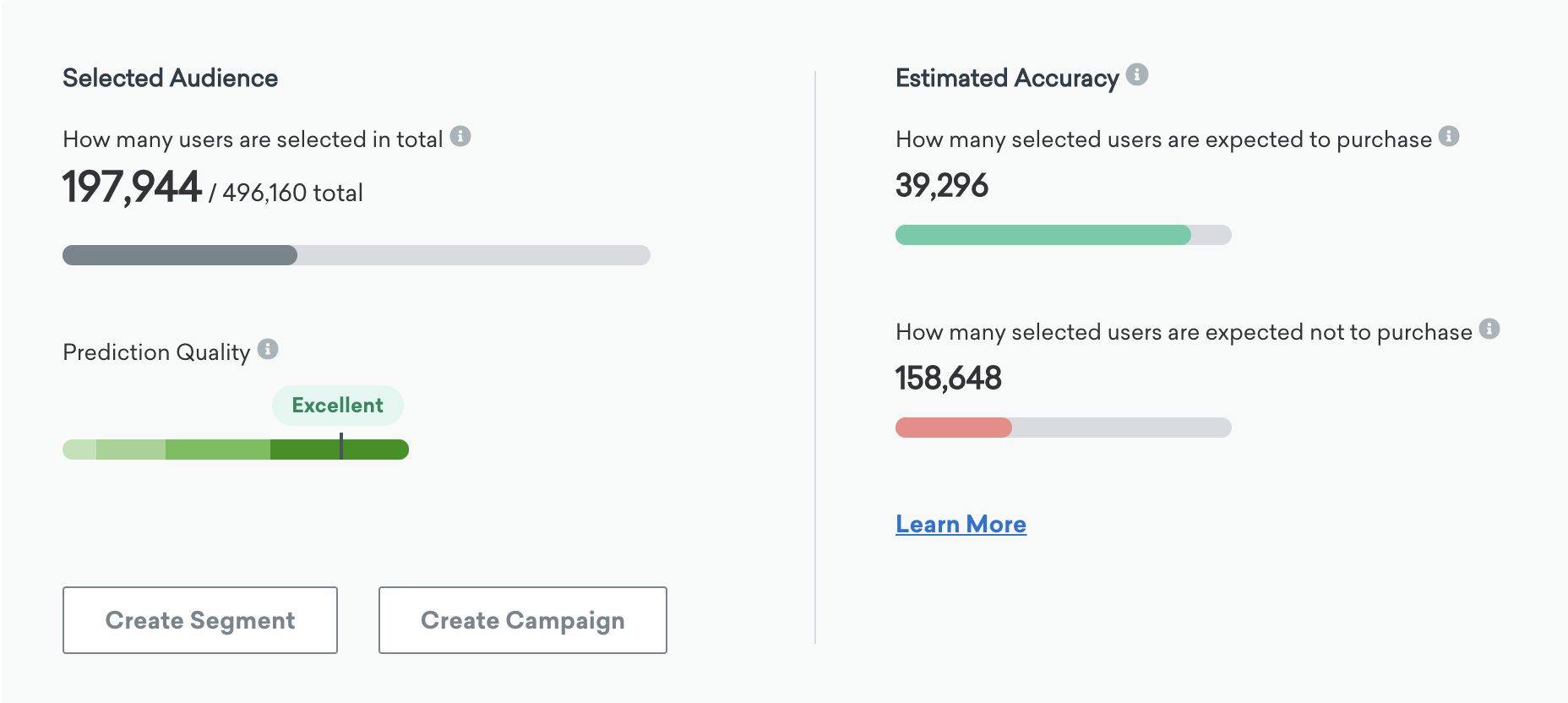
차트 아래 패널의 오른쪽 절반에는 선택한 예측 오디언스의 일부를 타겟팅할 때 예상되는 정확도의 추정치를 두 가지 방법으로 보여줍니다: 선택한 사용자가 이벤트를 수행할 것으로 예상되는 수와 그렇지 않을 것으로 예상되는 수입니다.
예상 성능
예상 정확도를 사용하여 이벤트를 수행할 것으로 예상되는 선택된 사용자 수를 확인할 수 있습니다.
예측은 완벽하게 정확하지 않으며, 어떤 예측도 완벽하지 않기 때문에 Braze는 이벤트를 수행할 모든 미래 사용자를 식별할 수 없습니다. 가능성 점수는 정보에 입각한 신뢰할 수 있는 예측 세트와 같습니다. 진행률 막대는 예측 오디언스에서 예상되는 “진정한 긍정” 중 선택된 오디언스로 타겟팅될 수 있는 수를 나타냅니다. 이 메시지를 보내지 않더라도 이 수의 사용자가 이벤트를 수행할 것으로 예상됩니다.
수행되지 않을 것으로 예상됨
예상 정확도를 사용하여 이벤트를 수행하지 않을 것으로 예상되는 선택된 사용자 수를 확인할 수 있습니다.
모든 머신러닝 모델은 오류를 일으킵니다. 선택한 사용자 중에서 높은 가능성 점수를 가진 사용자가 실제로 이벤트를 수행하지 않는 경우가 있을 수 있습니다. 이들은 아무런 조치를 취하지 않으면 그 행사를 수행하지 않을 것입니다. 어차피 타겟이 될 것이므로 이는 오류 또는 “위양성”입니다. 이 두 번째 진행률 표시줄의 전체 너비는 이벤트를 수행하지 않을 것으로 예상되는 사용자 수를 나타내며, 채워진 부분은 현재 슬라이더 위치를 사용하여 잘못 타겟팅될 사용자입니다.
이 정보를 사용하여 실제 양성 중 몇 개를 포착할지, 허용할 수 있는 허위 양성의 수, 그리고 비즈니스에 대한 오류의 비용이 무엇인지 결정하시기를 권장합니다. 귀중한 프로모션을 보내는 경우 차트의 왼쪽을 선호하여 비구매자(거짓 양성)만을 대상으로 할 수 있습니다. 또는, 자주 구매하는 구매자(진성 긍정)를 다시 구매하도록 장려하기 위해 차트의 오른쪽을 선호하는 사용자 섹션을 선택할 수 있습니다.
예측 품질
모델의 정확도를 측정하기 위해 예측 품질 측정기준은 과거 데이터에 대해 테스트했을 때 특정 머신 러닝 모델이 얼마나 효과적인지 보여줍니다. Braze는 모델 생성 페이지에서 지정한 그룹에 따라 데이터를 가져옵니다. 모델은 하나의 데이터 세트(“학습” 세트)에서 학습된 다음 새로운 별도의 데이터 세트(“테스트” 세트)에서 테스트됩니다.
예측은 2주마다 다시 학습되고 예측 품질 측정기준과 함께 업데이트되어 최신 사용자 행동 패턴에 대한 예측을 최신 상태로 유지합니다. 또한 이런 일이 발생할 때마다 지난 2주간 예측한 결과를 실제 사용자 결과와 비교하여 테스트합니다. 그런 다음 _예측 품질_은 이러한 실제 결과(추정치가 아닌)를 기반으로 계산됩니다. 이는 실제 시나리오에서 예측이 정확한지 확인하기 위한 자동 백테스트(즉, 과거 데이터에 대한 예측 모델 테스트)입니다. 이 재교육 및 백테스트가 마지막으로 수행된 시간은 예측 페이지와 개별 예측 분석 페이지에 표시됩니다. 미리보기 예측도 생성 후 이 백테스트를 한 번 수행합니다. 이렇게 하면 무료 버전의 기능을 사용하더라도 맞춤 예측의 정확성을 확신할 수 있습니다.
Prediction quality example
예를 들어, 평균적으로 20%의 사용자가 이탈하는 경우, 20%의 사용자 중 무작위로 하위 집합을 선택하여 (실제 이탈 여부와 상관없이) 무작위로 이탈한 것으로 표시하면 실제 이탈자 중 20%만 정확하게 식별할 수 있을 것으로 예상할 수 있습니다. 무작위 추측입니다. 모델이 그 정도만 잘 수행한다면 이 경우 리프트는 1이 될 것입니다.
반면에 이 모델에서 20%의 사용자에게만 메시지를 보낼 수 있고, 그 과정에서 “진짜” 이탈자만 포착하고 다른 이탈자는 포착하지 못한다면 상승률은 100%/20% = 5가 됩니다. 메시지를 보낼 가능성이 높은 이탈 고객의 모든 비율에 대해 이 비율을 차트화하면 이탈률 곡선을 얻을 수 있습니다.
상승도 품질(및 예측 품질)을 생각하는 또 다른 방법은 테스트 세트에서 이탈자를 식별할 때 예측의 상승도 곡선이 무작위 추측(0%)과 완벽함(100%) 사이에서 얼마나 멀리 떨어져 있는지를 나타내는 것입니다. 리프트 품질에 대한 원본 논문은 데이터베이스 마케팅에서 리프트 품질 측정하기를 참조하세요.
측정 방법
_예측 품질_을 측정하는 척도는 리프트 품질입니다. 일반적으로 ‘상승도’는 전환과 같은 성공적인 결과의 증가된 비율 또는 백분율을 의미합니다. 이 경우 성공적인 결과는 이탈할 가능성이 있는 사용자를 정확하게 식별하는 것입니다. 상승도 품질은 테스트 세트의 메시징에 대해 예측이 가능한 모든 오디언스 규모에 걸쳐 제공하는 평균 상승도입니다. 이 접근 방식은 무작위로 추측하는 것보다 모델이 얼마나 더 나은지 측정합니다. 이 측정값에서 0%는 모델이 누가 이탈할지 무작위로 추측하는 것보다 낫지 않음을 의미하며, 100%는 누가 이탈할지 완벽하게 알고 있음을 나타냅니다.
권장 범위
다양한 범위의 _예측 품질_에 대해 다음을 권장합니다.
| 예측 품질 범위(%) | 추천 |
|---|---|
| 60 - 100 | 훌륭합니다. 최고 수준의 정확도입니다. 오디언스 정의를 변경하더라도 추가 이점이 없을 수 있습니다. |
| 40 - 60 | 좋습니다. 이 모델은 정확한 예측을 산출하지만, 다른 오디언스 설정을 적용하면 결과가 향상될 수도 있습니다. |
| 20 - 40 | 보통입니다. 이 모델은 어느 정도의 정확도와 가치를 제공하지만, 다른 오디언스 정의를 적용해 보고 성과가 향상되는지 확인하는 것이 좋습니다. |
| 0 - 20 | 미흡합니다. 기존의 오디언스 정의를 변경한 다음, 다시 시도해보는 것이 좋습니다. |
이벤트 상관 테이블
이 분석은 예측 오디언스의 이벤트와 상관관계가 있는 사용자 속성 또는 행동을 보여줍니다. 평가된 속성은 나이, 국가, 성별 및 언어입니다. 분석되는 행동에는 세션, 구매, 총 지출 금액, 커스텀 이벤트, 캠페인 및 지난 30일 동안 수신된 캔버스 단계가 포함됩니다.
테이블은 각각 이벤트를 수행할 가능성이 더 높고 낮은 경우를 위해 왼쪽과 오른쪽으로 나뉩니다. 각 행에 대해 왼쪽 열에 있는 행동 또는 속성을 가진 사용자가 이벤트를 수행할 가능성이 더 높거나 낮은 비율이 오른쪽 열에 표시됩니다. 이 숫자는 이 행동이나 속성을 가진 사용자의 가능성 점수를 전체 예측 오디언스의 이벤트 수행 가능성으로 나눈 비율입니다.
이 표는 예측이 다시 훈련될 때만 업데이트되며 사용자 가능성 점수가 업데이트될 때는 업데이트되지 않습니다.
미리보기 예측의 상관관계 데이터는 부분적으로 숨겨집니다. 이 정보를 공개하려면 구매가 필요합니다. 자세한 내용은 계정 매니저에게 문의하세요.
문제 해결
예측을 만들 수 없습니다.
커스텀 이벤트에 대한 예측을 생성할 수 없는 경우 샘플 크기가 충분하지 않기 때문일 수 있습니다. Braze는 이벤트를 수행한 사용자 수를 추정하며, 충분한 사용자가 이벤트를 수행하지 않은 경우 샘플이 모델을 학습시키기에 충분한 데이터를 제공하지 못할 수 있습니다. 이 경우 시스템이 사용자가 없는 것으로 추정하여 예측을 생성하지 못할 수 있습니다.
성공적인 예측을 생성하려면 예측 오디언스에서 충분한 수의 사용자가 타겟 커스텀 이벤트를 수행했는지 확인해야 합니다. 정확한 임계값은 다양하지만, 사용자 기반에서 사용량이 매우 낮은 이벤트는 안정적인 모델 학습을 위한 충분한 데이터를 제공하지 못할 수 있습니다.
 GitHub 에서 이 페이지를 편집합니다.