Braze를 ChatGPT 앱과 통합하기
이 가이드는 Braze를 ChatGPT 앱과 통합하여 AI 기반 애플리케이션 내에서 분석 및 이벤트 로깅을 활성화하는 방법을 다룹니다.
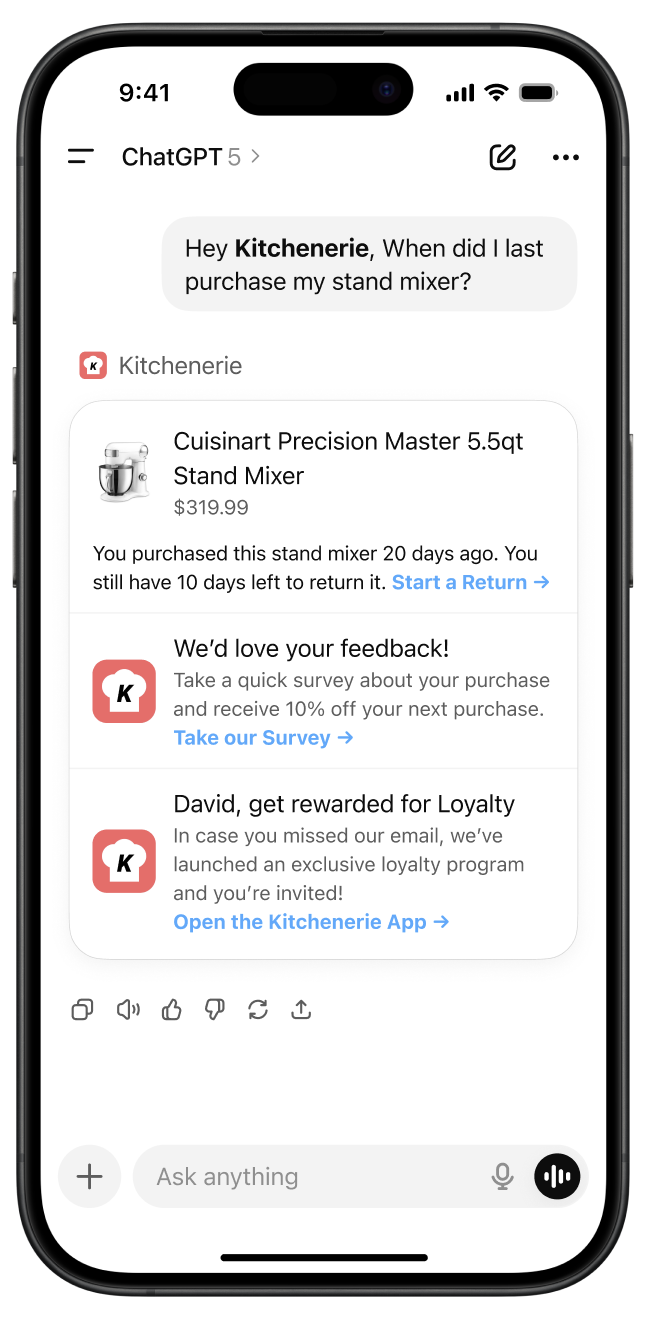
개요
ChatGPT 앱은 AI 대화형 애플리케이션을 구축하기 위한 강력한 플랫폼을 제공합니다. Braze를 ChatGPT 앱과 통합하면, AI 시대에도 다음과 같은 방법을 포함하여 퍼스트파티 데이터 통제권을 지속적으로 유지할 수 있습니다:
- ChatGPT 앱 내에서 사용자 참여도와 동작을 추적합니다(예: 고객이 어떤 질문이나 채팅 기능을 사용하는지 파악).
- AI 상호작용 패턴을 기반으로 Braze Campaign(캠페인)을 세그먼트하고 리타겟팅합니다(예: 주당 3회 이상 채팅을 이용한 사용자에게 이메일 발송).
주요 이점
- 고객 여정을 주도하세요: 사용자가 ChatGPT를 통해 귀사의 브랜드와 상호작용하는 동안, 귀사는 그들의 행동, 선호도 및 참여 패턴에 대한 가시성을 유지합니다. 이 데이터는 AI 플랫폼의 분석에만 머무르지 않고 Braze 고객 프로필에 직접 반영됩니다.
- 크로스 플랫폼 리타겟팅: ChatGPT 앱 내 사용자 상호작용을 추적하고, AI 사용 패턴을 기반으로 한 개인화된 Campaign을 통해 자사 채널(이메일, SMS, 푸시 알림, 인앱 메시징) 전반에 걸쳐 리타겟팅하세요.
- 1:1 프로모션 콘텐츠를 ChatGPT 대화로 전달: 팀이 앱을 위해 구축한 커스텀 대화형 UI 구성요소를 활용하여 ChatGPT 경험 내에서 Braze 인앱 메시지, Content Cards 등을 직접 전달하세요.
- 매출 기여도: ChatGPT 앱 상호작용에서 비롯된 구매 및 전환을 추적합니다.
필수 조건
Braze를 ChatGPT 앱과 통합하기 전에 다음을 준비해야 합니다:
- Braze 워크스페이스에 새로운 웹 앱 및 API 키
- OpenAI 플랫폼에서 생성된 ChatGPT 앱 (OpenAI 샘플 앱)
ChatGPT 앱 통합
설정
1단계: Braze 통합 파일 가져오기
ChatGPT 앱 통합 리포지토리에서 braze.js 파일을 프로젝트에 복사하세요. 이 파일에는 필요한 모든 Braze SDK 구성 및 헬퍼 함수가 포함되어 있습니다.
2단계: 종속성 설치
Braze의 최신 기능 세트를 사용하려면 웹 SDK를 설치하세요:
클라이언트 측 통합의 경우:
npm install @braze/web-sdk
Implementation
There are two ways to integrate Braze with your ChatGPT app depending on your use case:
Client-side integration (custom widgets)

Recommended Approach: This method enables rich messaging experiences and real-time user interaction tracking within your ChatGPT app widgets.
For displaying Braze messaging and tracking user interactions within your custom ChatGPT app widgets, use the Web SDK integration. A full messaging example can be found in our sample repository here.
Configure widget metadata
Add the following metadata to your MCP server file to allow Braze domains, ensuring to update the CDN domain based on your region:
"openai/widgetCSP": {
connect_domains: ["https://YOUR-SDK-ENDPOINT"],
resource_domains: [
"https://appboy-images.com",
"https://braze-images.com",
"https://cdn.braze.eu",
"https://use.fontawesome.com"
],
}
YOUR-SDK-ENDPOINT를 실제 Braze SDK 엔드포인트로 대체하세요.
useBraze 훅 설정
import { useBraze } from "./utils/braze";
function YourWidget() {
const braze = useBraze({
apiKey: "your-braze-api-key",
baseUrl: "your-braze-endpoint.braze.com",
});
useEffect(() => {
if (!braze.isInitialized) {
return;
}
// Set user identity
braze.changeUser("user-id-123");
// Log widget interactions
braze.logCustomEvent("viewed_pizzaz_list");
}, [braze.isInitialized]);
return (
// Your widget JSX
);
}
Braze Content Cards 표시
const [cards, setCards] = useState([]);
useEffect(() => {
// - Available in version 7.0.0+
// Subscribe to content card events. The SDK sends the cached cards right away.
braze.subscribeToContentCardsEvents((event) => {
switch (event.type) {
case braze.ChannelEventType.CACHE_REPLAY:
case braze.ChannelEventType.CACHE_LOAD:
case braze.ChannelEventType.DATA_UPDATED:
setCards(event.cacheSnapshot.contentCards.cards);
break;
}
});
// Get cached content cards
setCards(braze.getCachedContentCards()?.cards ?? []);
// Subscribe to content card updates
braze.subscribeToContentCardsUpdates((contentCards) => {
setCards(contentCards.cards);
});
// Open session
braze.openSession();
return () => {
braze.removeAllSubscriptions();
}
}, []);
웹 SDK 7.0.0 이상에서는 subscribeToContentCardsEvents가 CACHE_REPLAY 이벤트를 통해 캐시된 카드를 즉시 전달하므로 getCachedContentCards() 호출이 필요하지 않습니다. subscribeToContentCardsUpdates는 7.0.0부터 더 이상 사용되지 않습니다.
위젯 이벤트 추적
// Track user interactions within your widget
const handleButtonClick = () => {
braze.logCustomEvent("widget_button_clicked", {
button_type: "save_list",
widget_name: "pizza_list"
});
};
const handleItemInteraction = (itemId) => {
braze.logCustomEvent("item_interacted", {
item_id: itemId,
interaction_type: "view_details"
});
};
서버 측 통합 (MCP 서버)
MCP 서버에서 메시징 기능을 위한 서버 측 통합이 필요한 경우 [email protected]으로 문의하세요. MCP 서버에서 이벤트 및 구매를 추적하려면 REST API를 사용하세요.