Registre os dados de notificação por push
Aprenda como registrar os dados de notificação por push pelo SDK da Braze.
Registrando dados com a API da Braze (recomendado)
Você pode registrar análises em tempo real fazendo chamadas para o endpoint /users/track. Para registrar análises, envie o valor braze_id do dashboard da Braze para identificar qual perfil de usuário atualizar.
Registrando dados manualmente
Dependendo dos detalhes da sua carga útil, você pode registrar análises manualmente dentro da sua implementação de FirebaseMessagingService.onMessageReceived ou da sua activity de inicialização. Sua subclasse de FirebaseMessagingService deve concluir a execução em até 9 segundos após a invocação para evitar ser sinalizada ou encerrada pelo sistema Android.
Registro de dados com a API da Braze (recomendado)
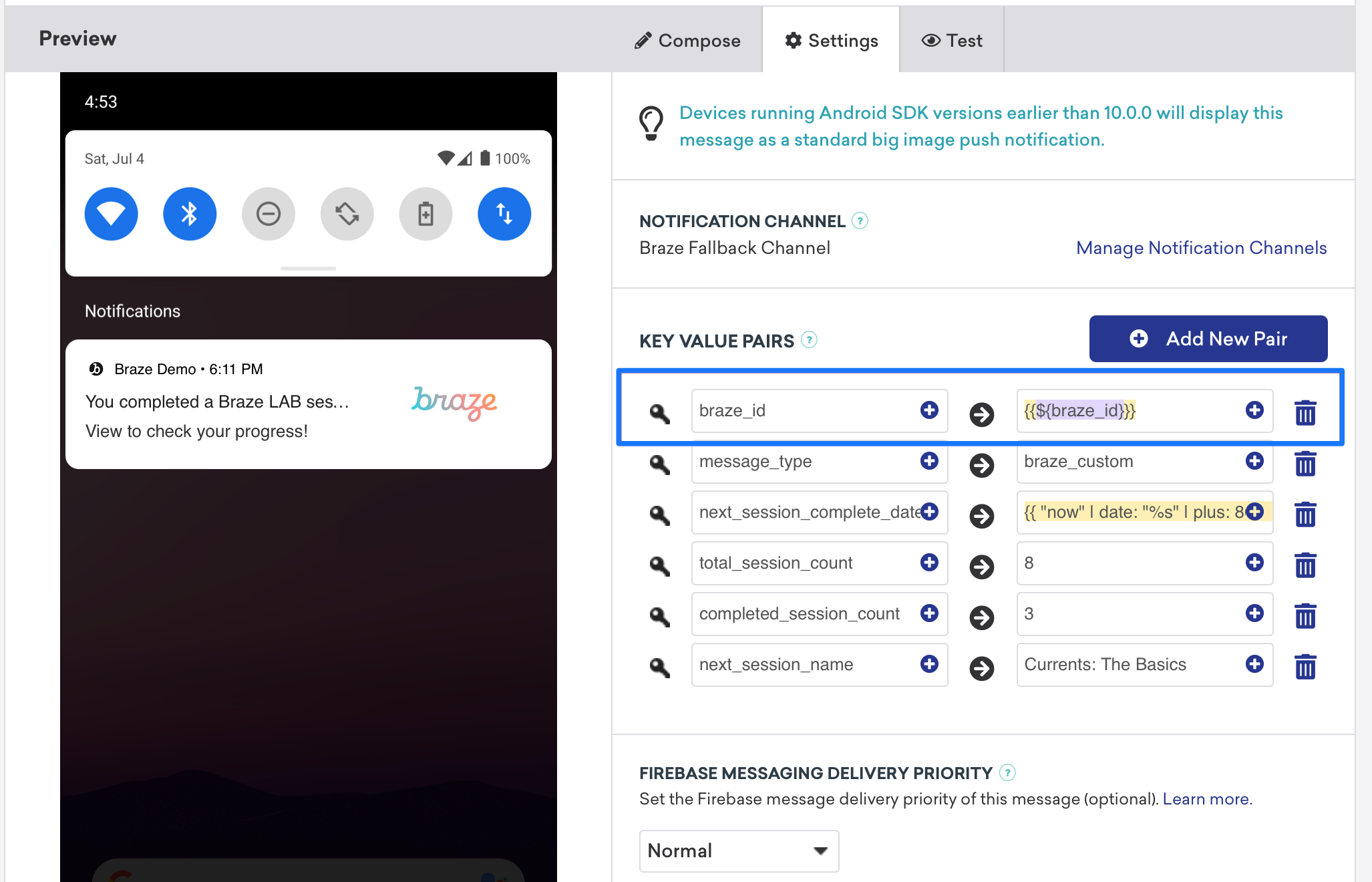
O registro de análise de dados pode ser feito em tempo real com a ajuda do endpoint /users/track da API da Braze. Para registrar análises de dados, envie o valor braze_id no campo de pares de chave-valor (conforme mostrado na captura de tela a seguir) para identificar qual perfil de usuário deve ser atualizado.

Registro manual de dados
O registro manual exige que você primeiro configure espaços de trabalho no Xcode e, em seguida, crie, salve e recupere análises de dados. Isso requer algum trabalho personalizado de desenvolvimento da sua parte. Os snippets de código a seguir ajudarão a resolver isso.
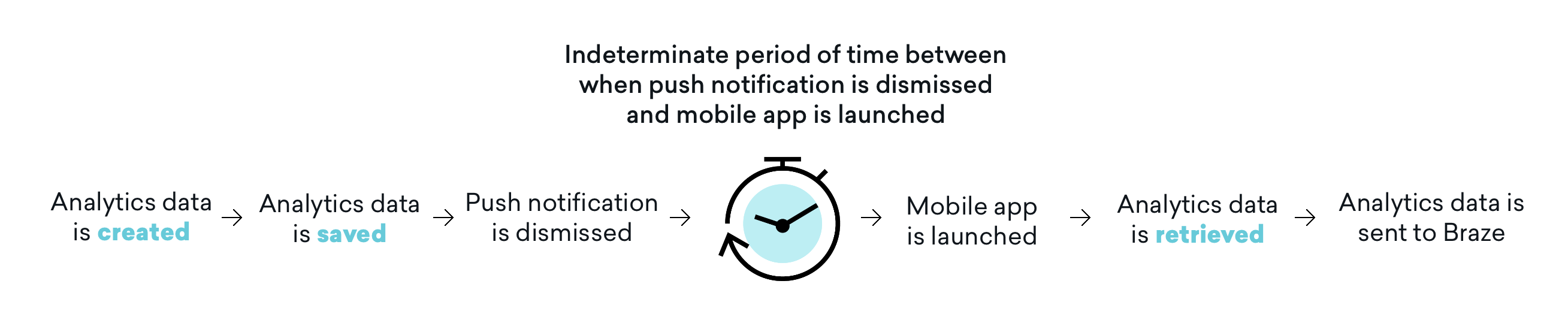
É importante observar que os dados de análise não são enviados para a Braze até que o app seja aberto novamente. Isso significa que, dependendo das suas configurações de dispensa, muitas vezes existe um período indeterminado entre o momento em que uma notificação por push é dispensada e o momento em que o app é aberto e os dados de análise são recuperados. Embora esse intervalo de tempo possa não afetar todos os casos de uso, você deve considerar esse impacto e ajustar a jornada do usuário conforme necessário para incluir a abertura do app e resolver essa questão.
Etapa 1: Configurar grupos de apps no Xcode
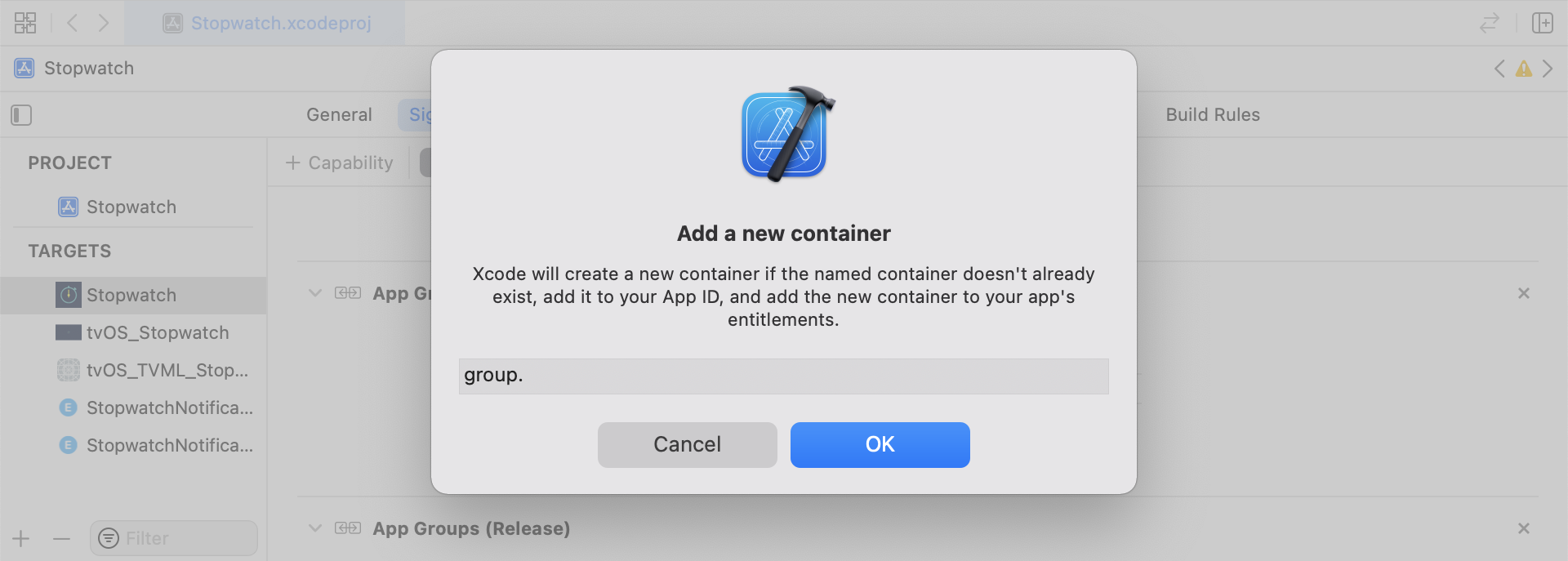
No Xcode, adicione a capacidade App Groups. Se você não tem nenhum espaço de trabalho no seu app, vá até a capacidade do target principal do app, ative App Groups e clique no botão + Adicionar. Em seguida, use o bundle ID do seu app para criar o espaço de trabalho. Por exemplo, se o bundle ID do seu app for com.company.appname, você pode nomear seu espaço de trabalho como group.com.company.appname.xyz. Certifique-se de que App Groups esteja ativado tanto para o target principal do app quanto para o target da extensão de conteúdo.
Etapa 2: Integrar snippets de código
Os snippets de código a seguir são uma referência útil sobre como salvar e enviar eventos personalizados, atributos personalizados e atributos de usuário. Este guia usará termos de UserDefaults, mas a representação do código estará na forma do arquivo auxiliar RemoteStorage. Existem arquivos auxiliares adicionais, UserAttributes e EventName Dictionary, que são usados ao enviar e salvar atributos de usuário.
Salvando eventos personalizados
Para salvar eventos personalizados, você deve criar os dados de análise do zero. Isso é feito criando um dicionário, preenchendo-o com metadados e salvando os dados por meio de um arquivo auxiliar.
- Inicialize um dicionário com metadados do evento
- Inicialize
userDefaultspara recuperar e armazenar os dados do evento - Se já existir um array, adicione os novos dados ao array existente e salve
- Se não existir um array, salve o novo array em
userDefaults
func saveCustomEvent(with properties: [String: Any]? = nil) {
// 1
let customEventDictionary = Dictionary(eventName: "YOUR-EVENT-NAME", properties: properties)
// 2
let remoteStorage = RemoteStorage(storageType: .suite)
// 3
if var pendingEvents = remoteStorage.retrieve(forKey: .pendingCustomEvents) as? [[String: Any]] {
pendingEvents.append(contentsOf: [customEventDictionary])
remoteStorage.store(pendingEvents, forKey: .pendingCustomEvents)
} else {
// 4
remoteStorage.store([customEventDictionary], forKey: .pendingCustomEvents)
}
}
- (void)saveCustomEvent:(NSDictionary<NSString *, id> *)properties {
// 1
NSDictionary<NSString *, id> *customEventDictionary = [[NSDictionary alloc] initWithEventName:@"YOUR-EVENT-NAME" properties:properties];
// 2
RemoteStorage *remoteStorage = [[RemoteStorage alloc] initWithStorageType:StorageTypeSuite];
NSMutableArray *pendingEvents = [[remoteStorage retrieveForKey:RemoteStorageKeyPendingCustomEvents] mutableCopy];
// 3
if (pendingEvents) {
[pendingEvents addObject:customEventDictionary];
[remoteStorage store:pendingEvents forKey:RemoteStorageKeyPendingCustomAttributes];
} else {
// 4
[remoteStorage store:@[ customEventDictionary ] forKey:RemoteStorageKeyPendingCustomAttributes];
}
}
Enviando eventos personalizados para a Braze
O melhor momento para registrar qualquer dado de análise salvo de uma extensão de conteúdo de notificação é logo após a inicialização do SDK. Isso pode ser feito percorrendo todos os eventos pendentes, verificando a chave “Event Name”, definindo os valores apropriados na Braze e, em seguida, limpando o armazenamento para a próxima vez que essa função for necessária.
- Percorra o array de eventos pendentes
- Percorra cada par chave-valor no dicionário
pendingEvents - Verifique explicitamente a chave “Event Name” para definir o valor correspondente
- Todos os outros pares chave-valor serão adicionados ao dicionário
properties - Registre o evento personalizado individual
- Remova todos os eventos pendentes do armazenamento
func logPendingCustomEventsIfNecessary() {
let remoteStorage = RemoteStorage(storageType: .suite)
guard let pendingEvents = remoteStorage.retrieve(forKey: .pendingCustomEvents) as? [[String: Any]] else { return }
// 1
for event in pendingEvents {
var eventName: String?
var properties: [AnyHashable: Any] = [:]
// 2
for (key, value) in event {
if key == PushNotificationKey.eventName.rawValue {
// 3
if let eventNameValue = value as? String {
eventName = eventNameValue
} else {
print("Invalid type for event_name key")
}
} else {
// 4
properties[key] = value
}
}
// 5
if let eventName = eventName {
AppDelegate.braze?.logCustomEvent(eventName, properties: properties)
}
}
// 6
remoteStorage.removeObject(forKey: .pendingCustomEvents)
}
- (void)logPendingEventsIfNecessary {
RemoteStorage *remoteStorage = [[RemoteStorage alloc] initWithStorageType:StorageTypeSuite];
NSArray *pendingEvents = [remoteStorage retrieveForKey:RemoteStorageKeyPendingCustomEvents];
// 1
for (NSDictionary<NSString *, id> *event in pendingEvents) {
NSString *eventName = nil;
NSMutableDictionary *properties = [NSMutableDictionary dictionary];
// 2
for (NSString* key in event) {
if ([key isEqualToString:@"event_name"]) {
// 3
if ([[event objectForKey:key] isKindOfClass:[NSString class]]) {
eventName = [event objectForKey:key];
} else {
NSLog(@"Invalid type for event_name key");
}
} else {
// 4
properties[key] = event[key];
}
}
// 5
if (eventName != nil) {
[AppDelegate.braze logCustomEvent:eventName properties:properties];
}
}
// 6
[remoteStorage removeObjectForKey:RemoteStorageKeyPendingCustomEvents];
}
Salvando atributos personalizados
Para salvar atributos personalizados, você deve criar os dados de análise do zero. Isso é feito criando um dicionário, preenchendo-o com metadados e salvando os dados por meio de um arquivo auxiliar.
- Inicialize um dicionário com metadados do atributo
- Inicialize
userDefaultspara recuperar e armazenar os dados do atributo - Se já existir um array, adicione os novos dados ao array existente e salve
- Se não existir um array, salve o novo array em
userDefaults
func saveCustomAttribute() {
// 1
let customAttributeDictionary: [String: Any] = ["YOUR-CUSTOM-ATTRIBUTE-KEY": "YOUR-CUSTOM-ATTRIBUTE-VALUE"]
// 2
let remoteStorage = RemoteStorage(storageType: .suite)
// 3
if var pendingAttributes = remoteStorage.retrieve(forKey: .pendingCustomAttributes) as? [[String: Any]] {
pendingAttributes.append(contentsOf: [customAttributeDictionary])
remoteStorage.store(pendingAttributes, forKey: .pendingCustomAttributes)
} else {
// 4
remoteStorage.store([customAttributeDictionary], forKey: .pendingCustomAttributes)
}
}
- (void)saveCustomAttribute {
// 1
NSDictionary<NSString *, id> *customAttributeDictionary = @{ @"YOUR-CUSTOM-ATTRIBUTE-KEY": @"YOUR-CUSTOM-ATTRIBUTE-VALUE" };
// 2
RemoteStorage *remoteStorage = [[RemoteStorage alloc] initWithStorageType:StorageTypeSuite];
NSMutableArray *pendingAttributes = [[remoteStorage retrieveForKey:RemoteStorageKeyPendingCustomAttributes] mutableCopy];
// 3
if (pendingAttributes) {
[pendingAttributes addObject:customAttributeDictionary];
[remoteStorage store:pendingAttributes forKey:RemoteStorageKeyPendingCustomAttributes];
} else {
// 4
[remoteStorage store:@[ customAttributeDictionary ] forKey:RemoteStorageKeyPendingCustomAttributes];
}
}
Enviando atributos personalizados para a Braze
O melhor momento para registrar qualquer dado de análise salvo de uma extensão de conteúdo de notificação é logo após a inicialização do SDK. Isso pode ser feito percorrendo os atributos pendentes, definindo o atributo personalizado apropriado na Braze e, em seguida, limpando o armazenamento para a próxima vez que essa função for necessária.
- Percorra o array de atributos pendentes
- Percorra cada par chave-valor no dicionário
pendingAttributes - Registre atributos personalizados individuais com a chave e o valor correspondentes
- Remova todos os atributos pendentes do armazenamento
func logPendingCustomAttributesIfNecessary() {
let remoteStorage = RemoteStorage(storageType: .suite)
guard let pendingAttributes = remoteStorage.retrieve(forKey: .pendingCustomAttributes) as? [[String: Any]] else { return }
// 1
pendingAttributes.forEach { setCustomAttributesWith(keysAndValues: $0) }
// 4
remoteStorage.removeObject(forKey: .pendingCustomAttributes)
}
func setCustomAttributesWith(keysAndValues: [String: Any]) {
// 2
for (key, value) in keysAndValues {
// 3
if let value = value as? [String] {
setCustomAttributeArrayWithKey(key, andValue: value)
} else {
setCustomAttributeWithKey(key, andValue: value)
}
}
}
- (void)logPendingCustomAttributesIfNecessary {
RemoteStorage *remoteStorage = [[RemoteStorage alloc] initWithStorageType:StorageTypeSuite];
NSArray *pendingAttributes = [remoteStorage retrieveForKey:RemoteStorageKeyPendingCustomAttributes];
// 1
for (NSDictionary<NSString*, id> *attribute in pendingAttributes) {
[self setCustomAttributeWith:attribute];
}
// 4
[remoteStorage removeObjectForKey:RemoteStorageKeyPendingCustomAttributes];
}
- (void)setCustomAttributeWith:(NSDictionary<NSString *, id> *)keysAndValues {
// 2
for (NSString *key in keysAndValues) {
// 3
[self setCustomAttributeWith:key andValue:[keysAndValues objectForKey:key]];
}
}
Salvando atributos de usuário
Ao salvar atributos de usuário, recomendamos criar um objeto personalizado para identificar qual tipo de atributo está sendo atualizado (email, first_name, phone_number, etc.). O objeto deve ser compatível com armazenamento/recuperação a partir de UserDefaults. Consulte o arquivo auxiliar UserAttribute para ver um exemplo de como fazer isso.
- Inicialize um objeto
UserAttributecodificado com o tipo correspondente - Inicialize
userDefaultspara recuperar e armazenar os dados do evento - Se já existir um array, adicione os novos dados ao array existente e salve
- Se não existir um array, salve o novo array em
userDefaults
func saveUserAttribute() {
// 1
guard let data = try? PropertyListEncoder().encode(UserAttribute.userAttributeType("USER-ATTRIBUTE-VALUE")) else { return }
// 2
let remoteStorage = RemoteStorage(storageType: .suite)
// 3
if var pendingAttributes = remoteStorage.retrieve(forKey: .pendingUserAttributes) as? [Data] {
pendingAttributes.append(contentsOf: [data])
remoteStorage.store(pendingAttributes, forKey: .pendingUserAttributes)
} else {
// 4
remoteStorage.store([data], forKey: .pendingUserAttributes)
}
}
- (void)saveUserAttribute {
// 1
UserAttribute *userAttribute = [[UserAttribute alloc] initWithUserField:@"USER-ATTRIBUTE-VALUE" attributeType:UserAttributeTypeEmail];
NSError *error;
NSData *data = [NSKeyedArchiver archivedDataWithRootObject:userAttribute requiringSecureCoding:YES error:&error];
if (error != nil) {
// log error
}
// 2
RemoteStorage *remoteStorage = [[RemoteStorage alloc] initWithStorageType:StorageTypeSuite];
NSMutableArray *pendingAttributes = [[remoteStorage retrieveForKey:RemoteStorageKeyPendingUserAttributes] mutableCopy];
// 3
if (pendingAttributes) {
[pendingAttributes addObject:data];
[remoteStorage store:pendingAttributes forKey:RemoteStorageKeyPendingUserAttributes];
} else {
// 4
[remoteStorage store:@[data] forKey:RemoteStorageKeyPendingUserAttributes];
}
}
Enviando atributos de usuário para a Braze
O melhor momento para registrar qualquer dado de análise salvo de uma extensão de conteúdo de notificação é logo após a inicialização do SDK. Isso pode ser feito percorrendo os atributos pendentes, definindo o atributo personalizado apropriado na Braze e, em seguida, limpando o armazenamento para a próxima vez que essa função for necessária.
- Percorra o array de dados de
pendingAttributes - Inicialize um objeto
UserAttributecodificado a partir dos dados do atributo - Defina o campo de usuário específico com base no tipo de atributo de usuário (e-mail)
- Remova todos os atributos de usuário pendentes do armazenamento
func logPendingUserAttributesIfNecessary() {
let remoteStorage = RemoteStorage(storageType: .suite)
guard let pendingAttributes = remoteStorage.retrieve(forKey: .pendingUserAttributes) as? [Data] else { return }
// 1
for attributeData in pendingAttributes {
// 2
guard let userAttribute = try? PropertyListDecoder().decode(UserAttribute.self, from: attributeData) else { continue }
// 3
switch userAttribute {
case .email(let email):
user?.email = email
}
}
// 4
remoteStorage.removeObject(forKey: .pendingUserAttributes)
}
- (void)logPendingUserAttributesIfNecessary {
RemoteStorage *remoteStorage = [[RemoteStorage alloc] initWithStorageType:StorageTypeSuite];
NSArray *pendingAttributes = [remoteStorage retrieveForKey:RemoteStorageKeyPendingUserAttributes];
// 1
for (NSData *attributeData in pendingAttributes) {
NSError *error;
// 2
UserAttribute *userAttribute = [NSKeyedUnarchiver unarchivedObjectOfClass:[UserAttribute class] fromData:attributeData error:&error];
if (error != nil) {
// log error
}
// 3
if (userAttribute) {
switch (userAttribute.attributeType) {
case UserAttributeTypeEmail:
[self user].email = userAttribute.userField;
break;
}
}
}
// 4
[remoteStorage removeObjectForKey:RemoteStorageKeyPendingUserAttributes];
}
Arquivos auxiliares
Arquivo auxiliar RemoteStorage
enum RemoteStorageKey: String, CaseIterable {
// MARK: - Notification Content Extension Analytics
case pendingCustomEvents = "pending_custom_events"
case pendingCustomAttributes = "pending_custom_attributes"
case pendingUserAttributes = "pending_user_attributes"
}
enum RemoteStorageType {
case standard
case suite
}
class RemoteStorage: NSObject {
private var storageType: RemoteStorageType = .standard
private lazy var defaults: UserDefaults = {
switch storageType {
case .standard:
return .standard
case .suite:
return UserDefaults(suiteName: "YOUR-DOMAIN-IDENTIFIER")!
}
}()
init(storageType: RemoteStorageType = .standard) {
self.storageType = storageType
}
func store(_ value: Any, forKey key: RemoteStorageKey) {
defaults.set(value, forKey: key.rawValue)
}
func retrieve(forKey key: RemoteStorageKey) -> Any? {
return defaults.object(forKey: key.rawValue)
}
func removeObject(forKey key: RemoteStorageKey) {
defaults.removeObject(forKey: key.rawValue)
}
func resetStorageKeys() {
for key in RemoteStorageKey.allCases {
defaults.removeObject(forKey: key.rawValue)
}
}
}
@interface RemoteStorage ()
@property (nonatomic) StorageType storageType;
@property (nonatomic, strong) NSUserDefaults *defaults;
@end
@implementation RemoteStorage
- (id)initWithStorageType:(StorageType)storageType {
if (self = [super init]) {
self.storageType = storageType;
}
return self;
}
- (void)store:(id)value forKey:(RemoteStorageKey)key {
[[self defaults] setValue:value forKey:[self rawValueForKey:key]];
}
- (id)retrieveForKey:(RemoteStorageKey)key {
return [[self defaults] objectForKey:[self rawValueForKey:key]];
}
- (void)removeObjectForKey:(RemoteStorageKey)key {
[[self defaults] removeObjectForKey:[self rawValueForKey:key]];
}
- (void)resetStorageKeys {
[[self defaults] removeObjectForKey:[self rawValueForKey:RemoteStorageKeyPendingCustomEvents]];
[[self defaults] removeObjectForKey:[self rawValueForKey:RemoteStorageKeyPendingCustomAttributes]];
[[self defaults] removeObjectForKey:[self rawValueForKey:RemoteStorageKeyPendingUserAttributes]];
}
- (NSUserDefaults *)defaults {
if (!self.defaults) {
switch (self.storageType) {
case StorageTypeStandard:
return [NSUserDefaults standardUserDefaults];
break;
case StorageTypeSuite:
return [[NSUserDefaults alloc] initWithSuiteName:@"YOUR-DOMAIN-IDENTIFIER"];
}
} else {
return self.defaults;
}
}
- (NSString*)rawValueForKey:(RemoteStorageKey)remoteStorageKey {
switch(remoteStorageKey) {
case RemoteStorageKeyPendingCustomEvents:
return @"pending_custom_events";
case RemoteStorageKeyPendingCustomAttributes:
return @"pending_custom_attributes";
case RemoteStorageKeyPendingUserAttributes:
return @"pending_user_attributes";
default:
[NSException raise:NSGenericException format:@"Unexpected FormatType."];
}
}
Arquivo auxiliar UserAttribute
enum UserAttribute: Hashable {
case email(String?)
}
// MARK: - Codable
extension UserAttribute: Codable {
private enum CodingKeys: String, CodingKey {
case email
}
func encode(to encoder: Encoder) throws {
var values = encoder.container(keyedBy: CodingKeys.self)
switch self {
case .email(let email):
try values.encode(email, forKey: .email)
}
}
init(from decoder: Decoder) throws {
let values = try decoder.container(keyedBy: CodingKeys.self)
let email = try values.decode(String.self, forKey: .email)
self = .email(email)
}
}
@implementation UserAttribute
- (id)initWithUserField:(NSString *)userField attributeType:(UserAttributeType)attributeType {
if (self = [super init]) {
self.userField = userField;
self.attributeType = attributeType;
}
return self;
}
- (void)encodeWithCoder:(NSCoder *)encoder {
[encoder encodeObject:self.userField forKey:@"userField"];
[encoder encodeInteger:self.attributeType forKey:@"attributeType"];
}
- (id)initWithCoder:(NSCoder *)decoder {
if (self = [super init]) {
self.userField = [decoder decodeObjectForKey:@"userField"];
NSInteger attributeRawValue = [decoder decodeIntegerForKey:@"attributeType"];
self.attributeType = (UserAttributeType) attributeRawValue;
}
return self;
}
@end
Arquivo auxiliar EventName Dictionary
extension Dictionary where Key == String, Value == Any {
init(eventName: String, properties: [String: Any]? = nil) {
self.init()
self[PushNotificationKey.eventName.rawValue] = eventName
if let properties = properties {
for (key, value) in properties {
self[key] = value
}
}
}
}
@implementation NSDictionary (Helper)
- (id)initWithEventName:(NSString *)eventName properties:(NSDictionary *)properties {
self = [self init];
if (self) {
dict[@"event_name"] = eventName;
for(id key in properties) {
dict[key] = properties[key];
}
}
return self;
}
@end