What’s new in Braze
For more information on any of the updates listed on this page, contact your account manager or open a support ticket. Check out our SDK Changelogs for more information about our monthly SDK releases, improvements, and breaking changes.
April 2, 2026
April 2, 2026 release
Data & Reporting
New Banner channel fields in Currents and Datashare events
Braze added fields for existing Banner channel events in Currents and Datashare exports. For a list of these event and field updates, see Changes in Version 7.
Mixpanel EU and India data center support for Currents
The Currents Mixpanel integration now supports Mixpanel’s EU and India data centers. When you configure a Mixpanel integration, you can choose which Mixpanel region Braze sends your data to. This update supports Mixpanel’s growing international footprint for mutual customers. For more information, see Mixpanel.
Reusable Cloud Data Ingestion (CDI) sources and syncs
Early access
Cloud Data Ingestion (CDI) has a new design that separates sources and syncs, so you can reuse one source across multiple syncs. Existing syncs migrate automatically to the new sources and syncs model with no downtime. Go to Cloud Data Ingestion > Sources to view, edit, or create sources, then select a source from the dropdown when creating a sync. This change reduces repetitive setup, and creates a foundation for future enhancements. For more information, see Setting up data warehouse integrations.
BrazeAITM
File support tickets from BrazeAI OperatorTM
General availability
BrazeAI Operator now includes a flow to file Braze support tickets without leaving the dashboard. For steps, auto-included context, and tips for faster resolution, see File support tickets with BrazeAI Operator.
Orchestration
Multi-language translations
General availability
After adding locales to your workspace, use multi-language translations to target users in different languages all within a single push, email, Banner, in-app message, or Content Block.

Canvas Context enhancements
General availability
In Canvas, you can now reference context variables to set:
- An expiration for Banners and in-app messages in a Message step
- A personalized delays for Action Paths steps
In the Context variable name field, you can also enter the context variable name or select it from the dropdown in the step editor. For more details, see Context and Context variables.
Channels & Touchpoints
KakaoTalk
General availability
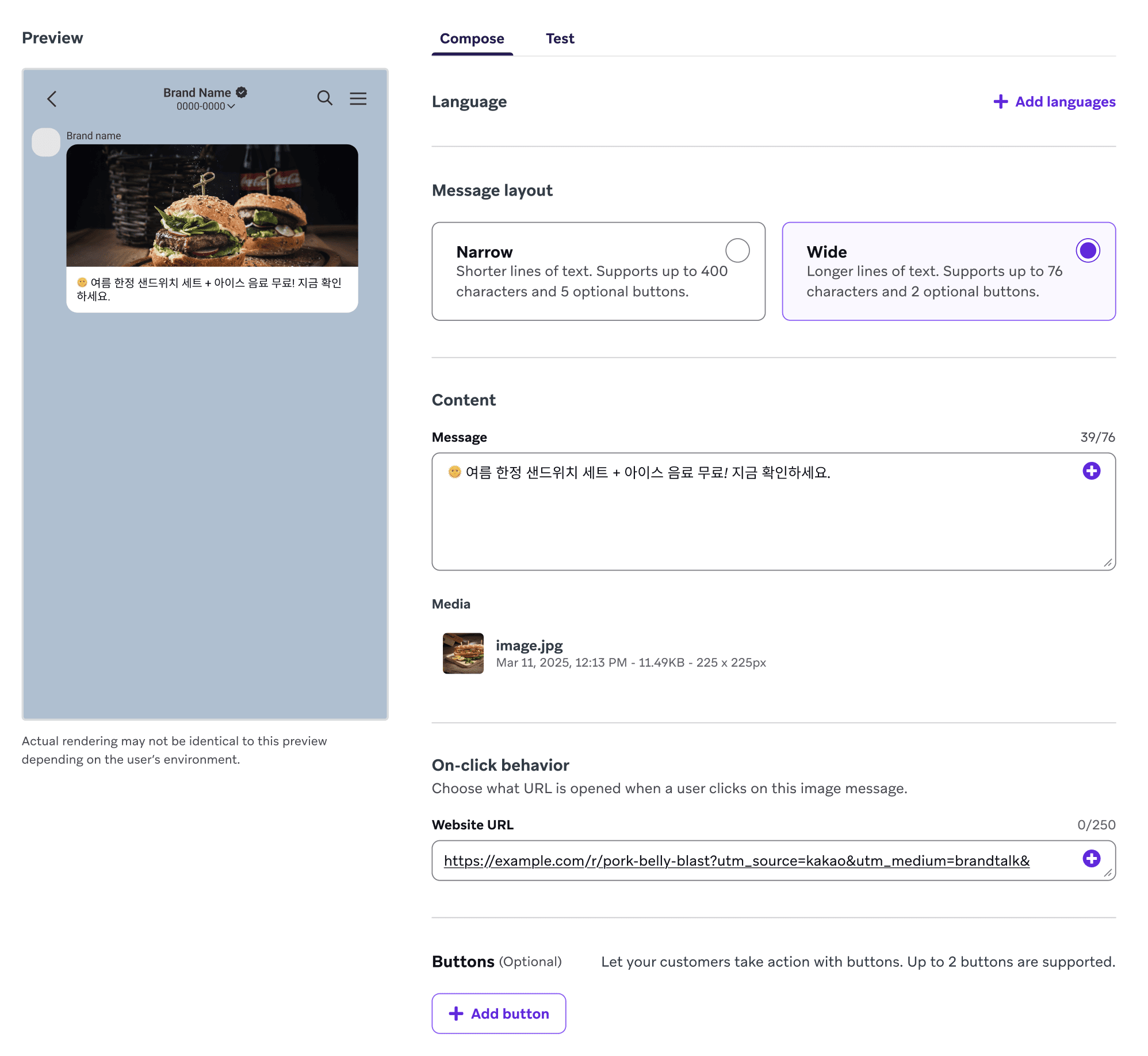
KakaoTalk is a messaging channel that enables broadcast messaging and 1:1 chat with users. Create a personalized user experience by using Liquid and other dynamic content to build an environment that fosters and enhances a rich user experience with your brand.
Banners in Canvas
General availability
You can use Banners as a messaging channel in Canvas Message steps. Banners allow you to personalize app or website content dynamically, reflecting real-time user eligibility and behavior.
Partnerships
CataBoom - Message Personalization - Visual and Interactive Content
CataBoom is a gamification platform. Brands use it to build and launch interactive digital experiences, including spin-to-win games, quizzes, and instant-win games. Those experiences deepen engagement and collect first-party data.
Denada - Message Orchestration - Templates
Denada is an AI-powered marketing creative platform that lets subject matter experts create on-brand marketing materials through natural conversation. With Denada, teams can go from ideation to finished email content without needing design expertise.
Poq - eCommerce - Mobile app platform
Poq enables enterprise businesses to rapidly launch, manage, and scale fully native iOS and Android apps—delivering high-performance mobile experiences that drive commerce and bring your brand promise to life.
The Trade Desk – Canvas Audience Sync
Using the Braze Audience Sync to The Trade Desk, you can dynamically sync your first-party user data from Braze directly into The Trade Desk for ad retargeting, lookalike modeling, and suppression.
SDK
Connect your Integrated Development Environment (IDE) to the Docs MCP
Use AI coding assistants to accelerate your Braze integration workflow by connecting your Integrated Development Environment (IDE) to the Braze Docs MCP through Context7. This gives your assistant direct access to current Braze documentation, so it can generate more accurate SDK guidance, code examples, and troubleshooting help in your development environment. For setup steps in Cursor, Claude Desktop, and VS Code, see Building with an LLM.
SDK breaking updates
The following SDK updates have been released. Breaking updates are listed below; all other updates can be found by checking the corresponding SDK changelogs.
- Cordova 15.0.0
- Updated the native Android bridge from Braze Android SDK 39.0.0 to 41.1.1.
- Updated the native iOS bridge from Braze Swift SDK 13.2.0 to 14.0.1.
- Fixes an issue with
subscribeToInAppMessageinvolving the success callback.
- Roku SDK 2.2.1
- Fixes a crash when processing a failed HTTP request for templated in-app messages while the device has intermittent or no connectivity.
- Web SDK 6.6.0
- Adds the
cookieExpiryInDaysinitialization option to configure cookie duration from the default of 400 days.
- Adds the
- Flutter SDK 18.0.0
- Adds delayed initialization support.
- Streamlines the iOS integration process to not require writing native code to forward Content Cards, Banners, feature flags, in-app messages, or push notification updates from the native SDK.
- The SDK will now automatically set up these subscriptions when the Braze instance is created.
- This matches the existing behavior on Android.
- To migrate, remove any manual calls to
braze.contentCards.subscribeToUpdates(),braze.banners.subscribeToUpdates(),braze.notifications.subscribeToUpdates,braze.featureFlags.subscribeToUpdatesandbraze.inAppMessagePresenterin theAppDelegate. - By default, in-app messages will be presented. To override this, set a custom in-app message presenter using the
postInitializationclosure inBrazePlugin.configure(_:postInitialization:).
- Swift SDK 14.0.4
- Fixes a bug with push automation on SDK re-initialization.
- Fixes an issue where invalid images in push stories were not filtered out.
- Swift SDK 14.0.3
March 5, 2026
March 5, 2026 release
Data & Reporting
New data center
General availability
Braze has launched a new data center: JP-01. You can sign up for region-specific data centers when setting up your Braze account.
Context variables
General availability
Context variables are temporary pieces of data you can create and use within a user’s journey through a specific Canvas. Each time a user enters the Canvas—even if they have entered it before—the context variables will be redefined based on the latest entry data and Canvas setup. This approach allows each Canvas entry to maintain its own independent context, allowing users to have multiple active states within the same journey while retaining the specific context for each state.
Cloud Data Ingestion sources
Early access
Cloud Data Ingestion has a new UI that separates sources from syncs, letting you reuse a single source across any number of syncs. This reduces duplicate configuration and simplifies setup when you have multiple syncs. If you have existing syncs, they’re automatically migrated to the new sources-and-syncs structure with no downtime. To get started, go to Cloud Data Ingestion > Sources to view, edit, or create sources, then select a source from the dropdown when creating a sync.
Additional fields for Currents and Data Share events
General availability
Currents and Data Share events now include the following new fields to deepen the data available for analytics and downstream systems:
agentconsole.AgentExecuted: Addederror(string)—a description of any error that occurred.agentconsole.ToolInvocation: Addedrequest_id(string)—a unique ID for the overall LLM request and complete execution.users.messages.rcs.InboundReceive: Addedcanvas_variation_name(string)—the name of the Canvas variation the user received.
Campaign and Canvas fields for Snowflake Data Share
General availability
Snowflake Data Share now includes additional fields reflecting Campaign and Canvas information across 66 existing tables, including:
campaign_namecanvas_namecanvas_step_namecanvas_variation_namemessage_variation_nameconversion_behaviorexperiment_split_name
CSV pre-import validation and error reporting
General availability
CSV user imports now support pre-import validation and detailed error reporting. Before importing, select Validate file before importing on the Import Users page—Braze will scan your file and generate a report identifying rows that will fail entirely (errors) and rows that will succeed with some values skipped (warnings). You can download the report, fix your CSV, and re-upload, or proceed as-is. After the import completes, a downloadable report of any rows that failed is also available, with the exact reason for each issue.
Messaging diagnostics dashboard
Early access
The Messaging Diagnostics dashboard provides a high-level breakdown of message sending outcomes, allowing you to spot trends and diagnose potential issues in your messaging setup. This dashboard can help you understand why messages from your campaigns or Canvases may not have been sent as expected.
BrazeAITM
Braze Agents in Agent Console
General availability
Braze Agents are AI-powered helpers you can create inside Braze. Agents can generate content, make intelligent decisions, and enrich your data so you can deliver more personalized customer experiences. When you create an agent, you define its purpose and set guardrails for how it should behave. After it’s live, the agent can be deployed in Braze to generate personalized copy, make real-time decisions, or update catalog fields.
Orchestration
Granular user permissions
Early access
Braze is introducing granular permissions, a more flexible way to manage user access. Refer to Migrating to granular permissions to learn about the migration process, including how legacy permissions map to granular permissions.
Channel-based rate limiting
General availability
When setting a delivery speed rate limit for a multi-channel campaign or Canvas, you can choose to set either a shared rate limit or a channel-based limit. When a multichannel campaign or Canvas uses channel-based rate limiting, the rate limit applies to each of the selected channels. For example, you can set your campaign or Canvas to send a maximum of 5,000 webhooks and 2,500 SMS messages per minute across the campaign or Canvas.
Canvas Context step
General availability
Canvas Context steps let you create and update one or more variables for a user as they move through a Canvas. For example, if you have a Canvas that manages seasonal discounts, you can use a context variable to store a different discount code each time a user enters the Canvas.
Channels & Touchpoints
Translate locales in Content Blocks
Early access
After adding locales to your workspace, you can target users in different languages all within a Content Block.
Partnerships
Algolia - Search Recommendations
Algolia is a search and discovery platform that helps developers build fast, relevant, and scalable search experiences. With a powerful API-first approach, Algolia combines advanced ranking algorithms with AI-driven insights for seamless site search, navigation, and personalized content discovery.
Anthropic - AI Model Provider
Anthropic is an AI safety and research company developing Claude, a next-generation AI assistant built to be helpful, honest, and safe for a wide range of language tasks.
Canva - Message Personalization - Creative Studio
Canva syncs your images in Canva directly to the Braze Media library, streamlining your creative workflow and keeping your visual assets up to date across all your messaging channels.
DOTS.ECO - Rewards
DOTS.ECO lets you reward users with real-world environmental impact through trackable digital certificates. Each certificate can include metadata like a shareable certificate URL and image URL, so users can view (and revisit) their proof of impact.
Figma - Message Personalization - Creative Studio
Figma is a collaborative design platform that allows you to build, design, and prototype products. Use this integration to send images and visual assets from Figma directly into the Braze media library.
Flybuy - Message Personalization - Location
Flybuy by Radius Networks is the leading omnichannel location platform leveraging AI-powered technology to optimize speed of service across pickup, delivery, drive-thru, and dine-in. Through its integrated Marketing Suite, Flybuy also enables brands to deliver hyper-targeted, moment-based messages, helping to drive engagement, increase check size, and support broader loyalty initiatives.
Google Gemini - AI Model Provider
Google Gemini is Google’s family of AI models that combines advanced reasoning across text, code, and images to help brands deliver smarter, more personalized experiences.
Limbik - Message Personalization - Personalization Engines
Limbik is your AI resonance layer—predicting how real audiences interpret and respond to messages, concepts, and AI outputs before they reach the market. Powered by continuous primary research across 60+ countries and 25+ languages, Limbik delivers human-validated synthetic audiences—digital populations that simulate real audience response at machine speed and with research-grade accuracy (95% confidence, 1.5% to 3% margin of error). Limbik gives you the ability to immediately ensure your messaging resonates with what your target audience believes and feels.
Linkrunner - Message Orchestration - Attribution
Linkrunner is a mobile attribution and analytics platform that helps you track and analyze your user acquisition campaigns.
Mailizio - Message Orchestration - Templates
Mailizio is an email creation and management platform that makes it easy to design reusable, brand-safe content using an intuitive visual editor. With Mailizio’s integration to Braze, you can export your content blocks and email templates, then automatically generate in-app messages from those same assets, enabling fast and fully controlled campaign deployment.
Open Loyalty - Data and Analytics - Loyalty
Open Loyalty is a cloud-based loyalty program platform that lets you build and manage customer loyalty and rewards programs. The Braze and Open Loyalty integration syncs loyalty data—such as points balance, tier changes, and expiry warnings—directly into Braze in real-time. This lets you trigger personalized messages (Email, Push, SMS) when a user’s loyalty status changes.
OpenAI - AI Model Provider
OpenAI creates advanced AI models, like GPT, that enable natural language understanding and generation, empowering brands to build and scale meaningful customer interactions.
Shopgate - Channels
Shopgate is a mobile commerce and omnichannel platform that helps merchants create shopping apps and improve the efficiency of brick-and-mortar stores through fulfillment tools and clienteling, meaning personalized in-store customer support based on customer data.
Splio - Data and Analytics - Cohort Import
Splio is an audience-building tool that lets you increase the number of campaigns and revenue without harming customer experience, and provides analytics to track the performance of CRM campaigns both online and offline.
SDK
SDK breaking updates
The following SDK updates have been released. Breaking updates are listed below; all other updates can be found by checking the corresponding SDK changelogs.
- Android SDK 41.1.1
- Flutter SDK 17.1.0
- Swift SDK 14.0.2
- Xamarin SDK 9.0.0
- Updated the Android binding from Braze Android SDK 37.0.0 to 41.0.0.
- Updated the iOS binding from Braze Swift SDK 13.3.0 to 14.0.1.
- Added new transitive NuGet dependencies required by the Braze Android SDK:
- Xamarin.AndroidX.DataStore.Preferences (1.1.7.1)
- Xamarin.KotlinX.Serialization.Json.Jvm (1.9.0.2)
- Xamarin.Kotlin.StdLib has been updated from 2.0.21.3 to 2.3.0.1. If your project explicitly pins this package to an older version, you will need to update it to avoid restore errors.
- Removed the News Feed feature.
- The BRZInAppMessageDismissalReason.BRZInAppMessageDismissalReasonWipeData enum case has been renamed to BRZInAppMessageDismissalReason.WipeData.
- Expo Plugin 4.0.0
- This version requires 19.0.0 of the Braze React Native SDK.
- (Android) Fixed a memory leak in the data persistence layer.
- (Android) Added support for Braze.getInitialPushPayload() to handle push notification deep links when the app is launched from a terminated state. This resolves an issue where deep links from push notifications were not handled on Android when the app was cold started.
- React Native SDK 19.0.0
- Updates the native Swift SDK version bindings from Braze Swift SDK 13.3.0 to 14.0.1.
- Updates the native Android SDK version bindings from Braze Android SDK 40.0.2 to 41.0.0.
February 5, 2026
February 5, 2026 release
BrazeAITM
Content Optimizer
Beta
Content Optimizer is a continuous, high-variant content testing Canvas step that delivers automated engagement optimization. Using a drag-and-droppable interface similar to the message step, define the components to test, generate variants using AI (or enter them manually), and use Liquid tags to map these components to your message content.
Built on a non-contextual multi-armed bandit optimizer, Content Optimizer sends a single message per user, determining which combination of component variants to deliver based on predictive recommendations. As the step gathers data over time, high-performing variants naturally increase in send allocation while poor-performing variants decrease. Content Optimizer works best with repeated-send Canvases that have consistent daily user volume (at least a few thousand users per day) to enable continuous optimization.
Data & Reporting
eCommerce recommended events
Early access
To match eCommerce recommended events with the existing purchase event, we added the “Places Order” conversion event, which is similar to “Makes Purchase”.
Channels & Touchpoints
Translate locales in banners
Early access
After adding locales to your workspace, target users in different languages all within a single banner.
Configure width for drag-and-drop Content Blocks
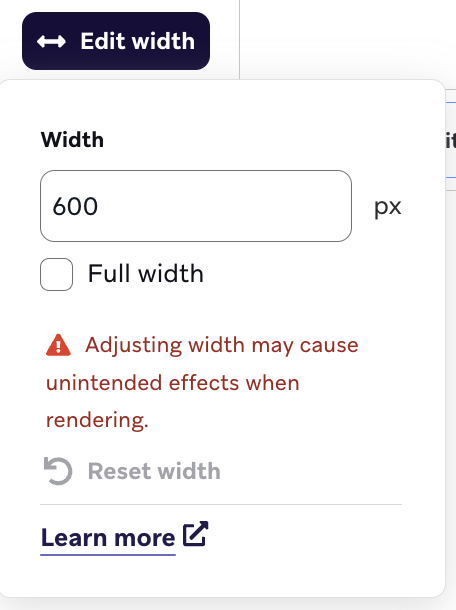
Adjust the width of your Content Block by selecting the button in the navigation menu. The default width is 100% when not specified in your email global style settings; otherwise, the global settings will be honored.
Use automated IP warming
Early access
Use automated IP warming to gradually increase your daily send volume, allowing inbox providers to learn and trust your sending patterns. Braze sends to your most engaged subscribers first, which allows daily volume to grow at a pace that matches best practices.
Partnerships
LinkedIn – Canvas Audience Sync
Using the Braze Audience Sync to LinkedIn, add user data from your Braze integration to LinkedIn customer lists to deliver advertisements based on behavioral triggers, segmentation, and more. Any criteria normally used to trigger a message (such as push, email, SMS, and webhook) in a Braze Canvas based on user data can now trigger an ad to that user in your LinkedIn customer lists.
Oracle Crowdtwist - Data & analytics
Oracle Crowdtwist is a leading cloud-native customer loyalty solution to empower brands to offer personalized customer experiences. Their solution offers over 100 out-of-the-box engagement paths, providing rapid time-to-value for marketers to develop a more complete view of the customer.
Fullstory - Dynamic Content
Fullstory’s behavioral data platform helps technology leaders make better, more informed decisions. By injecting digital behavioral data into their analytics stack, Fullstory’s patented technology unlocks the power of quality behavioral data at scale–transforming every digital visit into actionable insights.
Open Loyalty - Data & analytics
Open Loyalty is a cloud-based loyalty program platform that lets you build and manage customer loyalty and rewards programs. The Braze and Open Loyalty integration syncs loyalty data—such as points balance, tier changes, and expiry warnings—directly into Braze in real-time. This lets you trigger personalized messages (Email, Push, SMS) when a user’s loyalty status changes.
DOTS.ECO - Extensions
DOTS.ECO lets you reward users with real-world environmental impact through trackable digital certificates. Each certificate can include metadata like a shareable certificate URL and image URL, so users can view (and revisit) their proof of impact.
Mailizio - Message orchestration
Mailizio is an email creation and management platform that makes it easy to design reusable, brand-safe content using an intuitive visual editor. With Mailizio’s integration to Braze, export your content blocks and email templates, then automatically generate in-app messages from those same assets, enabling fast and fully controlled campaign deployment.
APIs
Media Library POST APIs
General availability
Media Library assets can now be added via API, enabling customers, partners, and agencies to automate more of their message creation workflows. Use the API to upload an asset file directly or copy a file from an existing URL. This feature unlocks integration and automation capabilities.
Currents and Datashare
Agent Console Events for Storage destinations and Datashare
General availability
Two new events are now available for Storage destinations (AWS S3, GCS, and Azure Blob Storage) and Snowflake Datashare: agentconsole.AgentExecuted and agentconsole.ToolInvocation. These events enable you to analyze Agent Console usage and details in your downstream systems, helping you understand and get the most out of your agent usage. Agents allow you to create and deploy intelligent agents that can perform specific tasks across Braze, including generating content in canvases or catalogs and routing users down different paths based on intelligent decisioning. For more information, see the Currents changelog.
New ‘Retry’ events for individual channels
General availability
New retry events are now available for email, LINE, push notifications, SMS, webhooks, and WhatsApp channels. These events provide visibility into when frequency capping results in a scheduled message being delayed rather than aborted. When a message is deprioritized or frequency capped, it can now be retried within a configured retry window, giving you better insight into message delivery patterns and frequency capping impacts. For more information, see the Currents changelog.
Add new ‘time_ms’ field to TokenStateChange event
General availability
A new time_ms field has been added to the users.behaviors.pushnotification.TokenStateChange event, providing millisecond-level granularity for tracking push token state changes. This enhanced precision helps you understand the latest status of a push token when multiple changes occur within the same second, giving you confidence in downstream systems that you have the correct subscription status. For more information, see the Currents changelog.
Send Anonymous user to Tealium Destinations
General availability
Events that do not have an external user ID defined can now be streamed to Tealium destinations. When you select the “Include events from anonymous users” checkbox on your Currents integration, events without an external user ID will be sent to the destination instead of being suppressed. This capability is critical for downstream analytics and use cases involving non-identified and anonymous users.
Send Anonymous user to CustomHTTP Destinations
Beta
Events that do not have an external user ID defined can now be streamed to CustomHTTP destinations. When you select the “Include events from anonymous users” checkbox on your Currents integration, events without an external user ID will be sent to the destination instead of being suppressed. This capability is critical for downstream analytics and use cases involving non-identified and anonymous users.
Email Open event — “machine_open” field
The Email Open event now generates the “machine_open” field value to report on the Machine Open metric.
SDK
The following SDK updates have been released. Swift SDK v14.0.1 fixes an issue with the handling of universal links. Android SDK v40.2.0 fixes a potential memory leak and resolves an issue with multiple sessions being opened when transparent activities are present. Expo SDK v3.2.0 adds the forwardUniversalLinks option (default: false) to configure the native Swift SDK handling of universal links.
SDK breaking updates
The following SDK updates have been released. Breaking updates are listed below; all other updates can be found by checking the corresponding SDK changelogs.
- Android SDK 41.0.0
- Renamed
BrazeConfig.Builder.setIsLocationCollectionEnabled()tosetIsAutomaticLocationCollectionEnabled(). - Renamed
BrazeConfig.isLocationCollectionEnabledtoisAutomaticLocationCollectionEnabled. - Renamed
BrazeConfigurationProvider.isLocationCollectionEnabledtoisAutomaticLocationCollectionEnabled.
- Renamed
- Android SDK 40.2.0
- Expo Plugin 3.2.0
- Swift SDK 14.0.1
January 8, 2026
January 8, 2026 release
Data & Reporting
Updates to Currents events
General availability
These following changes were made to Currents in Version 4:
- Field changes to event type
users.behaviors.pushnotification.TokenStateChange:- Added new
stringfieldpush_token: Push token of the event
- Added new
- Field changes to event type
users.messages.pushnotification.Bounce:- Added new
stringfieldpush_token: Push token of the event
- Added new
- Field changes to event type
users.messages.pushnotification.Send:- Added new
stringfieldpush_token: Push token of the event
- Added new
- Field changes to event type
users.messages.rcs.Click:- Added new
stringfieldcanvas_variation_name: Name of the Canvas variation this user received - Field
user_phone_numberis now optional.
- Added new
- Field changes to event type
users.messages.rcs.InboundReceive:- Field
user_idis now optional.
- Field
- Field changes to event type
users.messages.rcs.Rejection:- Added new
stringfieldcanvas_step_message_variation_id: API ID of the Canvas step message variation this user received
- Added new
Refer to the Currents changelog for the event changes for each release.
Export sync logs by all rows
Early access
In the Cloud Data Ingestion Sync Log dashboard, choose to export the row-level logs for a sync run by:
- Rows with errors: Downloads a file containing only the rows that had an Error status.
- All rows: Downloads a file containing every row processed in the run.
Channels & Touchpoints
Bring Your Own (BYO) WhatsApp connector
The Bring Your Own (BYO) WhatsApp connector offers a partnership between Braze and Infobip, in which you give Braze access to your Infobip WhatsApp Business Manager (WABA). This allows you to manage and pay for messaging costs directly with Infobip while using Braze for segmentation, personalization, and campaign orchestration.
Banners in Canvas
Early access
Select Banners as a messaging channel in a Message step for Canvas. Use the drag-and-drop editor to create personalized inline messages, providing non-intrusive, contextually relevant experiences that update automatically at the start of each user session.
Dynamic BCC
General availability
With dynamic BCC, use Liquid in your BCC address. Note that this feature is only available in Email Preferences and can’t be set on the campaign itself. Only one BCC address per email recipient is allowed.
Channel-based rate limits
As an alternative to a rate limit that gets shared across an entire multi-channel campaign or Canvas, select a specific rate limit per channel. In this case, the rate limit will apply to each of your selected channels. For example, set your campaign or Canvas to send a maximum of 5,000 webhooks and 2,500 SMS messages per minute across the campaign or Canvas. For more details, see Rate limiting and frequency capping.
Partnerships
LILT - Localization
LILT is the complete AI solution for enterprise translation and content creation. LILT enables global organizations to scale and optimize their content, product, communications, and support operations, with AI agents and fully automated workflows.
SDK breaking updates
The following SDK updates have been released. Breaking updates are listed below; all other updates can be found by checking the corresponding SDK changelogs.
- Android 40.1.1
- Android SDK 40.1.0
- Swift SDK 14.0.0
- Removes News Feed.
- This fully removes all UI elements, data models, and actions associated with News Feed.
- Removes News Feed.
- Web SDK 6.4.0
December 9, 2025
December 9, 2025
Data & Reporting
Adding Google Tag Manager to a landing page
To add Google Tag Manager to your landing pages, add a Custom Code block to your landing page in the drag-and-drop editor, then insert the Tag Manager code into the block.
Orchestration
SMS Liquid use case
The Respond with different messages based on inbound SMS keyword use case incorporates dynamic SMS keyword processing to respond to specific inbound messages with different message copy. For example, you can send different responses when someone texts “START” versus “JOIN”.
Allowlisting for Connected Content
You can allowlist specific URLs to be used for Connected Content. To access this feature, contact your customer success manager.
Channels & Touchpoints
SMS character encoding
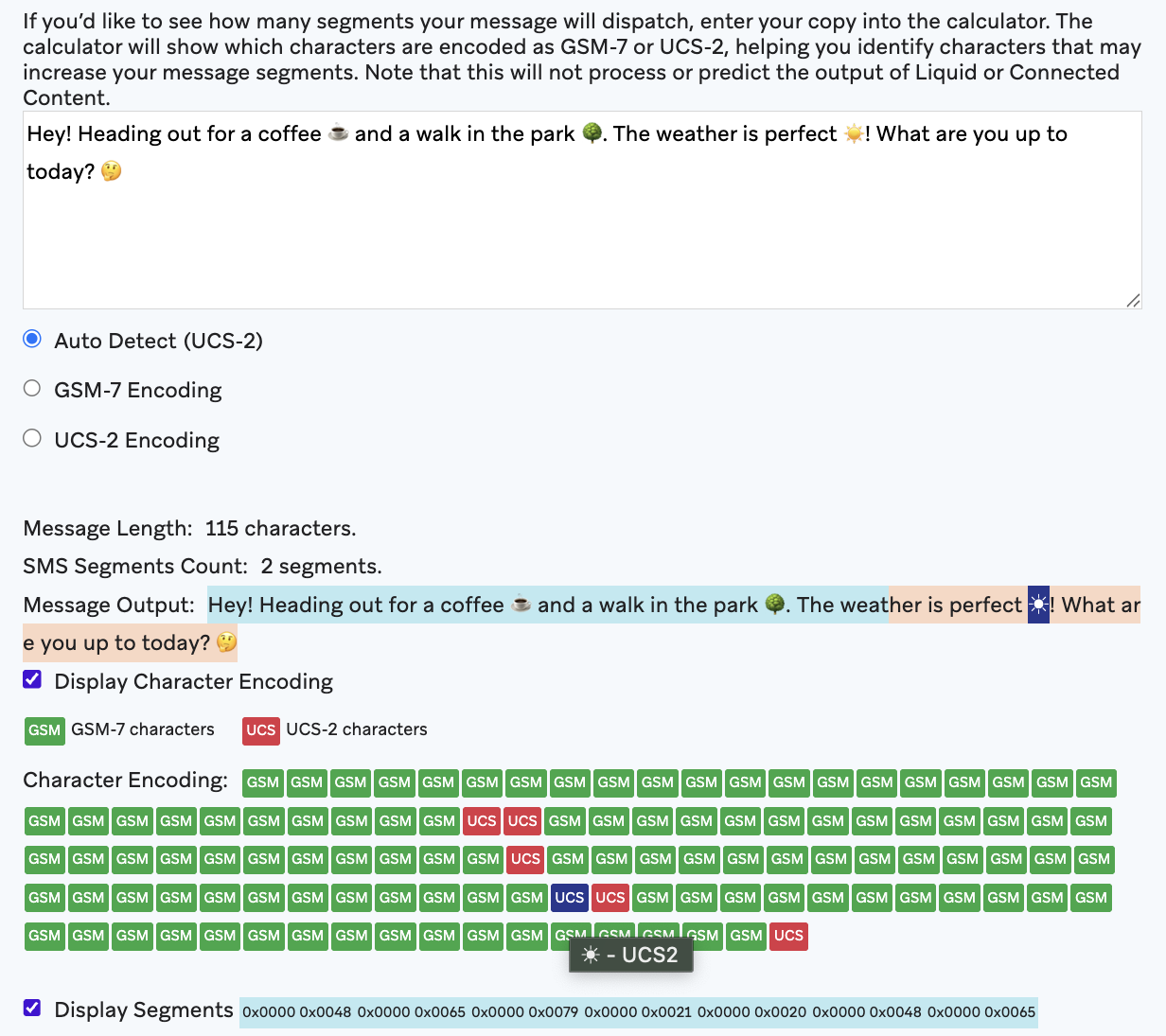
Our SMS segment calculator now has character encoding! Select Display Character Encoding to identify which characters are encoded as GSM-7 or UCS-2.
WhatsApp messages with optimization
Because MM API for WhatsApp doesn’t offer 100% deliverability, it’s important to understand how to retarget users who may not have received your message on other channels.
To retarget users, we recommend building a segment of users who didn’t receive a specific message. To do this, filter by the error code 131049, which indicates that a marketing template message was not sent due to WhatsApp’s per-user marketing template limit enforcement. You can do this by using Braze Currents or SQL Segment Extensions.
Partnerships
OtherLevels - Dynamic content
OtherLevels is an experience platform that uses generative AI to transform how sports brands, publishers, and operators connect with their customers by transforming traditional content into on-brand personalized video and rich media experiences at scale.
SDK
SDK breaking updates
The following SDK updates have been released. Breaking updates are listed below; all other updates can be found by checking the corresponding SDK changelogs.
November 11, 2025
November 11, 2025
Data flexibility
Live Activities Push to Start Registered for App segmentation filter
The Live Activities Push to Start Registered for App filter segments your users by whether they are registered to start a Live Activity through iOS push notifications for a specific app.
RFM SQL Segment Extension
You can create an RFM (recency, frequency, monetary) Segment Extension to target your best users by measuring their purchasing habits.
RFM analysis is a marketing technique that identifies your best users by scoring users on a scale from 0—3 for each category (recency, frequency, monetary), where 3 is the best score and 0 is the worst. Recency, frequency, and monetary values are all based on data from a specific time range of your choosing.
Custom attributes — Values
When viewing a usage report, select the Values tab to view the top values of the selected custom attributes based on a sample of approximately 250,000 users.
Sync logs and observability for Cloud Data Ingestion
General availability
The Cloud Data Ingestion (CDI) Sync Log dashboard allows you to monitor all data processed by CDI, verify whether data was synced successfully, and diagnose any issues with “incorrect” or missing data.
Multi-rule feature flag rollouts
Use multi-rule feature flag rollouts to define a sequence of rules for evaluating users, which allows for precise segmentation and controlled feature releases. This method is ideal for deploying the same feature to diverse audiences.
Mapping to catalog fields for drag-and-drop product blocks
In your catalog settings, you can select the Product blocks toggle to map to specific fields and information in your catalog. This allows you to select which fields to use as the product title, product URL, and image URL.
Frequency capping abort events in Currents
When using Currents, you can now reference abort_type in the channel abort events. This identifies that a message has been aborted due to frequency capping and includes which frequency capping rule caused the abort. This helps inform how you set up your frequency capping rules. Refer to Message engagement events for specific Currents event details.
Robust channels
Background row images
General availability
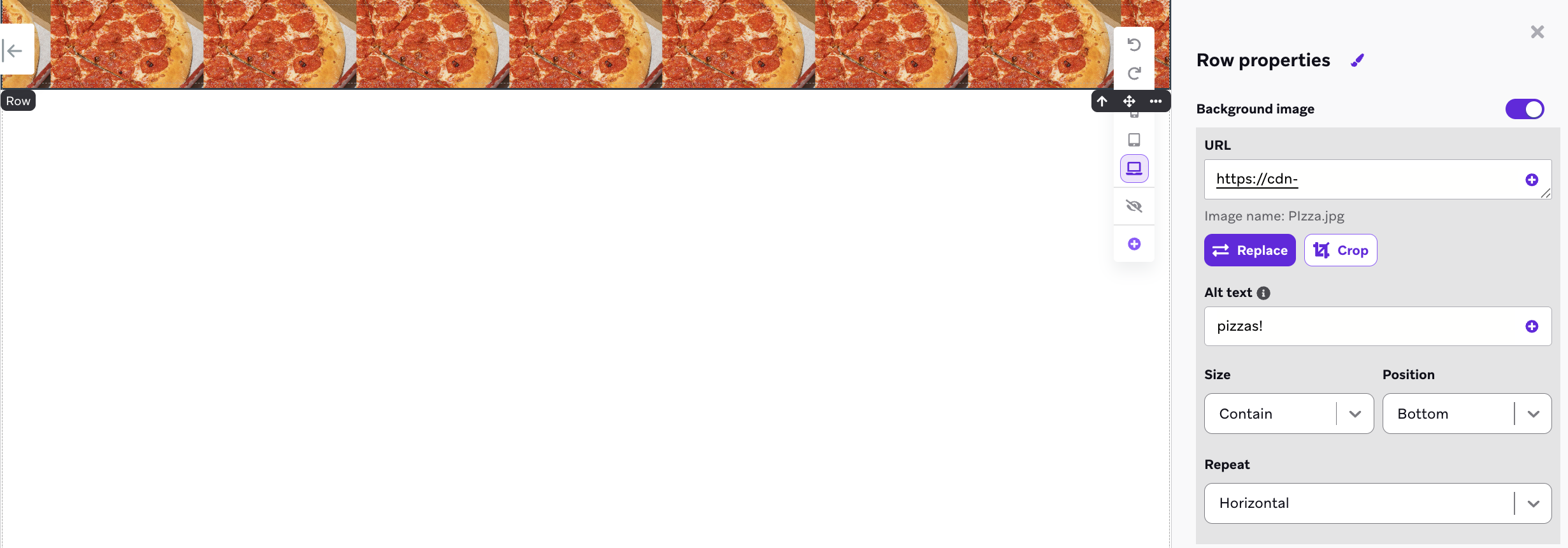
You can add a background row image to an in-app message or landing page in the Row properties panel. Toggle on Background image, and then provide an image URL or select an image from the media library. Finally, configure your alt text, size, position, and whether the image repeats to create patterns across the row.
Copy preview link
Use Copy preview link in your Banners, email custom footers, and email opt-in and unsubscribe pages to generate a shareable link that shows how your content will look like for a random user.
WhatsApp messages with optimized delivery
Use Meta’s advanced AI systems to deliver your marketing messages to more users who are most likely to engage with them, significantly boosting deliverability and message engagement.
WhatsApp messages with optimized delivery are sent using Meta’s new Marketing Messages Lite API, which provides superior performance compared to the traditional Cloud API. This new sending pipeline helps you better reach users who value and want to receive your messages.
WhatsApp Flows
When incorporating a WhatsApp Flow message into a Braze Canvas or campaign, you may want to capture and utilize specific information that users submit through the Flow. Braze needs to receive additional information regarding the structure of the user response, specifically the expected shape of the JSON response, to generate the required nested custom attribute (NCA) schema.
Now you can give Braze the information about the response structure by saving the Flow response as a custom attribute and completing a test send.
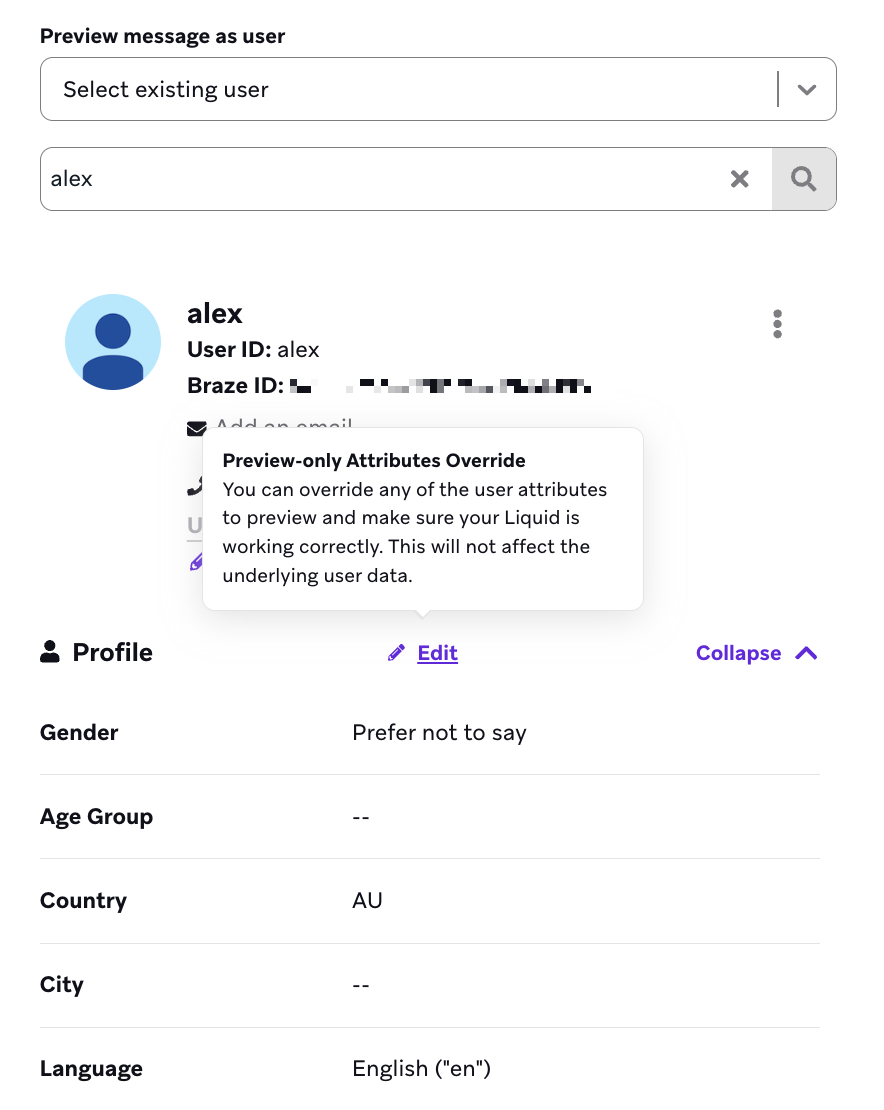
Editable user preview
You can edit individual fields from a random or existing user to help test dynamic content within your message. Select Edit to convert the selected user into a custom user you can modify.
AI and ML automation
BrazeAI Decisioning Studio™ Go
You can now set up your integration with BrazeAI Decisioning Studio™ Go by referencing these configuration articles for:
New features for Braze Agents
Beta
You can now customize your Braze Agent by:
- Applying brand guidelines for your agent to adhere to in its response.
- Referencing a catalog to further personalize your message.
- Structuring an agent’s output by providing the output format.
- Adjusting the temperature for the level of deviation for your agent’s output.
ChatGPT models with BrazeAI OperatorTM
Beta
You can select from these GPT models to use for different request types with Operator:
- GPT-5 nano
- GPT-5 mini (default)
- GPT-5
New Braze partnerships
StackAdapt - Advertising
StackAdapt is an AI-powered marketing platform that delivers targeted performance-driven advertising. It allows you to sync user profile data from Braze into the StackAdapt Data Hub. By connecting the two platforms, you can create a unified view of your customers and activate first-party data to improve ad performance.
Cloudinary - Dynamic content
Cloudinary is an image and video platform that empowers you to manage, edit, optimize, and deliver images and video on a massive scale to any campaign across channels and customer journeys. When integrated and enabled, Cloudinary’s media management will power and provide dynamic, contextual, and personalized asset delivery for your Braze campaigns and Canvases.
Kameleoon - A/B testing
Kameleoon is an optimization solution with experiment, AI-powered personalization, and feature management capabilities in a single unified platform.
SDK updates
The following SDK updates have been released. Breaking updates are listed below; all other updates can be found by checking the corresponding SDK changelogs.
- React Native SDK 18.0.0
- Fixes the Typescript type for the callback of
subscribeToInAppMessageandaddListenerforBraze.Events.IN_APP_MESSAGE_RECEIVED.- These listeners now properly return a callback with the new
InAppMessageEventtype. Previously, the methods were annotated to return aBrazeInAppMessagetype, but it was actually returning aString. - If you are using either subscription API, ensure that the behavior of your in-app messages are unchanged after updating to this version. See our sample code in
BrazeProject.tsx.
- These listeners now properly return a callback with the new
- The APIs
logInAppMessageClicked,logInAppMessageImpression, andlogInAppMessageButtonClickednow accept only aBrazeInAppMessageobject to match its existing public interface.- Previously, it would accept both a
BrazeInAppMessageobject as well as aString.
- Previously, it would accept both a
BrazeInAppMessage.toString()now returns a human-readable string instead of the JSON string representation.- To get the JSON string representation of an in-app message, use
BrazeInAppMessage.inAppMessageJsonString.
- To get the JSON string representation of an in-app message, use
- On iOS,
[[BrazeReactUtils sharedInstance] formatPushPayload:withLaunchOptions:]has been moved to[BrazeReactDataTranslator formatPushPayload:withLaunchOptions:].- This new method is a now a class method instead of an instance method.
- Adds nullability annotations to
BrazeReactUtilsmethods. - Removes the following deprecated methods and properties from the API:
getInstallTrackingId(callback:)in favor ofgetDeviceId.registerAndroidPushToken(token:)in favor ofregisterPushToken.setGoogleAdvertisingId(googleAdvertisingId:adTrackingEnabled:)in favor ofsetAdTrackingEnabled.PushNotificationEvent.push_event_typein favor ofpayload_type.PushNotificationEvent.deeplinkin favor ofurl.PushNotificationEvent.content_textin favor ofbody.PushNotificationEvent.raw_android_push_datain favor ofandroid.PushNotificationEvent.kvp_datain favor ofbraze_properties.
- Updates the native Android SDK version bindings from Braze Android SDK 39.0.0 to 40.0.2.
- Fixes the Typescript type for the callback of
- .NET MAUI (Xamarin) SDK Version 8.0.0
- Updated the iOS binding from Braze Swift SDK 12.1.0 to 13.3.0. This includes Xcode 26 support.
- Flutter SDK 16.0.0
- Updates the native Android bridge from Braze Android SDK 39.0.0 to 40.0.0.
- Braze Swift SDK 13.3.0
- Web SDK 6.3.0
- Android SDK 40.0.0-40.0.2
October 14, 2025
October 14, 2025 release
BrazeAI Decisioning Studio™
BrazeAI Decisioning Studio™ replaces A/B testing with AI decisioning that personalizes everything, and maximizes any metric: drive dollars, not clicks. With BrazeAI Decisioning Studio™, you can optimize any business KPI. Refer to our dedicated section BrazeAI Decisioning Studio™ for sample use cases and key features.
Data flexibility
New Currents events
These new events were added to the Currents glossary:
users.messages.rcs.Clickusers.messages.rcs.Rejectionusers.messages.line.Abortusers.messages.line.Sendusers.messages.line.InboundReceiveusers.messages.line.Clickusers.messages.rcs.Deliveryusers.messages.rcs.InboundReceiveusers.messages.rcs.Readusers.messages.rcs.Sendusers.messages.rcs.Abortusers.messages.inappmessage.Abort
These new fields were added to the following Currents events:
is_sms_fallback:users.messages.sms.Deliveryusers.messages.sms.DeliveryFailureusers.messages.sms.Rejection
message_id,in_reply_to,flow_id,flow_response_json,product_id,catalog_id:users.messages.whatsapp.InboundReceive
message_id,flow_id,template_name:users.messages.whatsapp.Sendusers.messages.whatsapp.Deliveryusers.messages.whatsapp.Failureusers.messages.whatsapp.Read
Suppression lists
General availability
Suppression lists are groups of users who automatically do not receive any campaigns or Canvases. Suppression lists are defined by segment filters, and users enter and exit suppression lists as they meet filter criteria.
Zero-copy personalization
Early access
Sync Canvas triggers using Cloud Data Ingestion for zero-copy personalization. This feature accesses user-specific information from your data storage solution and passes it to a destination Canvas. Canvas steps can optionally include personalization fields that are not persisted on Braze user profiles.
Canvas Context variables for Audience Paths and Decision Split steps
Early access
You can create context variable filters that use previously-declared context variables in Audience Paths and Decision Split steps.
Unlocking creativity
Deal Cards for emails
Use Deal Cards to provide key deal information directly at the top of email bodies. This allows recipients to quickly understand the offer details and take action.
Templates for Banners
When you compose your Banner, you can now start with a blank template, use a Braze template, or select a saved Banner template.
Robust channels
Suppression lists
General availability
Suppression lists specify groups of users who will never receive messages. Admins can create suppression lists with segment filters to narrow down a user group the same way you would for segmentation.
LINE click tracking
General availability
When LINE click tracking is turned on, Braze automatically shortens your URLs, adds tracking mechanisms, and records clicks in real time. While LINE offers aggregate click data, Braze provides granular user information that is timely and actionable. This data empowers you to create more targeted segmentation and retargeting strategies, such as segmenting users based on click behavior and triggering messages in response to specific clicks.
SMS and RCS bot click filtering
General availability
SMS and RCS bot click filtering enhances campaign analytics and workflows by excluding suspected bot clicks. A “bot click” refers to automated clicks on shortened links in SMS and RCS messages, such as those from web crawlers, Android and iOS link previews, or CPaaS security software. This feature facilitates accurate reporting, segmentation, and orchestration to engage real users.
Transfer WhatsApp phone numbers
Transfer a WhatsApp Business Account (WABA) phone number and its associated subscription group from one workspace to another within Braze.
WhatsApp Flows response messages and preview
In a Canvas, you can create a WhatsApp message step that uses a response message and flow message. You can also select Preview Flow to preview the Flow directly in Braze to confirm it behaves as expected.
WhatsApp product messages
Product messages empower you to send interactive WhatsApp messages that showcase products directly from your Meta catalog.
Integrating Braze and WhatsApp with an external system
Leverage the power of AI chatbots and live agent hand-offs on the WhatsApp channel to streamline your customer support operations. By automating routine inquiries and seamlessly transitioning to human agents when needed, you can significantly improve response times and enhance the overall customer experience.
AI and ML automation
Braze Agents
Beta
Braze Agents are AI-powered helpers you can create inside Braze. Agents can generate content, make intelligent decisions, and enrich your data so you can deliver more personalized customer experiences.
New Braze partnerships
Jasper - Templates
The Jasper integration with Braze empowers you to streamline content creation and campaign execution. With Jasper, your marketing teams can generate high-quality, on-brand copy in minutes. Braze then facilitates the delivery of these messages to the right audience at the optimal time. This integration fosters seamless workflows, reduces manual effort, and drives stronger engagement outcomes.
Swym - Loyalty and retargeting
Swym helps eCommerce brands capture shopping intent with Wishlists, Save for Later, Gift Registry, and Back-in-Stock alerts. Using rich, permission-based data, you can craft hyper-targeted campaigns and deliver personalized shopping experiences that drive engagement, boost conversions, and increase loyalty.
SDK updates
The following SDK updates have been released. Breaking updates are listed below; you can find all other updates by checking the corresponding SDK changelogs.
- Cordova SDK 14.0.0
- Updated the native Android bridge from Braze Android SDK 37.0.0 to 39.0.0.
- The minimum required GradlePluginKotlinVersion is now 2.1.0.
- Updated the native iOS bridge from Braze Swift SDK 12.0.0 to 13.2.0. This includes Xcode 26 support.
- Removes support for News Feed. The following APIs have been removed:
launchNewsFeedgetNewsFeedgetNewsFeedUnreadCountgetNewsFeedCardCountgetCardCountForCategoriesgetUnreadCardCountForCategories
- Updated the native Android bridge from Braze Android SDK 37.0.0 to 39.0.0.
- React Native SDK 17.0.0-17.0.1
- Updates the native Android SDK version bindings from Braze Android SDK 37.0.0 to 39.0.0.
- Removes support for News Feed. The following APIs have been removed:
launchNewsFeedrequestFeedRefreshgetNewsFeedCardslogNewsFeedCardClickedlogNewsFeedCardImpressiongetCardCountForCategoriesgetUnreadCardCountForCategoriesBraze.Events.NEWS_FEED_CARDS_UPDATEDBraze.CardCategory
- Web SDK 6.2.0
- Flutter SDK 15.1.0
- Unity SDK 10.0.0
- Updated the native iOS bridge from Braze Swift SDK 12.0.0 to 13.2.0. This includes Xcode 26 support.
September 16, 2025
September 16, 2025 release
Data flexibility
Braze Data Platform
Braze Data Platform is a set of comprehensive, composable set of data capabilities and partner integrations that empowers you to create personalized, impactful experiences across the customer lifecycle. Learn more about the three data related jobs to be done:
Custom Banner properties
Early access
You can use custom properties from your Banner campaign to retrieve key–value data through the SDK and modify your app’s behavior or appearance. To learn more, see Custom Banner properties.
Token authentication
General availability
When using Braze Connected Content, you may find that certain APIs require a token instead of a username and password. Braze can store credentials that hold token authentication header values.
Promotion codes
You can save promotion codes to a user’s profile through a User Update step. For more information, refer to Saving promotion codes to user profiles.
Unlocking creativity
Braze Pilot
Braze Pilot is a publicly available app for Android and iOS that allows you to launch messages from your Braze dashboard to your phone. Check out Getting started with Braze Pilot for a walkthrough of downloading the app, initializing the connection to your Braze dashboard, and completing the setup.
New Braze partnerships
Blings - Visual and interactive content
Blings is a next-generation personalized video platform that enables you to deliver real-time, interactive, and data-driven video experiences across channels at scale.
Shopify standard integration with third-party tool
For Shopify online stores, we recommend using Braze’s standard integration method to support the Braze SDKs on your site.
However, we understand that you may prefer using a third-party tool, like Google Tag Manager, so we put together a guide on how you can. To get started, see Shopify: Third-party tagging.
SDK updates
The following SDK updates have been released. Breaking updates are listed below; all other updates can be found by checking the corresponding SDK changelogs.
- Braze Flutter SDK 15.0.0
- Updates the native Android bridge from Braze Android SDK
36.0.0to39.0.0. - Updates the native iOS bridge from Braze Swift SDK
12.0.0to13.2.0. This includes Xcode 26 support.
- Updates the native Android bridge from Braze Android SDK
- Braze Swift SDK 7.0.0
- Updates the Braze Swift SDK bindings to require releases from the
13.0.0+SemVer denomination. This allows compatibility with any version of the Braze SDK from13.0.0up to, but not including,14.0.0.
- Updates the Braze Swift SDK bindings to require releases from the
August 19, 2025
August 19, 2025 release
Time zone consistency standardization to Canvas Context
Early access
If you’re participating in the Canvas Context step early access, all timestamps with a datetime type from trigger event properties in action-based Canvases will always be normalized to UTC. To learn more about this, refer to Time zone consistency standardization.
Data flexibility
Self-serve custom domains
Self-serve custom domains empower you to configure and manage your own custom domains for SMS, RCS, and WhatsApp—directly from your Braze dashboard. You can easily add, monitor, and manage up to 10 custom domains in one place.
Segment funnel statistics
Select View funnel statistics to display the statistics for that filter group and see how each added filter impacts your segment statistics. You’ll see an estimated count and percentage for users who are targeted by all filters up to that point. Once the statistics are displayed for a filter group, they will update automatically whenever you change the filters.
New response fields for /campaigns/details endpoint for push notifications
The messages response for push notifications now includes two new fields:
image_url: An image URL for an Android notification image, an iOS notification image, or a web push icon image.large_image_url: A web notification image URL for Android Chrome and Windows web push actions.
Defining PII fields
Selecting and defining certain fields as PII fields only affects what Users can view on the Braze dashboard and does not impact how the End User data in such PII fields is handled.
Consult your legal team to align your dashboard’s settings with any privacy regulations and policies applicable to your company, including those related to data retention.
Sharing a Report Builder download link
You can share a dashboard link to the report by selecting Share and then Share a link or Send or schedule an email.
Unlocking creativity
Custom head tags for drag-and-drop emails
Use <head> tags to add CSS and metadata in your email message. For example, you can use these tags to add a stylesheet or favicon. Liquid is supported in <head> tags.
Robust channels
Fuzzy out-out best practices
We’ve added a best practices section to help you thoughtfully configure your fuzzy opt-out message and create a clear, compliant, and positive experience for your subscribers.
WhatsApp Flows
Early access
WhatsApp Flows is an enhancement to the existing WhatsApp channel, allowing you to create interactive and dynamic messaging experiences.
WhatsApp inbound product questions
Users can respond to your product or catalog message with product questions. These arrive as inbound messages, which can then be sorted with an Action Path.
Additionally, Braze extracts the product ID and catalog ID from these questions, so if you wish to automate responses or send questions to another team (such as customer support), you can include those details.
AI and ML automation
New BrazeAI™ use case articles
We’ve added new use case articles to help you get the most out of BrazeAI™. These guides highlight practical ways to apply AI to your engagement strategies, including:
- Predictive Churn: Identify customers at risk of churning and take action early.
- Predictive Events: Anticipate key user actions and shape experiences in real time.
- Recommendations: Deliver more relevant content and products based on customer behavior.
MCP server
Beta
The Braze MCP server, a secure and read-only connection, lets AI tools like Claude and Cursor access non-PII Braze data to answer questions, analyze trends, and provide insights without altering data.
SDK updates
The following SDK updates have been released. Breaking updates are listed below; all other updates can be found by checking the corresponding SDK changelogs.
- Swift SDK 13.0.0
- Extends the functionality of
BrazeSDKAuthDelegate.braze(_:sdkAuthenticationFailedWithError:)to be triggered for “Optional” authentication errors.- The delegate method
BrazeSDKAuthDelegate.braze(_:sdkAuthenticationFailedWithError:)will now be triggered for both “Required” and “Optional” authentication errors. - If you want to only handle “Required” SDK authentication errors, add a check ensuring that
BrazeSDKAuthError.optionalis false inside your implementation of this delegate method.
- The delegate method
- Fixes the usage of
Braze.Configuration.sdkAuthenticationto take effect when enabled.- Previously, the value of this configuration was not consumed by the SDK and the token was always attached to requests if it was present.
- Now, the SDK will only attach the SDK authentication token to outgoing network requests when this configuration is enabled.
- The setters for all properties of
Braze.FeatureFlagand all properties ofBraze.Bannerhave been madeprivate. The properties of these classes are now read-only. - Removes the
Braze.Banner.idproperty, which was deprecated in version11.4.0.- Instead, use
Braze.Banner.trackingIdto read a banner’s campaign tracking ID.
- Instead, use
- Extends the functionality of
- React Native SDK 16.0.0
- Updates the native Android SDK version bindings from Braze Android SDK 36.0.0 to 37.0.0.
- Updates the native Swift SDK version bindings from Braze Swift SDK 12.0.0 to 13.0.0.
- The
sdkAuthenticationErrorevent will now trigger for both “Required” and “Optional” authentication errors.
- The
- Xamarin SDK 7.0.0
- Added support for .NET 9.0 for the iOS and Android bindings.
- This removes support for .NET 8.0.
- This requires a minimum version of iOS 12.2.
- Updated the Android binding from Braze Android 32.0.0 to 37.0.0.
- Updated the iOS binding from Braze Swift SDK 10.0.0 to 12.1.0.
- This release contains APIs for the Banners feature but is not currently fully supported by this SDK. If you wish to use Banners in your .NET MAUI app, contact your customer support manager before integrating into your application.
- Added support for .NET 9.0 for the iOS and Android bindings.
- Cordova SDK 13.0.0
- Updated the internal iOS implementation of
enableSdkmethod to usesetEnabled: instead of_requestEnableSDKOnNextAppRun, which was deprecated in the Swift SDK. - Calling this method no longer requires the app to be re-launched to take effect. The SDK will now become enabled as soon as this method is executed.
- Updated the native Android bridge from Braze Android SDK
36.0.0to37.0.0.
- Updated the internal iOS implementation of