Shopify data features
This article provides an overview of Braze Shopify features, including what Shopify data is tracked and example payloads, historical backfill, and product syncs.
Tracked Shopify events
The Shopify integration uses eCommerce recommended events to capture key shopping behaviors. For implementation examples and marketing strategies using these events, refer to eCommerce use cases.

The Shopify integration supports Shopify customer create and customer update webhooks, which are located in your data configuration settings. When a user profile is created or updated in Shopify, a corresponding user profile in Braze will be created or updated.
These actions don’t trigger custom events in Braze and are solely used to sync Shopify user data with Braze. The data synced includes custom attributes, standard attributes, and, if enabled within your configuration, subscription group states.
{
"name": "ecommerce.product_viewed",
"properties": {
"product_id": "12345",
"product_name": "product",
"variant_id": "123",
"image_url": "www.image-url.com",
"product_url": "mystorefront.myshopify.com/product",
"price": 10,
"currency": "USD",
"source": "mystorefront.myshopify.com",
"metadata": {
"sku": "sku"
},
"type": [
"price_drop",
"back_in_stock"
]
}
}
{
"name": "ecommerce.cart_updated",
"properties": {
"cart_id": "Z2NwLXVzLWVhc3QxOjAxSjk3UFg4RlFZMjVTVkRHRlc1RlI3SlRY",
"currency": "USD",
"total_value": 2000000,
"products": [
{
"product_id": "8266836345064",
"product_name": "PANTS!!!",
"variant_id": "44610569208040",
"image_url": "https://cdn.shopify.com/s/files/1/0604/4211/6328/files/1200px-Trousers-colourisolated.jpg?v=1689256168",
"product_url": "https://test-store.myshopify.com/products/pants?variant=44610569208040",
"quantity": 2,
"price": 1000000,
"metadata": {
"sku": "007"
}
}
],
"source": "https://test-store.myshopify.com",
"metadata": {}
}
}
{
"name": "ecommerce.checkout_started",
"time": "2022-05-23T13:52:38-04:00",
"properties": {
"cart_id": "eeafa272cebfd4b22385bc4b645e762c",
"total_value": 421.88,
"subtotal_value": 396.88,
"tax": 15.00,
"shipping": 10.00,
"currency": "USD",
"products": [
{
"product_id": "632910392",
"product_name": "IPod Nano - 8GB",
"variant_id": "808950810",
"quantity": 1,
"price": 199,
"metadata": {
"sku": "IPOD2008PINK"
}
}
],
"source": "braze-mock-storefront.myshopify.com",
"checkout_id": "123123123",
"metadata": {
"checkout_url": "https://checkout.local/548380009/checkouts/123123123/recover?key=example-secret-token"
}
}
}
{
"name": "ecommerce.order_placed",
"time": "2022-05-23T13:52:38-04:00",
"properties": {
"order_id": "820982911946154508",
"cart_id": "eeafa272cebfd4b22385bc4b645e762c",
"total_value": 421.88,
"subtotal_value": 396.88,
"tax": 15.00,
"shipping": 10.00,
"currency": "USD",
"total_discounts": 5,
"discounts": [],
"products": [
{
"product_id": "632910392",
"product_name": "IPod Nano - 8GB",
"variant_id": "808950810",
"quantity": 1,
"price": 199,
"metadata": {
"sku": "IPOD2008PINK"
}
}
],
"source": "braze-mock-storefront.myshopify.com",
"metadata": {
"order_status_url": "https://apple.myshopify.com/690933842/orders/123456abcd/authenticate?key=abcdefg",
"order_number": "1234",
"tags": [
"heavy",
"heavy2"
],
"referring_site": "https://www.google.com",
"payment_gateway_names": [
"visa",
"bogus"
]
}
}
}
{
"name": "shopify_fulfilled_order",
"time": "2022-05-23T14:44:34-04:00",
"properties": {
"order_id": 4444668657855,
"line_items": [
{
"quantity": 1,
"product_id": 6143032066239,
"sku": null,
"title": "Dark Denim Top",
"variant_id": 40094740549876,
"variant_title": "Small Dark Denim Top",
"vendor": "partners-demo",
"name": "Dark Denim Top",
"properties": [],
"price": "60.00",
"fulfillment_status": "fulfilled"
}
],
"shipping": [
{
"title": "Standard",
"price": "0.00"
}
],
"total_price": "130.66",
"confirmed": true,
"total_discounts": "0.00",
"discount_codes": [],
"order_number": 1093,
"order_status_url": "https://test-store.myshopify.com/",
"cancelled_at": null,
"tags": "",
"closed_at": "2022-05-23T14:44:34-04:00",
"fulfillment_status": "fulfilled",
"fulfillments": [
{
"shipment_status": null,
"status": "success",
"tracking_company": "Other",
"tracking_number": "456",
"tracking_numbers": [
"456"
],
"tracking_url": "https://braze.com",
"tracking_urls": [
"https://braze.com"
],
"line_items": [
{
"fulfillment_status": "fulfilled",
"name": "Dark Denim Top",
"price": "60.00",
"product_id": 6143032066239,
"quantity": 1,
"requires_shipping": true,
"sku": null,
"title": "Dark Denim Top",
"variant_id": 40094740549876,
"variant_title": "Small Dark Denim Top",
"vendor": "partners-demo"
}
]
}
]
},
"braze_id": "123abc123abc"
}
{
"name": "shopify_partially_fulfilled_order",
"time": "2022-05-23T14:43:34-04:00",
"properties": {
"order_id": 4444668657855,
"line_items": [
{
"quantity": 1,
"product_id": 6143032066239,
"sku": null,
"title": "Dark Denim Top",
"variant_id": 40094740549876,
"variant_title": "",
"vendor": "partners-demo",
"name": "Dark Denim Top",
"properties": [],
"price": "60.00",
"fulfillment_status": "fulfilled"
}
],
"shipping": [
{
"title": "Standard",
"price": "0.00"
}
],
"total_price": "130.66",
"confirmed": true,
"total_discounts": "0.00",
"discount_codes": [],
"order_number": 1093,
"order_status_url": "https://test-store.myshopify.com/",
"cancelled_at": null,
"tags": "",
"closed_at": null,
"fulfillment_status": "partial",
"fulfillments": [
{
"shipment_status": null,
"status": "success",
"tracking_company": "Other",
"tracking_number": "123",
"tracking_numbers": [
"123"
],
"tracking_url": "https://braze.com",
"tracking_urls": [
"https://braze.com"
],
"line_items": [
{
"fulfillment_status": "fulfilled",
"name": "Dark Denim Top",
"price": "60.00",
"product_id": 6143032066239,
"properties": [],
"quantity": 1,
"requires_shipping": true,
"sku": null,
"title": "Dark Denim Top",
"variant_id": 40094740549876,
"variant_title": "",
"vendor": "partners-demo"
}
]
}
]
},
"braze_id": "abc123abc123"
}
{
"name": "shopify_paid_order",
"time": "2022-05-23T13:52:38-04:00",
"properties": {
"order_id": 4444596371647,
"line_items": [
{
"quantity": 1,
"product_id": 6143033344191,
"sku": null,
"title": "LED High Tops",
"variant_id": 40094740549876,
"variant_title": null,
"vendor": "partners-demo",
"name": "LED High Tops",
"properties": [],
"price": "80.00",
"fulfillment_status": null
}
]
}
}
{
"name": "ecommerce.order_cancelled",
"time": "2022-05-23T13:52:38-04:00",
"properties": {
"order_id": "820982911946154508",
"cancel_reason": "no longer necessary",
"total_value": 421.88,
"subtotal_value": 396.88,
"tax": 15.00,
"shipping": 10.00,
"currency": "USD",
"total_discounts": 5,
"discounts": [],
"products": [
{
"product_id": "632910392",
"product_name": "IPod Nano - 8GB",
"variant_id": "808950810",
"quantity": 1,
"price": 199,
"metadata": {
"sku": "IPOD2008PINK"
}
}
],
"source": "braze-mock-storefront.myshopify.com",
"metadata": {
"order_status_url": "https://apple.myshopify.com/690933842/orders/123456abcd/authenticate?key=abcdefg",
"order_number": "1234",
"tags": [
"heavy",
"heavy2"
]
}
}
}
{
"name": "ecommerce.order_refunded",
"time": "2022-05-23T13:52:38-04:00",
"properties": {
"order_id": "820982911946154508",
"total_value": 421.88,
"currency": "USD",
"products": [
{
"product_id": "632910392",
"product_name": "IPod Nano - 8GB",
"variant_id": "808950810",
"quantity": 1,
"price": 199,
"metadata": {
"sku": "IPOD2008PINK"
}
}
],
"source": "braze-mock-storefront.myshopify.com",
"metadata": {
"order_note": "item was broken"
}
}
}
{
"name": "shopify_account_login",
"properties": {
"source": "braze-mock-storefront.myshopify.com"
}
}

Braze relies on Shopify to provide required event properties (such as cart_id or cart_token) for eCommerce events. In rare cases, temporary issues with Shopify may cause these properties to be missed, which can cause affected events to be dropped.
Event: ecommerce.product_viewed
Type: Recommended event
Triggered: When a customer views a product page
Data source: Braze SDKs
Use Case: Browse abandonment
| Variable | Liquid templating |
|---|---|
product_id |
{{event_properties.${product_id}}} |
product_name |
{{event_properties.${product_name}}} |
variant_id |
{{event_properties.${variant_id}}} |
image_url |
{{event_properties.${image_url}}} |
product_url |
<your-store.myshopify.com>{{event_properties.${product_url}}} Add your Shopify site domain before the URL. |
price |
{{event_properties.${price}}} |
currency |
{{event_properties.${currency}}} |
source |
{{event_properties.${source}}} |
sku |
{{event_properties.${metadata}[0].sku}} |
type |
event_properties.${type} |
Event: ecommerce.cart_updated
Type: Recommended event
Triggered: When a customer adds, removes, or updates their shopping cart
Data source: Braze SDKs
Use Case: Cart abandonment
For Abandoned Cart Canvases, you first need to add the initial shopping cart Liquid tag to gain context of the shopping cart in your message.
{% shopping_cart {{context.${cart_id}}} %}
Then you can add the following shopping cart Liquid tags into your message.
| Variable | Liquid templating |
|---|---|
cart_id |
{{ shopping_cart.cart_id }} |
currency |
{{ shopping_cart.currency }} |
total_value |
{{ shopping_cart.total_value }} |
product_id |
{{ shopping_cart.products[0].product_id }} |
product_name |
{{ shopping_cart.products[0].product_name }} |
variant_id |
{{ shopping_cart.products[0].variant_id }} |
image_url |
{{ shopping_cart.products[0].image_url }} |
product_url |
{{ shopping_cart.products[0].product_url }} |
quantity |
{{ shopping_cart.products[0].quantity }} |
price |
{{ shopping_cart.products[0].price }} |
sku |
{{ shopping_cart.products[0].metadata[0].sku }} |
source |
{{ shopping_cart.source }} |
metadata (value) |
{{ shopping_cart.metadata[0].<add_value_here> }} |

For more information on how to build out a Liquid for loop to dynamically add all products into your email, refer to Abandoned Cart product personalization for emails.
Event: ecommerce.checkout_started
Type: Recommended event
Triggered: When a user navigates to the checkout page
Data source: Braze REST API
Use Case: Checkout abandonment
If a customer uses Shop Pay as an accelerated checkout option, Shopify may bypass certain standard checkout events (such as the Shopify checkout started webhook). This means Braze may not receive the data needed to add the checkout token alias, which can impact checkout abandonment tracking and user profile reconciliation.
For Abandoned Checkout Canvases, you first need to use the following Liquid tag:
{% shopping_cart {{context.${cart_id}}} :abort_if_not_abandoned false %}
{{context.${cart_id}}}
Then you can add the following Liquid tags into your message to reference the products within your cart at the point of checkout.
| Variable | Liquid templating |
|---|---|
cart_id |
{{ shopping_cart.cart_id }} |
currency |
{{ shopping_cart.currency }} |
total_value |
{{ shopping_cart.total_value }} |
product_id |
{{ shopping_cart.products[0].product_id }} |
product_name |
{{ shopping_cart.products[0].product_name }} |
variant_id |
{{ shopping_cart.products[0].variant_id }} |
image_url |
{{ shopping_cart.products[0].image_url }} |
product_url |
{{ shopping_cart.products[0].product_url }} |
quantity |
{{ shopping_cart.products[0].quantity }} |
price |
{{ shopping_cart.products[0].price }} |
sku |
{{ shopping_cart.products[0].metadata.sku }} |
source |
{{ shopping_cart.source }} |
checkout_url |
{{ shopping_cart.metadata[0].checkout_url }} |
Event: ecommerce.order_placed
Type: Recommended event
Triggered: When a user successfully completes the checkout process and places an order
Data source: Braze REST API
Use Case: Order confirmation, post-purchase retargeting, upsells or cross-sells
| Variable | Liquid templating |
|---|---|
| cart_id | {{event_properties.${cart_id}}} |
| currency | {{event_properties.${currency}}} |
| discounts | {{event_properties.${discounts}}} |
| order_id | {{event_properties.${order_id}}} |
| product_id | {{event_properties.${products}[0].product_id}} |
| product_name | {{event_properties.${products}[0].product_name}} |
| variant_id | {{event_properties.${products}[0].variant_id}} |
| quantity | {{event_properties.${products}[0].quantity}} |
| sku | {{event_properties.${products}[0].metadata.sku}} |
| total_discounts | {{event_properties.${total_discounts}}} |
| order_status_url | {{event_properties.${metadata}.order_status_url}} |
| order_number | {{event_properties.${metadata}.order_number}} |
| tags | {{event_properties.${metadata}.tags}} |
| referring_site | {{event_properties.${metadata}.referring_site}} |
| payment_gateway_names | {{event_properties.${metadata}.payment_gateway_names}} |
Shopify’s checkout completed webhook doesn’t contain product URLs or image URLs. As a result, you need to use Catalogs Liquid personalization as mentioned in Abandoned Cart product personalization for emails.
Event: shopify_fulfilled_order
Type: Custom Event
Triggered: When a user’s order is fulfilled and ready for shipping
Data source: Braze REST API
Use Case: (Transactional) Fulfillment update
| Variable | Liquid templating |
|---|---|
| Order ID | {{event_properties.${order_id}}} |
| Total Price | {{event_properties.${total_price}}} |
| Total Discounts | {{event_properties.${total_discounts}}} |
| Confirmed Status | {{event_properties.${confirmed}}} |
| Order Status URL | {{event_properties.${order_status_url}}} |
| Order Number | {{event_properties.${order_number}}} |
| Cancelled Timestamp | {{event_properties.${cancelled_at}}} |
| Closed Timestamp | {{event_properties.${closed_at}}} |
| Item ID | {{event_properties.${line_items}[0].product_id}} |
| Item Quantity | {{event_properties.${line_items}[0].quantity}} |
| Item SKU | {{event_properties.${line_items}[0].sku}} |
| Item Title | {{event_properties.${line_items}[0].title}} |
| Item Vendor | {{event_properties.${line_items}[0].vendor}} |
| Item Name | {{event_properties.${line_items}[0].name}} |
| Item Properties | {{event_properties.${line_items}[0].properties}} |
| Item Price | {{event_properties.${line_items}[0].price}} |
| Shipping Title | {{event_properties.${shipping}[0].title}} |
| Shipping Price | {{event_properties.${shipping}[0].price}} |
| Fulfillment Status | {{event_properties.${fulfillment_status}}} |
| Fulfillment Shipment Status | {{event_properties.${fulfillments}[0].shipment_status}} |
| Status | {{event_properties.${fulfillments}[0].status}} |
| Fulfillment Tracking Company | {{event_properties.${fulfillments}[0].Fulfillment tracking_company}} |
| Fulfillment Tracking Number | {{event_properties.${fulfillments}[0].Fulfillment tracking_number}} |
| Fulfillment Tracking Numbers | {{event_properties.${fulfillments}[0].Fulfillment tracking_numbers}} |
| Fulfillment Tracking URL | {{event_properties.${fulfillments}[0].Fulfillment tracking_url}} |
| Fulfillment Tracking URLs | {{event_properties.${fulfillments}[0].Fulfillment tracking_urls}} |
| Fulfillment Status | {{event_properties.${fulfillments}[0].line_items[0].fulfillment_status}} |
| Fulfillment Name | {{event_properties.${fulfillments}[0].line_items[0].name}} |
| Fulfillment Price | {{event_properties.${fulfillments}[0].line_items[0].price}} |
| Fulfillment Product ID | {{event_properties.${fulfillments}[0].line_items[0].product_id}} |
| Fulfillment Quantity | {{event_properties.${fulfillments}[0].line_items[0].quantity}} |
| Fulfillment Shipping | {{event_properties.${fulfillments}[0].line_items[0].requires_shipping}} |
| Fulfillment SKU | {{event_properties.${fulfillments}[0].line_items[0].sku}} |
| Fulfillment Title | {{event_properties.${fulfillments}[0].line_items[0].title}} |
| Fulfillment Vendor | {{event_properties.${fulfillments}[0].line_items[0].vendor}} |
| Variant ID | {{event_properties.${line_items}[0].variant_id}} |
| Variant Title | {{event_properties.${line_items}[0].variant_title}} |
Event: shopify_partially_fulfilled_order
Type: Custom Event
Triggered: When part of a user’s order is fulfilled and ready for shipping
Data source: Braze REST API
Use Case: (Transactional) Fulfillment update
| Variable | Liquid templating |
|---|---|
| Order ID | {{event_properties.${order_id}}} |
| Total Price | {{event_properties.${total_price}}} |
| Total Discounts | {{event_properties.${total_discounts}}} |
| Confirmed Status | {{event_properties.${confirmed}}} |
| Order Status URL | {{event_properties.${order_status_url}}} |
| Order Number | {{event_properties.${order_number}}} |
| Cancelled Timestamp | {{event_properties.${cancelled_at}}} |
| Closed Timestamp | {{event_properties.${closed_at}}} |
| Item ID | {{event_properties.${line_items}[0].product_id}} |
| Item Quantity | {{event_properties.${line_items}[0].quantity}} |
| Item SKU | {{event_properties.${line_items}[0].sku}} |
| Item Title | {{event_properties.${line_items}[0].title}} |
| Item Vendor | {{event_properties.${line_items}[0].vendor}} |
| Item Name | {{event_properties.${line_items}[0].name}} |
| Item Properties | {{event_properties.${line_items}[0].properties}} |
| Item Price | {{event_properties.${line_items}[0].price}} |
| Shipping Title | {{event_properties.${shipping}[0].title}} |
| Shipping Price | {{event_properties.${shipping}[0].price}} |
| Fulfillment Status | {{event_properties.${fulfillment_status}}} |
| Fulfillment Shipment Status | {{event_properties.${fulfillments}[0].shipment_status}} |
| Fulfillment Status | {{event_properties.${fulfillments}[0].status}} |
| Fulfillment Tracking Company | {{event_properties.${fulfillments}[0].tracking_company}} |
| Fulfillment Tracking Number | {{event_properties.${fulfillments}[0].tracking_number}} |
| Fulfillment Tracking Numbers | {{event_properties.${fulfillments}[0].tracking_numbers}} |
| Fulfillment Tracking URL | {{event_properties.${fulfillments}[0].tracking_url}} |
| Fulfillment Tracking URLs | {{event_properties.${fulfillments}[0].tracking_urls}} |
| Fulfillment Status | {{event_properties.${fulfillments}[0].line_items[0].fulfillment_status}} |
| Fulfillment Name | {{event_properties.${fulfillments}[0].line_items[0].name}} |
| Fulfillment Price | {{event_properties.${fulfillments}[0].line_items[0].price}} |
| Fulfillment Product ID | {{event_properties.${fulfillments}[0].line_items[0].product_id}} |
| Fulfillment Quantity | {{event_properties.${fulfillments}[0].line_items[0].quantity}} |
| Fulfillment Shipping | {{event_properties.${fulfillments}[0].line_items[0].requires_shipping}} |
| Fulfillment SKU | {{event_properties.${fulfillments}[0].line_items[0].sku}} |
| Fulfillment Title | {{event_properties.${fulfillments}[0].line_items[0].title}} |
| Fulfillment Vendor | {{event_properties.${fulfillments}[0].line_items[0].vendor}} |
| Variant ID | {{event_properties.${line_items}[0].variant_id}} |
| Variant Title | {{event_properties.${line_items}[0].variant_title}} |
Event: shopify_paid_order
Type: Custom Event
Triggered: When a user’s order is marked as paid within Shopify
Data source: Braze REST API
Use Case: (Transactional) Payment confirmation
| Variable | Liquid templating |
|---|---|
| Order ID | {{event_properties.${order_id}}} |
| Confirmed Status | {{event_properties.${confirmed}}} |
| Order Status URL | {{event_properties.${order_status_url}}} |
| Order Number | {{event_properties.${order_number}}} |
| Cancelled Timestamp | {{event_properties.${cancelled_at}}} |
| Total Discounts | {{event_properties.${total_discounts}}} |
| Total Price | {{event_properties.${total_price}}} |
| Tags | {{event_properties.${tags}}} |
| Discount Codes | {{event_properties.${discount_codes}}} |
| Item ID | {{event_properties.${line_items}[0].product_id}} |
| Item Quantity | {{event_properties.${line_items}[0].quantity}} |
| Item SKU | {{event_properties.${line_items}[0].sku}} |
| Item Title | {{event_properties.${line_items}[0].title}} |
| Item Vendor | {{event_properties.${line_items}[0].vendor}} |
| Item Properties | {{event_properties.${line_items}[0].properties}} |
| Item Price | {{event_properties.${line_items}[0].price}} |
| Shipping Title | {{event_properties.${shipping}[0].title}} |
| Shipping Price | {{event_properties.${shipping}[0].price}} |
| Variant ID | {{event_properties.${line_items}[0].variant_id}} |
| Variant Title | {{event_properties.${line_items}[0].variant_title}} |
Event: ecommerce.order_cancelled
Type: Recommended event
Triggered: When a user’s order is cancelled
Data source: Braze REST API
Use Case: (Transactional) Order cancellation confirmation
| Variable | Liquid templating |
|---|---|
| Order ID | {{event_properties.${order_id}}} |
| Total Price | {{event_properties.${total_price}}} |
| Total Discounts | {{event_properties.${total_discounts}}} |
| Confirmed | {{event_properties.${confirmed}}} |
| Order Status URL | {{event_properties.${order_status_url}}} |
| Order Number | {{event_properties.${order_number}}} |
| Cancelled Timestamp | {{event_properties.${cancelled_at}}} |
| Tags | {{event_properties.${tags}}} |
| Discount Codes | {{event_properties.${discount_codes}}} |
| Fulfillment Status | {{event_properties.${fulfillment_status}}} |
| Fulfillments | {{event_properties.${fulfillments}}} |
| Item ID | {{event_properties.${line_items}[0].product_id}} |
| Item Quantity | {{event_properties.${line_items}[0].quantity}} |
| Item SKU | {{event_properties.${line_items}[0].sku}} |
| Item Title | {{event_properties.${line_items}[0].title}} |
| Item Vendor | {{event_properties.${line_items}[0].vendor}} |
| Item Name | {{event_properties.${line_items}[0].name}} |
| Item Properties | {{event_properties.${line_items}[0].properties}} |
| Fulfillment Status | {{event_properties.${line_items}[0].fulfillment_status}} |
| Shipping Title | {{event_properties.${shipping}[0].title}} |
| Shipping Price | {{event_properties.${shipping}[0].price}} |
| Variant ID | {{event_properties.${line_items}[0].variant_id}} |
| Variant Title | {{event_properties.${line_items}[0].variant_title}} |
Event: ecommerce.order_refunded
Type: Recommended event
Triggered: When a user’s order is refunded
Data source: Braze REST API
Use Case: (Transactional) Refund confirmation
| Variable | Liquid templating |
|---|---|
| Order ID | {{event_properties.${order_id}}} |
| Order Note | {event_properties.${note}}} |
| Item ID | {{event_properties.${line_items}[0].product_id}} |
| Item Quantity | {{event_properties.${line_items}[0].quantity}} |
| Item SKU | {{event_properties.${line_items}[0].sku}} |
| Item Title | {{event_properties.${line_items}[0].title}} |
| Item Vendor | {{event_properties.${line_items}[0].vendor}} |
| Item Name | {{event_properties.${line_items}[0].name}} |
| Item Properties | {{event_properties.${line_items}[0].properties}} |
| Item Price | {{event_properties.${line_items}[0].price}} |
| Variant ID | {{event_properties.${line_items}[0].variant_id}} |
| Variant Title | {{event_properties.${line_items}[0].variant_title}} |
Event: shopify_account_login
Type: Custom Event
Triggered: When a user logs into their account
Data source: Braze REST API
Use Case: Welcome series
| Variable | Liquid templating |
|---|---|
source |
{{event_properties.${source}}} |
The Shopify integration currently doesn’t support populating the Braze purchase event. As a result, purchase filters, Liquid tags, action-based triggers, and analytics should use the ecommerce.order_placed event.
Supported Shopify custom attributes
All attributes are sourced from the Braze REST API.
| Attribute name | Description | Data source |
|---|---|---|
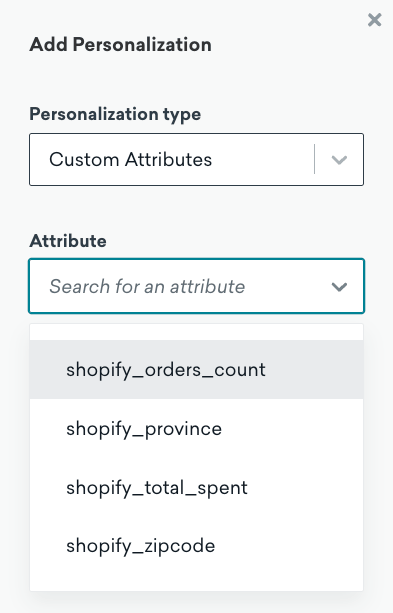
shopify_total_spent |
The total amount of money that the customer has spent across their order history. | Shopify’s customers/purchasing_summary webhook |
shopify_orders_count |
The number of orders associated with this customer. Test and archived orders aren’t counted. | Shopify’s customers/purchasing_summary webhook |
shopify_last_order_id |
The ID of the customer’s last order. | Shopify’s customers/purchasing_summary webhook |
shopify_zipcode |
The customer’s zipcode from their default address. | Shopify’s customers/create and customers/update webhooks |
shopify_province |
The customer’s province from their default address. | Shopify’s customers/create and customers/update webhooks |
shopify_locale |
The customer’s locale (for example, en or fr-CA), set from the browser language collected by the Braze web pixel until they place an order, then updated from the locale on their latest checkout. |
Braze web pixel, Shopify orders/* webhooks, historical customer backfill |
Shopify no longer provides the name of a customer’s last order, so Braze doesn’t set a shopify_last_order_name attribute. Profiles that already have a value keep it, but it isn’t updated.
Liquid personalization
To add Liquid personalization for your Shopify custom attributes, select + Personalization. Then select Custom Attributes as your personalization type.
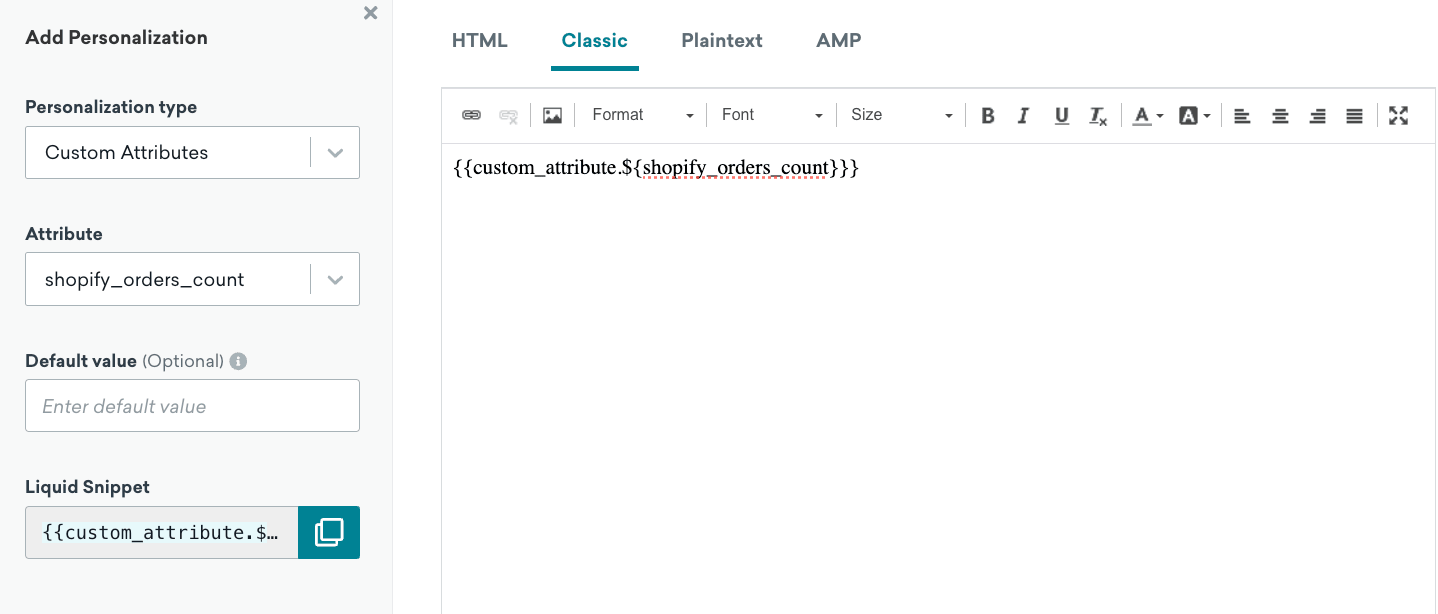
After selecting your custom attribute, input a default value and copy the Liquid snippet into your message.
Supported Shopify standard attributes
All attributes are sourced from the Braze REST API.
- First Name
- Last Name
- Phone
- City
- Country
Braze will only update supported Shopify custom attributes and Braze standard attributes if there is a difference in data from the existing user profile. For example, if the inbound Shopify data contains a first name of Bob and Bob already exists as a first name on the Braze user profile, Braze will not trigger an update, and you will not be charged a data point.
SDK data collection
For more information on what data is collected by the Braze SDKs, see SDK data collection.
Historical backfill
Historical Shopify data is imported from before you connect Braze. During setup, you choose how far back to import order events and customer profiles. Each timeframe is counted back from the date you complete your integration.
Through the Shopify standard integration setup or Shopify custom integration setup, you can turn on historical backfill to include past customers and orders in segments, campaigns, and Canvases. When you turn it on, select:
- An orders date range: Past 90 days, Past year, or Past 2 years (defaults to Past 90 days)
- A customer profiles date range: Past year, Past 2 years, or All time (defaults to All time)
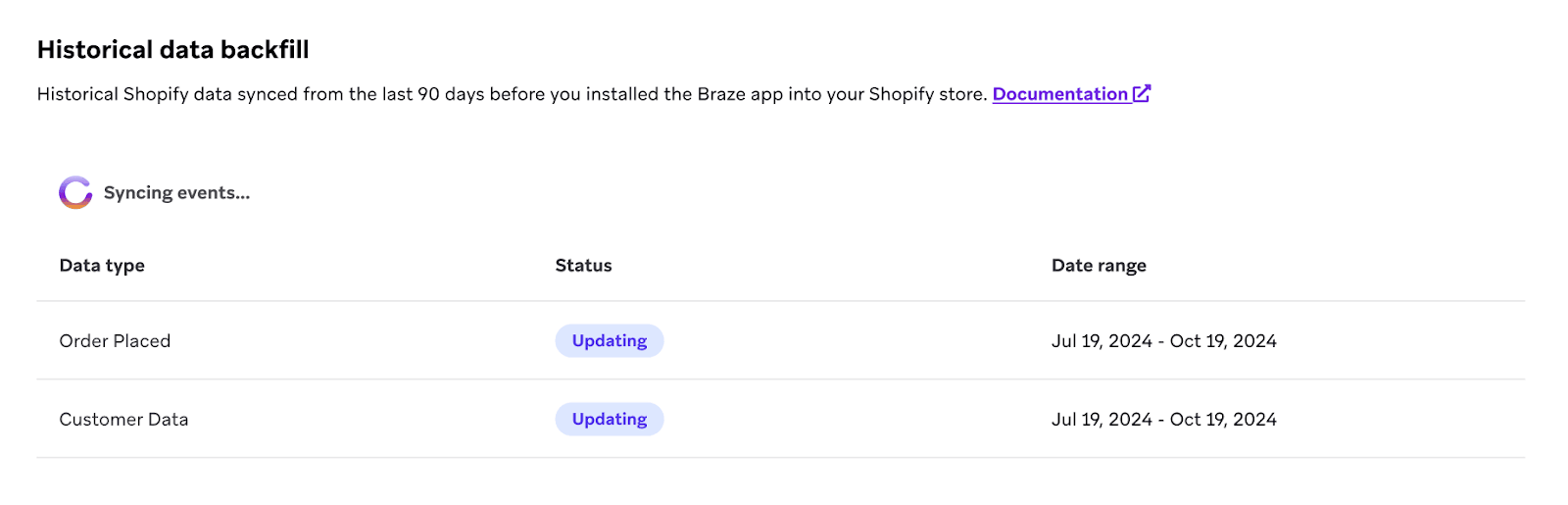
Braze shows an estimated record count and processing time for each option before you finish setup. After the backfill completes, your selected windows appear as concrete dates on the Shopify partner page. These selections can’t be changed after setup completes.
When Braze imports your Shopify customers, it assigns the external_id type that you chose in your configuration settings.
If you’re an existing Braze customer with active campaigns or Canvases, review how imported customers and order events affect your segments and journeys before you enable historical backfill. Historical backfill doesn’t retroactively update users who are already in active campaigns or Canvases.
If you plan to integrate with a custom external ID (for either the standard integration or the custom integration), you will be required to add your custom external ID as a Shopify customer metafield to all existing Shopify customer profiles and then perform the historical backfill.
How Braze selects historical data
Braze uses these Shopify date fields when the initial load runs:
| Data | Available windows | Shopify date field |
|---|---|---|
| Order events (order placed, order refunded, and order cancelled) | Past 90 days, Past year, or Past 2 years | Order created date |
| User profiles | Past year, Past 2 years, or All time | Customer updated date |
If you migrate historical orders into Shopify and keep their original created dates, Braze imports only orders whose created dates fall within the order window you selected.
Setting up Shopify historical backfill
- Select Turn on historical backfill in the Track Shopify data step.
- Choose a date range for orders and a date range for customer profiles. Review the estimated counts and processing time for your selections.
- After you complete your integration setup, Braze begins the initial data sync. You can monitor progress on the Shopify Data tab of your integration settings.
Backfill sync rate and timing
Historical backfill is performed by Braze’s Shopify integration—not the Braze SDK—and starts automatically when you complete integration setup.
After you enable historical backfill, Braze imports order events and customer profiles from Shopify in batches. Order events and customer profiles sync on separate timelines, so one may finish before the other. Large backfills are split into parallel date ranges so they can run at the same time.
Sync time depends on how much historical data is in your store and which windows you selected. Stores with high order volume or large customer bases may take longer to complete backfill. You can’t change the backfill speed or request a faster sync.
Synced data
For the initial data sync, Braze imports the order events and user profiles described in How Braze selects historical data. When Braze imports your Shopify customers, it assigns the external_id type that you chose in your configuration settings.
The following table summarizes the data included in that initial load.
| Braze recommended events | Shopify custom events | Braze standard attributes | Braze subscription statuses |
|---|---|---|---|
|
|
|
|