Constructor
Constructor is a search and product discovery platform that uses AI and machine learning to deliver personalized search, recommendations, and browsing experiences for eCommerce and retail websites.
With the Braze and Constructor integration, you can use Constructor’s Offsite Product Discovery to dynamically generate and deliver personalized product recommendations in Braze messages.
Use cases
- Abandoned cart and post-order follow-ups: Generate dynamic product recommendations based on user behavior and cart contents to send personalized abandoned cart reminders or post-order suggestions.
- Similar product recommendations for abandoned cart items: Suggest similar products to items left in a user’s cart to keep them engaged and offer alternatives.
- Recently viewed item reminders: Notify users about items they recently viewed but haven’t purchased yet, encouraging them to complete their purchase.
- Promotion campaigns: Deliver personalized promotional messages with curated product recommendations tailored to user preferences for seasonal sales or special offers.
- Visually similar product suggestions: Recommend visually similar items to those a user recently viewed, helping them discover related options they might prefer.
Prerequisites
| Requirement | Description |
|---|---|
| Constructor Account | A Constructor account with its Offsite Discovery service enabled is required to take advantage of this partnership. |
Integration
Work with your Constructor onboarding team to complete the integration process. Make sure behavioral data from your website or other relevant data sources is available to enable personalized product recommendations. Your Constructor onboarding team will also help configure the necessary HTML snippets for use in Braze messages.
Constructor’s Offsite Discovery API URL
You can use Constructor’s Offsite Discovery API URL to render product images and direct users to the appropriate product detail page. The following is a breakdown of the endpoint structure and an example of how to use it:
Example
<a href="https://offsite-discovery.cnstrc.com/v1/product/url?position=[position]&ui=[ui]&pod_id=[pod_id]&key=[key]&style_id=[style_id]&campaign_id=[campaign_id]" target="_blank">
<img
src="https://offsite-discovery.cnstrc.com/v1/product/image?position=[position]&ui=[ui]&pod_id=[pod_id]&key=[key]&style_id=[style_id]&campaign_id=[campaign_id]"
width="200"
border="0"
alt="Shop Now"
/>
</a>
Parameters
| Parameters | Description |
|---|---|
position |
Refers to the ranking of the specific recommended item within the suggested list (for example, position = 2). 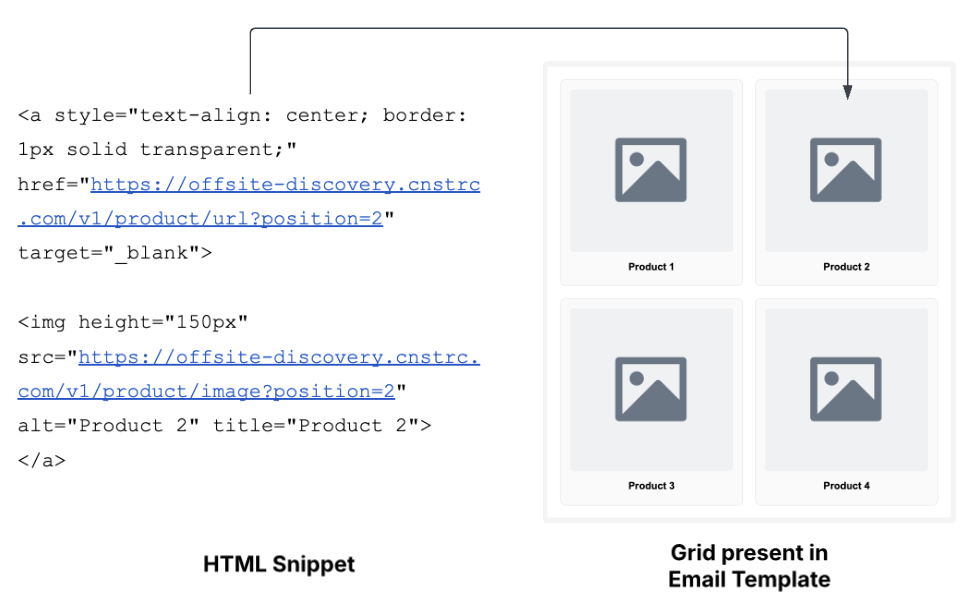 |
ui |
Represents the user’s identifier, crucial for personalizing recommendation results. Set the ui parameter as the customer’s external_id in Braze. If omitted, Constructor will return general recommendations instead of user-specific ones. |
pod_id |
Identifier for the pod containing strategy and searchandising rules for recommendations (for example, a pod with a bestseller strategy generates personalized bestseller). |
key |
The Constructor index key for this customer. |
style_id |
Determines which images are displayed for the product card. For example, different style_ids display unique product card images. |
campaign_id |
Unique ID for the email campaign. |
Optional inputs
| Input | Description |
|---|---|
item_id |
Represents the seed item. Necessary for item-item based strategies, such as alternative, complementary, bundles. For example, the first item in an email is the seed item, with subsequent items as alternatives. |
num_results |
Number of products to be added to the email. The default is 10, up to 100. For example, num_results = 3 means three recommendations are added. |
Connected Content
You can also use Connected Content to send personalized messages featuring Constructor recommendations.
Example Connected Content request
{% connected_content https://offsite-discovery.cnstrc.com/v1/recommendations/pods/{{ constructor_pod }}?key=YOUR_API_KEY&ui={{ constructor_ui }}&campaign_id={{ constructor_campaign_id }}&num_results={{ constructor_num_results }}&item_id={{ constructor_item_id }} :save recs :cache 0 :rerender %}
Reach out to your Constructor account team if you have questions about your custom URL.
Content Blocks
We recommend saving your Connected Content snippet as a Braze Content Block. This allows you to centralize the request logic across multiple templates while defining campaign-specific variables directly within individual message templates. In the Content Block, you can add the HTML/CSS that stylizes the API response data.
The following is an example of defining the Liquid variables for a particular campaign:
{% assign constructor_ui = {{${user_id}}} %}
<!-- Dynamic User ID from Braze profile -->
{% assign constructor_item_id = '1234' %}
<!-- Seed item ID (required for item-based recommendation pods) -->
{% assign constructor_num_results = 6 %}
<!-- Number of recommended items to return -->
{% assign constructor_pod = 'test-user-featured' %}
<!-- Pod ID from Constructor Dashboard -->
{% assign constructor_campaign_id = 'your-personalized-picks' %}
<!-- Campaign name for tracking -->
Then, you can reference the Content Block snippet in the campaign.
{{content_blocks.${constructor_recommendations}}}
Best practices
Rate limiter
Ensure that you limit the number of messages sent by Braze per minute. This secures both Braze and Constructor APIs against hitting too much traffic from your campaign. Consult with your Constructor team on what the sending rate limit should be.
Retry
The Connected Content logic retries five times before aborting the message (it respects the rate limiter). This method helps prevent cases of failed recommendations publishing when it takes a little longer to fetch data from Constructor.
If you do not use :retry, then irrespective of the response returned from Constructor, Braze attempts to send the distribution, which may result in generating emails without any recommendations.