KakaoTalk click tracking
This page covers how to turn on click tracking in your KakaoTalk messages, test shortened links, use your custom domain in tracked links, and more.
When KakaoTalk click tracking is turned on, Braze automatically shortens your URLs, adds tracking mechanisms, and records clicks in real time. This data empowers you to create more targeted segmentation and retargeting strategies, such as segmenting users based on click behavior and triggering messages in response to specific clicks.
KakaoTalk click tracking can be used for text, image, and list item messages. It supports links within buttons and image on-click actions. You can also personalize URLs using Liquid and custom domains.
How it works
You can manage KakaoTalk click tracking settings in the Link options section of the composer. When turned on, URLs will be shortened using the default Braze domain (https://brz.ai) or the custom domain specified for the subscription group, and personalized for the user.
Any URLs that start with http:// or https:// will be shortened. You can have up to 25 URLs in a message. Shortened URLs that contain Liquid personalization (such as user-level tracking or UTM parameters) will be valid for two months.
Set up click tracking
Text messages
To set up click tracking for a text message:
- Compose a Text message and add a URL to the text field or button.
- In the Link options section of the composer, confirm Click Tracking is checked. Click tracking is turned on by default for all new messages.
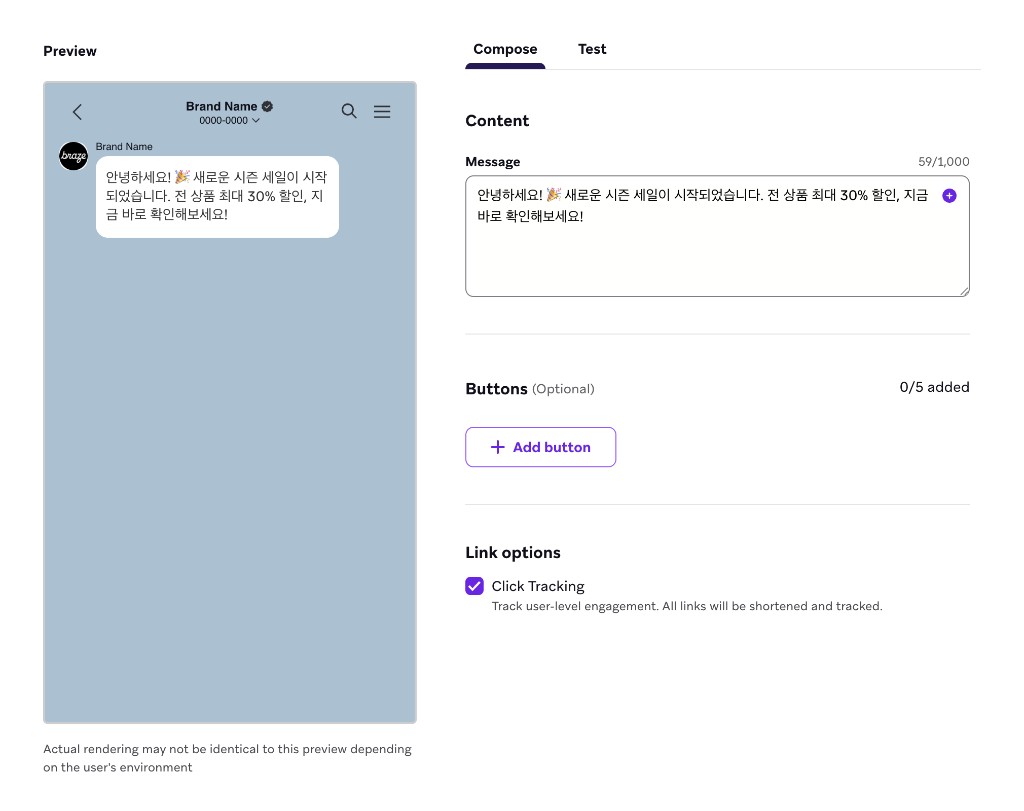
Image messages
To set up click tracking for an image message:
- Compose an Image message and set the on-click behavior to open a URL.
- Enter a URL into the URL field.
- In the Link options section of the composer, confirm Click Tracking is checked.
List item messages
To set up click tracking for a list item message:
- Compose a List item message and add a URL to the Website URL field for any item.
- In the Link options section of the composer, confirm Click Tracking is checked.
Custom domains
KakaoTalk click tracking allows you to use your own domain to personalize the look and feel of your shortened URLs, helping portray a consistent brand image. For more information, refer to Custom domains.
Liquid personalization in URLs
You can dynamically construct your URL directly within the Braze composer, allowing you to add dynamic UTM parameters to your URLs or send users unique links (such as directing users to their abandoned cart or to a specific product that is back in stock).
URLs can be dynamically generated through the use of any supported Liquid personalization tags.
1
https://example.com/?campaign_utm={{campaign.${api_id}}}&user_attribute={{custom_attribute.${attribute1}}}
You can also shorten custom-defined Liquid variables, as shown in the following example:
1
2
{% assign url_var = {{event_properties.${url_slug}}} %}
https://example.com/{{url_var}}
Braze shortens URLs that are rendered by Liquid, even those included in API-trigger properties. For example, if {{api_trigger_properties.${url_value}}} represents a valid URL, Braze will shorten and track that URL before sending the KakaoTalk message.
Testing
Before launching your campaign or Canvas, it’s best practice to preview and test your message first. To do so, go to the Test tab to preview and send a KakaoTalk message to content test groups or an individual user.
The preview will update with relevant personalization and the shortened URL.
If a draft is created within an active Canvas, a shortened URL won’t be generated. The actual shortened URL is generated when the Canvas draft is made active.
Reporting
The KakaoTalk performance table includes the column Total Clicks that shows a count of click events per variant and an associated click rate. For more details on KakaoTalk metrics, refer to KakaoTalk reporting.
Click data will be automatically reported in the analytics dashboard.
Retarget users
You can retarget users who have clicked a URL in a KakaoTalk message by using the following segmentation filters and triggers:
- Action-based triggers
- Interact with Campaign
- Interact with Step
- Segmentation filters
- Clicked/Opened Campaign
- Clicked/Opened Campaign or Canvas with Tag
- Clicked/Opened Step
Frequently asked questions
Are the links I receive when test sending real URLs?
Yes, real URLs will be generated when test sending. However, the exact URL sent in a launched campaign may differ from the one sent in a test send.
Can I add UTM parameters to a URL before it is shortened?
Yes, both static and dynamic parameters can be added.
How long do shortened URLs remain valid?
Personalized URLs are valid for two months from the time of URL registration.
Does the Braze SDK need to be installed in order to shorten URLs?
No, click tracking works without any SDK integration.
Do I know which individual users are clicking on a URL?
Yes. When click tracking is turned on, you can retarget users who have clicked URLs by using the KakaoTalk retargeting filters.
Does click tracking work with deep links or universal links?
Click tracking applies to web URLs. For deep links, you can set a deep link directly as the on-click action type for buttons in KakaoTalk—these don’t go through URL shortening or click tracking. If you prefer to use universal links from providers such as Branch or Appsflyer, those can be shortened, but Braze is unable to troubleshoot issues that may arise (such as breaking attribution or failing to redirect).
 Edit this page on GitHub